

Why Automate Weekly Digests?
Most teams rely on someone to manually pull numbers from dashboards or spreadsheets, format a summary, and email it out every week. This task consistently slips — the person responsible gets busy, the report goes out late, or the numbers are stale by the time anyone reads them. In a survey of operations managers, 60% reported that their weekly reporting process takes 1-2 hours of manual work, and nearly half said reports are delivered late at least twice a month. The delay means the team starts Monday without a clear picture of last week's performance, and decisions get made on gut feeling instead of data. Across a year, that is 50-100 hours of skilled labor spent on a task that adds zero analytical value — just formatting and distribution.
The manual process also introduces inconsistency. One week the report includes churn metrics; the next week they are forgotten. One analyst formats revenue as a chart; their colleague sends a plain table. Stakeholders who receive different formats each week stop trusting the data and start ignoring the email entirely. The report you spent an hour assembling goes unread because it no longer carries the credibility of consistency. When leadership loses confidence in the weekly report, every data discussion in every meeting becomes a debate about which numbers are correct rather than what to do about them.
Automated weekly digests solve all of this by generating and delivering the report on a fixed schedule, regardless of who is in the office, who is on vacation, or what crises consumed the team's attention. With Autonoly, your Google Sheets data is automatically compiled into a readable email digest and sent via Gmail every week. The AI agent does not just dump raw numbers — it highlights what changed, what matters, and what needs attention. The digest arrives at the same time, in the same format, every single week, building the kind of trust that makes people actually read it. Consistency is what transforms a report from background noise into a team ritual that drives real decisions.
Over time, these digests become more than status updates — they become your team's institutional memory. Every week's performance is documented, searchable, and comparable. Spotting trends across months or quarters becomes trivial when every data point was captured and delivered consistently. A new team member can read the last 12 digests and understand the trajectory of the business without a single briefing meeting.
How the AI Agent Builds the Digest
Autonoly's AI Agent Chat connects to your Google Sheet and reads the data relevant to the current week. It identifies the key metrics you have specified — revenue, signups, support tickets closed, pipeline value, or whatever KPIs you track — and calculates week-over-week changes, percentage growth, and deviation from targets. The agent also identifies outliers and anomalies — a metric that spiked 50% deserves a callout even if it is not one of your primary KPIs.
The agent then writes a narrative summary using Data Processing capabilities. Instead of a flat table of numbers, recipients get context: "Revenue increased 12% this week driven by a spike in enterprise signups on Thursday" or "Support tickets are up 23% — most related to the billing module update deployed on Tuesday." The narrative adapts each week based on what actually happened in the data, highlighting the most significant changes and calling out metrics that crossed warning thresholds. The agent avoids boilerplate language, writing fresh observations each week that reflect the specific story the data tells.
The email is formatted with clear sections, bold highlights for key figures, and a table of detailed metrics at the bottom for those who want the raw numbers. The agent adapts the formatting to look professional in both desktop and mobile email clients, using responsive HTML that renders correctly across Gmail, Outlook, and Apple Mail. Color-coded status indicators (green for on-track, yellow for watch, red for critical) make it possible to assess the week's health in a single glance.
Customizing Your Digest Content
The Visual Workflow Builder lets you configure exactly what goes into each digest:
Metric selection: Choose which columns from your sheet to include as KPIs
Comparison period: Week-over-week, month-over-month, or versus a fixed target
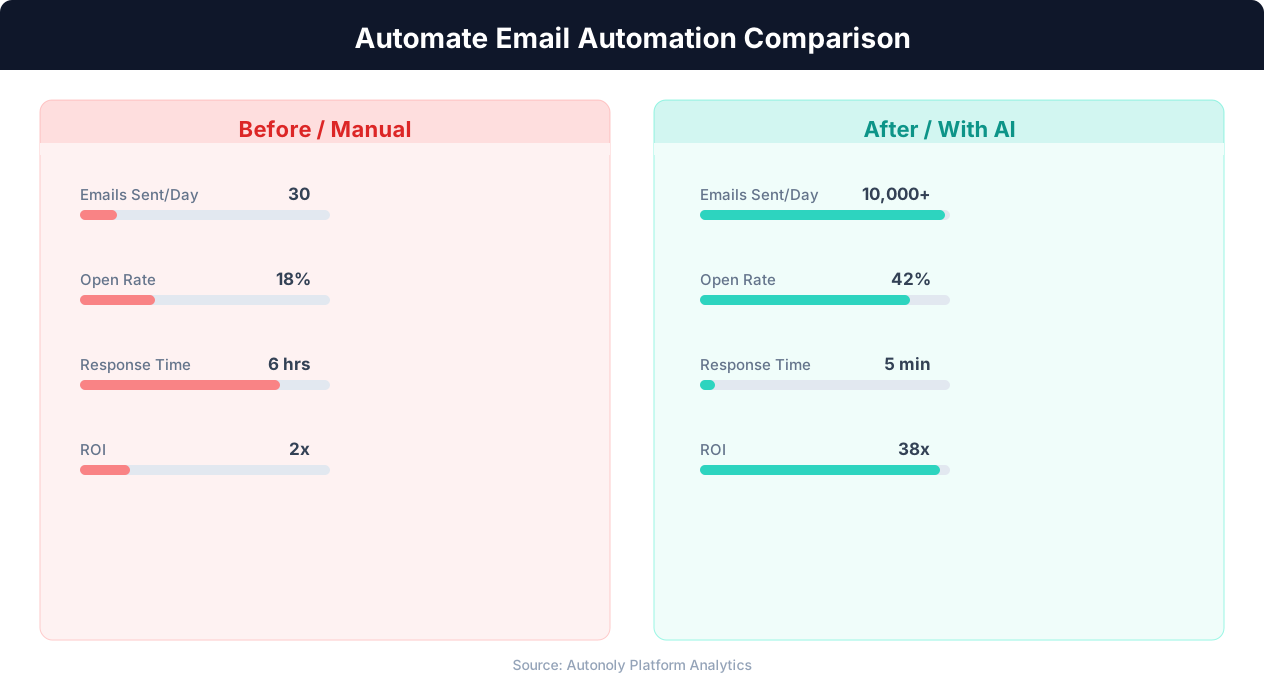
Manual vs automated email campaign performance
Key Insight: Automated email sequences generate 320% more revenue per email than one-off manual campaigns (Campaign Monitor).
Recipient lists: Different digests for different audiences — executives get a high-level summary, team leads get detailed breakdowns
Conditional sections: Use Logic & Flow to include an alert section only when metrics cross a threshold (e.g., churn rate exceeds 5%)
Goal tracking: Include progress bars toward quarterly or annual targets
You can pull data from multiple sheets into a single digest. For example, combine sales data from your CRM sheet, support metrics from your ticketing sheet, and marketing data from your analytics sheet into one unified weekly report. Browse the templates library for pre-built digest formats tailored to SaaS metrics, e-commerce KPIs, and agency reporting. Each template is fully customizable — add sections, change comparison periods, and adjust narrative tone to match your company culture.
Enhancing with Additional Data Sources
Go beyond Google Sheets by chaining this workflow with Browser Automation steps. The agent can scrape your analytics dashboard, pull social media metrics, or extract data from internal tools using SSH & Terminal before compiling the digest. This means your weekly email can include data that does not live in any spreadsheet — website traffic, ad spend, server uptime, or any metric accessible through a browser or API. The agent aggregates all sources into a single coherent digest, so recipients get one email with everything they need instead of checking five different tools.
Add a Slack notification step to post the digest summary in a team channel simultaneously, ensuring visibility across communication platforms. Teams that use both email and Slack for communication get the best of both worlds — a permanent email record and an instant Slack discussion thread where the team can react to the numbers in real time. Use Data Extraction to pull competitive benchmarks or market data into your digest for external context alongside your internal metrics.
What Data You Get
Each digest includes the metrics you selected, their current values, the comparison values from the prior period, calculated changes (both absolute and percentage), and a status indicator (on track, needs attention, critical). The narrative summary section interprets these numbers in plain language. At the bottom, a detailed data table provides the raw figures for anyone who wants to dig deeper, laid out with the HTML table markup that email clients render consistently. All data is sourced directly from your Google Sheet at generation time, ensuring the digest always reflects the latest available information. A "Highlights" section at the top calls out the biggest wins and the most urgent concerns, so even a 10-second skim delivers value.
Scheduling and Delivery
The workflow runs weekly by default — typically Monday morning before your team's standup — using cron-style scheduling that you configure to the exact day and time that works for your cadence. The agent generates the digest and sends it from your Gmail account, so it arrives in recipients' inboxes looking like a normal email from you. You can set up multiple delivery schedules — a Monday digest for internal teams and a Friday summary for clients or stakeholders. For fast-moving teams, add a mid-week check-in digest on Wednesday to catch issues before they compound.
Each run is logged with delivery status for every recipient. If an email bounces or fails, the agent retries once and flags it in the dashboard. A Slack notification confirms successful delivery so you know the digest went out without checking manually. Differential processing ensures the agent always uses the latest data available at generation time, and a data freshness check can delay generation if the source sheet has not been updated since the prior period — preventing stale digests from going out. You can view past digests in your Gmail sent folder for easy reference, and over time, these digests become a searchable archive of your team's weekly performance history. See pricing for details on recipient limits and scheduling frequency per plan.
Further Reading
Explore more about the tools and techniques used in this workflow: Automate Email Reports, Schedule Automated Workflows, Email Campaigns, Scheduled Execution.