

Why Automate Zillow Rental Scraping?
Zillow is the dominant real estate platform in the United States, listing millions of rental properties across every market. Real estate investors, property managers, relocation specialists, and market analysts all rely on Zillow data to understand rental market conditions. But collecting this data manually — clicking through listings, copying addresses and prices, noting amenities — is painfully slow when you need to analyze an entire market.
Autonoly's Browser Automation lets you extract hundreds of rental listings into a structured spreadsheet in minutes, transforming market research from a manual chore into an automated data pipeline.
How the AI Agent Scrapes Zillow
Zillow is one of the most aggressively protected real estate websites, with sophisticated bot detection and dynamically rendered content. Autonoly's AI Agent Chat overcomes these challenges by using a real browser session with human-like navigation patterns — scrolling, hovering, and interacting with the page naturally.
The agent navigates to Zillow's rental search, enters your target area, applies filters (price range, bedrooms, bathrooms, property type), and begins extracting listings. The Data Extraction engine identifies each property card and pulls consistent fields from every listing.
For detailed property data, the agent can click into individual listing pages to extract full descriptions, amenity lists, pet policies, parking details, and landlord information. This multi-level extraction produces comprehensive property profiles that go beyond the summary cards on search results.
What Data You Get
A standard Zillow rental export includes:
Address — Full property street address
Monthly Rent — Listed monthly rental price
Bedrooms — Number of bedrooms
Bathrooms — Number of bathrooms
Square Footage — Listed property size
Property Type — Apartment, house, condo, townhome
Year Built — Construction year
Listing Date — When the property was listed
Zillow URL — Direct link to the listing
Additional fields including amenities, pet policies, parking, laundry, and utility inclusion details are available when extracting from detail pages.
Customizing Your Extraction
The Visual Workflow Builder enables sophisticated rental market analysis:
Multi-area comparison: Scrape listings across multiple neighborhoods or zip codes in one workflow
Price tier analysis: Extract listings in different price brackets for market segmentation
Property type filtering: Focus on specific types like single-family homes, apartments, or condos
Time series tracking: Schedule regular scrapes to monitor how listings and prices change over time
Add Data Processing steps to calculate price-per-square-foot, days on market, or price deviation from neighborhood medians. Use SSH & Terminal to run Python scripts for rental yield calculations, heat map generation, or predictive pricing models.
Scheduling and Market Monitoring
Rental markets move fast — new listings appear daily, prices change, and properties get rented. Schedule daily or weekly scrapes to maintain a current inventory of available rentals. Over time, this builds a historical dataset that reveals seasonal patterns, price trends, and market velocity.
Property managers use automated monitoring to track competitor pricing in their submarket. Relocation companies monitor multiple cities for clients. Real estate investors identify markets where rents are rising fastest.
Exporting and Integrating
Deliver your rental data wherever your team works:
Excel (.xlsx) — Standard format for real estate analysis and financial modeling
[Google Sheets integration](/integrations/google-sheets) — Live collaborative analysis with team members
[Notion](/integrations/notion) — Build a searchable property database
[Airtable](/integrations/airtable) — Create relational views linking properties to neighborhoods and markets
Explore our templates library for pre-built rental scraping workflows. Visit pricing for details on execution costs. For background on automation concepts, see our workflow automation glossary. Browse all available output destinations on our Integrations page.
Use Cases
Real estate investors analyze rental yields by comparing asking rents to property values. Property managers benchmark their pricing against competitors in the same submarket. Relocation specialists build curated property shortlists for relocating employees. Data scientists build rental price prediction models using historical Zillow data. Urban planners study housing affordability by tracking rental price trends across neighborhoods and demographics.
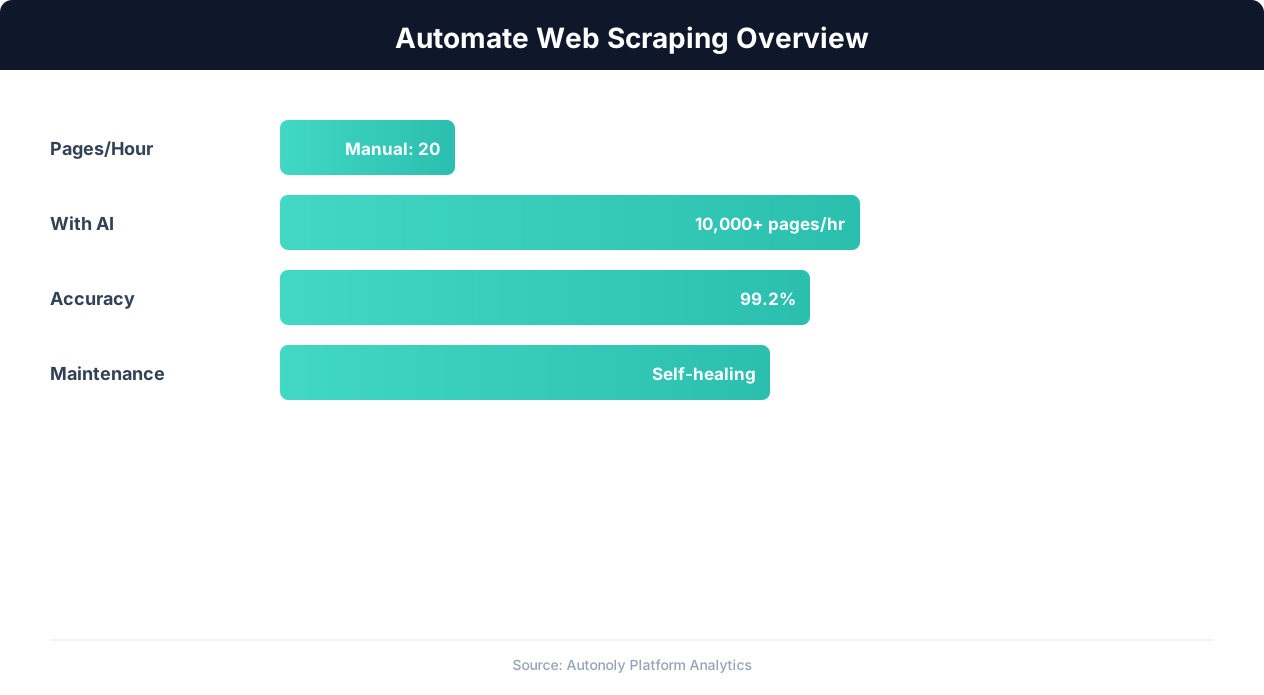
Web scraping automation accuracy across data types
Key Insight: 68% of traditional web scrapers break within 2 months due to website changes. AI-powered extraction adapts automatically, reducing maintenance by 85% (Oxylabs Research).
How the AI Agent Does It
Autonoly's AI agent uses Browser Automation to launch a real Chromium browser and navigate Zillow's rental search exactly as a human renter would. You describe your rental research needs in plain English — specifying target area, price range, bedrooms, or property type — and the agent handles the rest. It enters your search criteria, applies filters on Zillow's map-based interface, and uses the Data Extraction engine to identify each rental listing card and pull consistent data fields. Because Zillow employs aggressive bot detection, the agent navigates with human-like browsing patterns — natural scrolling speed, realistic click timing, and genuine browser fingerprints — ensuring reliable data collection without triggering access blocks. When gathering housing data that touches personal contact details, it is wise to keep handling consistent with privacy frameworks such as the CCPA.
Multi-Level Property Data
For detailed property profiles, the agent can click into individual listing pages to extract full descriptions, amenity details, pet policies, parking availability, and landlord contact information, all parsed from the rendered HTML structure of each page. This multi-level extraction produces comprehensive rental datasets that go far beyond the summary data visible on search results pages.
Key Insight: Companies using automated data collection make strategic decisions 4x faster by having real-time competitive and market data instead of quarterly manual reports (Gartner).
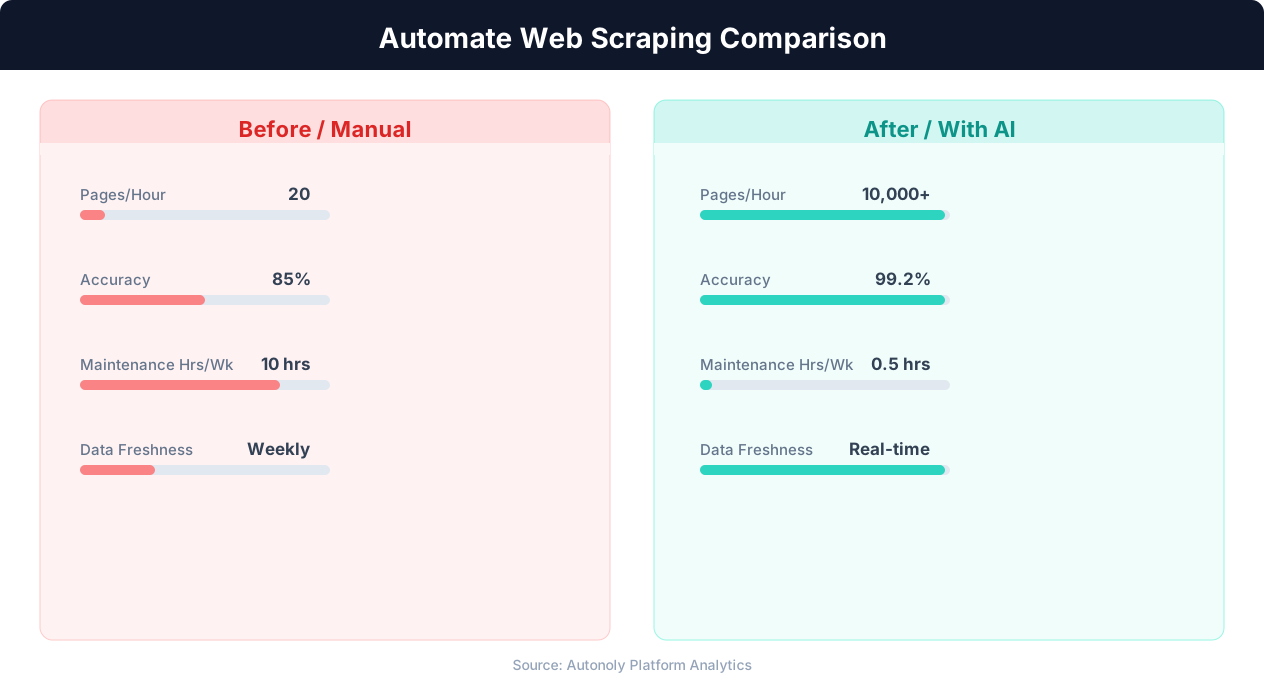
Data extraction speed for manual vs AI-powered scraping
Key Insight: Automated web scraping collects data from 1,000+ pages per hour — a task that would take a human researcher over 200 hours to complete manually (Bright Data Report).
Customize Your Output
The Visual Workflow Builder gives you full control over how rental data is processed and delivered. Add Data Processing steps to calculate price-per-square-foot, compare listings against neighborhood median rents, or score properties against your investment criteria. Use Logic & Flow conditions to filter out listings that exceed your budget, lack required amenities, or fall outside your target neighborhoods before they reach your final spreadsheet. Schedule recurring scrapes to build a historical pricing database, then route results to Google Sheets for collaborative analysis with your team or to Airtable for a visual property database with map views and linked neighborhood records. For advanced real estate analytics, pipe data through Python scripts using SSH & Terminal to generate rental yield calculations, heat maps, or predictive pricing models.
Further Reading
Explore more about the tools and techniques used in this workflow: Scrape Zillow Real Estate Data, Best Web Scraping Tools, Scheduled Execution.