Why Scrape Google Search Results?
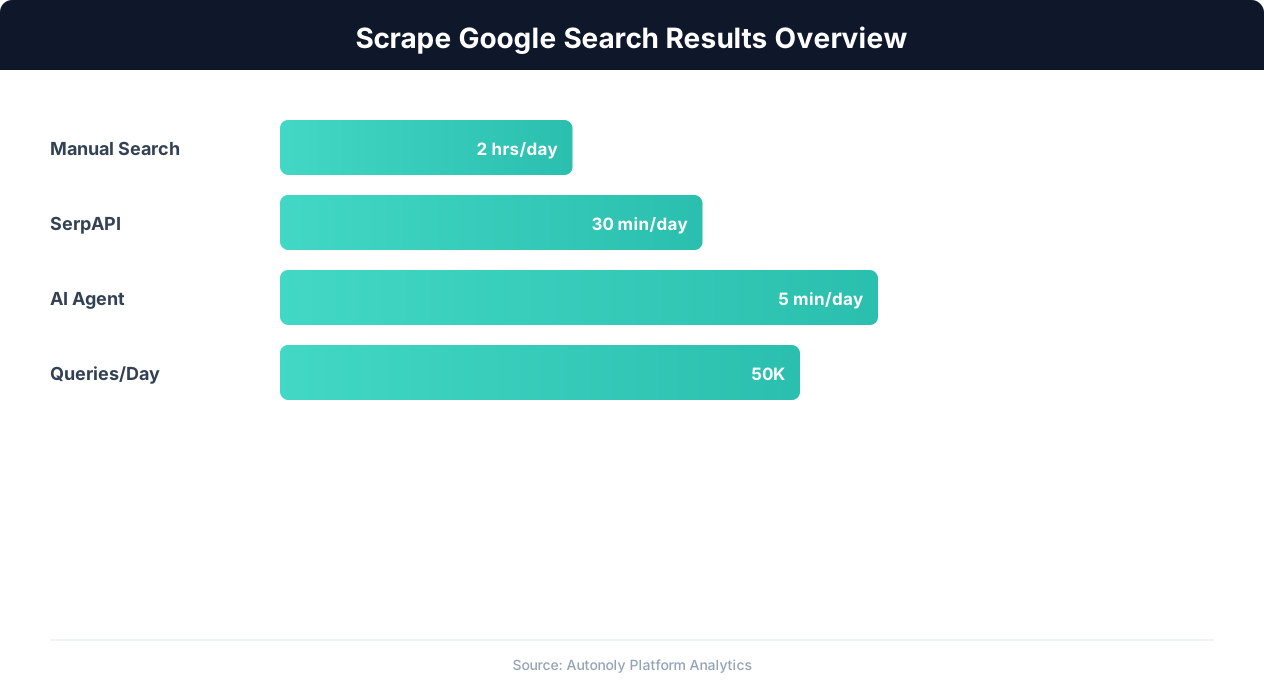
Google processes over 8.5 billion searches per day, making its search results page the most important real estate on the internet. The data contained in Google's search engine results pages (SERPs) is invaluable for SEO professionals, marketers, and businesses conducting competitive research. Scraping this data at scale transforms manual spot-checking into data-driven strategy.
SEO Rank Tracking
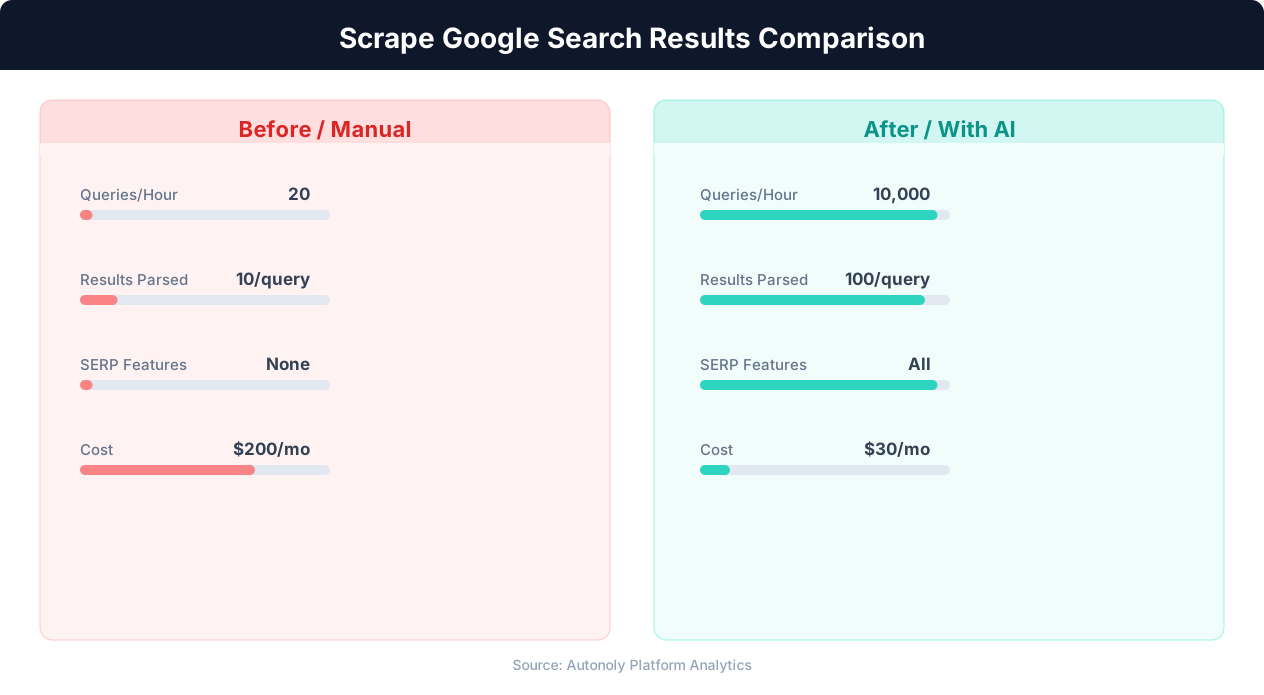
Knowing where your pages rank for target keywords — and how those rankings change over time — is foundational to SEO strategy. While paid rank tracking tools exist, they often have keyword limits, delayed updates, and restricted geographic options. Scraping Google directly gives you real-time ranking data for unlimited keywords, from any location, at any frequency you choose.
Beyond your own rankings, SERP scraping reveals who your competitors are for each keyword, how their rankings change in response to algorithm updates, and which new competitors are emerging. This competitive intelligence is impossible to gather manually at any meaningful scale.
Content Strategy and Keyword Research
Google's SERPs contain rich signals about search intent. The types of results that appear for a keyword — blog posts, product pages, videos, local results, knowledge panels — reveal what Google thinks searchers want. If the first page is dominated by how-to guides, Google interprets the keyword as informational intent. If it shows product pages, the intent is commercial. Scraping SERP features across hundreds of keywords maps the intent landscape for your entire market.
People Also Ask and Related Searches
The "People Also Ask" (PAA) boxes and "Related searches" sections at the bottom of SERPs are goldmines for content ideation. These are questions and queries that real users are searching for, algorithmically validated by Google. Scraping PAA data across your target keywords generates hundreds of content ideas that are directly aligned with what your audience is looking for.
Featured Snippet Opportunities
Featured snippets (the answer boxes at the top of some SERPs) capture a disproportionate share of clicks. Identifying which keywords trigger featured snippets, what format they use (paragraph, list, table), and who currently holds the snippet position reveals specific opportunities to capture this high-visibility placement. Scraping SERP features systematically identifies these opportunities at scale.
Market and Competitor Research
Beyond SEO, scraping Google search results supports broader business intelligence. Searching for industry terms reveals market trends, emerging competitors, news coverage, and public sentiment. Real estate companies monitor property search results. E-commerce businesses track product search visibility. Agencies monitor client brand presence across search. The applications extend well beyond traditional SEO.
What Data Can You Extract From Google SERPs?
Google's search results pages are far more than a list of ten blue links. Modern SERPs contain dozens of distinct elements, each providing different data points for analysis.
Organic Search Results
The core results that most people think of when they think of Google search. Each organic result provides:
- Position/rank: The result's position on the page (1-10 for the first page)
- Title tag: The clickable headline, which reveals the page's SEO title
- URL: The page's web address, showing domain authority distribution
- Meta description: The snippet text below the title, indicating content focus
- Sitelinks: Additional links beneath some results, indicating Google's trust in the domain
SERP Features
Google displays various special result types that occupy prime positions:
| Feature | Data Available | SEO Value |
|---|---|---|
| Featured Snippet | Answer text, source URL, format type | Position zero — highest visibility |
| People Also Ask | Questions, expanded answers, source URLs | Content ideation, FAQ optimization |
| Knowledge Panel | Entity data, facts, links | Brand presence, entity SEO |
| Local Pack | Business names, ratings, addresses | Local SEO competitive analysis |
| Image Pack | Image URLs, source pages | Image SEO opportunities |
| Video Results | Video titles, channels, durations | Video content opportunities |
| Shopping Results | Products, prices, merchants | E-commerce competitive intelligence |
| Related Searches | Suggested queries | Keyword expansion, content planning |
Paid Results (Ads)
Google Ads results appear above and below organic results. Scraping ad data reveals:
- Ad copy: Headlines and descriptions competitors use, revealing their messaging strategy
- Display URLs: Landing page paths, showing campaign structure
- Ad extensions: Sitelinks, callouts, and structured snippets used in ads
- Ad position and density: How many ads appear for a keyword indicates commercial value
SERP Metadata
Beyond individual results, the SERP itself provides metadata:
- Total result count: "About 1,240,000 results" — indicates keyword competition level
- Search suggestion corrections: "Showing results for X. Search instead for Y" — reveals Google's understanding of query intent
- SERP feature presence: Which special result types appear for each keyword, and in what positions
Google's Anti-Scraping Measures and How to Navigate Them
Google invests heavily in detecting and blocking automated access to its search results. Understanding these defenses is essential for building a scraping approach that works reliably.
How Google Detects Scrapers
Rate-based detection: Google monitors the frequency of searches from each IP address. Normal human search behavior is 3-5 searches per hour with irregular timing. Automated scrapers typically send searches much faster and with regular intervals — both are strong detection signals.
CAPTCHA challenges: When Google suspects automated activity, it presents a reCAPTCHA challenge requiring the user to identify objects in images. These challenges escalate in difficulty with repeated triggers — from simple checkbox clicks to multi-image selection puzzles.
IP reputation: Google maintains reputation scores for IP addresses. Datacenter IPs (AWS, Google Cloud, DigitalOcean) have low reputation because they are commonly used for scraping. Residential IPs have higher reputation. Repeated CAPTCHA triggers further degrade an IP's reputation.
Browser fingerprinting: Google's JavaScript checks for automation indicators: the navigator.webdriver flag, missing browser plugins, inconsistent user agent strings, and behavioral signals like mouse movement patterns and scroll behavior.
Cookie and session analysis: Google tracks session behavior through cookies. A session that only performs searches without clicking results, visiting Gmail, or exhibiting other Google ecosystem behavior looks suspicious.
Strategies for Reliable SERP Scraping
Real browser with stealth configuration: Use a stealth-configured Chromium browser that masks automation indicators. Autonoly's browser automation handles this automatically, running searches through a real browser that is indistinguishable from manual browsing. For custom implementations, see our guide on bypassing anti-bot detection.
Residential proxy rotation: Route each search through a different residential IP address. Geographic diversity further reduces detection risk. Match proxy locations to your target search market — use US residential IPs for US SERP data.
Human-like search patterns: Space searches 30-60 seconds apart with random variation. Occasionally click on a result. Vary the search query structure. Do not search the same domain repeatedly.
Session warming: Before scraping, browse Google normally — visit google.com, check Gmail if applicable, perform a few casual searches. This establishes a behavioral baseline that makes subsequent search scraping less anomalous.
Google Search API alternative: For users who want to avoid scraping entirely, Google's Custom Search JSON API provides programmatic access to search results. The free tier allows 100 queries per day; additional queries cost $5 per 1,000. The API returns clean, structured data but limits the results to 10 per query and does not include all SERP features.
Scraping Google SERPs With Autonoly: Step-by-Step
Autonoly's AI agent can scrape Google search results through its browser automation capabilities, handling anti-detection measures automatically while extracting structured data from the rendered SERP.
Step 1: Prepare Your Keyword List
Start with a list of keywords you want to scrape. This can be a Google Sheet, CSV file, or a list entered directly in the workflow. For SEO rank tracking, this is your target keyword set. For market research, this is your industry terms and competitor brand names.
Organize keywords with any relevant metadata:
| Keyword | Category | Target URL | Search Volume |
|---|---|---|---|
| best crm software | Commercial | oursite.com/crm | 12,000 |
| how to choose a crm | Informational | oursite.com/blog/crm-guide | 4,800 |
| salesforce vs hubspot | Comparison | oursite.com/compare | 8,200 |
Step 2: Configure the Scraping Workflow
Open Autonoly and describe your goal to the AI agent:
"For each keyword in my Google Sheet, search Google and extract the top 10 organic results (position, title, URL, description), any People Also Ask questions, the featured snippet if present, and the number of ads at the top. Save all results to a new Google Sheet with the keyword and search date."
The agent builds a workflow that reads keywords from your sheet, performs each search in a real browser, extracts the specified data using intelligent data extraction, and writes results to your output sheet.
Step 3: Configure Search Parameters
Specify search parameters that affect results:
- Location: Google personalizes results by location. Specify a target city or country for consistent results (e.g., "Search as if from New York, NY").
- Language: Set the search language to match your target market.
- Device type: Desktop and mobile SERPs differ significantly. Specify which you want, or scrape both for comparison.
- Number of results: Request 10, 20, or more results per page by using Google's
numparameter.
Step 4: Run and Monitor
The agent processes each keyword with appropriate delays between searches. You can monitor progress in real time through the live browser control panel, watching each search execute and data being extracted. A typical run of 50 keywords takes 30-45 minutes with conservative timing to avoid detection.
Step 5: Review and Analyze
The extracted data arrives in your Google Sheet as structured rows. Each row represents one organic result for one keyword, with columns for position, title, URL, description, SERP feature presence, and metadata. This format is ready for analysis — pivot tables, ranking trend charts, and competitive comparison.
For ongoing rank tracking, schedule the workflow to run daily or weekly. Over time, this builds a ranking history dataset that reveals trends, algorithm update impacts, and competitive movements.
Extracting People Also Ask and Featured Snippets
People Also Ask (PAA) boxes and featured snippets are among the most valuable SERP features for content strategy. Extracting them at scale provides a direct pipeline from search demand to content creation.
People Also Ask: A Content Goldmine
PAA boxes appear for most informational queries, showing 3-4 related questions that users commonly ask. Clicking any question expands it to show a brief answer and source URL, and generates 2-3 additional questions. This cascading behavior means each initial PAA box can be expanded to reveal dozens of related questions.
To extract PAA data effectively:
- Identify the PAA box: The AI agent locates the "People also ask" section on the SERP. It is typically positioned between organic results 2-4.
- Extract visible questions: Read the initial 3-4 questions shown by default.
- Expand for more questions: Click each question to expand it (revealing the answer and source URL) and trigger additional questions. Repeat this expansion 2-3 times to collect 10-15 questions per keyword.
- Extract answers and sources: For each expanded question, capture the answer text, source URL, and answer format (paragraph, list, or table).
Structuring PAA Data for Content Planning
Organize extracted PAA questions into a content planning matrix:
💡 Key Insight
Google processes 8.5 billion searches per day — monitoring even a fraction provides massive competitive intelligence.
| Source Keyword | PAA Question | Answer Source | Our Coverage | Priority |
|---|---|---|---|---|
| best crm software | What is the easiest CRM to use? | competitor.com | Not covered | High |
| best crm software | How much does a CRM cost? | blog.example.com | Partial | Medium |
| how to choose a crm | What features should a CRM have? | oursite.com | Covered | Monitor |
Questions not covered by your content represent direct content opportunities. If users are asking these questions and Google is sourcing answers from competitors, creating better answers can capture that traffic.
Featured Snippet Extraction and Analysis
Featured snippets appear at "Position 0" — above the first organic result. They come in three formats:
- Paragraph snippets: A block of text answering the query directly. Most common for "what is" and "how does" queries.
- List snippets: Numbered or bulleted lists. Common for "how to," "steps to," and "best" queries.
- Table snippets: Structured data in table format. Common for comparison queries and data-heavy topics.
For each keyword, extract: whether a featured snippet appears, its format type, the answer content, and the source URL. This data reveals which of your target keywords have snippet opportunities and what format Google prefers for each.
Building a Snippet Capture Strategy
To capture featured snippets, create content that directly answers the target question in the format Google prefers. If the current snippet is a paragraph, include a clear, concise paragraph answer within the first 300 words of your page. If it is a list, structure your content as a numbered or bulleted list. Match the format, provide a better answer, and ensure your page has sufficient topical authority. Monitoring snippet ownership over time (through scheduled SERP scraping) reveals whether your efforts are succeeding.
Building an Automated SERP Monitoring System
One-time SERP scraping provides a snapshot. Automated, recurring SERP monitoring provides the trend data that drives strategic decisions. Here is how to build a complete monitoring system.
Daily vs Weekly Monitoring
The right monitoring frequency depends on your market's volatility:
- Daily monitoring: Necessary for highly competitive keywords where rankings shift frequently (e-commerce, finance, news). Also necessary during active SEO campaigns to measure impact in near-real-time.
- Weekly monitoring: Sufficient for most keywords in less volatile niches (B2B SaaS, professional services, education). Provides trend data without excessive data volume or scraping risk.
- Event-triggered monitoring: Run additional scrapes after publishing new content, after Google algorithm updates, or after competitors make significant changes.
Workflow Architecture
A complete SERP monitoring workflow in Autonoly consists of:
- Keyword source: A Google Sheet containing your target keywords, updated as your keyword strategy evolves.
- Scheduled trigger: A scheduled execution that runs the workflow at your chosen frequency.
- SERP scraping: The browser automation module that searches each keyword, extracts ranking data, and handles Google's anti-detection measures.
- Data storage: Results written to a Google Sheet, database, or API endpoint for historical accumulation.
- Alert logic: Conditional checks that trigger notifications for significant changes — ranking drops, new competitors entering the top 10, featured snippet gains or losses.
- Notification: Slack messages or emails for ranking alerts, plus a weekly summary report.
Tracking Ranking Changes Over Time
With daily or weekly data, build dashboards that show:
- Ranking trends: Line charts showing position over time for each keyword. Upward trends validate SEO efforts; downward trends signal problems.
- Share of voice: What percentage of your target keywords have your site in the top 3, top 10, and top 20? Track this aggregate metric to measure overall SEO performance.
- Competitor movement: When a competitor's rankings improve across multiple keywords simultaneously, they have likely made a significant SEO investment (content, links, technical improvements). Early detection allows proactive response.
- SERP feature changes: Track when featured snippets appear or disappear for your keywords, when PAA boxes change, and when new SERP features emerge. These changes can dramatically affect click-through rates even when rankings stay constant.
Data Volume Management
Monitoring 200 keywords daily generates approximately 2,000 result rows per day (10 results per keyword) — 60,000 rows per month. Google Sheets handles this volume comfortably for 6-12 months. For longer-term monitoring or larger keyword sets, export to a database. Autonoly's database integration can write results directly to PostgreSQL, MySQL, or other database systems for long-term storage and analysis.
Legal and Ethical Considerations
Scraping Google search results occupies a familiar legal gray area in web scraping. Google's terms of service prohibit automated access, but the practical and legal landscape is nuanced.
Google's Terms of Service
Google's Terms of Service state: "Don't misuse our Services. For example, don't interfere with our Services or try to access them using a method other than the interface and the instructions that we provide." This is interpreted as prohibiting automated scraping. Google enforces this primarily through technical measures (CAPTCHAs, rate limiting, IP blocking) rather than legal action against individual scrapers.
Legal Precedent
The legal landscape favors scrapers of publicly available data. The hiQ Labs v. LinkedIn ruling established that accessing public data does not violate the Computer Fraud and Abuse Act, even when the site's terms prohibit scraping. Google search results are publicly accessible without authentication, which strengthens the legal position for scraping public SERP data.
💡 Key Insight
Businesses tracking SERP positions daily detect ranking changes 7x faster, enabling 40% quicker SEO response times.
That said, Google has pursued legal action against large-scale commercial scraping operations that resell SERP data as a primary product. Individual businesses scraping for their own competitive intelligence are at much lower risk than companies building commercial SERP data products.
Ethical Scraping Practices
Regardless of legality, responsible scraping practices minimize negative impact and reduce risk:
- Rate limit conservatively: Space searches at least 30 seconds apart. This adds no meaningful burden to Google's infrastructure while significantly reducing detection risk.
- Use data for analysis, not redistribution: Extracting SERP data for your own SEO strategy is different from building a commercial SERP data product.
- Respect robots.txt guidance: While robots.txt is not legally binding, respecting it demonstrates good faith.
- Consider the Google Search API: For use cases where 100 queries per day is sufficient, the official API is the cleanest path. It provides structured data without any Terms of Service concerns.
For more comprehensive guidance on scraping legality, see our web scraping best practices guide which covers the CFAA, GDPR, and international regulations.
Advanced SERP Scraping Techniques
Beyond basic rank extraction, advanced techniques unlock deeper insights from Google's search results.
Local Search Scraping
Google's results vary significantly by location. Scraping from multiple geographic locations reveals local ranking differences, local pack variations, and geographic content preferences. This is essential for businesses with multiple locations or national SEO campaigns.
To scrape location-specific results, use proxies from target cities or append Google's uule parameter (an encoded location string) to the search URL. Autonoly's browser automation can simulate different locations through proxy configuration, making multi-location SERP analysis straightforward.
Mobile vs Desktop SERP Comparison
Mobile and desktop SERPs differ substantially — different rankings, different SERP features, and different result counts above the fold. Since Google uses mobile-first indexing, mobile SERP data is arguably more important than desktop. Scrape both versions by switching user agents and viewport sizes between searches, then compare rankings to identify mobile-specific optimization opportunities.
SERP Feature Mapping
Build a feature map across your keyword set showing which SERP features appear for each keyword. This reveals patterns — maybe your industry's informational queries consistently trigger PAA boxes and featured snippets, while commercial queries show shopping results and ads. This feature map guides content strategy: create FAQ content for PAA-heavy keywords, create comparison content for snippet-heavy keywords, and optimize product feeds for shopping-result keywords.
Competitor Content Analysis
For each keyword, the top-ranking URLs represent the content Google considers most relevant. Scraping these URLs (not just the SERP listing but the actual page content) enables competitive content analysis: average word count, heading structure, topic coverage, media usage, and internal linking patterns. This analysis, combined with SERP position data, reveals what content characteristics correlate with higher rankings in your specific niche.
Combining SERP scraping with page content extraction creates a powerful feedback loop: identify ranking opportunities through SERP data, analyze top-ranking content to understand what works, create optimized content, then monitor rankings to measure impact. Autonoly's combination of browser automation and data extraction supports this entire workflow in a single platform.