Why Scrape TikTok Data for Marketing Research?
TikTok has become the dominant short-form video platform worldwide, with over 1.5 billion monthly active users and an algorithm that shapes purchasing decisions, brand perception, and cultural trends faster than any other social network. For marketers, agencies, and brands, TikTok data is not optional anymore — it is a primary source of consumer intelligence.
Trend Discovery Before Your Competitors
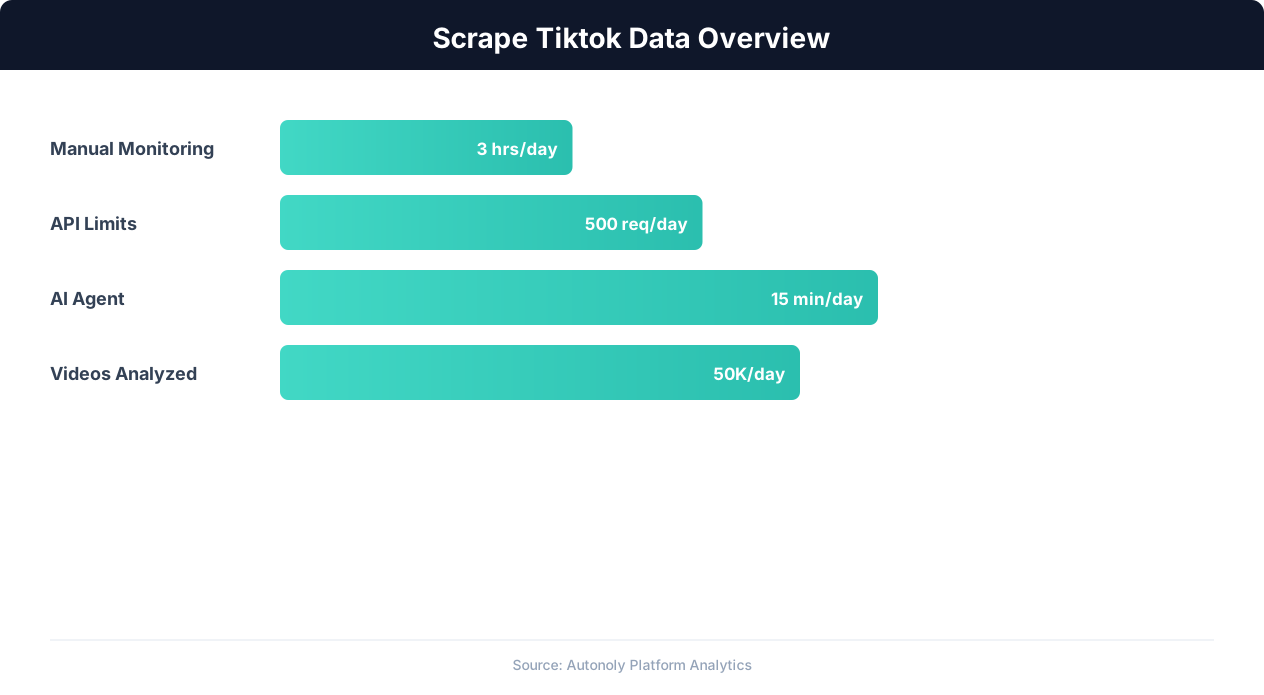
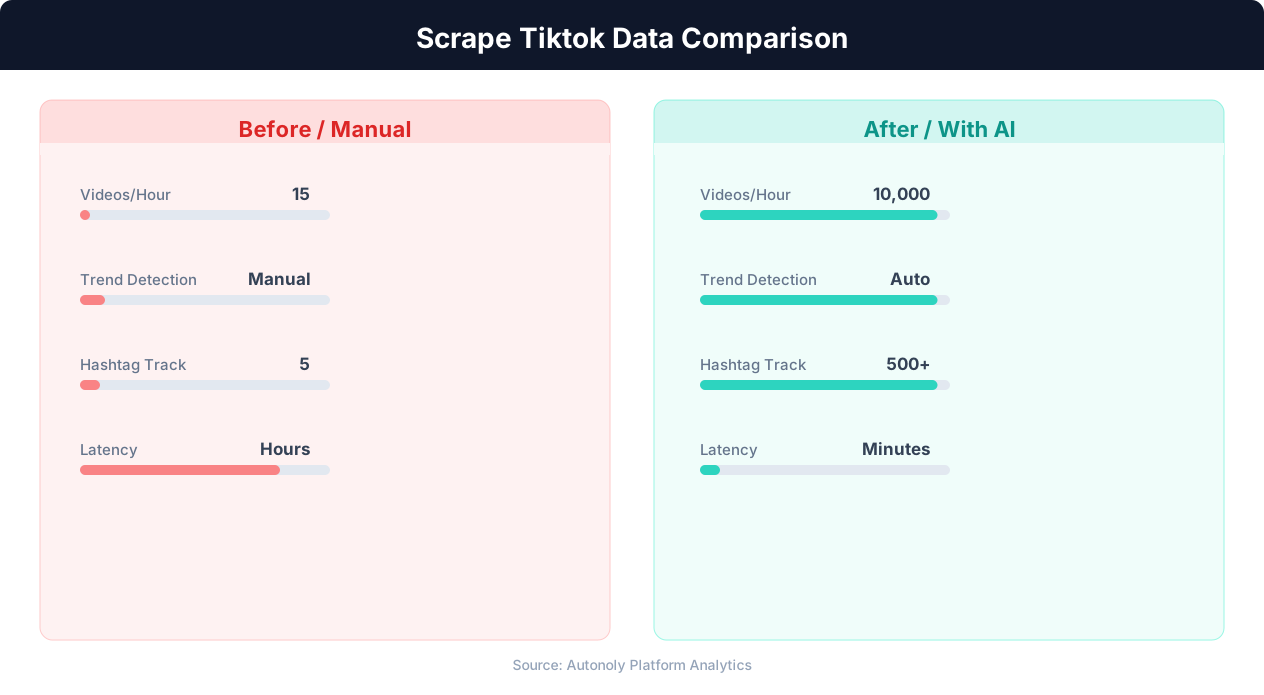
TikTok trends move fast. A sound, hashtag, or challenge can go from zero to hundreds of millions of views in 48 hours, then fade within a week. Brands that spot trends early can create relevant content while the trend is still rising, earning disproportionate organic reach. Brands that arrive late create content that feels stale. The difference between early and late is often just 2-3 days — a window that manual monitoring consistently misses.
Scraping TikTok search results and trending pages gives you structured data on what is gaining momentum right now. Instead of scrolling your For You page hoping to spot patterns, you can track view counts, engagement rates, and posting velocity across hashtags and sounds systematically. This turns trend discovery from guesswork into data analysis.
Competitor and Creator Intelligence
Understanding what content your competitors post, how often they post, and which of their videos perform best provides a blueprint for your own content strategy. Scraping competitor profiles reveals their posting cadence, average engagement rates, most-used hashtags, and content themes. Similarly, scraping creator profiles helps brands identify potential influencer partners based on actual performance data rather than follower counts alone.
Hashtag and Content Strategy
Every TikTok video is tagged with hashtags that determine its discoverability. Scraping hashtag pages reveals the total view count for each hashtag, the volume of new videos being posted under it, and the types of content that perform best within that hashtag. This data directly informs content strategy — you can identify high-volume hashtags where competition is manageable, find niche hashtags that your target audience follows, and discover hashtag combinations that top-performing videos use together.
Product and Market Research
TikTok has become a product discovery engine. The hashtag #TikTokMadeMeBuyIt has accumulated billions of views, and products that go viral on TikTok routinely sell out across retailers within days. Scraping product-related searches, review videos, and unboxing content reveals which products are gaining organic traction, what consumers say about them, and how sentiment shifts over time. For e-commerce brands and product managers, this is real-time market research at zero cost.
The challenge is that TikTok's data is locked inside a heavily JavaScript-rendered, anti-bot-protected web application that traditional scraping tools cannot handle. This is where browser automation becomes essential.
What TikTok Data Can You Extract?
TikTok's web interface exposes a rich set of data across several page types. Understanding what is available helps you design focused extraction workflows that capture exactly the data points your research requires.
Video Metadata
Each TikTok video page contains detailed metadata that is valuable for content analysis and trend tracking:
- Video title/description — The caption text posted by the creator, including hashtags and mentions. Captions reveal content themes, keyword usage, and call-to-action patterns.
- View count — Total number of views the video has received. This is the primary metric for measuring reach and virality.
- Like count — Number of likes (hearts). The like-to-view ratio is a key engagement quality metric.
- Comment count — Number of comments. High comment counts relative to views indicate content that sparks conversation.
- Share count — Number of shares. Shares are the strongest signal of content that resonates enough for users to send to others.
- Save/bookmark count — Number of saves. Saves indicate content with lasting utility or reference value.
- Sound/music used — The audio track associated with the video. Trending sounds are a primary driver of virality on TikTok.
- Post date — When the video was published. Essential for time-series analysis and trend velocity tracking.
- Duration — Video length in seconds. Duration affects completion rates and algorithmic distribution.
Creator Profile Data
Creator profiles provide the context needed to evaluate influencer partnerships and competitive benchmarks:
- Username and display name — The creator's handle and public name.
- Follower count — Total followers. Combined with engagement data, this reveals whether a creator has an engaged audience or inflated numbers.
- Following count — How many accounts the creator follows. A very high following-to-follower ratio can indicate follow-for-follow growth tactics.
- Total likes received — Cumulative likes across all videos. This provides a lifetime engagement metric.
- Bio text — The creator's profile description, often containing contact information, brand affiliations, and niche identifiers.
- Verified status — Whether the account has TikTok's verification badge.
- Profile link — The external URL in the creator's bio, often linking to a Linktree, website, or other social profiles.
Search Result Data
TikTok's search page returns results across multiple tabs — Videos, Users, Sounds, Hashtags, and LIVE. Scraping search results for specific keywords reveals which videos rank highest for that term, which creators dominate the topic, and which sounds are associated with the content. Search result scraping is particularly valuable for SEO-style analysis of TikTok's discovery algorithm.
Hashtag Page Data
Each hashtag on TikTok has a dedicated page showing the total view count for all videos using that hashtag and a feed of top and recent videos. Scraping hashtag pages over time creates a dataset that tracks hashtag growth velocity — how quickly a hashtag is accumulating views — which is the most reliable early indicator of an emerging trend.
Comment Data
Video comments contain unfiltered consumer sentiment. Scraping comments from product review videos, brand mentions, or competitor content reveals what real users think, want, and complain about. Comment data is especially valuable for sentiment analysis and voice-of-customer research. Each comment includes the commenter's username, the comment text, like count, reply count, and timestamp.
TikTok's Anti-Bot Protections and Why Browser Automation Is Required
TikTok employs aggressive anti-bot measures that make it one of the more challenging platforms to scrape. Understanding these protections is essential for designing a scraping approach that actually works.
JavaScript-Heavy Rendering
TikTok's web application is a single-page application (SPA) built with React. The initial HTML response from TikTok's servers contains almost no content — just a JavaScript bundle that renders the entire page client-side. This means HTTP-only scrapers (like Python's requests library or simple cURL scripts) receive an empty shell with no video data, no engagement metrics, and no creator information. You must execute the JavaScript to get the actual content, which requires a real browser engine.
Device Fingerprinting
TikTok's anti-bot system collects an extensive browser fingerprint that goes well beyond the standard checks. It examines canvas rendering, WebGL parameters, audio context properties, installed fonts, screen resolution, timezone, language settings, and dozens of navigator properties. Headless browsers that do not carefully configure these properties get flagged immediately. TikTok also uses behavioral fingerprinting — tracking mouse movements, scroll patterns, and interaction timing to distinguish humans from bots.
Rate Limiting and CAPTCHA
TikTok enforces strict rate limits on both API calls and page loads. Exceeding these limits triggers CAPTCHA challenges — typically a slide-to-verify puzzle or image rotation challenge. These CAPTCHAs are custom-built by TikTok (not reCAPTCHA or hCaptcha) and are difficult to solve programmatically. After multiple CAPTCHA failures, TikTok may temporarily block the IP address or require phone verification.
API Signature Verification
TikTok's internal API endpoints require signed request parameters (including msToken, X-Bogus, and _signature) that are generated by obfuscated JavaScript running in the browser. These signatures change with each request and are tied to the browser session, making it impossible to call TikTok's APIs directly without reverse-engineering their signature generation — a process that breaks frequently as TikTok updates their code.
Why Playwright-Based Browser Automation Works
The most reliable approach to scraping TikTok is using a real browser controlled by an automation framework like Playwright. This approach works because:
- Full JavaScript execution: Playwright runs a real Chromium browser that executes TikTok's JavaScript exactly as a human's browser would, rendering all content correctly.
- Authentic fingerprints: A properly configured Playwright browser generates fingerprints indistinguishable from a regular Chrome installation.
- Natural interaction patterns: Playwright can simulate realistic scrolling, clicking, and waiting behaviors that pass behavioral analysis checks.
- Session management: Playwright maintains cookies, local storage, and session state across page navigations, keeping the browsing session consistent.
Autonoly uses Playwright-based browser automation as its core scraping engine. The AI agent controls a real browser, navigates TikTok naturally, and extracts data from the fully rendered pages. This approach handles TikTok's anti-bot protections without requiring you to understand or manage them directly.
Step-by-Step: Scraping TikTok Data with Autonoly
Autonoly's AI agent approach turns TikTok scraping from a complex engineering project into a conversation. Here is a complete walkthrough of extracting TikTok marketing intelligence using Autonoly.
Step 1: Define Your Research Goal
Before launching the agent, clarify exactly what you need. TikTok scraping works best when focused on a specific research question:
- Trend tracking: "What are the top trending hashtags in the fitness niche this week?"
- Competitor analysis: "What are the last 50 videos posted by @competitorbrand, including engagement metrics?"
- Influencer research: "Find TikTok creators in the skincare niche with 50K-500K followers and engagement rates above 5%."
- Product research: "What are the top videos for the search term 'protein powder review' sorted by views?"
Step 2: Start an Agent Session and Describe Your Task
Open Autonoly's workflow builder and launch the AI agent chat. Describe your scraping goal in plain English. For example:
"Go to TikTok and search for 'home office setup'. Extract the top 30 video results including the video caption, creator username, view count, like count, comment count, share count, and the sound used. I want to analyze which types of home office content get the most engagement."
The agent opens a real browser, navigates to TikTok's search page, enters your query, and begins extracting data from the rendered results.
Step 3: Watch the Agent Work in Real Time
Autonoly's live browser control panel shows you exactly what the agent sees. You can watch it navigate to TikTok, handle any cookie consent dialogs, enter the search query, and scroll through results. If the agent encounters a CAPTCHA or login prompt, it adapts its approach — often switching to a different entry point or adjusting its browsing pattern to avoid triggering additional challenges.
Step 4: Handle TikTok's Infinite Scroll
TikTok search results load dynamically as you scroll — there is no traditional pagination with page numbers. The agent handles this automatically by scrolling down the page, waiting for new results to load, extracting the newly visible videos, and continuing until it reaches your target count. You can monitor the extraction count in the agent panel as it progresses.
Step 5: Refine the Extraction
After the agent extracts the first batch, review the results. If you need additional data points, just tell the agent: "Also extract the video duration and posting date for each result." The agent adjusts its extraction logic and re-processes the results. If certain results are not relevant (for example, if TikTok's search returns off-topic videos), you can guide the agent: "Filter out results that are not actually about home office setups."
Step 6: Export to Google Sheets
Once you are satisfied with the extracted data, tell the agent to export it. "Export this data to a new Google Sheet called 'TikTok Home Office Research'." The agent uses Autonoly's Google Sheets integration to create the spreadsheet, format the columns, and populate all rows. The resulting sheet is immediately shareable with your team and ready for analysis.
Step 7: Scale to Multiple Searches
Repeat the process for related search terms — "home office desk," "work from home setup," "desk tour" — and export each to a separate tab in the same spreadsheet. This builds a comprehensive dataset that covers your topic from multiple angles, revealing patterns that a single search would miss.
Analyzing TikTok Trends and Hashtag Performance
Raw TikTok data becomes marketing intelligence when you analyze it for patterns. Here are the most valuable analyses you can run on scraped TikTok data, and how Autonoly's terminal capabilities make them accessible without setting up a local data analysis environment.
Hashtag Velocity Analysis
The most actionable metric for trend detection is hashtag velocity — how quickly a hashtag is accumulating views over time. A hashtag with 10 million total views that gained 8 million of those views in the last week is far more relevant than a hashtag with 100 million views that has been growing slowly over months. To calculate velocity, scrape the same hashtag pages at regular intervals (daily or weekly) and compute the view count delta between scrapes. Hashtags with accelerating velocity are emerging trends worth jumping on.
Engagement Rate Benchmarking
Engagement rate (likes + comments + shares divided by views) varies dramatically across TikTok niches. Scraping the top 100 videos for your target keywords and calculating the median engagement rate gives you a benchmark for your own content performance. If the median engagement rate for "home office setup" videos is 8%, and your videos average 3%, that gap quantifies exactly how much room for improvement exists. Autonoly's terminal can run Python with pandas to compute these statistics from your exported Sheets data automatically.
💡 Key Insight
TikTok has over 1.5 billion monthly active users, with trends spreading 3x faster than on other social platforms.
Sound and Music Trend Analysis
Sounds drive virality on TikTok. When a particular sound goes viral, every video using that sound gets a distribution boost from the algorithm. By scraping the sound/music field from top-performing videos in your niche, you can identify which sounds are currently driving the most engagement. Track sound usage over time to catch sounds that are trending upward before they peak — this gives you a content creation advantage of 3-5 days over competitors who rely on manual trend spotting.
Content Theme Clustering
Analyzing video captions and hashtags from top-performing content reveals the dominant themes in your niche. Using Autonoly's terminal to run text analysis on scraped captions, you can identify recurring keywords, common caption structures, and thematic clusters. For example, scraping 200 fitness videos might reveal that the top-performing content clusters around "transformation stories," "workout tutorials," "meal prep," and "gym fail compilations" — each representing a distinct content pillar with different engagement characteristics.
Posting Time and Frequency Analysis
Scraping post timestamps from top creators in your niche reveals optimal posting patterns. Analyze the distribution of posting times (by hour and day of week) and correlate with engagement metrics to identify when content in your niche gets the most traction. Most niches have 2-3 peak posting windows — publishing during these windows maximizes your content's initial distribution, which compounds through TikTok's algorithm.
Competitive Content Calendar Mapping
Scraping a competitor's complete video history provides their content calendar — what they post, how often, and how each content type performs. Map this over time to identify their content strategy shifts, seasonal patterns, and experimentation cycles. When a competitor suddenly starts posting more of a specific content type, it often signals that they have found a format that performs well — intelligence you can use to inform your own strategy.
Exporting TikTok Data and Setting Up Recurring Scrapes
One-time TikTok scrapes provide a snapshot, but the real value comes from ongoing monitoring. TikTok trends change weekly, creator performance fluctuates, and hashtag dynamics shift constantly. Setting up automated, recurring scrapes transforms your TikTok intelligence from a point-in-time report into a continuous monitoring system.
Structuring Your Export
Organize your TikTok data exports with a consistent schema that supports time-series analysis. A well-structured TikTok video dataset includes:
| Column | Type | Purpose |
|---|---|---|
| Video URL | Text | Unique identifier and reference link |
| Creator Username | Text | Attribution and creator analysis |
| Caption | Text | Content analysis and keyword extraction |
| Hashtags | Text | Trend tracking and categorization |
| Views | Number | Reach measurement |
| Likes | Number | Engagement quality |
| Comments | Number | Conversation signal |
| Shares | Number | Virality indicator |
| Sound Name | Text | Audio trend tracking |
| Post Date | Date | Time-series analysis |
| Scrape Date | Date | Data freshness tracking |
Google Sheets for Team Collaboration
For marketing teams, Google Sheets is the ideal export destination because it enables real-time collaboration. Set up your Sheet with separate tabs for each research dimension — one for video data, one for hashtag metrics, one for creator profiles. Use conditional formatting to highlight videos with above-average engagement rates or hashtags with accelerating view counts. Add sparkline charts in a summary tab to visualize trends at a glance.
Scheduling Recurring TikTok Scrapes
Autonoly's scheduled execution feature lets you run TikTok scraping workflows on a recurring basis. For trend monitoring, a weekly cadence is typically sufficient — TikTok trends usually develop over 5-7 days. For competitive monitoring, daily scrapes capture the granularity needed to track posting patterns and engagement changes.
To set up a scheduled scrape:
- Build and test your TikTok scraping workflow in the workflow builder.
- Click the Schedule button and configure the frequency (daily, weekly, or custom cron expression).
- Set the output destination to append to your existing Google Sheet, preserving historical data.
- Configure Slack or email notifications for completion and errors.
Slack Alerts for Trend Spikes
Combine your TikTok scraping workflow with Autonoly's Slack integration to receive alerts when specific conditions are met. For example, set up an alert that fires when a hashtag you are tracking gains more than 50% views since the last scrape, or when a competitor posts a video that exceeds their average view count by 3x. These real-time alerts let your content team react to trends within hours instead of waiting for the next weekly report.
Building a TikTok Trend Dashboard
As your automated scrapes accumulate data over weeks and months, the dataset becomes powerful enough to support trend forecasting. Use the historical data to identify seasonal patterns (fitness content spikes every January, back-to-school content peaks in August), calculate trend lifecycle durations for your niche, and build a predictive model for which types of content are likely to perform well in the coming weeks. The combination of browser automation for data collection and data processing for analysis creates a complete marketing intelligence pipeline.
Advanced TikTok Scraping Strategies
Once you have the basics working, several advanced strategies can dramatically increase the value of your TikTok data collection.
Multi-Region Scraping
TikTok's content varies significantly by region. A video trending in the United States may not appear in search results in the United Kingdom, and vice versa. For brands operating in multiple markets, scraping TikTok from different regional perspectives reveals which trends are global, which are market-specific, and which are just beginning to cross over from one market to another. Autonoly's browser automation can be configured to simulate browsing from different regions, capturing region-specific trending data.
Influencer Discovery Pipelines
Instead of manually searching for influencers, build an automated discovery pipeline. Start by scraping the top videos for your target keywords, then extract the creator usernames from those videos. Next, scrape each creator's profile to get their follower count, total likes, and recent video performance. Calculate an engagement rate for each creator and filter to those that meet your criteria (for example, 50K-500K followers with engagement rates above 5%). The result is a qualified influencer shortlist built entirely from performance data rather than subjective browsing.
💡 Key Insight
Brands leveraging automated TikTok trend analysis launch viral campaigns 60% faster with 2x higher engagement.
Hashtag Network Mapping
TikTok videos typically use 3-7 hashtags. By scraping the complete hashtag set for hundreds of videos in your niche, you can build a hashtag co-occurrence network — a graph showing which hashtags are frequently used together. This reveals hashtag clusters, bridge hashtags that connect different content communities, and orphan hashtags with high views but low co-occurrence (indicating untapped content opportunities). This analysis is straightforward with Autonoly's terminal, where you can run Python network analysis libraries like NetworkX on your scraped data.
Comment Sentiment Mining
Scraping comments from product-related TikTok videos provides raw consumer sentiment data. Using Autonoly's terminal environment with Python NLP libraries, you can run sentiment analysis on thousands of comments to quantify public opinion about a product, brand, or trend. Track sentiment over time to detect shifts — a product that had overwhelmingly positive sentiment three months ago but now shows mixed sentiment may be experiencing quality issues or increased competition.
Sound Trend Early Warning
Build a workflow that scrapes TikTok's Discover page daily and tracks the view counts of trending sounds. Calculate the day-over-day growth rate for each sound. Sounds with growth rates accelerating (not just growing, but growing faster each day) are the most likely to become the next viral trend. Alerting on sound acceleration gives your content team a 2-4 day head start on creating content with that sound before it peaks.
These advanced strategies combine Autonoly's browser automation for data collection, data processing for analysis, and scheduled execution for ongoing monitoring into a comprehensive TikTok intelligence system that runs on autopilot.
Best Practices and Ethical Considerations
TikTok scraping should be conducted responsibly, with respect for both the platform's infrastructure and the creators whose content you are analyzing.
Respect Rate Limits
Do not bombard TikTok's servers with rapid-fire requests. Space your page loads with realistic delays (5-10 seconds between navigations) and limit your total extraction volume to what a human could reasonably browse in a session. Autonoly's agent automatically applies natural timing patterns, but if you are building custom workflows, configure explicit delays between extraction steps.
Scrape Public Data Only
Only extract data that is publicly visible on TikTok without logging in. Private accounts, DM content, and data behind authentication boundaries are off-limits. Public video metadata, engagement metrics, and creator profile data displayed on public pages are fair game for research purposes.
Use Data for Analysis, Not Republication
Scrape TikTok data for analysis, research, and internal decision-making — not for republishing videos, cloning creator content, or building competing platforms. Using scraped data to inform your own original content strategy is fundamentally different from copying other creators' work.
Comply with Privacy Regulations
If you scrape TikTok user data (usernames, bios, follower counts), be aware of applicable privacy regulations including GDPR (if any of the creators are EU residents) and CCPA (for California residents). Store personal data securely, use it only for your stated research purpose, and have a data retention policy that limits how long you keep it. For more context on legal considerations, see our guide on whether web scraping is legal.
Do Not Scrape Minors' Data
TikTok has a significant user base under 18. If your scraping includes creator profile data, implement filtering to exclude accounts that appear to belong to minors (typically identifiable through bio content, school references, or age mentions). Collecting and analyzing data from minors' accounts creates significant legal and ethical exposure under COPPA and similar regulations.
Monitor TikTok's Terms of Service
TikTok's Terms of Service prohibit automated data collection, similar to most social platforms. While the legal enforceability of ToS restrictions on public data scraping remains unsettled (particularly after the hiQ v. LinkedIn ruling), it is important to stay informed about how this legal landscape evolves. For a detailed discussion of scraping legality across platforms, see our web scraping best practices guide.