
Why Automate Abandoned Cart Recovery?
Abandoned carts represent one of the biggest revenue leaks in e-commerce. Industry data consistently shows that roughly 70% of online shopping carts are abandoned before checkout. For a store doing $50,000 per month in revenue, that means over $100,000 in potential sales are slipping away every month. Even recovering just 10% of those abandoned carts would add $10,000 to your monthly revenue — with zero additional customer acquisition cost, since these shoppers have already demonstrated purchase intent by adding items to their cart.
The reasons shoppers abandon carts are well documented by research bodies such as the Baymard Institute: unexpected shipping costs, required account creation, a complex checkout process, comparison shopping, or simply getting distracted. Whatever the reason, the window for recovery is narrow. Research shows that recovery emails sent within the first few hours achieve open rates above 40% and conversion rates of 5-11%, but those numbers drop sharply after 24 hours. Manual follow-up is simply impossible at scale — by the time you notice an abandoned cart in the Shopify admin, the recovery window has often already closed. This is why automated, time-sensitive outreach makes such a dramatic difference to bottom-line revenue.
Most Shopify merchants rely on built-in abandoned cart emails or expensive third-party apps like Klaviyo, Omnisend, or Privy that send generic, templated messages. These batch emails land in the promotions tab of Gmail and feel impersonal — the customer sees a branded HTML template and immediately recognizes it as marketing automation. Open rates for these emails typically hover around 15-20%, and click-through rates are even lower. With Autonoly's Browser Automation, you take a fundamentally different approach: recovery emails are sent directly from your personal Gmail account, making each message feel like a genuine personal follow-up from a real human being rather than a marketing blast from a faceless brand.
The financial case for automation is compelling. Third-party cart recovery apps charge $30-300 per month depending on your email volume and feature tier. Autonoly replaces this recurring expense while delivering better results thanks to the personal Gmail delivery advantage. For a store with 500 abandoned carts per month, even a modest 8% recovery rate at a $75 average cart value means $3,000 in recovered revenue — paid for many times over by a single workflow.
How It Works in Practice
The AI agent monitors your Shopify admin's abandoned checkouts section every few hours. When it finds carts that have been idle beyond your configured threshold — typically 1 to 4 hours — it extracts the customer's email, the products they left behind (with names, images, and prices), and the cart total. Using this data, it crafts a personalized email that references the exact items the customer was considering, making the message feel tailored rather than templated.
You control the email template and tone — friendly and casual, professional and direct, or anything in between. Include a discount code to sweeten the deal, add a direct link back to their pre-filled cart, or simply remind them their items are still waiting. The Data Extraction engine pulls all the product details needed to make each email specific and relevant, including product names, variant details like size and color, individual prices, and the total cart value.
Why Gmail Outreach Beats App-Based Emails
Emails sent from your personal Gmail account have significantly higher open rates than those sent through marketing platforms. They land in the primary inbox rather than the promotions tab, they come from a real email address your customers can reply to, and they build genuine rapport. When a customer sees an email from "[email protected]" with a plain-text message mentioning the exact product they were looking at, it feels like personal attention — not a triggered automation. This approach works especially well for smaller stores and DTC brands where personal relationships drive repeat purchases and customer lifetime value.
Customizing Your Recovery Strategy
The Visual Workflow Builder lets you build sophisticated recovery sequences beyond a single email. For example, send a gentle reminder after 2 hours, follow up with a 10% discount after 24 hours if the cart is still abandoned, and escalate to a 15% offer after 48 hours. Use Logic & Flow conditions to vary the approach based on cart value — carts over $200 might warrant a more aggressive discount, while smaller carts get a simple reminder. You can even segment by customer type: first-time visitors receive a welcome discount, while returning customers get a loyalty appeal.
Measuring Results
Track recovery rates by logging every abandoned cart and its outcome to Google Sheets. Record the customer email, cart value, email sent timestamp, and whether the cart was eventually converted. Combine this workflow with the monitor-shopify-orders-to-sheets task to correlate recovery emails with completed orders. Over time, this dataset reveals which email templates, discount levels, and timing windows produce the best conversion rates — turning your cart recovery from guesswork into a data-driven system.
For more context on how abandoned cart recovery fits into e-commerce automation, see our workflow automation glossary. Check the templates library for pre-built cart recovery workflows you can clone and customize in minutes. Visit our pricing page to see how this compares to dedicated cart recovery apps.
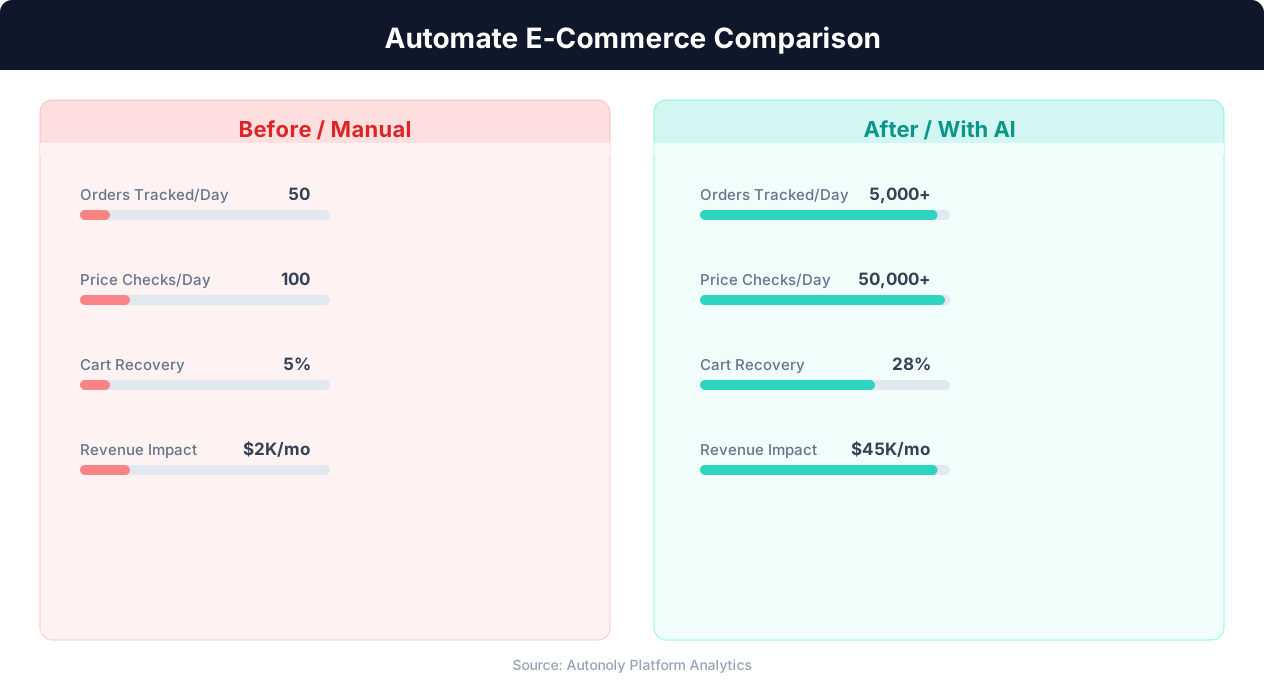
Manual vs automated product listing time comparison
Key Insight: Automated inventory sync reduces stockouts by 63% and overstock situations by 45%, directly improving margins (National Retail Federation).
How the AI Agent Does It
The agent uses Browser Automation to log into your Shopify admin panel through a real Chromium browser. It navigates to the abandoned checkouts page, reads each entry, and extracts the customer email, cart contents, timestamps, and cart value. The agent applies your configured threshold to filter out carts that were abandoned too recently — giving customers time to return on their own before receiving an email. For each qualifying cart, it switches to Gmail, composes a new email using your template with the extracted product details dynamically inserted, and sends it. The entire flow runs in a single browser session, handling Shopify's dynamic JavaScript interface and Gmail's compose window seamlessly. Because recovery emails are commercial messages, your template should comply with the CAN-SPAM Act — including an accurate subject line, a physical mailing address, and a clear unsubscribe option.
The Data Extraction engine handles edge cases like carts with multiple items, carts where a product has since gone out of stock, and carts from customers who have already completed a separate purchase. Because the agent adapts to page layout changes through visual pattern recognition rather than hardcoded CSS selectors, it continues working even when Shopify or Gmail update their interfaces — no brittle selectors to maintain, no broken workflows after platform updates.
Key Insight: Product listing automation cuts catalog management time by 78%, allowing sellers to scale from 500 to 5,000+ SKUs without additional staff (BigCommerce Research).
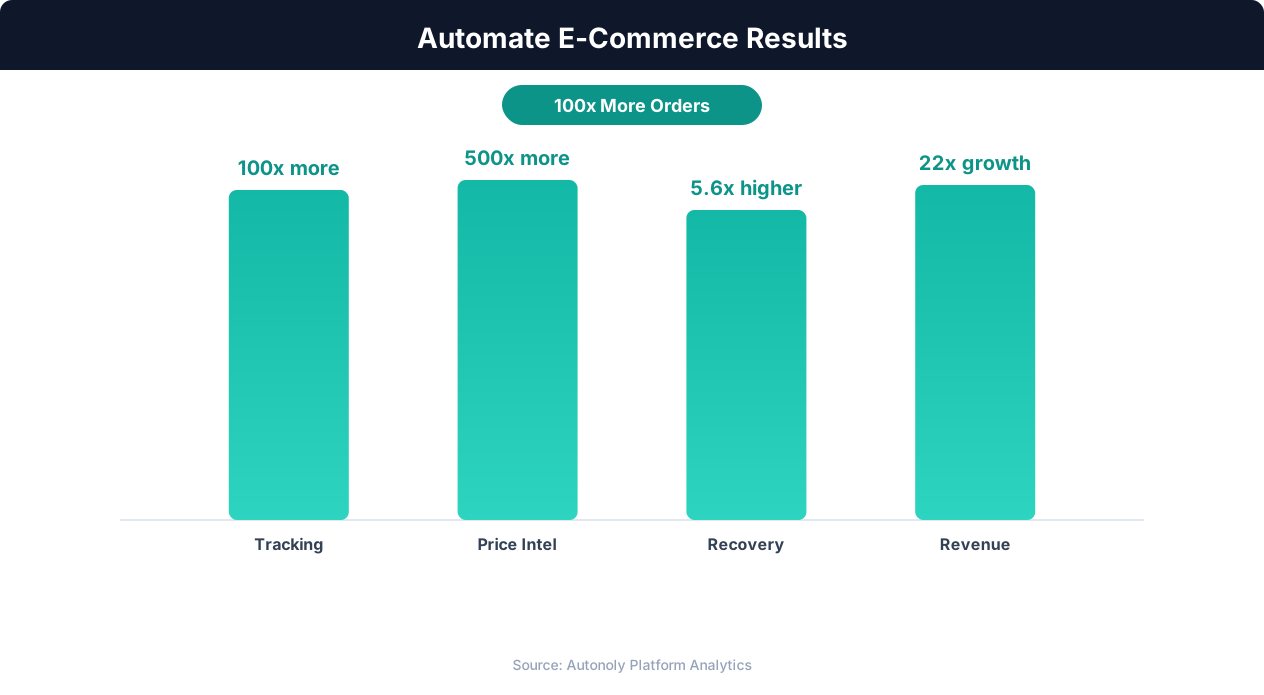
Revenue growth from e-commerce workflow automation
Key Insight: E-commerce businesses using automation grow revenue 2.5x faster than those relying on manual processes (Shopify Commerce Trends).
Scheduling and Automation
Configure this workflow to run every 4 hours using the Visual Workflow Builder, striking the right balance between timely follow-up and not overwhelming customers. The cron-based scheduler ensures consistent timing, and each run completes in just a few minutes even for stores with hundreds of abandoned carts. The agent only processes carts that are new since the last run, so customers never receive duplicate recovery emails. Differential processing means the agent compares current abandoned carts against its record of previously processed ones, sending emails only for genuinely new abandonments.
Add Logic & Flow conditions to skip carts below a minimum value, exclude certain product categories, or escalate high-value carts with a more aggressive discount offer. You can also route a daily summary to Slack so your team knows how many recovery emails were sent, the total cart value at stake, and the running recovery rate. Chain this workflow with other automations using the Visual Workflow Builder — for example, when a recovered cart converts to an order, automatically trigger a thank-you email or update your CRM. Use SSH & Terminal to run custom analytics scripts on your recovery data for advanced insights into customer behavior patterns.
Further Reading
Explore more about the tools and techniques used in this workflow: Automate Email Reports, No Code Automation Guide, Email Campaigns, Scheduled Execution.