
What is Logic & Flow Control?
Conditional branching types: if/else decision trees, for-each loops, parallel execution branches, and try/catch error handling
Most automation tools are glorified "if trigger then action" machines. Webhook fires, action runs. Email arrives, row gets added to spreadsheet. That covers maybe 20% of real business automation needs. The other 80% requires actual logic: decisions, loops, error recovery, parallel processing, and human checkpoints.
Logic & Flow Control is what transforms Autonoly from a simple task runner into something that can handle real business processes. It is the difference between "when I get an email, save the attachment" and "when I get an invoice email, extract the data, validate it against our PO system, route it for approval if over $10K, handle rejections, retry failed API calls, and alert the finance team if anything goes wrong."
All logic is configured visually in the Visual Workflow Builder — no code required. You drag logic nodes onto the canvas, set conditions through configuration panels, and wire branches by connecting edges. The result is a workflow that is both powerful and readable by anyone on your team.
Why Most Automation Tools Fail at Logic
The fundamental problem is that most tools were built for simple integrations, and logic was bolted on later. Zapier added Paths, but they are limited and awkward. IFTTT is literally "if this then that" — one trigger, one action, no branching. Even Make (Integromat), which has solid router modules, makes error handling unnecessarily complex with its opaque error route system.
Real business logic requires:
Decisions based on data — not just "did this trigger fire?" but "what is the value of this field, and what should we do differently based on 5 possible ranges?"
Iteration over collections — process each row in a spreadsheet, each email in an inbox, each page of search results
Error recovery — when step 8 of 12 fails because an API timed out, do not trash the work from steps 1-7
Parallel processing — run 3 independent tasks simultaneously and merge results when all finish
Human checkpoints — pause the workflow and wait for a person to approve, reject, or modify before continuing
Rate limiting — respect external API limits without building custom throttling logic
Autonoly handles all of these as first-class visual nodes.
Conditional Branching
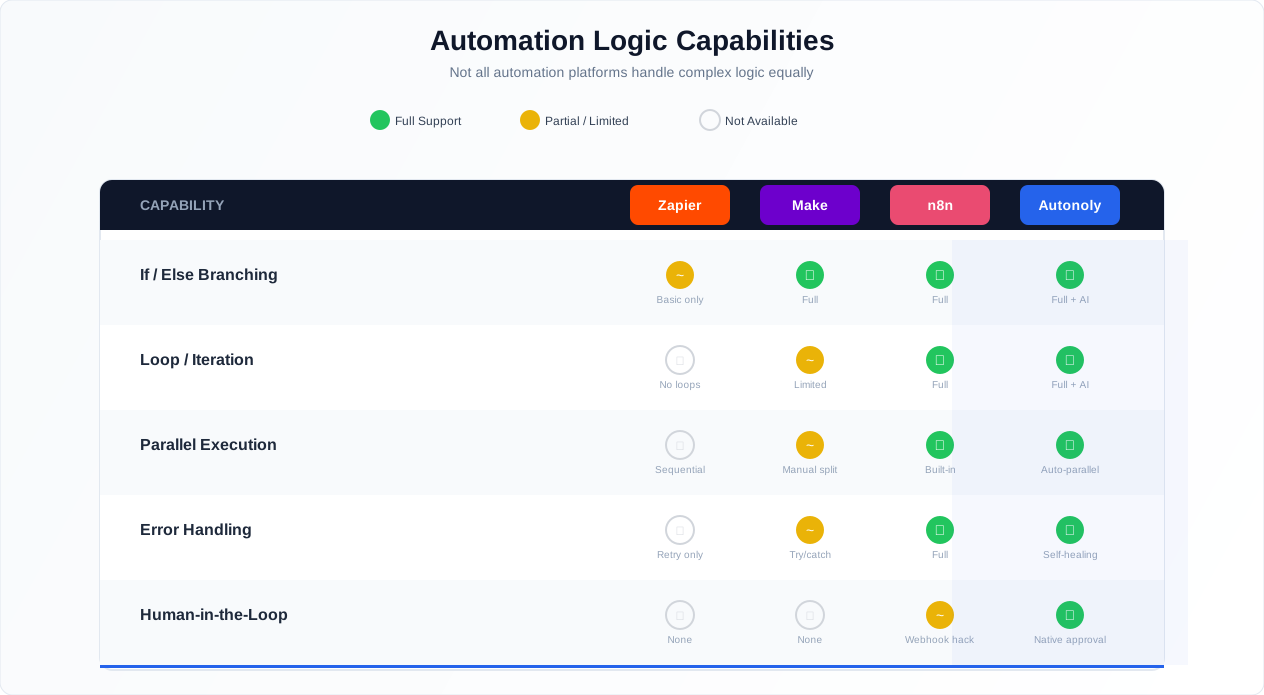
Comparison of conditional logic across automation platforms: simple if/else, multi-branch routing, and nested decision trees
Conditional branching routes your workflow down different paths based on data values. This is where automations stop being rigid scripts and start being intelligent processes.
If/Else: The Foundation
The simplest form is an if/else node: if a condition is true, execution follows one path; if false, it follows another. Conditions support comparison operators — equals, not equals, greater than, less than, contains, starts with, ends with, regex match, is empty, is not empty — and can reference any variable from earlier in the workflow.
Simple example: an e-commerce price monitoring workflow scrapes competitor prices with Data Extraction. A condition checks: is the price below your target threshold? If yes, send a Slack notification and log the opportunity. If no, just update the tracking spreadsheet. One condition node turns a passive data collector into an active alerting system.
Switch/Case: Multi-Branch Routing
When you need more than two paths, use multi-branch routing. Instead of nesting if/else nodes three levels deep (which becomes unreadable fast), a single switch node evaluates a value and routes to one of N branches.
Example: a customer support triage workflow receives incoming tickets via webhook. A switch node evaluates the category field: billing issues route to the finance team's Slack channel, technical bugs route to Jira via API, feature requests route to a Notion database, and spam gets silently discarded. One node, four branches, zero nested conditions.
Nested Conditions: When You Need Depth
Sometimes you genuinely need conditions within conditions. A loan application workflow might first check the applicant's credit score (above 700? below 500? in between?), then within each branch check the loan amount, then check the employment status. The Visual Workflow Builder renders each branch clearly so you can trace the logic visually, but here is the honest gotcha: nested conditions deeper than 3 levels become unmaintainable. If you are nesting more than 3 levels, you should split the workflow into sub-workflows or preprocess the data to simplify the decision tree.
Loops & Iteration
Loops are what make batch processing possible. Without them, you build automations that handle one item at a time. With them, you build automations that process entire datasets.
For-Each Loops: Process Every Item in a Collection
The for-each loop takes a list — a collection of URLs, a set of extracted records, an array from an API response — and runs the downstream nodes once for each item. The current item's data is available via a loop variable.
Real example: you have a spreadsheet with 200 company URLs. A for-each loop iterates over every row. For each URL, the workflow navigates to the company website using Browser Automation, extracts the "About Us" page content, runs it through an AI content node to classify the company's industry and size, and writes the enriched data back to the spreadsheet. 200 companies, fully enriched, no manual work.
While Loops: Repeat Until Done
While loops repeat until a condition is met. The classic use case is pagination: keep clicking "Next Page" and extracting data until there are no more pages. The loop checks for the presence of a "Next" button or a next-page cursor in the API response. When the condition fails, the loop exits.
The critical gotcha with while loops: you must have a guaranteed exit condition. If the "Next Page" button selector changes and your loop never finds it missing, you have an infinite loop that burns through execution credits. Always add a maximum iteration count as a safety valve. 1,000 iterations is a reasonable default. If your workflow legitimately needs more, increase it explicitly.
Nested Loops: The Power and the Danger
You can nest loops. Loop through a list of search queries, and for each query, loop through the paginated results. Loop through product categories, and for each category, loop through the products.
The danger: nested loops multiply. A loop of 100 items with an inner loop of 50 items runs the inner nodes 5,000 times. Add a third level and you are at hundreds of thousands of iterations. This is almost always a mistake. If you find yourself nesting more than two levels, restructure the workflow. Process the data in stages with intermediate storage rather than deeply nested iteration.
Error Handling: Try/Catch for Automations
This is the section that matters most, and it is the section that most automation builders get wrong — or ignore entirely.
Real-world automations encounter errors constantly. Pages fail to load. CSS selectors change because a website redesigned. APIs return 500 errors. Rate limits kick in. OAuth tokens expire. A webhook payload has a field you did not expect. This is not exceptional — this is normal operation.
Most automation tools just... stop when something fails. The workflow halts at the failed step, maybe you get an email notification, and you have to manually fix the issue and re-run everything. All the work from the successful steps? Potentially lost.
Try/Catch Blocks
Autonoly's try/catch blocks work like exception handling in programming. Wrap a section of your workflow in a "try" path. If any node inside the try path fails, execution jumps to the "catch" path instead of stopping. In the catch path, you define what happens:
Log and alert: Write the error details to a log and send a Slack notification so someone knows to investigate
Retry with backoff: Wait 5 seconds, try again. If it fails again, wait 30 seconds and try once more. If it still fails, move to the next item
Alternative approach: If the primary extraction selector fails, try a backup selector. If API v2 is down, fall back to API v1
Skip and continue: In a loop processing 100 items, if item 47 fails, skip it and continue with item 48 instead of stopping the entire batch
Graceful degradation: If the enrichment API is down, still save the basic data without enrichment rather than losing everything
What to Wrap in Error Handling
The rule is simple: wrap every external interaction in try/catch. Any node that makes a network call, loads a webpage, calls an API, reads from a database, or sends an email can fail for reasons completely outside your control. This includes:
Browser navigation nodes (pages fail to load, elements are missing)
API/HTTP request nodes (timeouts, rate limits, auth failures)
SSH commands (connection refused, command fails)
Integration writes (Google Sheets API quota exceeded, Slack rate limit)
Data extraction nodes (selector changed, content structure altered)
Internal logic nodes — conditions, data transforms, variable assignments — almost never fail. Do not clutter your workflow by wrapping every single node. Focus error handling on the external boundaries.
Human Approval Gates
Not everything should be fully automated. Some decisions need a human in the loop, especially when money, legal liability, or public-facing content is involved.
Human approval gates pause a workflow and wait for a person to take action before continuing. The workflow sends a notification — via Slack, email, or the Autonoly dashboard — with a summary of the data and action buttons (approve, reject, request changes). When the person responds, the workflow resumes down the appropriate branch.
Real example: purchase order approval. A procurement workflow generates a purchase order based on inventory levels and supplier pricing. If the PO total exceeds $10,000, the workflow pauses and sends a Slack message to the procurement manager: "PO #4521 for $12,450 from Acme Corp — 500 units of Widget A at $24.90. [Approve] [Reject] [Modify]." The manager clicks Approve, and the workflow submits the PO to the supplier's API, sends a confirmation email, and updates the inventory system.
Configure timeout behavior: if no response within 24 hours, either auto-approve (for low-risk actions), auto-reject (for high-risk actions), or escalate to a second approver. This prevents workflows from sitting in limbo indefinitely.
Delays & Rate Limiting
Delays add pauses between workflow steps. They seem simple, but getting them wrong causes real problems.
Fixed delays wait a specific number of seconds. Use them for letting pages fully render after navigation (JavaScript-heavy SPAs often need 2-3 seconds), respecting API rate limits (Shopify allows 2 requests per second, so add a 500ms delay between calls), or waiting for email delivery before checking an inbox.
Random delays add variability between a minimum and maximum duration. This is essential for Browser Automation workflows that interact with websites — fixed 2-second delays between every click are a bot fingerprint. Random delays between 1 and 5 seconds create human-like patterns that avoid detection. Our guide on bypassing anti-bot detection covers timing strategies in detail.
Rate limiting nodes enforce throughput caps for API-heavy workflows. Configure maximum requests per minute or second, and the workflow automatically throttles itself. This is better than adding manual delays because the rate limiter accounts for actual processing time — if a request takes 3 seconds, the limiter adjusts the next delay accordingly.
Data Routing: Sending Data to the Right Place
Data routing is conditional branching applied specifically to output destinations. Based on the content, category, or characteristics of data, you route it to different systems.
Example: a content moderation workflow processes user-submitted reviews. An AI classification node categorizes each review as positive, negative, or spam. The routing logic sends positive reviews directly to the published feed, negative reviews to a moderation queue in Airtable for human review, and spam to a log file (never delete spam immediately — you need it for training the classifier). Each destination gets exactly the data it needs, in the format it needs.
Variable System
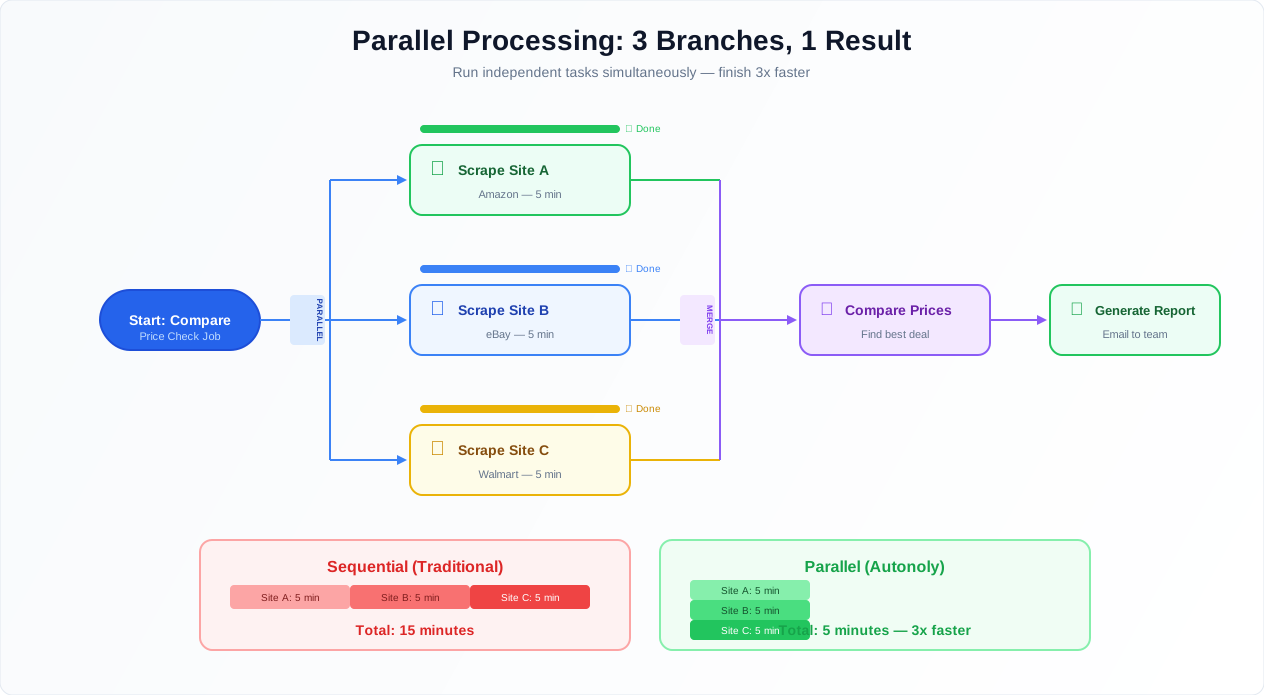
Decision tree execution flow showing condition evaluation, branch selection, parallel processing, and result merging
Variables are how data flows between nodes. When a node produces output — extracted data, an API response, a transformed dataset — it stores the result in a named variable. Downstream nodes reference that variable using the ${variableName} syntax.
The system preserves types: arrays stay arrays, objects stay objects, numbers stay numbers. This matters more than you might think. When you pass a collection from an extraction node into a loop, it arrives as an array — no parsing, no JSON.parse(), no conversion. When you pass a number into a condition, it compares numerically, not as a string (so 9 is less than 10, not greater — a bug that plagues tools with weak typing).
Variables persist across the entire workflow execution. You can reference data from step 1 in step 20. For complex transformations, use Data Processing nodes to reshape, filter, or combine variables between logic nodes.
Parallel Execution
Parallel branches let you run multiple paths simultaneously. When you need to scrape data from Amazon, Walmart, and Target at the same time, you create three parallel branches. Each branch runs independently. When all three complete, a merge node combines the results into a single dataset.
This is not just a convenience — it is a significant performance optimization. Three sequential API calls that each take 5 seconds take 15 seconds total. Three parallel calls take 5 seconds total. For workflows with multiple independent data sources or output destinations, parallel execution can cut runtime by 60-80%.
Concurrency controls let you manage resource usage. Set a maximum number of parallel branches to prevent overwhelming target services. Timeout settings ensure no single branch blocks the others indefinitely — if one branch hangs for 60 seconds, you can cancel it while keeping the results from the other completed branches.
The critical rule: parallel branches must be independent. If branch B needs data from branch A, they cannot run in parallel. This sounds obvious, but it is the most common mistake in parallel workflow design. If you catch yourself trying to reference a variable from another parallel branch, restructure: run the dependency first, then parallelize the independent tasks.
When to Split Into Sub-Workflows
Here is the gotcha that every power user hits eventually: complex logic becomes unmaintainable. A workflow with 15 condition nodes, 4 nested loops, 3 parallel branches, and error handling on every external call becomes a visual spaghetti monster that nobody wants to debug.
The solution: split complex logic into sub-workflows. Each sub-workflow handles one responsibility:
Data collection sub-workflow: handles scraping, extraction, and pagination
Data processing sub-workflow: handles transformation, validation, and enrichment
Decision and routing sub-workflow: handles business logic and conditional routing
Notification sub-workflow: handles alerts, emails, and team notifications
Each sub-workflow is independently testable, independently schedulable, and independently readable. When the data collection step breaks, you debug just that sub-workflow without wading through the notification logic.
A good heuristic: if a workflow canvas does not fit on one screen at a readable zoom level, it is too complex. Split it.
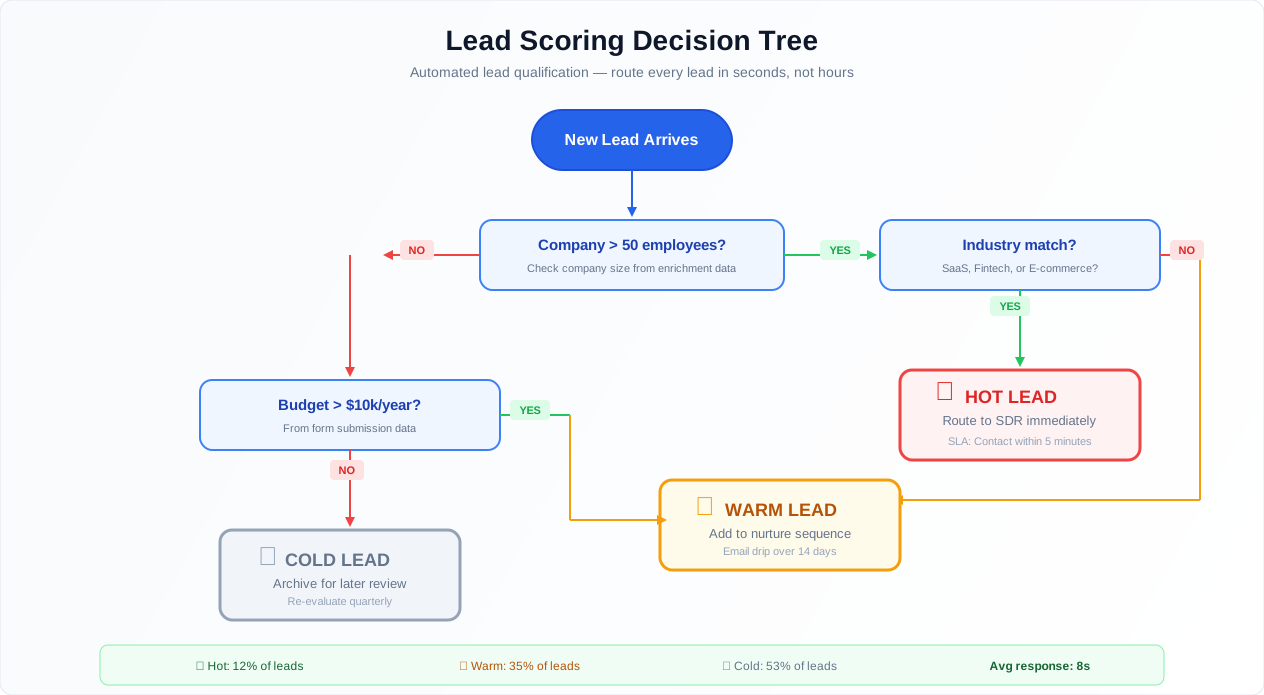
A Real Example: Lead Scoring Workflow
Abstract explanations only go so far. Here is a concrete lead scoring workflow that uses every logic feature:
The business goal: Score inbound leads based on firmographic and behavioral data, then route them to the right sales team member.
The workflow:
- Webhook trigger — fires when a new lead is captured from the website form
- Data enrichment loop — for each lead, call Clearbit's API to get company size, industry, revenue, and tech stack. Wrapped in try/catch with retry, because Clearbit has occasional timeouts
- Scoring conditions:
- Company size > 50 employees? +20 points
- Industry is SaaS, fintech, or healthcare? +15 points
- Revenue > $10M? +10 points
- Lead opened 3+ marketing emails in the past 30 days? +25 points (checked via HubSpot API)
- Lead visited pricing page? +30 points (checked via analytics API)
- Multi-branch routing based on total score:
- Score > 80 (hot lead): Immediately notify the account executive via Slack DM with full lead details. Create a task in Salesforce. Flag for same-day follow-up
- Score 40-80 (warm lead): Add to the SDR team's Google Sheet for next-day outreach. Enroll in a 3-email nurture sequence via HubSpot
- Score < 40 (cold lead): Add to a long-term nurture list in Airtable. No immediate action
- Error handling — if enrichment fails for a lead, assign a default score of 50 (warm) and flag for manual review. Never discard a lead because of an API failure
This workflow uses conditions (scoring), loops (processing each lead), parallel execution (checking multiple data sources simultaneously), error handling (enrichment API failures), and data routing (different destinations based on score). On the canvas, the entire logic is visible. The sales director can look at it and say "actually, make the hot threshold 70, not 80" — and that is a single condition node edit.
For more on building lead generation systems, see our automating lead generation guide.
Best Practices from Building Complex Decision Trees
Default to error handling on every external interaction. Any node that touches an external service can fail. Wrap these in try/catch blocks as a standard practice, not an afterthought. The catch path should, at minimum, log the error and send a notification. Better yet, implement intelligent recovery: retry with a delay, try an alternative approach, or skip the failing item and continue with the rest.
Use random delays between loop iterations for web scraping. Fixed delays between requests are a bot fingerprint. Use random delays (1 to 5 seconds) when iterating over URLs with Browser Automation. Our guide on bypassing anti-bot detection covers timing strategies in detail.
Preprocess data to simplify conditions. If a condition has more than 4 branches, the data is probably not structured well for decision-making. Use a Data Processing node to preprocess: instead of a 10-branch condition checking price ranges, add a "price_tier" column (budget, mid-range, premium, luxury) and branch on that single value. Simpler conditions are easier to debug and easier to explain to stakeholders.
Always add a maximum iteration count to while loops. This is non-negotiable. Every while loop needs a safety valve. If your pagination loop expects 50 pages but a website change makes it see infinite "next page" links, the safety valve stops it at page 100 instead of running 10,000 iterations and burning through your execution credits.
Parallel branches must be truly independent. If branch B reads data that branch A writes, they cannot run in parallel. This causes race conditions — sometimes B runs first and sees stale data, sometimes A runs first and everything works. These bugs are the worst kind: intermittent and hard to reproduce. Design parallel branches so each one is fully self-contained, then merge results after all branches complete.
Split workflows at the 20-node mark. When a workflow exceeds 20 nodes, it becomes exponentially harder to debug. Break it into sub-workflows. A data collection workflow triggers a data processing workflow, which triggers a routing workflow. Each module becomes independently testable, debuggable, and reusable.
Security & Compliance
Logic & Flow nodes control the execution path of your workflow. For compliance-sensitive processes, this is actually an advantage: the audit trail captures the full execution path — which branches were taken, which conditions evaluated to true or false, and which loop iterations completed — without exposing the data values that drove the decisions.
This creates a verifiable record of decision-making within the automation. When an auditor asks "why did this invoice get auto-approved?", the execution log shows exactly which conditions were evaluated, what the results were, and which path was taken. The credential vault protects sensitive values regardless of which branch accesses them. For the full picture of Autonoly's security infrastructure, visit the Security feature page.
Common Use Cases
Resilient Multi-Site Data Collection
A market research firm scrapes data from 100 websites daily. Each site is processed in a loop with try/catch, retry logic for transient failures, and skip-after-three-failures logic. After the loop, a conditional branch checks how many sites failed — more than 10% triggers an urgent Slack alert to the engineering team; 5-10% triggers a routine review email; less than 5% sends a normal summary. This ensures one flaky website does not crash the entire daily collection. The firm processes 100 sites reliably because failures in 3-4 sites (which happens almost daily as websites change) are handled gracefully instead of catastrophically. Our web scraping best practices guide covers error handling for large-scale extraction.
Conditional Notification System
A Website Monitoring workflow detects changes across dozens of competitor pages. Logic & Flow processes each detected change through a classification pipeline: price changes above 10% trigger an immediate Slack alert to the pricing team; new product listings trigger an email to the product team with extracted details; content changes (blog posts, press releases) trigger a weekly digest entry; and insignificant changes (timestamp updates, ad rotations, cookie banner modifications) are silently logged. Parallel branches handle the immediate alerts and digest accumulation simultaneously. At the end of each week, a scheduled summary compiles the digest entries and distributes them via Gmail. The key design decision: classify aggressively and alert selectively. Most monitoring tools either alert on everything (noisy) or alert on nothing (useless).
Paginated API Data Collection with Rate Limiting
A data engineering workflow pulls records from the HubSpot CRM API, which paginates at 100 records per page. A while loop makes sequential requests, passing the cursor from each response to the next request. A delay node enforces rate limiting at the API's stated limit of 10 requests per second (with a buffer — the workflow caps at 8/second). Conditional checks handle response codes: 200 continues normally, 429 (rate limited) triggers a 10-second cooldown before retrying, and 5xx errors trigger exponential backoff retries (1s, 5s, 30s). When no more pages remain, the accumulated dataset passes to Data Processing for deduplication and export to a PostgreSQL database. See our AI workflow automation guide for more patterns.
Multi-Stage Content Approval Pipeline
A content marketing team uses AI to generate blog post drafts. The workflow uses AI Content to generate 5 topic ideas, then loops through each to generate a full draft. Each draft goes through a quality scoring condition: AI-assessed quality above 7/10 goes to the human editor's approval queue (human approval gate via Slack), quality between 4 and 7 gets sent back for AI regeneration with revised prompts (up to 2 retries), and quality below 4 is discarded with a log entry explaining why. The editor approves, requests changes, or rejects via Slack buttons. Approved drafts are automatically formatted and pushed to the CMS via API. The entire pipeline turns "generate 5 blog posts" into a reliable, quality-controlled content operation.