
Why Clean Your Email Lists?
Email deliverability directly impacts your business. Sending to invalid addresses increases bounce rates, which damages your sender reputation with email providers like Google, Microsoft, and Yahoo. Once your reputation drops, even legitimate emails to valid recipients start landing in spam folders. A bounce rate above 2% is a red flag for most email service providers, and it can take weeks — sometimes months — to recover a damaged sender reputation. During that recovery period, your entire email communication suffers: marketing campaigns underperform, sales outreach gets filtered, and even transactional emails like invoices and receipts may not reach their intended recipients. The damage radiates outward from one dirty campaign to affect every email your domain sends.
Beyond deliverability, dirty lists waste money directly. If you are paying per-send through an email marketing platform like Mailchimp, SendGrid, or HubSpot, every email to an invalid address is wasted budget. A list with 15% invalid addresses means 15% of your email spend generates zero value. And duplicate entries mean contacts receive multiple copies of your message, which looks unprofessional and increases unsubscribe rates — further hurting your sender reputation in a vicious cycle. For companies sending 50,000 emails per month, a 15% invalid rate translates to 7,500 wasted sends every month and potentially hundreds of dollars in unnecessary platform fees.
The problem compounds over time. Contact lists degrade naturally at a rate of about 25% per year as people change jobs, companies rebrand, and email addresses are deactivated. A list that was clean six months ago may have hundreds of invalid entries today. Without regular validation, you are unknowingly damaging your deliverability with every campaign. The degradation is invisible until you see your open rates declining and your bounce reports climbing — by which point significant reputation damage has already occurred.
Autonoly's AI-powered list cleaning catches problems that simple regex validation misses. It connects to your Google Sheets contact list and performs comprehensive validation on every entry, returning actionable results that tell you exactly which addresses are safe, which are problematic, and what to do about each one. Unlike basic validation tools that only check syntax, the agent performs multi-layer verification that catches domain-level issues, common typos, disposable addresses, and duplicates in a single pass.
How the AI Agent Cleans Your List
The AI Agent Chat reads your email list from Google Sheets and runs each address through multiple validation layers using Data Processing and Data Extraction capabilities:
Syntax validation: Catches malformed addresses — missing @ symbols, spaces, illegal characters, and formatting errors that guarantee a bounce, measured against the address grammar defined in RFC 5322. This catches obvious errors like "john@" or "sarah@company" that a human might overlook in a large list. It also catches less obvious issues like double dots in domain names, trailing periods, and addresses with Unicode characters that render invisibly but cause delivery failures.
Domain verification: The agent checks whether the email domain exists and has valid MX records configured to receive email. Addresses at non-existent domains are flagged immediately, saving you from guaranteed hard bounces. It also detects parked domains, domains that have recently expired, and domains with DNS misconfigurations that would cause delivery to fail silently.
Typo detection: Common misspellings are identified and corrected. The agent recognizes patterns like "gmial.com" (gmail.com), "yaho.com" (yahoo.com), "outlok.com" (outlook.com), "hotmal.com" (hotmail.com), and hundreds of other frequent typos across major email providers and corporate domains. It suggests corrections rather than silently changing addresses, so you maintain control over your data. The typo engine also catches transposed characters and missing TLD components.
Duplicate removal: The agent identifies exact duplicates and near-duplicates ([email protected] vs [email protected] vs [email protected]) and flags them for removal. It preserves the entry with the most complete contact data and references the original row so you can merge records if needed. For lists with associated contact data, it detects the same person appearing with different email addresses by comparing names and company fields.
Disposable email detection: Addresses from temporary email services (like guerrillamail, tempmail, mailinator, and hundreds of others) are flagged as risky, since these are typically not real prospects and may not even exist by the time you send. The agent maintains an updated database of known disposable email providers, catching new throwaway services as they appear.
The agent also normalizes formatting — trimming whitespace, lowercasing domains, removing invisible Unicode characters, and standardizing the format of each address so your list is clean and consistent.
What Data You Get
The agent adds a status column to your sheet with one of these values:
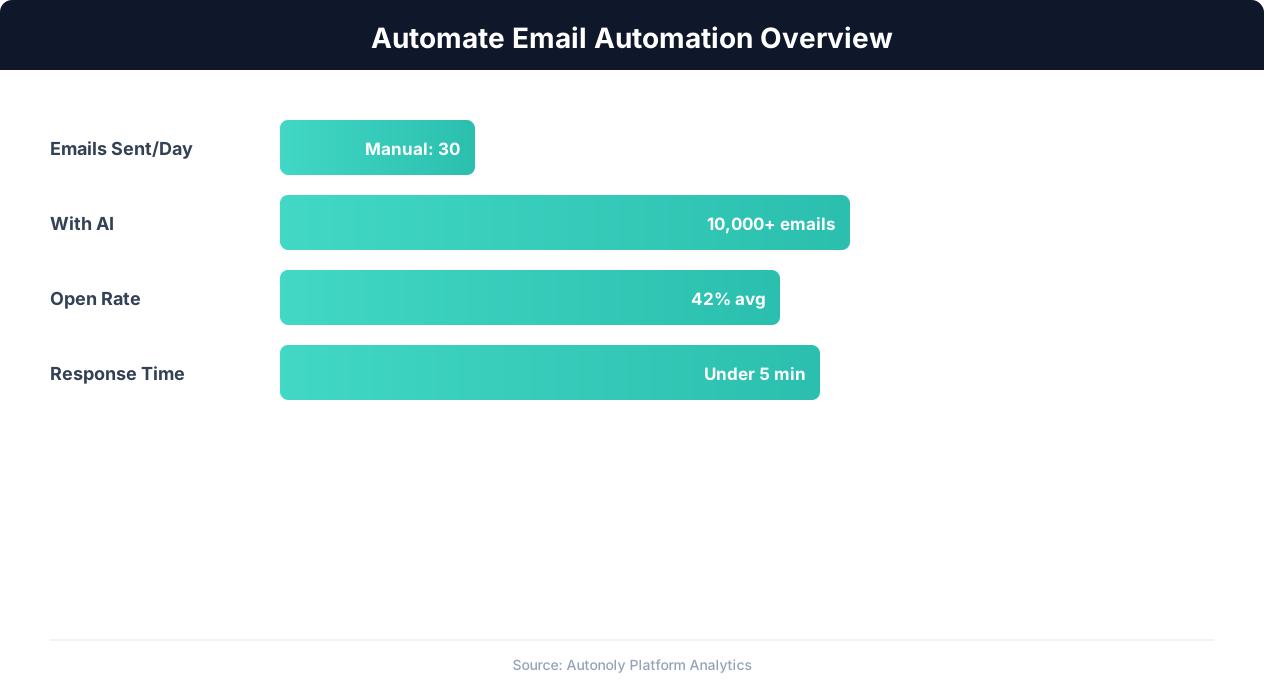
Email automation impact on engagement metrics
Key Insight: Companies using email automation see a 14.5% increase in sales productivity and a 12.2% reduction in marketing overhead costs (Nucleus Research).
Valid — Address passed all checks, safe to send
Invalid — Address is definitely undeliverable (bad syntax, non-existent domain)
Corrected — A typo was detected and a suggestion is provided in an adjacent column
Duplicate — This address appears elsewhere in the list, row number of the original is noted
Risky — Disposable email provider or catch-all domain that may not reach a real person
A summary row at the bottom shows the total count and percentage for each status category, giving you an instant health assessment of your list. You can filter your sheet by status to quickly review and act on each category. The Visual Workflow Builder lets you add automated follow-up actions — for example, move valid addresses to a "Ready to Send" sheet and archive invalid ones into a separate tab. A trend chart tracks your list health over time if you run cleaning on a recurring schedule, showing whether your data quality is improving or degrading.
Integrating with Your Outreach Pipeline
Feed your cleaned list directly into the cold email outreach workflow for maximum deliverability. Chain the list cleaning step with Logic & Flow conditions: only proceed with outreach if the valid rate exceeds 90%, otherwise alert you via Slack that the list needs manual review before sending. This gate prevents you from accidentally running an outreach campaign on a dirty list and damaging your sender reputation. The gate acts as a safety valve that protects your domain's long-term email health.
For recurring list hygiene, schedule this workflow to run before each email campaign. Import new contacts into a staging sheet, let the agent clean and validate, then merge approved entries into your master list. Combine with Browser Automation to validate questionable domains by checking if their websites are active — a domain with a live website is more likely to have functioning email than one that returns a 404. Browse the templates library for pre-built list cleaning and outreach pipeline templates. Use SSH & Terminal to cross-reference cleaned addresses against your CRM database for deduplication across systems.
Use Cases
Pre-campaign validation: Clean your entire list before every marketing campaign to ensure maximum deliverability and protect your sender reputation. A 5-minute validation run prevents weeks of reputation damage. Run it as a mandatory gate in your campaign workflow so no outreach goes out on an unchecked list.
Lead import processing: When importing leads from conferences, webinars, or purchased lists, run them through validation before adding to your CRM. Catch the inevitable typos, fake addresses, and disposable emails before they pollute your database. This is especially critical for purchased lists, which often have 20-30% invalid rates.
Ongoing list hygiene: Schedule weekly or monthly cleaning runs on your master contact database to catch addresses that have gone invalid since the last check. Maintain a consistently clean list without manual effort. Track your list health score over time using Google Sheets dashboards that visualize valid-rate trends.
Scheduling and Execution
This task runs as a one-time operation by default — connect your sheet, clean the list, and get results within minutes. A list of 10,000 email addresses typically completes in under 10 minutes. For teams that continuously add new contacts, schedule it to run daily or weekly on your incoming leads sheet using cron-style scheduling. The agent uses differential processing to evaluate only new rows since the last run, keeping your list perpetually clean without reprocessing the entire database. Each processed row is marked with a validation timestamp so you can see exactly when each address was last verified.
Each run produces a validation report summary, delivered via Slack notification or logged in the Autonoly dashboard. The report includes total addresses checked, breakdown by status category, and a comparison to the previous run's results so you can spot trends in data quality. For teams that import leads from multiple sources, the report breaks down quality metrics by source — revealing which lead providers deliver clean data and which need improvement. See pricing for list size limits per plan.
Further Reading
Explore more about the tools and techniques used in this workflow: Automate Lead Generation, No Code Automation Guide, Email Campaigns, Ai Content.