

Why Automate Rent Collection Reminders?
Late rent payments are one of the most common and costly headaches for landlords and property managers — a pain point reflected in the property-management trends tracked by the National Association of Realtors. Every month, the same cycle repeats: due dates approach, some tenants pay on time, others forget, and you spend hours chasing down missing payments with phone calls, text messages, and individual emails. This manual collection process is not only time-consuming — it is inconsistent. When you are busy with maintenance emergencies, new tenant screenings, or property showings, reminders slip through the cracks and late payments pile up.
The financial impact of late rent extends beyond the missed payment itself. Cash flow disruptions make it harder to cover mortgage payments, property taxes, insurance, and vendor invoices on time. Chronic late payments strain the landlord-tenant relationship and can escalate into formal collection actions that cost even more time and money. For property managers handling portfolios of 10, 50, or 100+ units, the administrative burden of manual rent collection outreach becomes untenable without dedicated staff.
By automating rent reminders with Google Sheets and Gmail, you create a reliable, hands-free system that sends personalized reminders to every tenant on the same schedule every month. Tenants appreciate the professional, consistent communication — it treats everyone equally and removes the awkwardness of personal follow-up calls. Studies show that simple payment reminders reduce late payments significantly, and automated reminders ensure the message goes out without fail, every single month, even when you are on vacation or managing a crisis.
This approach works for independent landlords managing a single duplex or property management companies overseeing hundreds of units. The system scales effortlessly because adding a new tenant is as simple as adding a row to your spreadsheet. There are no per-tenant fees, no complex software integrations, and no learning curve — just a spreadsheet and your existing Gmail account working together through Autonoly's automation engine.
How the AI Agent Sends Reminders
The workflow begins by reading your tenant ledger from Google Sheets. Each row contains the tenant's name, email address, unit or property identifier, monthly rent amount, and due date. The agent processes every active row and generates a personalized email for each tenant using the Data Processing engine to format each email with the correct tenant name, amount, and due date.
You can customize the email template to match your tone — friendly and casual for a small portfolio, or professional and formal for a management company. The template can include payment instructions, links to your online payment portal, accepted payment methods, your contact information for questions, and late fee policy reminders. Once the emails are composed, the agent sends them through your connected Gmail account. Each email appears to come directly from you, maintaining the personal relationship with your tenants. The agent logs the send status for each tenant back into the spreadsheet so you have a record of every reminder sent.
The agent gracefully handles edge cases throughout the process. If an email address is blank, it skips that row and flags it for your review. If a tenant's rent amount has changed, it picks up the updated figure from the spreadsheet automatically. Tenants marked as inactive or moved out are skipped without any manual adjustment needed between months. You can use the AI Agent Chat to set up and modify the workflow through natural conversation.
What Data You Get
Every reminder cycle produces a complete communication log in your spreadsheet:
Tenant Name — Who received the reminder
Unit / Property — Which unit the reminder is for
Rent Amount — The amount stated in the email
Due Date — The payment due date referenced
Send Timestamp — Exact date and time the email was delivered
Delivery Status — Sent, failed, or skipped with reason
Payment Status — Updated when payment is recorded
Over time, this log creates a comprehensive communication history for each tenant, serving as documentation in case of disputes.
Customizing Your Workflow
The Visual Workflow Builder lets you add sophisticated logic to your reminder pipeline. Use Logic & Flow conditions to skip tenants who have already paid, send escalated language to tenants with overdue balances, or route certain notifications to a property manager instead of the tenant directly. You can set up multiple reminder touchpoints within a single billing cycle — for example, a friendly heads-up five days before the due date, a standard reminder on the due date, and a late notice three days after. Each touchpoint uses a different email template with appropriate messaging. Browse our templates library for pre-built rent reminder workflows.
Integration Options
For larger operations, add a Slack notification that alerts your team whenever a batch of reminders goes out, along with a summary of any tenants flagged as chronically late. Log all reminder activity to Google Sheets with automatic monthly summary reports showing reminder counts, open balances, and payment trends powered by the Data Processing engine. Visit the Integrations page for the full list of supported destinations.
Use Cases
Independent landlords sending monthly reminders across a small portfolio of rental units
Property management companies automating reminder pipelines for hundreds of tenants across multiple buildings
Commercial landlords reminding business tenants of rent, CAM charges, and insurance requirements
Student housing operators managing large volumes of monthly payments with high tenant turnover
Vacation rental managers sending payment reminders for long-term seasonal rentals
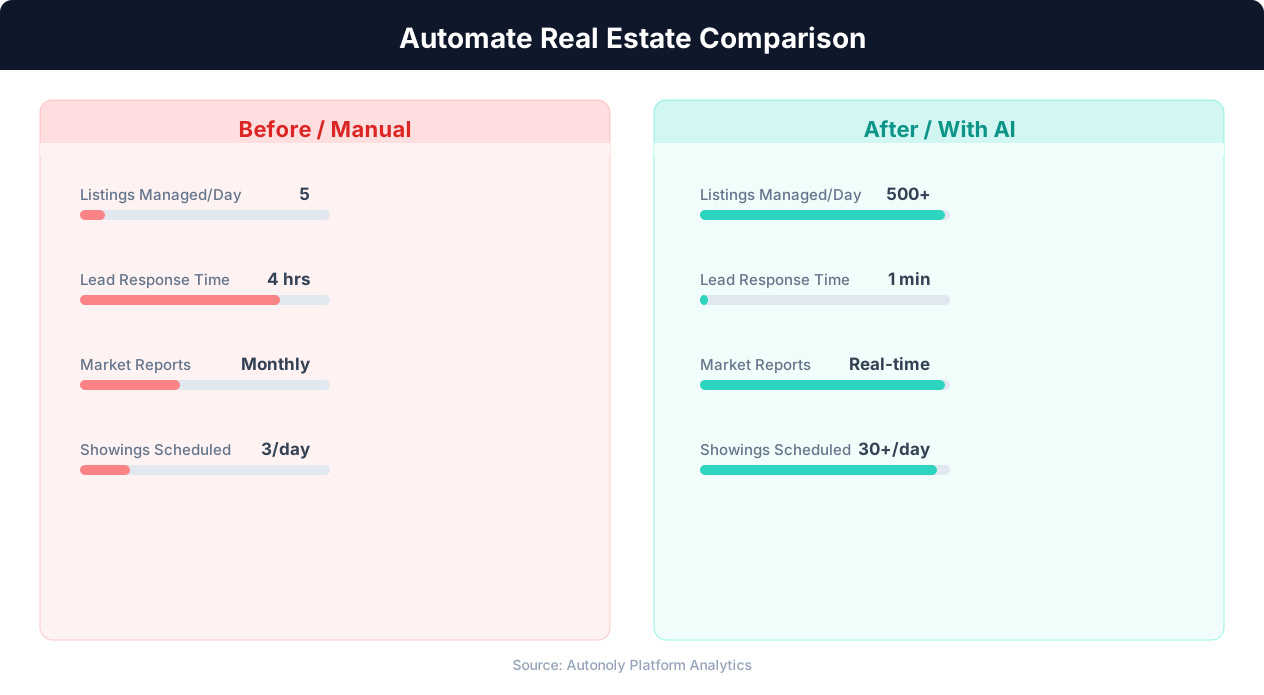
Lead response time for manual vs automated real estate workflows
Key Insight: Automated listing syndication saves agents 15+ hours per week on data entry while ensuring listings appear on all major portals within minutes (Inman Research).
How the AI Agent Does It
The agent connects to your Google Sheets ledger, reads the active tenant list, and generates personalized reminder emails for each one. It uses Data Processing to merge tenant details into your email template and sends each message through Gmail. Send statuses are written back to the spreadsheet so you always know which reminders went out successfully. The entire pipeline from spreadsheet read to email delivery to status logging happens in a single automated run.
Key Insight: AI-powered property matching increases client satisfaction by 43% by surfacing relevant listings faster than manual MLS searches (RealTrends Report).
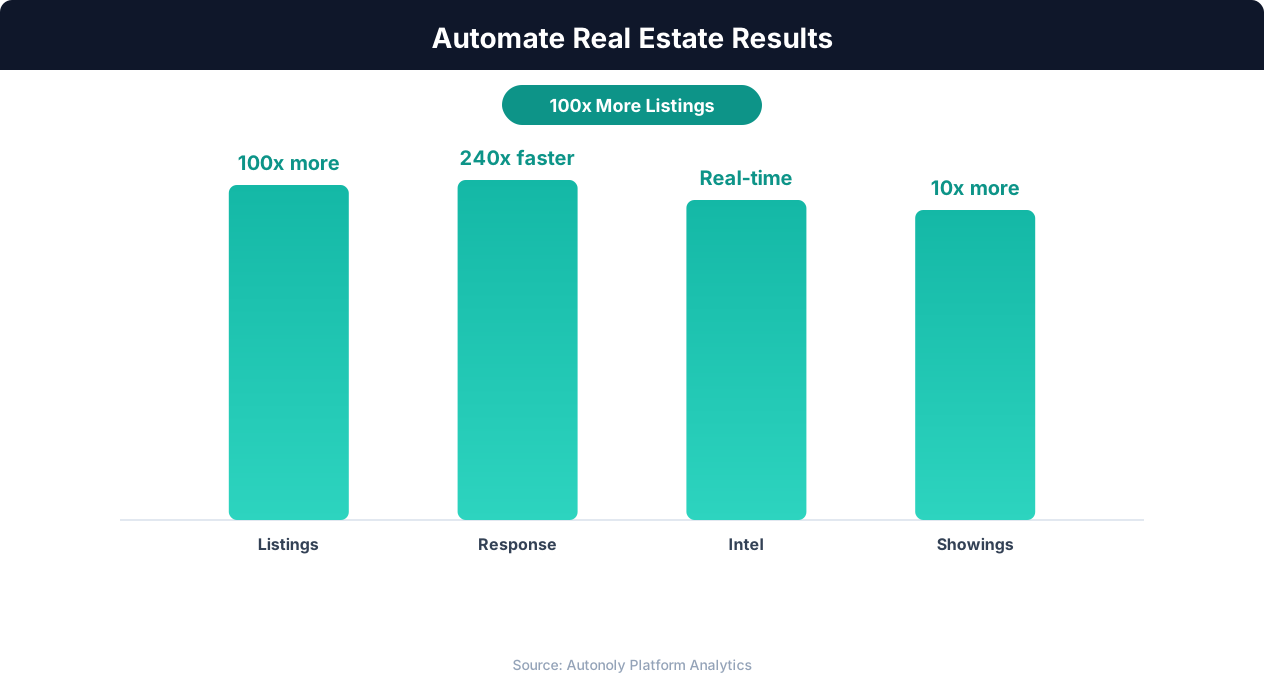
Deal closure rate improvements from real estate automation
Key Insight: Real estate agents using automation close 26% more deals by eliminating manual listing management and lead follow-up delays (NAR Technology Report).
Scheduling and Automation
Rent reminders work best on a monthly schedule timed to your lease terms. Most landlords schedule the initial reminder for the 27th or 28th of each month, giving tenants a few days notice before the first of the month due date. The Visual Workflow Builder lets you set the exact day and time for each monthly run, and you can trigger additional runs manually for special situations like mid-month reminders for tenants on non-standard payment schedules.
The workflow runs completely unattended. On the scheduled date, the agent reads the current tenant data, generates emails, sends them, and updates the spreadsheet — all without any manual intervention. Add Logic & Flow conditions to send different messages based on payment status, or chain multiple reminder touchpoints across the month. Check pricing to see how many automated runs are included in your plan.
Further Reading
Explore more about the tools and techniques used in this workflow: Real Estate Automation, Automate Email Reports, Email Campaigns, Scheduled Execution.