Two Approaches to AI Browser Automation
AI-powered browser automation is transforming how teams interact with websites. Instead of writing brittle scripts or manually clicking through repetitive workflows, you can now tell an AI agent what to do and watch it handle the rest. But the tools taking this approach differ dramatically in who they are built for. If the category itself is new to you, start with what automation is and our AI automation guide before comparing specific platforms.
Autonoly is an AI-native automation platform designed for non-developers. You describe tasks in plain English, an AI agent executes them in a cloud browser you can watch in real time, and the session converts into a repeatable workflow. No code, no Python, no terminal. It is built for operations teams, agencies, marketers, and anyone who needs browser automation without a developer on staff.
Skyvern is a YC-backed AI browser automation tool built primarily for developers. It uses a combination of computer vision and large language models to interact with websites programmatically. Skyvern is open-source (AGPL licensed) and provides a Python SDK that developers use to define and execute browser tasks. It has earned strong benchmark scores on the WebVoyager evaluation and offers a cloud-hosted option for those who do not want to self-host.
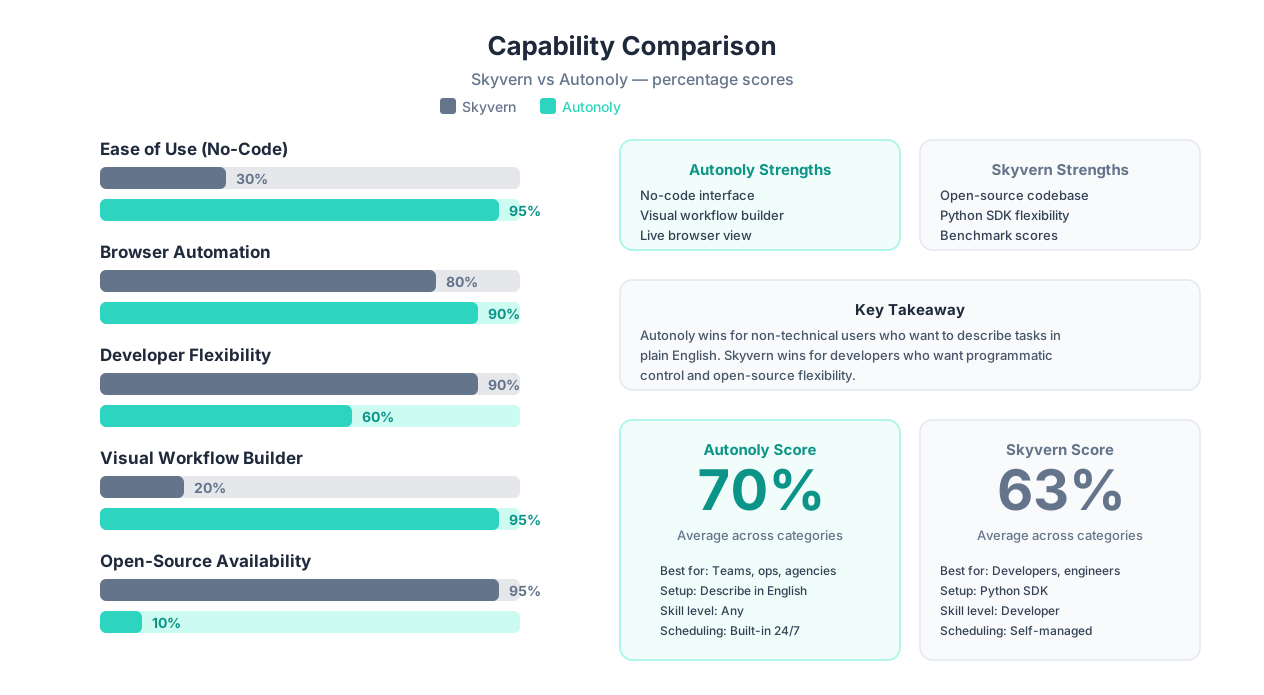
The fundamental difference is the audience: Autonoly is no-code, Skyvern requires code. This distinction shapes everything else — the setup process, the learning curve, the workflow management experience, and who can actually use the tool day to day.
Why This Comparison Matters
Browser automation is no longer optional for competitive businesses. Teams that automate data entry, form filling, competitor monitoring, and web scraping save 15-30 hours per week per person. The question is not whether to automate — it is which tool matches your team's technical capabilities and workflow needs.
This comparison is designed to be genuinely balanced. Skyvern has real advantages — particularly for developers who want open-source flexibility and programmatic control. We will be explicit about where Skyvern wins. The right choice depends entirely on your technical background, team composition, and what you are trying to automate.
| Attribute | Skyvern | Autonoly |
|---|---|---|
| Primary audience | Developers, engineers | Non-technical teams, ops managers |
| Setup method | Python SDK, pip install | Sign up, describe task in English |
| Interface | Code editor / terminal | Web dashboard with visual builder |
| Open-source | Yes (AGPL) | No |
| Cloud option | Yes (hosted plan) | Yes (cloud-native) |
| AI approach | Vision + LLM | AI agent + live browser |
| Free tier | Open-source (self-host free) | Yes (limited runs) |
Let us dig into the architectural differences that drive every practical distinction between these two tools.
Architecture: Code-First SDK vs No-Code AI Agent
The architectural difference between Skyvern and Autonoly is not subtle — it is the defining characteristic of each tool. Understanding this difference is essential before evaluating any other feature.
Skyvern: Python SDK and API-First
Skyvern is built as a developer tool. At its core, it provides a Python SDK that you install via pip and use to define browser automation tasks programmatically. Here is what the typical Skyvern workflow looks like:
- Install the SDK:
pip install skyvernor clone the open-source repo - Write Python code: Define tasks, navigation goals, and data extraction schemas in Python
- Execute via API: Run tasks through the Skyvern API, which launches a browser session and uses vision + LLM reasoning to complete the task
- Retrieve results: Get structured data back through the API response
Skyvern's AI approach is genuinely impressive from a technical standpoint. Rather than relying on CSS selectors or XPath (which break when websites change), Skyvern uses computer vision to "see" the page and a language model to reason about what to click, type, or extract. This makes it more resilient to UI changes than traditional Selenium or Playwright scripts.
However, every step requires developer involvement. Writing the task definition requires Python. Debugging failures requires reading logs and adjusting code. Scheduling requires setting up cron jobs or integrating with your own orchestration system. There is no visual interface for non-developers to create, modify, or monitor automations.
Autonoly: AI Agent with Visual Interface
Autonoly takes the opposite approach. Instead of a Python SDK, you interact with an AI agent through a chat interface. The workflow is:
- Describe the task: "Go to competitor.com, find all product prices, and put them in a Google Sheet"
- Watch it execute: The AI agent launches a cloud browser session that you can watch in real time
- Convert to workflow: The completed session converts into a repeatable workflow in the visual workflow builder
- Schedule and integrate: Set up scheduled runs, connect to Google Sheets, Slack, email, and 30+ other integrations
The AI agent handles the same underlying challenge — navigating websites that change — but wraps it in an interface that anyone on the team can use. No Python, no terminal, no API calls.
What This Means in Practice
The architecture difference creates a hard boundary around who can use each tool:
| Scenario | Skyvern | Autonoly |
|---|---|---|
| Marketing manager needs to scrape competitor prices | Must ask a developer to write the script | Describes the task, watches it execute |
| Operations team wants to automate form submissions | Developer writes Python, ops team waits | Ops team builds it themselves in minutes |
| Developer wants fine-grained control over extraction logic | Full programmatic control via Python | Agent handles logic; less manual control |
| Team wants to modify a running automation | Edit Python code, redeploy | Edit in visual builder, save |
| Debug a failed automation | Read API logs, inspect response objects | Watch the replay, see where agent got stuck |
Key Insight
This is not about which architecture is "better" — it is about who is building and maintaining the automations. If your automation team includes developers who prefer working in code, Skyvern's SDK model gives them precise control. If your automation users are business teams, ops managers, or agencies without developers, Autonoly's no-code model is the only realistic option.
The Open-Source Factor
Skyvern's open-source availability (AGPL license) is a genuine advantage for certain users. You can self-host Skyvern, inspect the source code, contribute improvements, and avoid vendor lock-in entirely. For engineering teams that value transparency and control over their infrastructure, this matters. Autonoly is a closed-source SaaS platform — you trade source code access for a managed experience that requires no infrastructure management. Both tradeoffs are valid depending on your priorities.
Feature-by-Feature Comparison: 16 Capabilities
Beyond architecture, Skyvern and Autonoly differ across specific features that affect daily use. Here is a breakdown of 16 capabilities that matter most for browser automation.
| Feature | Skyvern | Autonoly | Winner |
|---|---|---|---|
| No-code task creation | No — Python SDK required | Yes — describe in plain English | Autonoly |
| Visual workflow builder | No | Yes — drag-and-drop canvas | Autonoly |
| Live browser view | No — results returned after execution | Yes — watch agent in real time | Autonoly |
| Open-source | Yes (AGPL license) | No | Skyvern |
| Python SDK | Yes — full programmatic control | No | Skyvern |
| Vision-based element detection | Yes — core differentiator | Yes — AI agent uses vision | Tie |
| Self-healing (UI changes) | Yes — vision + LLM reasoning | Yes — agent adapts automatically | Tie |
| Scheduled execution | Manual setup (cron, Airflow, etc.) | Built-in cron scheduling | Autonoly |
| Native integrations | None — build your own | 30+ (Sheets, Slack, email, etc.) | Autonoly |
| Team collaboration | Git-based sharing | Shared workspaces, roles, permissions | Autonoly |
| Cross-session learning | No | Yes — agents improve over time | Autonoly |
| Form filling | Strong — purpose-built for forms | Strong — AI maps fields intelligently | Tie |
| Data extraction | Structured via JSON schemas | AI-guided web scraping | Tie |
| Benchmark scores | WebVoyager benchmark tested | No public benchmarks | Skyvern |
| Cloud hosting | Optional (hosted plan available) | Cloud-native (always hosted) | Autonoly |
| Self-hosting | Yes — Docker, full control | No | Skyvern |
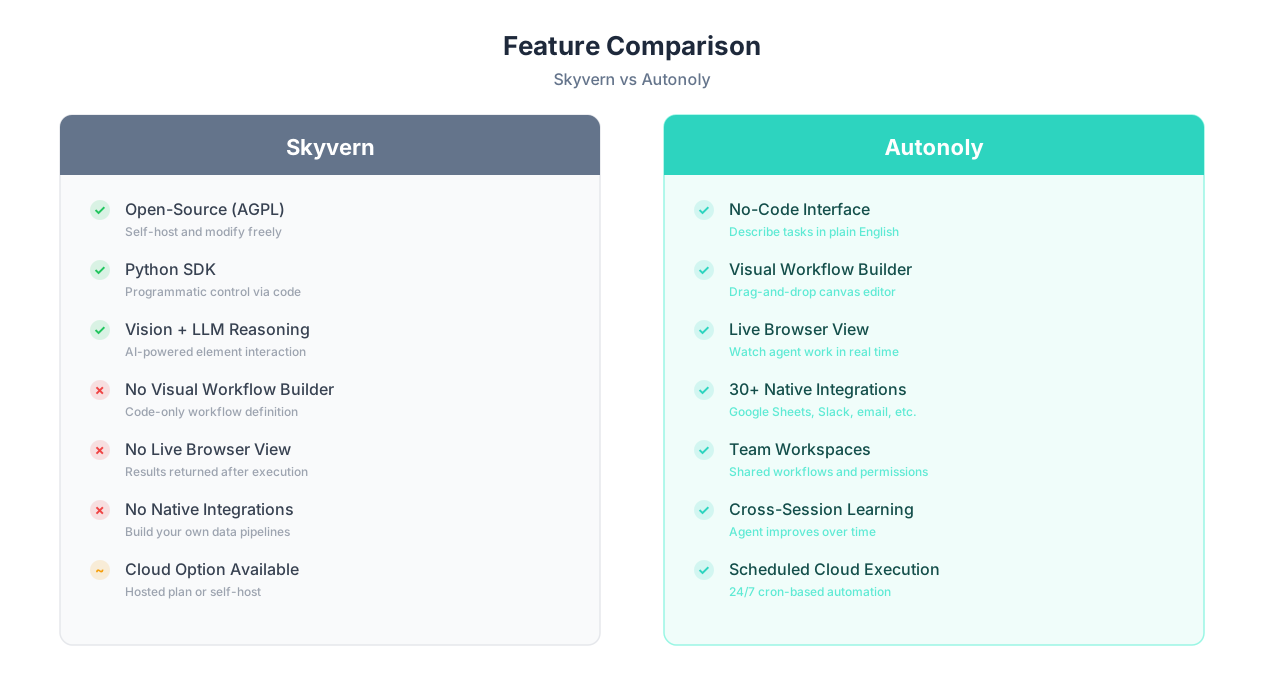
Important Note on Benchmarks
Skyvern publishes WebVoyager benchmark scores that demonstrate its ability to complete complex web tasks. These benchmarks are a genuine differentiator — they provide objective evidence of Skyvern's capability. Autonoly does not currently publish equivalent benchmarks. However, benchmarks measure isolated task completion, not the full workflow management experience (scheduling, integrations, team collaboration). Both data points matter.
Where Skyvern Genuinely Excels
Credit where it is due — Skyvern has meaningful advantages in several areas:
- Open-source transparency: You can read the source code, understand exactly how tasks are executed, and contribute improvements. For teams that require auditability or have strict vendor policies, this is a hard requirement that Autonoly cannot meet.
- Developer control: The Python SDK gives developers precise control over task definitions, error handling, retry logic, and data schemas. If you need custom extraction logic or complex conditional flows, writing Python gives you more granularity than a visual builder.
- Self-hosting: Running Skyvern on your own infrastructure means your data never leaves your servers. For healthcare, finance, or government teams with strict data residency requirements, self-hosting can be mandatory.
- Form automation: Skyvern was built with form filling as a primary use case. Its vision-based approach handles complex multi-step forms well, including government portals and insurance applications.
- Cost at scale for developers: If you have the engineering capacity to self-host, Skyvern's open-source version has no per-task costs beyond infrastructure.
Where Autonoly Genuinely Excels
Autonoly's advantages center on accessibility, workflow management, and the full automation lifecycle:
- Zero-code accessibility: Anyone on the team can create, modify, and manage automations. This eliminates the developer bottleneck that plagues SDK-based tools.
- Live browser view: Watching the AI agent work in real time provides transparency and makes debugging intuitive — you literally see where the agent gets stuck instead of parsing API logs.
- Visual workflow builder: The drag-and-drop canvas lets you build, modify, and connect multi-step workflows visually. No code, no YAML files, no JSON schemas.
- Native integrations: Out-of-the-box connections to Google Sheets, Slack, email, and 30+ other tools mean you can build end-to-end data pipelines without writing integration code.
- Team collaboration: Shared workspaces with role-based permissions let entire teams manage automations together. Skyvern's collaboration model is Git-based — fine for developers, unusable for non-technical team members.
- Cross-session learning: Autonoly's agents learn from previous sessions, getting faster and more reliable over time on repeated tasks.
Use Case Comparison: 5 Real Scenarios Head-to-Head
Features on paper are one thing — real-world performance is another. Here are five common automation scenarios and how each tool handles them.
Scenario 1: Scrape Competitor Pricing Data Weekly
| Aspect | Skyvern | Autonoly |
|---|---|---|
| Setup | Write Python script defining extraction schema | Describe: "Scrape prices from these 15 competitor sites" |
| Scheduling | Set up cron job or Airflow DAG | Click "Schedule" in dashboard |
| When sites change | Vision + LLM adapts automatically | AI agent adapts automatically |
| Output | JSON response — write code to send to Sheets | Direct integration to Google Sheets |
| Who can maintain it? | Developer who wrote the script | Anyone on the team |
| Best for this task? | Capable but developer-dependent | Autonoly wins — end-to-end no-code |
Verdict: Autonoly wins for non-technical teams. Both tools can scrape competitor prices, but Autonoly delivers the complete workflow (scrape, schedule, output to Sheets) without writing a single line of code. If you have a developer available, Skyvern works too — but the developer becomes a permanent dependency for maintenance.
Scenario 2: Fill Out Complex Government Forms
| Aspect | Skyvern | Autonoly |
|---|---|---|
| Form handling | Strong — purpose-built for forms | Strong — AI maps fields intelligently |
| Multi-page navigation | Vision-based page understanding | Agent navigates and fills step by step |
| Error recovery | Programmable retry logic in Python | AI reasons about errors and adapts |
| CAPTCHAs | External CAPTCHA service integration | AI-assisted or human-in-the-loop |
| Best for this task? | Skyvern wins (for developers) | Autonoly wins (for everyone else) |
Verdict: This is a genuine tie that depends on your team. Skyvern's form-filling capability is a core strength — it was built for this use case. But using it requires a developer. Autonoly's form-filling automation handles the same use case without code. If you have developers, Skyvern gives you more control over complex form logic. If you do not, Autonoly is the only option.
Scenario 3: Build an Integration Pipeline (Web to Spreadsheet to Slack)
| Aspect | Skyvern | Autonoly |
|---|---|---|
| Web scraping | Python SDK handles extraction | AI agent handles extraction |
| Spreadsheet integration | Write custom code (gspread library) | Built-in Google Sheets integration |
| Slack notification | Write custom code (slack_sdk) | Built-in Slack integration |
| Total setup time | 2-4 hours (write + test integrations) | 10-15 minutes |
| Best for this task? | Works but requires significant code | Autonoly wins — native integrations |
Verdict: Autonoly wins decisively for integration workflows. Skyvern handles the browser automation part well, but it has no native integrations — every downstream connection (Sheets, Slack, email, CRM) requires custom code. Autonoly's 30+ native integrations turn a multi-hour development project into a 15-minute configuration task.
Key Insight
The pattern across these scenarios is consistent: Skyvern matches or exceeds Autonoly on raw browser automation capability, but falls behind on everything that surrounds the automation — scheduling, integrations, team access, and maintenance. For developers who are willing to build those surrounding systems, Skyvern is powerful. For everyone else, the surrounding systems are the product.
Scenario 4: Self-Host an Automation System On-Premises
| Aspect | Skyvern | Autonoly |
|---|---|---|
| Self-hosting | Yes — Docker, full infrastructure control | No — cloud SaaS only |
| Data residency | Complete control — data stays on your servers | Data processed in Autonoly's cloud |
| Infrastructure costs | Your servers, your costs (can be lower) | Included in subscription |
| Maintenance burden | You manage updates, scaling, uptime | Fully managed by Autonoly |
| Best for this task? | Skyvern wins — only option for self-hosting | Not possible |
Verdict: Skyvern wins this scenario outright. If self-hosting is a hard requirement — due to data residency regulations, compliance needs, or organizational policy — Skyvern is the only option. Autonoly does not offer self-hosted deployment. This is a clear and important advantage for Skyvern in regulated industries.
Scenario 5: Non-Developer Needs to Automate Today
| Aspect | Skyvern | Autonoly |
|---|---|---|
| Can they start? | No — need Python knowledge | Yes — describe task in chat |
| Time to first automation | Days (learn Python + SDK) | 5-10 minutes |
| Ongoing maintenance | Developer required | Self-service by anyone |
| Best for this task? | Not designed for non-developers | Autonoly wins — built for this exact person |
Verdict: Autonoly wins by default. Skyvern cannot be used without Python knowledge. This is not a criticism — Skyvern is a developer tool. But if the person who needs automation is not a developer, Skyvern is not an option.
Pricing Comparison: What You Actually Pay
Pricing models for Skyvern and Autonoly differ fundamentally because the products serve different audiences and have different delivery models.
Skyvern Pricing
Skyvern has a dual pricing model:
- Open-source (self-hosted): Free forever. You run Skyvern on your own infrastructure and pay only for the compute resources (servers, browsers) and LLM API calls (OpenAI, Anthropic, etc.). For a team with existing infrastructure, this can be very cost-effective.
- Cloud hosted: Skyvern offers a managed cloud option with usage-based pricing. Costs vary based on task complexity and volume, but expect to pay per task run. This removes infrastructure management but adds per-use costs.
Autonoly Pricing
Autonoly uses straightforward subscription tiers:
- Free: Limited runs to test the platform
- Starter ($29/month): 500 runs, AI agent chat, visual workflow builder
- Pro ($79/month): 2,000 runs, team collaboration, 30+ integrations
- Enterprise ($199/month): Unlimited runs, priority support, advanced security
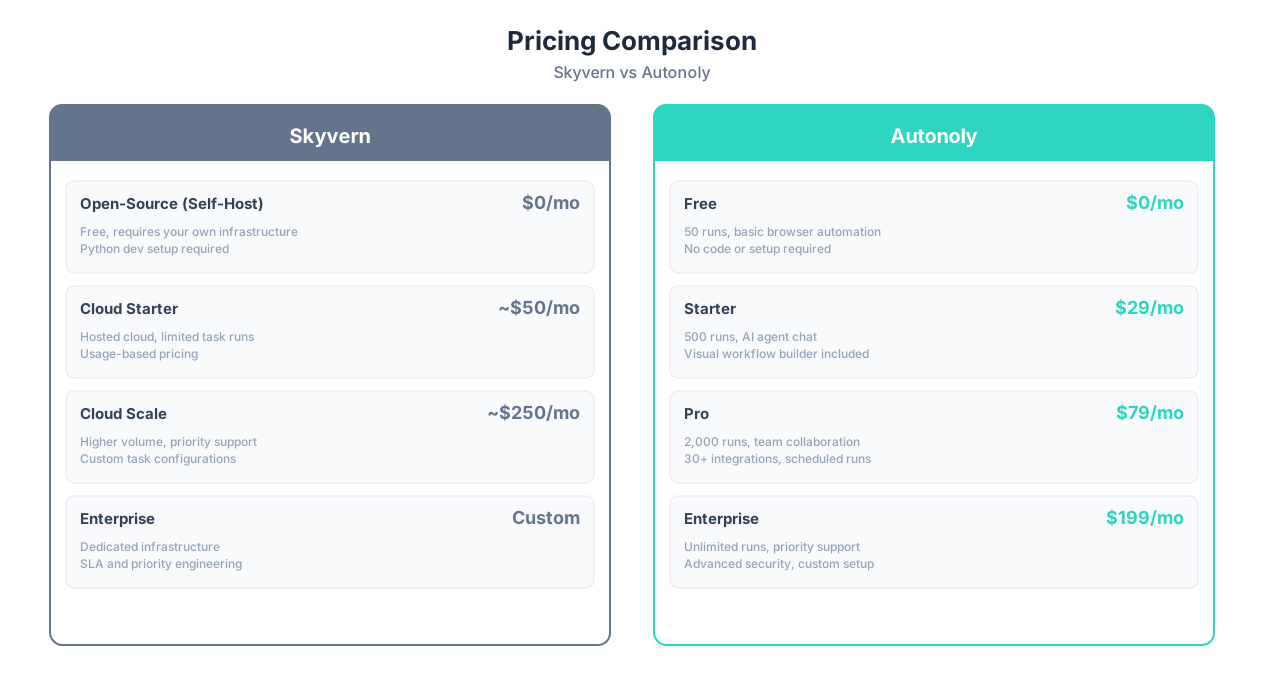
True Cost Analysis
Sticker price tells only part of the story. The real cost depends heavily on whether you have engineering resources available:
| Cost Factor | Skyvern (Self-Hosted) | Skyvern (Cloud) | Autonoly |
|---|---|---|---|
| Monthly subscription | $0 | Usage-based (varies) | $29-199/month |
| Infrastructure costs | $50-500/month (your servers) | Included | Included |
| LLM API costs | $20-200/month (OpenAI/Anthropic) | Included | Included |
| Developer time to build | 4-20 hours per workflow | 4-20 hours per workflow | 0 (no-code) |
| Developer time to maintain | 2-5 hours/month per workflow | 2-5 hours/month per workflow | Self-service maintenance |
| Integration development | 4-8 hours per integration | 4-8 hours per integration | 0 (native integrations) |
By the Numbers
If you value developer time at $75-150/hour, a single Skyvern workflow (4-20 hours to build, 2-5 hours/month to maintain) costs $300-3,000 upfront plus $150-750/month in maintenance. Autonoly's $79/month Pro plan includes 2,000 runs, team features, and self-service maintenance. For teams without dedicated developers, the cost comparison is not close. For engineering teams with spare capacity, Skyvern's self-hosted option can be cheaper at high volumes.
When Skyvern Is Cheaper
Skyvern's self-hosted open-source version wins on cost when:
- You have an engineering team with spare capacity
- You run high volumes (thousands of tasks daily) where per-task cloud pricing adds up
- You already have server infrastructure in place
- LLM API costs are manageable for your usage patterns
When Autonoly Is Cheaper
Autonoly wins on total cost when:
- You do not have developers available to build and maintain automations
- You need integrations (Sheets, Slack, etc.) that would require custom development on Skyvern
- Multiple team members need to create and manage automations (Skyvern requires each user to know Python)
- You value time-to-automation — minutes vs hours or days
For the latest plan details, check our pricing page.
When to Choose Skyvern
Skyvern is the right choice when your needs align with its developer-focused strengths. Here are the specific scenarios where Skyvern wins:
1. Your Team Includes Developers Who Prefer Code
If the people building automations are software engineers who are comfortable with Python, Skyvern's SDK gives them the control they expect. Developers often prefer code over visual interfaces because code is version-controllable, testable, and composable. If your automation team operates like a development team (Git, CI/CD, code reviews), Skyvern fits their workflow.
2. You Need Open-Source Transparency
Some organizations require the ability to audit the tools they use. Skyvern's AGPL-licensed source code is publicly available — you can inspect exactly how tasks are executed, how data is handled, and how the AI reasoning works. For security-conscious teams, open-source is not a nice-to-have; it is a requirement.
3. Data Residency Is Non-Negotiable
If your data cannot leave your infrastructure — due to HIPAA, GDPR, SOC 2, or organizational policy — Skyvern's self-hosted deployment is your only option between these two tools. You run everything on your servers, and no data passes through a third-party cloud.
4. Form Automation Is Your Primary Use Case
Skyvern was built with form filling as a core use case. Its vision-based approach handles complex multi-page forms — government portals, insurance applications, procurement systems — with strong accuracy. If forms are 80% of what you automate, Skyvern's purpose-built approach has a meaningful edge.
Key Insight
Skyvern is ideal for engineering teams that want to build browser automation into their product or internal tooling. If you are building automation as a feature (e.g., automating workflows for your customers), Skyvern's SDK approach gives you the programmatic control needed to embed automation into a larger system.
5. You Want Maximum Control Over Execution
The Python SDK lets you define custom error handling, retry strategies, timeouts, output schemas, and post-processing logic. If you need automation behavior that does not fit a standard template — unusual authentication flows, custom data validation, complex conditional branching — code gives you more precision than a visual builder.
6. Budget Is Tight and You Have Engineering Capacity
Self-hosting Skyvern's open-source version is free beyond infrastructure costs. If your engineering team has spare capacity and existing server infrastructure, the total cost can be significantly lower than any SaaS tool — especially at high volumes.
Skyvern's Ideal User Profile
- Software engineering team or technical startup
- Python proficiency across the team
- Self-hosting capability and preference
- Form automation as primary use case
- Need for open-source audit trail
- Data residency requirements
- Building automation into a product or internal platform
When to Choose Autonoly
Autonoly is the right choice when your automation needs must be met without developer involvement. Here are the specific scenarios where Autonoly wins:
1. Your Team Does Not Include Developers
This is the most straightforward decision criterion. If the people who need automations — ops managers, marketing teams, agency owners, executive assistants — do not write Python, Skyvern is not an option. Autonoly's entire value proposition is that anyone can automate without coding.
2. You Need End-to-End Workflows, Not Just Browser Tasks
Browser automation is often just one step in a larger workflow. Scraping data is useless if you cannot get it into a spreadsheet. Filling a form is useless if you cannot trigger a Slack notification when it is done. Autonoly's 30+ native integrations connect browser automation to the rest of your tool stack without writing integration code. With Skyvern, every integration is a custom development project.
3. Multiple People Need to Create and Manage Automations
In a team of 5-10 people who all need browser automation, requiring everyone to learn Python is unrealistic. Autonoly's shared workspaces let team members create their own automations, share them with colleagues, and manage permissions — all through a visual interface. The person who creates the automation does not need to be the person who maintains it.
4. You Want to See What the Agent Is Doing
Autonoly's live browser view lets you watch the AI agent work in real time. You see the cursor move, the forms fill, the pages navigate. This is not a minor feature — it builds trust (you see exactly what happens), simplifies debugging (you see where it fails), and lets you intervene when needed. Skyvern returns results after execution; you do not watch the process.
5. Automations Need to Run 24/7 Without Maintenance
Autonoly's cloud infrastructure runs your scheduled automations around the clock. No servers to manage, no cron jobs to configure, no Docker containers to keep running. Schedule an automation and forget about it. Self-hosting Skyvern gives you the same capability, but you are responsible for uptime, scaling, and monitoring — which is another engineering responsibility.
Important Note
If you are currently using Skyvern and your developer is the bottleneck for creating new automations, Autonoly can complement rather than replace Skyvern. Keep Skyvern for the complex, custom automations that benefit from programmatic control, and use Autonoly for the high-volume, straightforward automations that business teams create themselves.
6. You Value Time-to-Automation Over Customization
Describing a task in plain English and having a working automation in 5-10 minutes is fundamentally faster than writing Python, testing it, deploying it, and setting up integrations. If speed matters more than pixel-perfect control, Autonoly gets you running orders of magnitude faster.
Autonoly's Ideal User Profile
- Operations teams, agencies, small businesses
- Non-technical automation users (no Python needed)
- Need for end-to-end workflows with integrations
- Multiple team members managing automations
- Want to watch automations execute in real time
- Prefer managed cloud over self-hosted infrastructure
- Value speed of setup over maximum customization
- Repetitive tasks that benefit from cross-session learning
The Bottom Line: Which Tool Should You Choose?
The choice between Autonoly and Skyvern is not about which tool is objectively better — it is about who you are and what you need.
Choose Skyvern If:
- Your automation team includes developers comfortable with Python
- You need open-source code you can audit and modify
- Self-hosting is required for data residency or compliance
- Form automation is your primary use case and you want programmatic control
- You want to embed automation into a product or internal platform
- Budget is tight but engineering time is available
Choose Autonoly If:
- Your automation users are non-technical (ops, marketing, agencies)
- You need end-to-end workflows with integrations (Sheets, Slack, email)
- Multiple team members need to create and manage automations
- You want to watch automations execute in real time
- Scheduled, unattended automation is important
- Time-to-automation matters more than maximum customization
The Decision Matrix
| Decision Factor | Skyvern | Autonoly |
|---|---|---|
| Technical skill required | Python developer | None |
| Time to first automation | Hours to days | 5-10 minutes |
| Integration development | Custom code per integration | 30+ built-in |
| Team access | Developers only | Anyone |
| Open-source | Yes | No |
| Self-hosting | Yes | No |
| Live execution view | No | Yes |
| Cross-session learning | No | Yes |
| Best for | Developer teams, product automation | Business teams, ops, agencies |
The Honest Truth
If you landed on this page, you are probably comparing these tools because you are not sure you have the technical resources for Skyvern. That uncertainty is itself the answer — if using a Python SDK feels like a stretch for your team, Autonoly is the right choice. Conversely, if you are a developer reading this and thinking "I'd rather just write Python," Skyvern's open-source SDK is excellent and you should use it.
Both tools solve an important problem — making browser automation reliable through AI — but for different people.
If you are unsure, try both. Skyvern's open-source version is free to test if you have a developer available. Autonoly's free tier lets any team member run a few automations without commitment. Build your most important automation on both and see which experience matches your team's needs.
For more comparisons, read our Autonoly vs Bardeen comparison or our guide to the best AI agent platforms.