What Is the Model Context Protocol (MCP)?
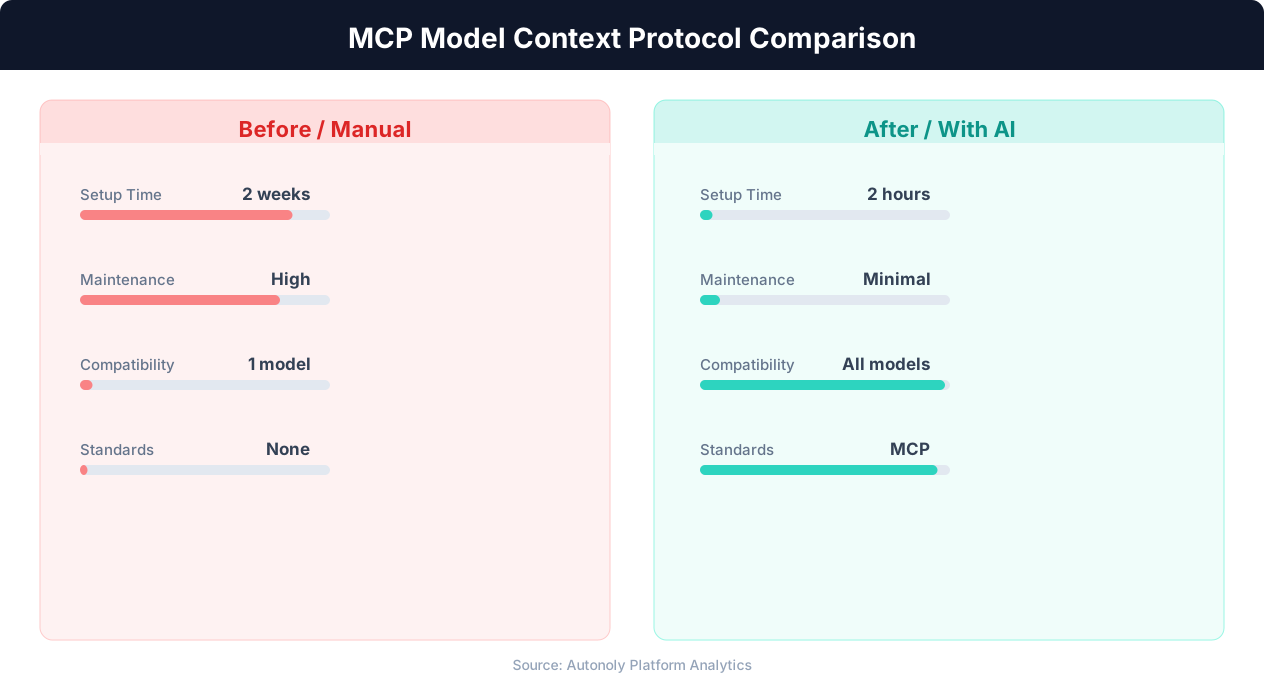
The Model Context Protocol (MCP) is an open standard created by Anthropic that defines how AI models connect to external tools, data sources, and services. Think of it as a universal adapter between AI agents and the outside world. Before MCP, every AI platform had its own proprietary method for connecting to tools. With MCP, a single standardized protocol lets any AI model connect to any MCP-compatible tool, regardless of who built either side.
To understand why MCP matters, consider the problem it solves. An AI agent is only as useful as the tools it can access. An AI agent that can reason brilliantly but cannot read your database, check a website, or send an email is limited to generating text. The power of AI agents comes from their ability to act: reading data, calling APIs, browsing the web, writing files, and interacting with services. But connecting an AI model to each tool requires custom integration code, and the number of possible tool integrations is enormous.
Before MCP, the integration landscape looked like early web services before REST APIs became standard. Every AI platform implemented tool connections differently. OpenAI's function calling, Anthropic's tool use, Google's function declarations, and LangChain's tools all used different formats, schemas, and protocols. A tool built for one platform did not work with another. Tool developers had to build separate integrations for each AI platform, just as web service providers once had to build separate interfaces for each consumer.
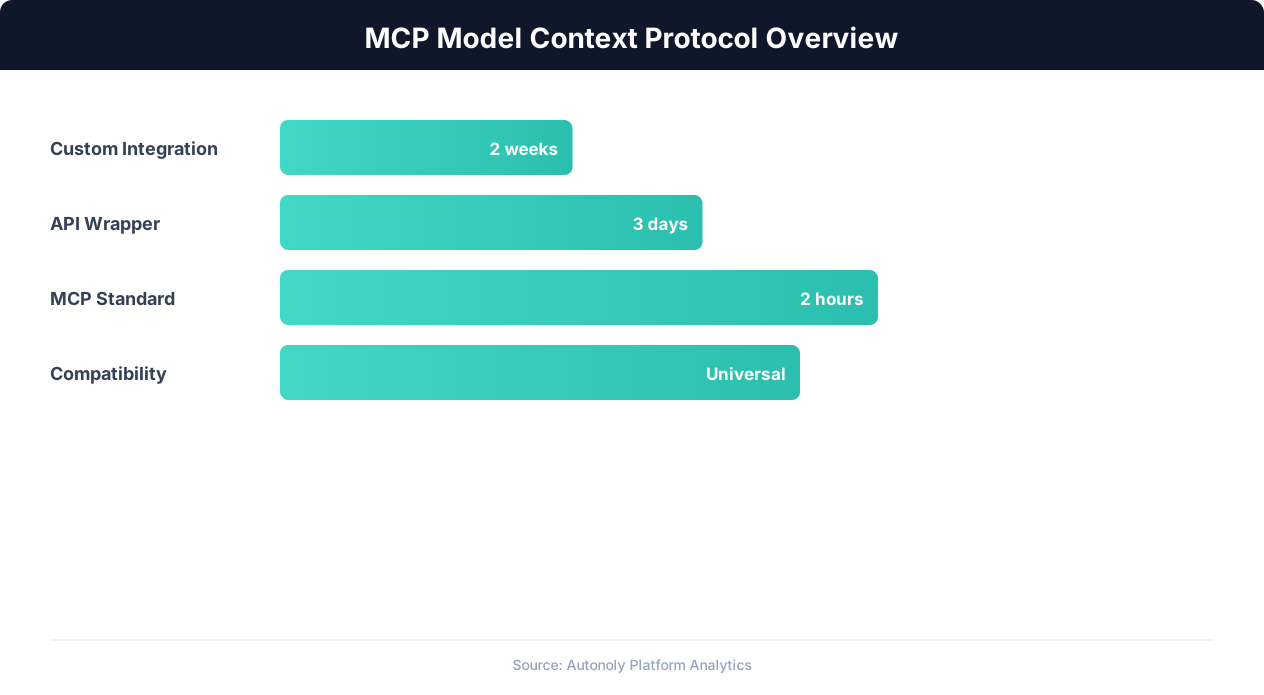
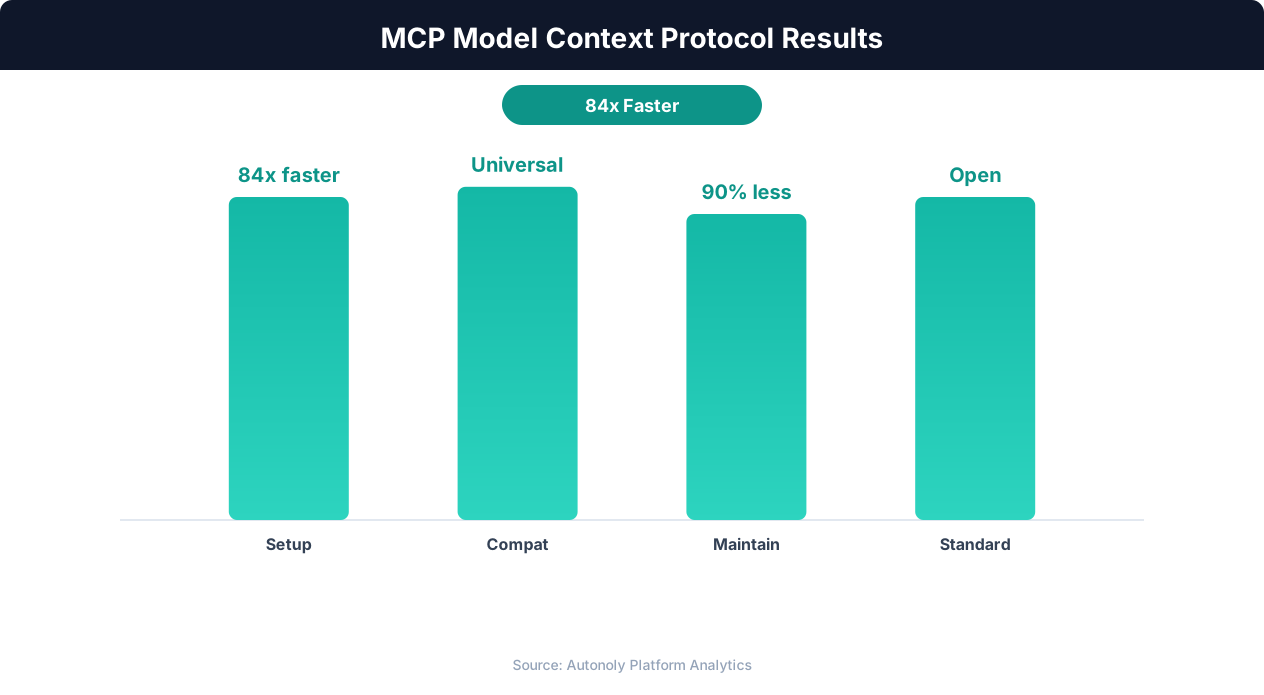
MCP standardizes this. It defines a protocol for how tools describe their capabilities (what they can do, what inputs they accept, what outputs they produce), how AI models discover available tools, how models invoke tools with structured inputs, and how tools return results. Any AI model that speaks MCP can use any MCP-compatible tool. Any tool that implements the MCP interface works with any MCP-compatible AI model. The N-to-N integration problem (every model must integrate with every tool) becomes a much simpler N-plus-M problem (each model implements MCP once, each tool implements MCP once, and everything connects).
The analogy to USB is apt. Before USB, every device had its own proprietary connector. Printers used parallel ports, keyboards used PS/2, external drives used SCSI. USB standardized the physical and logical connection, and suddenly any device could connect to any computer. MCP is doing the same thing for AI-to-tool connections: standardizing the interface so that tools and models can connect without custom integration work.
MCP Architecture: Hosts, Clients, and Servers
MCP uses a client-server architecture with three key components: hosts, clients, and servers. Understanding these components and how they interact is essential for both using and building MCP integrations.
MCP Hosts
The host is the application that the user interacts with. In practice, this is typically an AI assistant application (like Claude Desktop, an IDE plugin, or an automation platform like Autonoly). The host provides the user interface, manages the AI model interaction, and coordinates MCP client connections. When you chat with Claude Desktop and it uses a tool to check your database, Claude Desktop is the MCP host.
The host's responsibilities include: maintaining the connection between the user and the AI model, managing which MCP servers are available, handling authorization and security for tool access, and presenting tool results back to the user. The host decides which tools the AI model can see and use, providing a security boundary that prevents unauthorized tool access.
MCP Clients
MCP clients live inside the host application and maintain connections to MCP servers. Each client connects to one server. The client handles protocol-level communication: sending requests, receiving responses, managing connection lifecycle, and handling errors. From the host's perspective, the client is an abstraction that makes talking to MCP servers straightforward.
The client-server connection uses one of several transport mechanisms. For local MCP servers (running on the same machine), the standard transport is stdio (standard input/output), where the client spawns the server process and communicates through pipes. For remote MCP servers, HTTP with Server-Sent Events (SSE) provides the transport. The upcoming streamable HTTP transport will further simplify remote connections.
MCP Servers
MCP servers are the tools themselves. Each server exposes one or more capabilities: tools (functions the AI can call), resources (data the AI can read), and prompts (templates the AI can use). A filesystem MCP server might expose tools for reading and writing files. A database MCP server might expose tools for querying and updating tables. A web search MCP server might expose a search tool that returns results from the web.
The server describes its capabilities using a JSON schema that specifies: the name and description of each tool, the input parameters (with types, descriptions, and validation rules), and the output format. This schema is what the AI model uses to understand what the tool does and how to use it. Well-written tool descriptions are critical because the AI model's ability to use a tool correctly depends entirely on understanding the description.
The Communication Flow
When a user asks an AI agent to perform a task that requires a tool, the flow works like this: (1) The host sends the user's request to the AI model along with descriptions of available MCP tools. (2) The AI model reasons about the task and decides to use a tool, generating a tool call with specific inputs. (3) The host routes the tool call through the appropriate MCP client to the corresponding MCP server. (4) The MCP server executes the tool and returns the result. (5) The host sends the result back to the AI model. (6) The AI model incorporates the result into its reasoning and generates a response (or makes another tool call).
This loop can repeat multiple times as the AI model chains together tool calls to accomplish complex tasks. The MCP protocol handles each call independently, with the AI model maintaining context and deciding the sequence of calls based on its reasoning.
MCP Capabilities: Tools, Resources, and Prompts
MCP defines three types of capabilities that servers can expose. Understanding the distinction helps you choose the right capability type when building or evaluating MCP integrations.
Tools: Actions the AI Can Perform
Tools are the most commonly used MCP capability. A tool is a function that the AI model can call with specific inputs to perform an action and receive a result. Examples include: a database query tool that accepts a SQL query and returns results, a web search tool that accepts a search query and returns links, a file write tool that accepts content and a path and creates a file, an email send tool that accepts recipients, subject, and body and sends an email, and a browser navigation tool that accepts a URL and returns the page content.
Tools are model-controlled: the AI model decides when and how to use them based on the user's request and the tool descriptions. The model generates the tool inputs by interpreting the user's intent and mapping it to the tool's parameter schema. This is why clear, specific tool descriptions matter so much: the model must understand what a tool does and what inputs it expects to use it correctly.
Each tool definition includes: a unique name, a human-readable description (read by the AI model to understand the tool's purpose), and an input schema (JSON Schema defining the expected parameters). The server processes the inputs and returns a result as structured content (text, images, or embedded resources).
Resources: Data the AI Can Read
Resources represent data that the AI can access as context for its reasoning. Unlike tools (which perform actions), resources provide information. Examples include: file contents from a local filesystem, database records, API documentation, configuration files, and log data.
Resources are identified by URIs and can be either static (the AI can read them directly) or dynamic (the AI reads them by providing parameters). A resource might be a specific file (file:///config/settings.json) or a parameterized query (database://users?department=engineering).
The distinction between tools and resources matters for security and performance. Resources are read-only and lower-risk than tools (which can modify state). Some MCP hosts grant automatic access to resources while requiring user confirmation for tool calls. Resources also support subscription: the client can subscribe to a resource and receive notifications when it changes, enabling real-time data awareness.
Prompts: Templates for Common Tasks
Prompts are pre-defined templates that guide the AI model's behavior for specific tasks. An MCP server might expose a "code_review" prompt that includes instructions for reviewing code, or a "data_analysis" prompt that includes best practices for analyzing datasets. When the user selects a prompt, its content is injected into the AI model's context, shaping how it approaches the task.
Prompts are user-controlled: the user (or host application) explicitly selects which prompts to use, unlike tools where the AI model decides. This makes prompts appropriate for establishing workflows, templates, and standard procedures. A company might create MCP prompts that encode their specific analysis methodology, communication style, or quality standards.
Capability Discovery
MCP includes a discovery mechanism where the client requests the server's capability list at connection time. The server responds with all available tools, resources, and prompts, including their descriptions and schemas. This dynamic discovery means the host application does not need to know in advance what a server provides. It connects, discovers capabilities, and makes them available to the AI model. If the server adds a new tool, it becomes available to the AI on the next connection without any configuration change in the host.
The MCP Server Ecosystem: What Is Available Today
The MCP server ecosystem has grown rapidly since the protocol's release. Hundreds of MCP servers are now available, covering the most common tool categories that AI agents need. Here is a survey of what is available and where the ecosystem is heading.
Official and Reference Servers
Anthropic maintains several reference MCP servers that demonstrate the protocol and provide commonly needed capabilities. The filesystem server provides file reading, writing, and directory listing. The GitHub server provides repository management, issue tracking, and pull request operations. The PostgreSQL server provides database querying and schema inspection. The Brave Search server provides web search capabilities. These reference servers are well-maintained, thoroughly tested, and serve as implementation examples for server developers.
Database and Data Servers
MCP servers exist for most popular databases: PostgreSQL, MySQL, SQLite, MongoDB, Redis, and Elasticsearch. These servers allow AI agents to query databases, inspect schemas, and (with appropriate permissions) modify data. For data warehouses, servers for BigQuery, Snowflake, and Databricks are available or in development. These database servers are particularly powerful for data analysis workflows: the AI agent can inspect a database schema, write and execute queries, and analyze the results, all through MCP tool calls.
Cloud and Infrastructure Servers
Servers for AWS, Google Cloud, and Azure provide cloud resource management capabilities. A Kubernetes MCP server allows AI agents to inspect and manage cluster resources. Infrastructure-as-code servers (Terraform, CloudFormation) enable AI-assisted infrastructure provisioning. These servers are valuable for DevOps and infrastructure teams, enabling AI agents to help with deployment, monitoring, and troubleshooting.
Productivity and SaaS Servers
MCP servers for common business tools include: Google Workspace (Docs, Sheets, Drive, Gmail, Calendar), Slack (messaging, channel management), Notion (pages, databases), Linear (issue tracking), and Jira (project management). These servers enable AI agents to interact with the tools teams use daily, reading data for context and taking actions on behalf of the user.
Development Tool Servers
For developers, MCP servers provide access to: Git repositories, Docker containers, CI/CD pipelines (GitHub Actions, CircleCI), code analysis tools, and documentation generators. These servers power AI-assisted development workflows where the agent can read code, run tests, check CI results, and create pull requests.
Web and Browser Servers
Web-focused MCP servers include web scraping tools, browser automation capabilities, and HTTP request tools. Playwright-based MCP servers provide full browser control through the MCP interface, enabling AI agents to navigate websites, fill forms, and extract data. These servers are central to the web automation use cases that platforms like Autonoly specialize in, complementing its catalog of native app integrations.
The Growth Trajectory
The MCP server ecosystem is growing exponentially. Community-built servers appear daily on GitHub, and major SaaS companies are beginning to offer official MCP servers for their platforms. The pattern mirrors the early API economy: as standardization takes hold, the number of available integrations grows rapidly because the barrier to building them drops. Building an MCP server for a new tool is a weekend project for a developer, not a months-long integration effort. This low barrier means the long tail of niche tools and custom internal systems will eventually be MCP-accessible, not just the major platforms.
What MCP Means for Automation: The End of Integration Lock-In
MCP's impact on the automation industry is profound. It addresses the fundamental limitation that has constrained automation platforms since their inception: integration availability. Understanding this impact helps you evaluate how MCP changes your automation strategy.
The Integration Lock-In Problem
Traditional automation platforms derive their value from their integration catalog. Zapier's 7,000+ integrations, Make's 1,500+ apps, and n8n's growing library are their primary competitive moats. If you need to connect App A to App B, you choose the platform that has integrations for both. If your platform does not support a critical app, you are stuck: you either switch platforms, build a custom integration, or do the work manually.
This creates lock-in. Once you have built 50 workflows on Zapier, migrating to Make means rebuilding all 50 workflows using Make's different interface and integration library. The switching cost keeps users on platforms even when a competitor offers better features or pricing. And it gives platforms leverage: they can raise prices, knowing that migration costs make switching uneconomical.
How MCP Changes the Equation
MCP decouples tools from platforms. An MCP server for Salesforce works with any MCP-compatible host: Claude Desktop, Autonoly, an IDE plugin, or a custom application. If you build an automation using Salesforce's MCP server on Platform A, and later want to move to Platform B, the MCP server works identically on both platforms. The tool integration is portable.
This has several implications. First, the competitive focus shifts from "how many integrations do you have?" to "how good is your AI agent?" and "how reliable is your execution?" When every platform can access the same tools through MCP, the differentiator becomes the intelligence and reliability of the agent that uses those tools, not the existence of the integration itself.
💡 Key Insight
MCP reduces integration development time by 70% compared to building custom API connections for each service.
Second, niche and custom tools become first-class citizens. Building an MCP server for an internal company tool is straightforward (a few hundred lines of code). Once built, that server works with every MCP-compatible platform. This means internal tools, industry-specific software, and custom applications can be integrated into AI-powered automation without waiting for a major platform to build a connector.
Third, users gain freedom to choose the best platform for their needs without worrying about integration availability. If Platform A has a better AI agent but Platform B has an integration you need, MCP eliminates the tradeoff: both platforms can access the same MCP servers.
MCP and AI Agents
MCP is particularly powerful when combined with AI agents because agents can dynamically discover and use tools. An AI agent connected to a suite of MCP servers does not need pre-configured workflows for every possible task. It discovers the available tools (database query, web search, file management, email, etc.), reasons about which tools to use for the current task, and chains them together on the fly.
This dynamic tool composition is the foundation of truly autonomous AI agents. Instead of building a specific workflow for each task, you give the agent access to a broad set of tools and let it compose the right workflow for each new request — the same principle behind AI workflow automation. A request to "find our top 10 customers by revenue and email them about the new feature launch" might involve the agent using a database tool (to query customer data), a sorting tool (to rank by revenue), and an email tool (to send personalized messages). The agent decides the sequence and data flow based on the request, not a pre-built workflow — though the result is still captured as an inspectable automation in the visual workflow builder that you can review and rerun.
The Autonoly Perspective
Autonoly's AI agent combines MCP tool connectivity with browser automation, giving it access to both structured tools (databases, APIs, SaaS applications via MCP) and unstructured web interfaces (any website via browser control). This combination means the agent can use MCP servers for platforms that provide them while falling back to browser automation for platforms that do not. As the MCP ecosystem grows, more interactions will use structured MCP tools, improving speed and reliability, while browser automation remains available as a universal fallback. You can connect to compatible servers directly through Autonoly's MCP integration.
Building MCP Servers: A Practical Overview
If you are a developer or technical team, building your own MCP servers for internal tools or custom data sources is straightforward. Here is a practical overview of what is involved.
Development SDKs
Anthropic provides official MCP SDKs for TypeScript and Python, the two most common languages for tool development. The SDKs handle protocol implementation, transport management, and schema validation, letting you focus on the tool logic itself. Community SDKs exist for Go, Rust, Java, and other languages, though they vary in maturity.
Anatomy of a Simple MCP Server
An MCP server in Python looks like this conceptually:
from mcp.server import Server

server = Server("my-tool")

@server.tool()
async def search_inventory(
    product_name: str,
    min_quantity: int = 0
) -> str:
    """Search inventory for products by name.
    Returns matching products with quantities."""
    results = await db.query(
        "SELECT * FROM inventory WHERE name LIKE ? AND qty >= ?",
        [f"%{product_name}%", min_quantity]
    )
    return format_results(results)
The key elements are: the server instance (identified by name), tool functions decorated with the @server.tool() decorator, type-annotated parameters (used to generate the JSON Schema), and a docstring (used as the tool description that the AI model reads). The SDK handles everything else: protocol communication, schema generation, request routing, and error handling.
💡 Key Insight
Over 500 MCP servers are now available, covering databases, APIs, cloud services, and developer tools.
Tool Description Best Practices
The tool description (docstring) is the most important part of an MCP server because it determines whether the AI model uses the tool correctly. Good descriptions are: specific about what the tool does ("Searches the inventory database for products matching the given name, returning product ID, name, quantity, and warehouse location"), clear about input expectations ("product_name: partial match supported, case-insensitive; min_quantity: defaults to 0, filters out products below this threshold"), and explicit about output format ("Returns a formatted table of matching products, or 'No results found' if no matches").
Vague descriptions like "searches inventory" force the AI model to guess at behavior, leading to incorrect usage. Think of the description as instructions for a competent but literal assistant who has never used this tool before.
Security Considerations
MCP servers execute real actions with real consequences. Security is critical. Implement input validation beyond what the schema provides (check for SQL injection, path traversal, and other injection attacks). Limit the scope of what the server can do (a read-only database server should not accept write queries). Use the principle of least privilege for credentials the server uses. Log all tool invocations for audit purposes.
For servers that expose sensitive capabilities (file writing, database modification, email sending), consider implementing confirmation mechanisms. The server can return a confirmation prompt instead of executing the action immediately, requiring the user to approve the action before it proceeds.
Testing MCP Servers
Test MCP servers like any other software: unit tests for individual tool functions, integration tests that exercise the full request-response cycle, and end-to-end tests that use the server from an MCP client. The MCP Inspector tool (available from Anthropic) provides a visual interface for testing servers manually: connect to a server, browse its tools, invoke them with test inputs, and inspect the results.
Deployment Options
Local MCP servers run as processes on the user's machine, spawned by the host application. This is the simplest deployment and works well for personal tools and development workflows. Remote MCP servers run on a server (or cloud service) and are accessed over HTTP/SSE. This model supports team-wide tool sharing, centralized management, and server-side resources that are not available on individual machines. As the MCP ecosystem matures, hosted MCP server platforms are emerging that let you deploy and manage servers without infrastructure management.
The Future of MCP: What to Expect
MCP is still in its early stages, and its trajectory will shape the future of AI-tool interaction. Here is what to expect as the protocol matures.
Industry Adoption
MCP adoption is accelerating rapidly. Major IDE tools (Cursor, VS Code plugins, JetBrains) have added MCP support. Enterprise platforms are beginning to provide official MCP servers alongside their traditional APIs. The developer tools ecosystem has been the fastest adopter, but business tool and SaaS adoption is growing as well.
The tipping point for MCP will come when major SaaS platforms (Salesforce, HubSpot, Shopify, Slack) provide official MCP servers as a standard integration option alongside their REST APIs. At that point, AI agents will be able to interact with enterprise software through a standardized protocol, dramatically simplifying enterprise automation.
Protocol Evolution
The MCP specification continues to evolve. Key developments in progress include: streamable HTTP transport (simplifying remote server deployment), enhanced authentication and authorization mechanisms (enabling secure enterprise deployments), multi-modal tool outputs (tools that return images, charts, and interactive content alongside text), and improved error handling and retry semantics.
The protocol will also likely evolve to support more complex interaction patterns: long-running tool operations (tools that take minutes to complete), streaming results (tools that produce output incrementally), and collaborative tool sessions (multiple agents sharing access to the same tool state). These patterns are needed for enterprise-scale automation scenarios.
The Ecosystem Effect
As MCP adoption grows, a network effect emerges. More tools available through MCP makes MCP-compatible AI platforms more valuable, which drives more platform adoption, which incentivizes more tool builders to implement MCP. This virtuous cycle is similar to what drove app store growth for mobile platforms: more apps attract more users, which attract more developers, which create more apps.
We are likely to see MCP server marketplaces where developers publish and share MCP servers, quality ratings and reviews for popular servers, enterprise MCP server management platforms for controlling which tools are available to which teams, and industry-specific MCP server bundles (a "real estate" bundle with servers for MLS data, county records, and market analytics).
MCP vs. Competing Approaches
MCP is not the only approach to AI-tool connectivity. OpenAI's function calling provides a different (non-standardized) mechanism. Google's tool use follows yet another pattern. The question is whether MCP becomes the universal standard or coexists with platform-specific approaches.
MCP's strongest argument for becoming the standard is its open, platform-agnostic design. It is not tied to Anthropic's models or products. Any AI model from any provider can implement MCP compatibility. This neutrality makes it more likely to achieve broad adoption than a standard controlled by a direct competitor. The REST API analogy holds: REST won as a standard because it was open and practical, not because any single company mandated it.
What This Means for You
If you are evaluating AI agent platforms, prioritize MCP compatibility. Platforms that support MCP give you access to a growing ecosystem of tools without vendor lock-in. If you are a developer, building MCP servers for your tools and internal systems is a high-leverage investment that makes those tools accessible to any current or future AI platform. If you are a business user, MCP means that the range of what AI agents can automate for you will expand steadily as more tools join the ecosystem, without requiring you to learn new platforms or change your workflows.
The trajectory is clear: MCP is becoming the standard protocol for AI-tool interaction, and early adoption positions you to benefit as the ecosystem matures.