
What is AI & Content Generation?
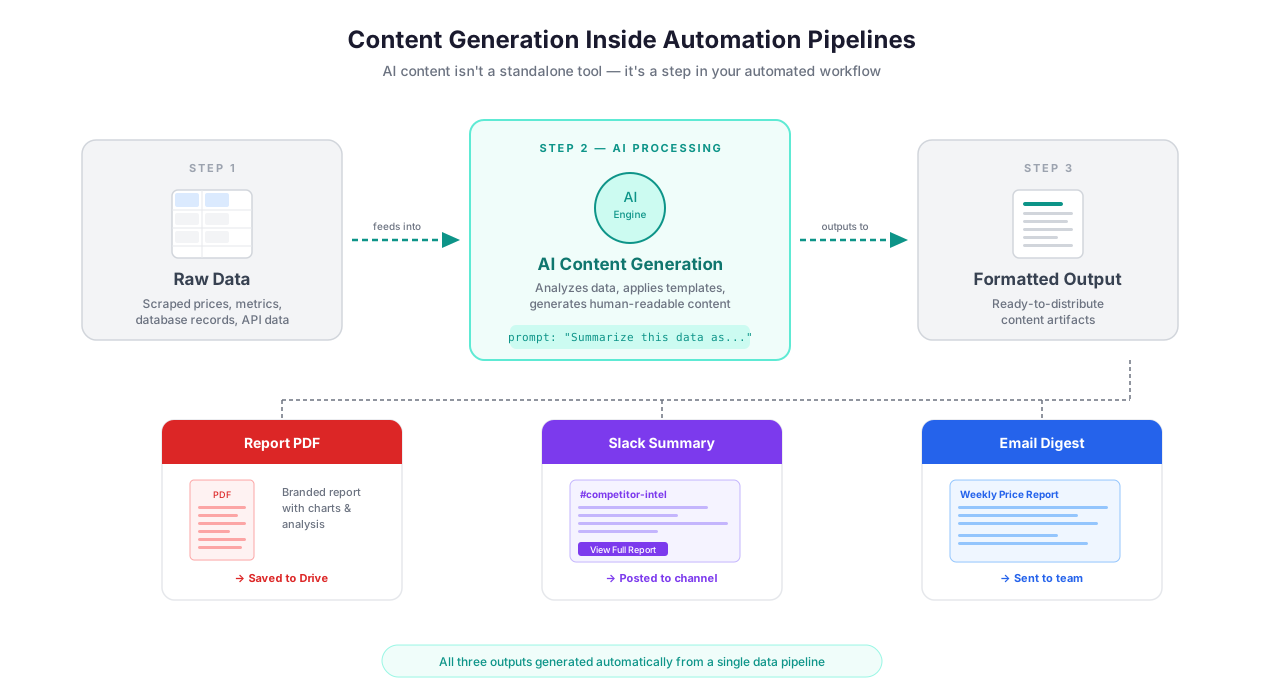
AI content generation within automation workflows: data in, structured reports and emails out
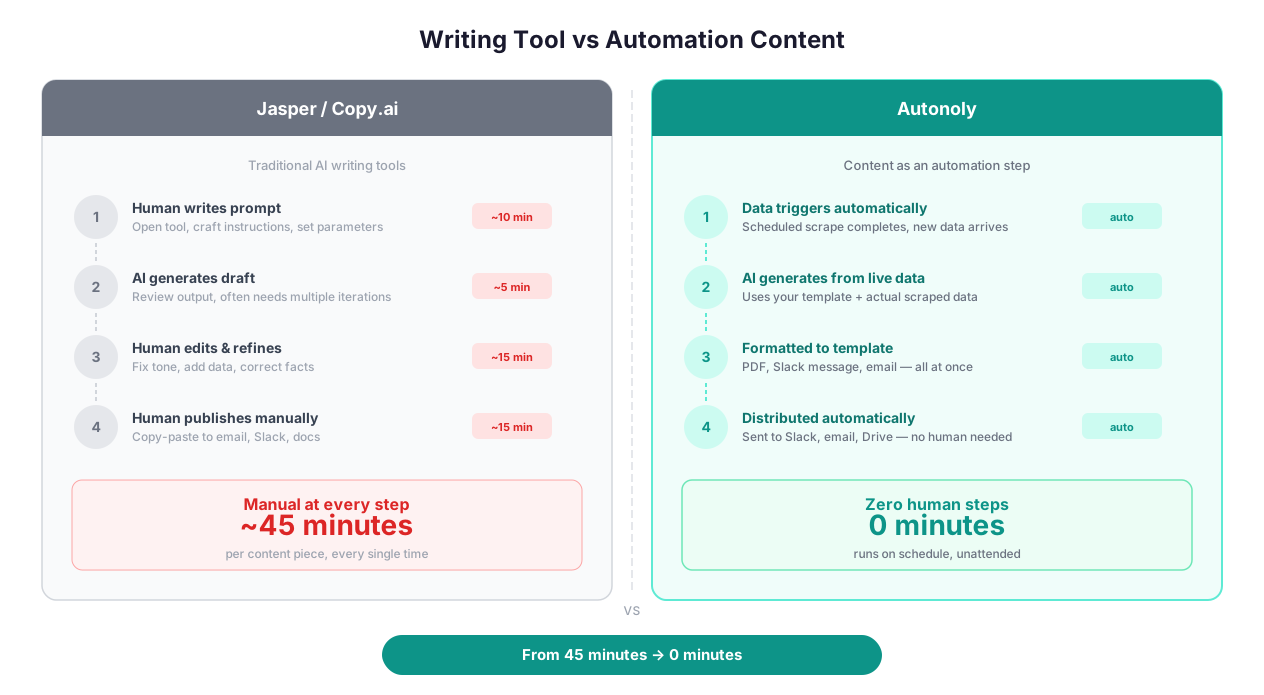
Let's get one thing straight: this is not Jasper. This is not Copy.ai. Those tools generate content in isolation — you type a topic, get a blog post, copy-paste it somewhere. Autonoly's AI content generation is fundamentally different because it operates inside automation workflows, not alongside them.
The distinction matters. When AI content generation lives inside your automation pipeline, the input is not "write me a blog post about CRM software." The input is live data flowing from previous workflow steps: 200 scraped product listings that need descriptions, 50 customer support tickets that need categorization and draft responses, a weekly batch of competitor pricing data that needs to be synthesized into a comparison report your sales team can actually use.
This is content generation as a data transformation step, not content generation as a writing tool. The AI node sits between data extraction and delivery via integrations, turning raw inputs into structured, actionable outputs.
The Real Problem This Solves
Every team has a version of this workflow: someone extracts data, copies it into a Google Doc, manually writes a summary or report, formats it, and emails it to stakeholders. This process happens for weekly reports, competitive analyses, customer feedback summaries, and internal briefs. It takes 2-4 hours per iteration, and the output quality depends entirely on who is doing the writing and how rushed they are.
AI content generation automates the transformation layer. The data flows in automatically from extraction steps. The AI processes it according to your prompt template. The formatted output is delivered to Slack, Google Sheets, email, or Notion. The whole pipeline runs on a schedule. Nobody touches it.
Content Generation Within Workflows
Standalone AI writing tools ask "what do you want to write about?" Autonoly asks "what should the AI do with this data?" That reframing opens up use cases that Jasper, Writesonic, and ChatGPT cannot handle:
Dynamic Reports From Extracted Data
You scrape competitor pricing from 15 e-commerce sites nightly. An AI content node takes the raw price data and generates a formatted comparison report: "Product X is 12% cheaper on Amazon than on the manufacturer's website. BestBuy dropped their price by $30 since last week. Walmart is currently out of stock." This report is not generic — it is computed from real data extracted minutes earlier. It lands in Slack before your pricing team's morning standup.
Try doing this in Jasper. You cannot. Jasper has no concept of extracted data, pricing deltas, or workflow state. It writes content from prompts, not from live data.
Automated Email Responses Based on Incoming Data
A workflow monitors a shared inbox for customer inquiries about order status. When an email arrives, the pipeline extracts the order number, looks up the status in your internal system via API call, and generates a personalized response: "Hi Sarah, your order #4829 shipped yesterday via FedEx. The tracking number is [number] and estimated delivery is Thursday." The draft response is either sent automatically or queued for human review, depending on your confidence threshold.
This is not an email template with mail merge fields. The AI constructs the response dynamically based on the order state, shipping carrier, delivery estimate, and customer history. If there is a delay, the response acknowledges the delay and offers next steps. If the product is backordered, the tone shifts to apologetic and the response includes an expected restock date.
PDF and Document Summarization
Scrape a batch of SEC 10-K filings. Each filing is 80-120 pages. An AI summarization step condenses each filing to a 500-word executive summary highlighting revenue growth, risk factors, and management outlook. A second AI step compares summaries across companies and generates a competitive landscape brief. The final output is a polished document that would take an analyst 3-4 days to produce manually.
The summarization handles technical language correctly because the prompt specifies the domain: "Summarize this 10-K filing for a financial analyst audience. Focus on revenue trends, margin changes, and forward guidance. Preserve specific numbers and percentages." Domain-specific prompts produce dramatically better summaries than generic "summarize this document" instructions.
Multi-Language Content at Scale
An international e-commerce company needs product descriptions in 8 languages. The workflow extracts product specifications from the English catalog, generates marketing-friendly descriptions, then translates each into German, French, Japanese, Spanish, Portuguese, Korean, and Italian. Crucially, the tone adjusts per market — formal and detail-oriented for Japan, casual and benefit-focused for the US and Australia, compliance-aware for Germany.
This is not just translation. A single AI node handles the cultural adaptation: "Translate the following product description to German. Use Sie (formal you). Emphasize technical specifications and safety certifications, which German consumers value. Maintain metric units." Running 500 products through this pipeline takes under an hour. A human translation team would need weeks.
Data Classification and Analysis
AI-powered classification pipeline vs manual review showing speed and consistency differences
The classification capabilities are, honestly, where most teams get the highest ROI. Content generation is flashy; classification is where the real time savings hide.
Sentiment Analysis That Actually Helps
Most sentiment analysis tools give you positive/negative/neutral labels. Useful but shallow. Autonoly's AI classification goes deeper with aspect-based sentiment:
Feed in 1,000 customer reviews for a SaaS product. Instead of "78% positive," you get: "Users are very positive about the onboarding experience (92% positive) but negative about the mobile app (34% positive). The most common complaint about mobile is 'slow loading times.' Price sentiment shifted from 65% positive to 48% positive after the January price increase."
This level of granularity requires a well-crafted prompt: "Classify each review by overall sentiment and by aspect sentiment for these categories: onboarding, features, pricing, support, mobile app, integrations. For each negative aspect mention, extract the specific complaint." The AI handles the nuance, the multi-label assignment, and the extraction simultaneously.
Support Ticket Triage
A customer support team receives 200+ tickets daily. An AI classification node routes each ticket by department (billing, technical, sales), urgency (critical, high, normal, low), and topic (bug report, feature request, account issue, how-to question). The classification runs in under 2 seconds per ticket and agrees with human agents 94% of the time.
The 6% disagreement is worth examining. It typically happens on tickets that straddle categories — "I was charged twice and the feature I paid for does not work" is both billing and technical. The AI assigns both labels, which is actually the correct behavior. Single-label classification systems force a choice that loses information.
Entity Extraction From Unstructured Text
Pull structured data out of messy text — company names, person names, dates, dollar amounts, product mentions, locations. This turns narrative text into tabular data. A job posting that says "We're looking for a Senior Product Manager with 5+ years of experience in San Francisco, salary range $160K-$200K" becomes structured fields: title=Senior Product Manager, experience=5+, location=San Francisco, salarymin=$160K, salarymax=$200K.
Combine entity extraction with web data extraction to build rich datasets from pages that contain mostly paragraph text — think news articles, company "About" pages, or research papers.
Template-Driven Content at Scale
For repetitive content generation — 500 product descriptions, 200 personalized outreach emails, 100 social media posts — the template approach produces the most consistent results.
Build a prompt template with variable injection: "Write a 150-word product description for ${productname}. Key features: ${features}. Target audience: ${audience}. Tone: ${tone}. Include a call-to-action that mentions ${ctaoffer}."
Wire this template to a Logic & Flow loop that iterates through your product catalog. Each iteration injects the current product's data into the template variables. The AI generates a unique description for each product while maintaining consistent structure and tone across the catalog.
The output quality depends almost entirely on the prompt template and the input data quality. Garbage in, garbage out applies here more than anywhere. If your product specifications are incomplete — missing features, vague descriptions — the AI fills gaps with generic filler. Clean, structured input data produces dramatically better output.
Building Multi-Step AI Pipelines
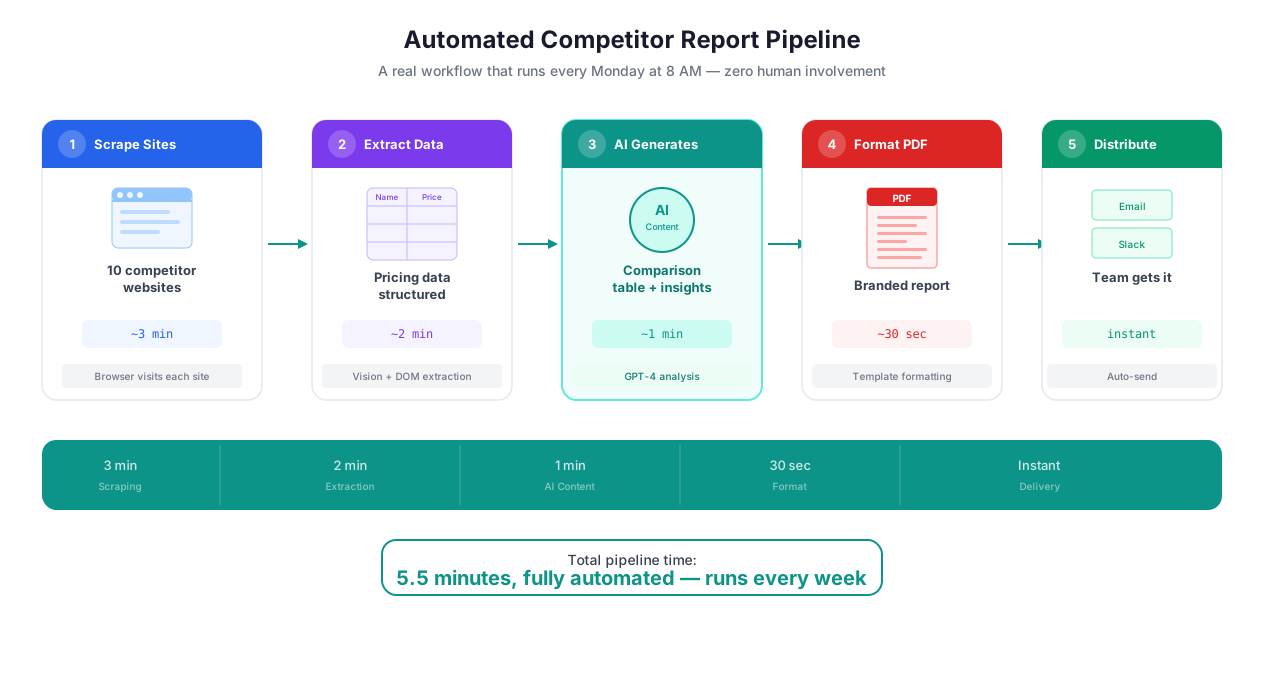
Multi-step AI content pipeline from data extraction through generation to delivery
Single AI calls produce decent output. Chained AI calls produce great output. Here is why.
A monolithic prompt — "analyze these 50 reviews and write a comprehensive report" — forces the AI to do extraction, classification, synthesis, and writing in a single step. It gets overwhelmed. The classification is sloppy. The writing is generic. The numbers are sometimes wrong.
A chained pipeline splits the work:
- Step 1 (Classification): Tag each review with sentiment, topic, and key complaints
- Step 2 (Aggregation): Count sentiment distributions, identify top complaints, calculate trends using Data Processing
- Step 3 (Synthesis): Generate a narrative summary from the aggregated statistics
- Step 4 (Formatting): Format the summary as an HTML email with charts and bullet points
Each step has a focused task. Each step's output feeds the next. The final result is dramatically better than a single-shot approach because each AI call has a narrow, well-defined job.
Real Pipeline: Competitive Content Brief
This pipeline runs weekly for a SaaS marketing team:
- Scrape the 10 latest blog posts from each of 5 competitor blogs
- AI summarization: condense each post to title, key argument, and target keyword
- AI classification: categorize posts by topic (product updates, thought leadership, tutorials, case studies)
- AI analysis: identify topics covered by 3+ competitors that your team has not covered
- AI generation: produce a content brief with suggested titles, outlines, and angle recommendations for each gap
- Delivery: push the brief to Notion and notify the content team on Slack
The marketing team spends zero time on competitive research. The brief arrives every Monday morning with specific, data-backed content recommendations.
Real Pipeline: Automated Customer Feedback Digest
An e-commerce brand runs this daily:
- Collect new reviews from Amazon, G2, and Trustpilot using data extraction
- AI classification: sentiment (positive/neutral/negative), topic (quality, shipping, pricing, support), and specific feature mentions
- Data processing: aggregate counts, calculate daily sentiment score, flag any review mentioning a safety concern
- AI generation: produce a 3-paragraph executive summary with the day's highlights, emerging issues, and recommended actions
- Delivery: email the digest to the product team, post a condensed version to Slack, push raw classified data to Google Sheets
The product team reads a 90-second summary instead of scrolling through 50 individual reviews. Safety-flagged reviews trigger an immediate Slack alert. The full classified dataset accumulates in Sheets for quarterly trend analysis.
Quality Control: When AI Output Needs Human Eyes
Let me be direct about limitations. AI-generated content is not publish-ready in all cases. Here is when you need human review and when you do not:
Skip human review for: internal reports and digests (the audience is forgiving and the data matters more than the prose), classification and tagging (the AI is actually better than humans at consistent multi-label classification), data transformation (reformatting, summarizing, translating structured data), and draft generation where a human editor refines the output.
Require human review for: customer-facing content (marketing copy, support responses, public-facing reports), anything involving legal or medical claims, content where factual accuracy is critical (financial reports, regulatory filings), and creative content where brand voice precision matters.
Build the review step into your workflow. An AI node generates the draft. A notification step sends it to a reviewer on Slack with a link to approve, edit, or reject. Approved content flows to the next step automatically. Rejected content triggers a regeneration with feedback incorporated into the prompt.
Best Practices
Write prompts with examples, not just instructions. "Write in a professional tone" is ambiguous. Including a 50-word example of what "professional" means to your brand eliminates guesswork. Two or three examples in the system prompt establish a pattern the AI follows consistently across thousands of generations.
Use variable injection for everything that changes. Hard-coded prompts produce one output. Parameterized prompts produce thousands. Reference variables from earlier workflow steps: "Write a product description for ${product_name}. Key features: ${features}. Price: ${price}." This pattern processes diverse inputs through a single template.
Chain AI steps for anything longer than 300 words. Single-shot generation degrades past 300-400 words. Break long content into steps: outline, expand sections, review and edit, format. Each step produces better output because it has a narrow focus. Our marketing automation guide covers multi-step content pipelines in detail.
Validate structured output with data processing rules. When generating JSON, CSV, or formatted tables, pipe the AI output through a Data Processing validation step. AI models occasionally produce malformed JSON (missing closing brackets, extra commas) or inconsistent CSV formatting. A validation step catches these before the data reaches your spreadsheets.
Sample before you scale. Run your prompt on 5 items. Review the output. Adjust tone, length, and format based on what you see. Then process the full dataset. This takes 2 minutes and prevents bulk-generating 500 product descriptions that all need to be redone because the tone was wrong.
Specify output format explicitly. "Return the result as a JSON object with keys: sentiment, score, topics, summary" produces dramatically better structured output than "analyze this review." The AI matches explicit format instructions almost perfectly. Vague format expectations produce unpredictable output structures.
Security & Compliance
AI content generation sends your data to language model APIs for processing. All transmissions use encrypted TLS 1.3 connections. The AI models process your requests in real time and do not retain your data for training purposes. Generated content is stored encrypted in your workspace with the same retention policies and deletion controls as all other Autonoly data.
Be deliberate about what data you include in AI prompts. If your workflow processes customer PII, financial records, or health data, consider whether the AI step needs the raw data or whether anonymized or aggregated inputs would suffice. A prompt that says "summarize the sentiment of these 50 reviews" does not need customer names or email addresses — strip those in a Data Processing step before the AI node.
The Security feature page covers the full encryption, isolation, and compliance architecture. Enterprise customers with specific data processing requirements can contact our team for custom arrangements.
Common Use Cases
Automated Competitive Intelligence Briefing
A SaaS company monitors 8 competitors. The weekly pipeline scrapes each competitor's blog, pricing page, and changelog using browser automation. An AI classification step tags every change by type: new feature, price change, blog content, hiring signal. A generation step produces a 2-page brief organized by competitor with the week's most significant moves highlighted. A final step emails the brief to the executive team and posts a summary to Slack. Total human involvement: zero. This replaces what was previously a 6-hour Friday afternoon task for a marketing analyst. For more, see our marketing automation guide.
Support Ticket Processing and Response Drafting
A B2B SaaS company receives 150-200 support tickets daily. The pipeline classifies each ticket by department, urgency, topic, and customer tier (based on account data pulled via API). High-priority tickets from enterprise customers are flagged immediately on Slack. For common ticket types (password resets, billing questions, feature requests), the AI generates a draft response personalized with the customer's name, account details, and relevant help center links. Support agents review drafts before sending — they edit roughly 15% of them, usually to add context about the customer's specific situation. The team handles 40% more tickets per day with the same headcount.
Multilingual Product Catalog Pipeline
An international e-commerce company with 2,000 SKUs needs product descriptions in 8 languages. The pipeline extracts English product specifications, generates marketing descriptions with brand-appropriate tone, then translates with market-specific adaptations. German descriptions emphasize technical precision and include metric measurements prominently. Japanese descriptions use formal keigo and lead with brand heritage. Brazilian Portuguese descriptions are conversational and emphasize installment payment options. The full catalog processes in 90 minutes. The previous approach — a team of 4 translators working for 3 weeks — cost 50x more. See our guide on automating email reports for similar multi-format output workflows.
Daily Research Digest for Investment Teams
A venture capital firm tracks 30 industry news sources. Every morning at 6 AM, a scheduled workflow scrapes the latest articles, classifies each by relevance to the firm's investment thesis, extracts mentioned companies and funding amounts, and generates a morning digest. The digest includes a 3-sentence summary of each relevant article, a "Companies to Watch" section listing newly mentioned startups with extracted funding details, and a "Trends" section noting topics covered by 3+ sources. Partners read the digest on their commute. It replaced a junior analyst's full-time job of morning news monitoring.