

Why Automate Appointment Reminders?
Patient no-shows are one of the most costly and persistent inefficiencies in healthcare administration. Because reminders touch protected health information, any automated outreach must be designed to comply with the HIPAA Privacy Rule administered by the U.S. Department of Health and Human Services. Industry data shows that missed appointments cost the US healthcare system billions annually, with average no-show rates ranging from 5 to 30 percent depending on the specialty and patient population. For an individual practice, every unfilled appointment slot represents lost revenue that cannot be recovered — the provider's time, the staff's preparation, and the room allocation are all wasted. A busy practice losing even five appointments per week to no-shows can see tens of thousands of dollars in annual revenue disappear.
The root cause is rarely malicious — patients simply forget. In the days between scheduling an appointment and the actual visit, the details fade from memory amid work obligations, family responsibilities, and daily distractions. A simple reminder email sent 24 to 48 hours before an appointment can reduce no-show rates by 25 to 40 percent, according to multiple healthcare studies. That single intervention pays for itself many times over in recovered appointment revenue and improved schedule utilization.
Most practices rely on front desk staff to make reminder calls manually, which is time-consuming, inconsistent, and increasingly ineffective. Staff members may skip reminders during busy periods, calls often go to voicemail, and the phone-tag cycle wastes time on both ends. Younger patients strongly prefer digital communication over phone calls. By automating reminders with Google Sheets and Gmail, every patient receives a timely, professional reminder without any manual effort from your team. The front desk is freed to focus on in-person patient care instead of spending the first hour of every morning on the phone.
This workflow works for medical offices, dental practices, therapy clinics, optometry offices, chiropractic practices, dermatology offices, and any healthcare provider that schedules patient visits. Whether you see 20 patients a day or 200, the automation handles the volume identically — every patient gets a reminder, every time. Browse our templates library for pre-built appointment reminder workflows.
How the AI Agent Sends Reminders
The workflow reads your appointment schedule from Google Sheets each day. Each row contains the patient's name, email address, appointment date and time, provider or doctor name, visit type (e.g., annual physical, follow-up, dental cleaning), and any special preparation instructions like fasting requirements or documents to bring. The agent uses Data Processing to filter the schedule and identify patients with appointments in the upcoming reminder window — typically 24 to 48 hours ahead.
For each qualifying appointment, the agent generates a personalized email using your practice's template. The email includes all essential details: patient name, date and time, provider name, office address, parking instructions, and any preparation requirements specific to the visit type. A clear call to action — such as a link or phone number to confirm, reschedule, or cancel — makes it easy for patients to respond. Emails are sent through Gmail from your practice's email address, maintaining professional branding. After sending, the agent updates a status column in your spreadsheet so you can see at a glance which patients received reminders and which emails failed to deliver.
If a patient reschedules after a reminder was sent, the agent detects the updated date on the next run and sends a new reminder for the rescheduled time. Cancelled appointments are skipped automatically based on a status column in your spreadsheet. Use the AI Agent Chat to set up and customize your reminder workflow through natural conversation.
What Data You Get
Your reminder tracking spreadsheet provides complete visibility into reminder activity:
Patient Name — Who received the reminder
Appointment Date/Time — When the visit is scheduled
Provider — Which doctor or clinician the patient is seeing
Visit Type — Annual exam, follow-up, procedure, lab work, etc.
Reminder Sent — Timestamp of when the email was delivered
Delivery Status — Sent, failed, or skipped with reason
Patient Response — Confirmed, rescheduled, cancelled, or no response
Preparation Instructions — What was included in the reminder
Customizing Your Workflow
The Visual Workflow Builder lets you configure multiple reminder touchpoints. A common pattern is a 48-hour initial reminder with full details and preparation instructions, a 24-hour confirmation reminder, and a 2-hour same-day reminder with check-in instructions. Each touchpoint uses a different email template. The Logic & Flow engine handles branching — if a patient confirmed after the first reminder, skip subsequent ones. If a patient cancelled, trigger a slot-opening notification to your waitlist. For practices with multiple locations, the agent automatically includes the correct office address based on where the appointment is booked.
Integration Options
While this workflow uses Google Sheets as the scheduling source, many practices export appointment data from their EHR or practice management system into a spreadsheet. The agent works with whatever export format your system provides. Add a Slack notification to your front desk channel summarizing how many reminders were sent each morning and flagging delivery failures. Connect with Gmail for professional branded communication. Visit the Integrations page for all connection options.
Use Cases
Medical offices reducing no-show rates by 25-40 percent with automated 48-hour reminders
Dental practices sending cleaning reminders with specific preparation instructions for each procedure type
Therapy clinics maintaining consistent appointment engagement with regular session reminders
Optometry offices reminding patients to bring current glasses and insurance cards to annual exams
Multi-location practices routing reminders with location-specific addresses and parking instructions
Specialist offices including referral paperwork reminders for first-time patients
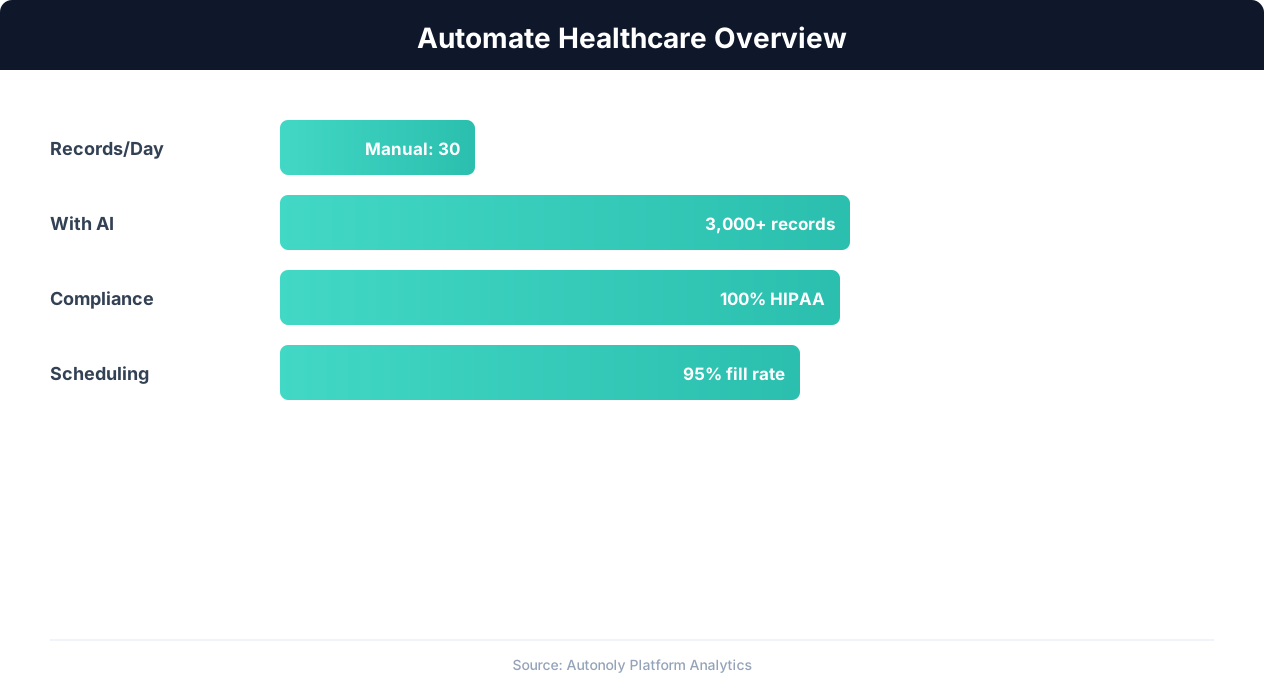
Healthcare automation impact on administrative efficiency
Key Insight: Healthcare organizations spend 34% of total revenue on administrative tasks. Automation can reduce this overhead by up to 50% (McKinsey Healthcare Report).
How the AI Agent Does It
The agent connects to your Google Sheets appointment schedule, identifies patients with upcoming visits within the reminder window, and generates personalized emails using your practice template. Each email is sent through Gmail with your practice's branding. Send statuses are logged back to the spreadsheet for tracking and compliance. The Data Processing engine can also generate weekly reports comparing no-show rates before and after automation, helping justify the system to practice administrators.
Key Insight: Automated appointment scheduling reduces no-show rates by 38% through timely reminders and easy rescheduling options (MGMA Research).
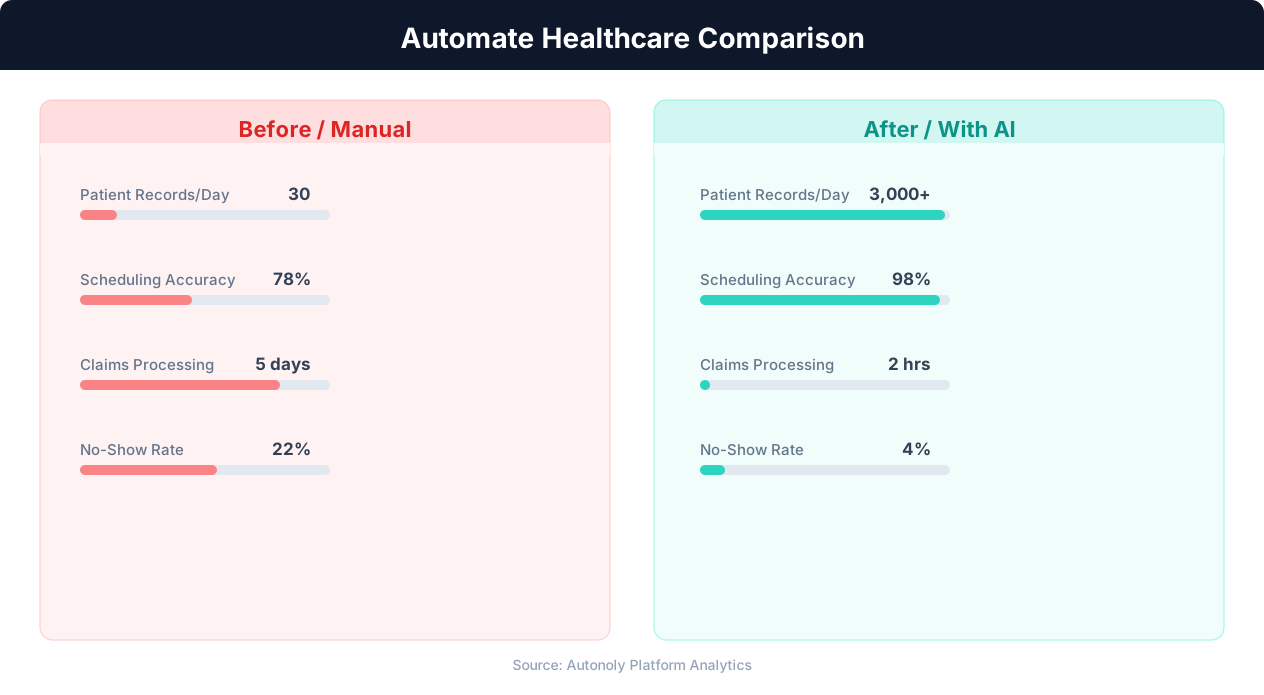
Patient wait time reduction with automated scheduling
Key Insight: Providers using automated patient intake report 42% shorter wait times and 29% higher patient satisfaction scores (Advisory Board).
Scheduling and Automation
The reminder workflow runs daily, typically in the early morning, to catch all appointments within the reminder window. The Visual Workflow Builder lets you set the exact run time. For practices with evening and weekend appointments, add a second daily run in the afternoon. Each run is fully autonomous — the agent reads the current schedule, identifies who needs reminders, sends emails, and logs results without any staff input.
Add Logic & Flow conditions to send different templates based on visit type, handle multi-location routing, skip patients who already confirmed, and chain multiple reminder touchpoints across the 48-hour window for maximum effectiveness. Check pricing to see how many automated runs are included in your plan.
Further Reading
Explore more about the tools and techniques used in this workflow: Automate Email Reports, No Code Automation Guide, Email Campaigns, Scheduled Execution.