

Why Automate Content Calendar Management?
Content marketing teams typically manage dozens of pieces in various stages simultaneously — ideation, drafting, review, design, scheduling, and publishing — spread across multiple authors, editors, and channels. As Harvard Business Review has observed about creative operations, the coordination overhead grows faster than the output unless the workflow itself is systematized. Keeping track of who is working on what, which pieces are due when, and what is falling behind requires constant vigilance that consumes an outsized portion of a content manager's time. Most teams use a Google Sheets content calendar as their single source of truth, but checking it daily, cross-referencing dates, and chasing down team members for status updates is a time sink that pulls managers away from the strategic work that actually moves the needle.
The consequences of poor content calendar management compound quickly. A missed blog post deadline delays the SEO strategy that depends on consistent publishing. An overdue email newsletter means your subscribers skip a week of engagement. A social media post that was supposed to align with a product launch goes out three days late, missing the momentum window entirely. Research shows that consistent publishing cadence is one of the strongest predictors of content marketing success, and inconsistency — even sporadic — erodes audience trust and search engine authority over time.
Automating content calendar management with Google Sheets and Slack integration turns your static spreadsheet into an active, proactive workflow. Every morning, your team gets a Slack message listing what needs to be published today, what is coming up this week, what is overdue, and who is responsible for each piece. Assignees get tagged directly so there is no ambiguity about who owns what — no more "I did not see that was due today" excuses.
This proactive approach catches slipping deadlines before they become problems. Instead of discovering on Friday that three blog posts scheduled for the week were never finished, you catch the delay on Monday when there is still time to recover. The daily rhythm of automated reminders creates accountability without requiring managers to micromanage, freeing them to focus on content strategy, audience development, and editorial quality.
How the AI Agent Manages Your Calendar
Autonoly's AI Agent Chat opens your content calendar spreadsheet through Browser Automation and reads every row. The Data Extraction engine identifies columns for content title, assigned author, due date, current status, publishing channel, and any custom fields you track. It then evaluates each item against today's date to determine what needs attention.
The Data Processing engine categorizes items into actionable groups:
Publishing today: Items with today's date that are marked as ready or scheduled
Due this week: Items with due dates in the next seven days that still need work
Overdue: Items past their due date that are not yet published
In review: Items waiting for editorial review or approval
Blocked: Items missing assets, approvals, or other dependencies
Each category is formatted into a clear Slack message with the content title, assignee, due date, current status, and publishing channel. Assignees are tagged with their Slack handles so they receive a direct notification they cannot miss.
What Data You Get
The daily content briefing provides a comprehensive view of your content pipeline:
Today's publishing queue — Content ready to go live with assignee and channel details
This week's deadlines — Upcoming items with days remaining and current status
Overdue items — Content that has passed its deadline, sorted by how many days overdue
Pipeline summary — Total items in each status category (draft, review, scheduled, published)
Author workload — How many pieces each team member has in progress
Publishing velocity — Week-over-week comparison of content output
Customizing Your Workflow
The Visual Workflow Builder lets you tailor reminders to your team's specific workflow:
Send reminders to the #content channel for team visibility
DM individual authors about their specific overdue items
Send a separate summary to the content manager with the full pipeline view
Escalate items that are more than three days overdue to a management channel
Use Logic & Flow to set different reminder frequencies for different content types. Blog posts might need daily reminders, while quarterly reports only need weekly check-ins. Social media posts might need same-day reminders, while whitepapers follow a weekly cadence. High-priority launch content might get twice-daily reminders during the launch week.
Status Tracking and Accountability
The agent can also update your spreadsheet based on actions taken. When a team member reacts to a Slack reminder with a checkmark emoji, the agent can update the content status in the spreadsheet. This creates a lightweight status tracking system without requiring team members to open the spreadsheet at all — they manage their content pipeline entirely from within Slack.
Over time, the daily snapshots build a dataset of publishing velocity — how many pieces your team publishes per week, average time from draft to publication, and which authors consistently meet or miss deadlines. This data lives in your Google Sheets spreadsheet for analysis and performance reviews.
Integration Options
Chain this calendar automation with other workflows for end-to-end content operations. When an item's status changes to "Ready to Publish," trigger the social media cross-posting workflow or an email newsletter compilation. Connect to Gmail to send author deadline reminders via email in addition to Slack. Export publishing analytics to Notion or Airtable for editorial dashboards. Visit the Integrations page for all supported connections, or browse the templates library for pre-built content calendar workflows.
Use Cases
Content marketing teams managing blog, email, and social media publishing schedules
Marketing agencies tracking content deliverables across multiple client calendars
Media companies coordinating editorial calendars across multiple writers and editors
Product marketing teams aligning content with product launch timelines and feature releases
Social media managers ensuring daily posting cadence across multiple platforms
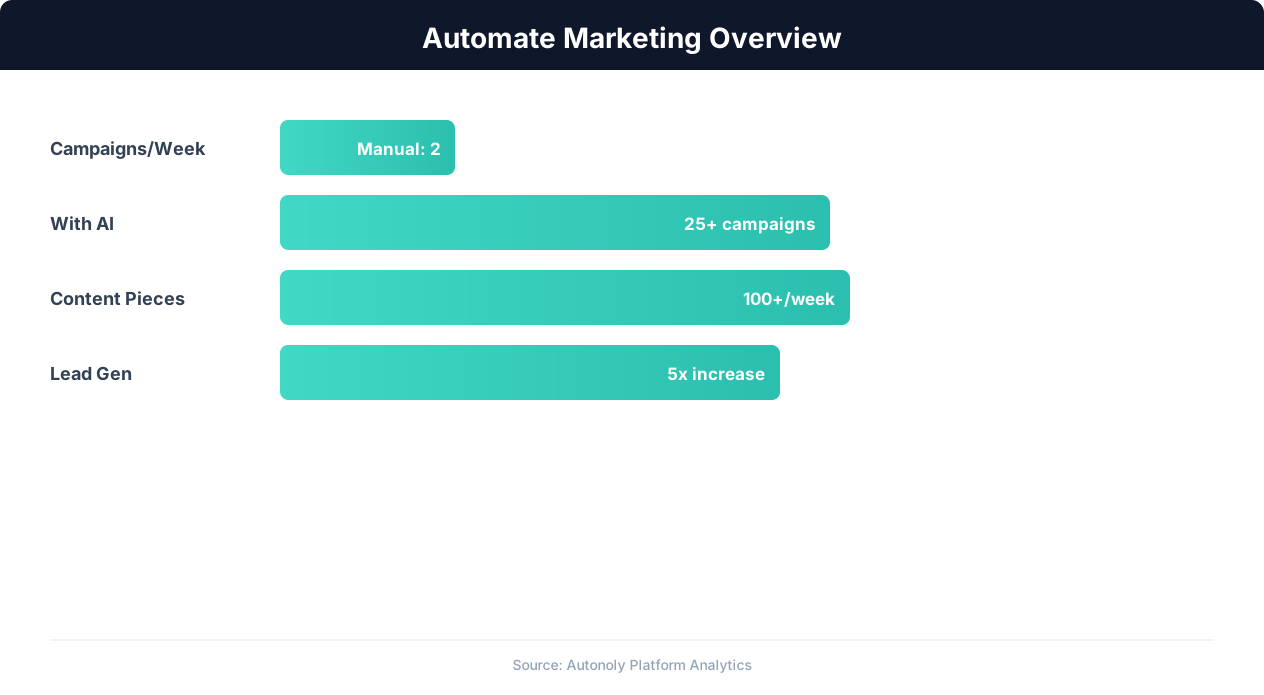
Marketing automation impact on campaign ROI
Key Insight: 63% of marketers say their biggest challenge is generating traffic and leads. Automation addresses this by running campaigns 24/7 without manual intervention (HubSpot State of Marketing).
How the AI Agent Does It
The agent opens your content calendar in Google Sheets via Browser Automation, reads all content items with their dates, statuses, and assignees. The Data Processing engine evaluates each item against the current date, categorizes them by urgency, and formats a clear summary. The agent then posts the formatted message to your Slack channel with tagged assignees.
Handling Complex Calendars
Whether your calendar is a single sheet or a multi-tab workbook with separate tabs for each content type, publishing channel, or month, the agent handles the structure. It can read across multiple tabs and consolidate items into a unified daily briefing, giving you a single view of everything your team needs to work on regardless of how your calendar is organized.
Key Insight: Marketing teams using automation see 451% more qualified leads and a 14.5% increase in sales productivity (Annuitas Group).
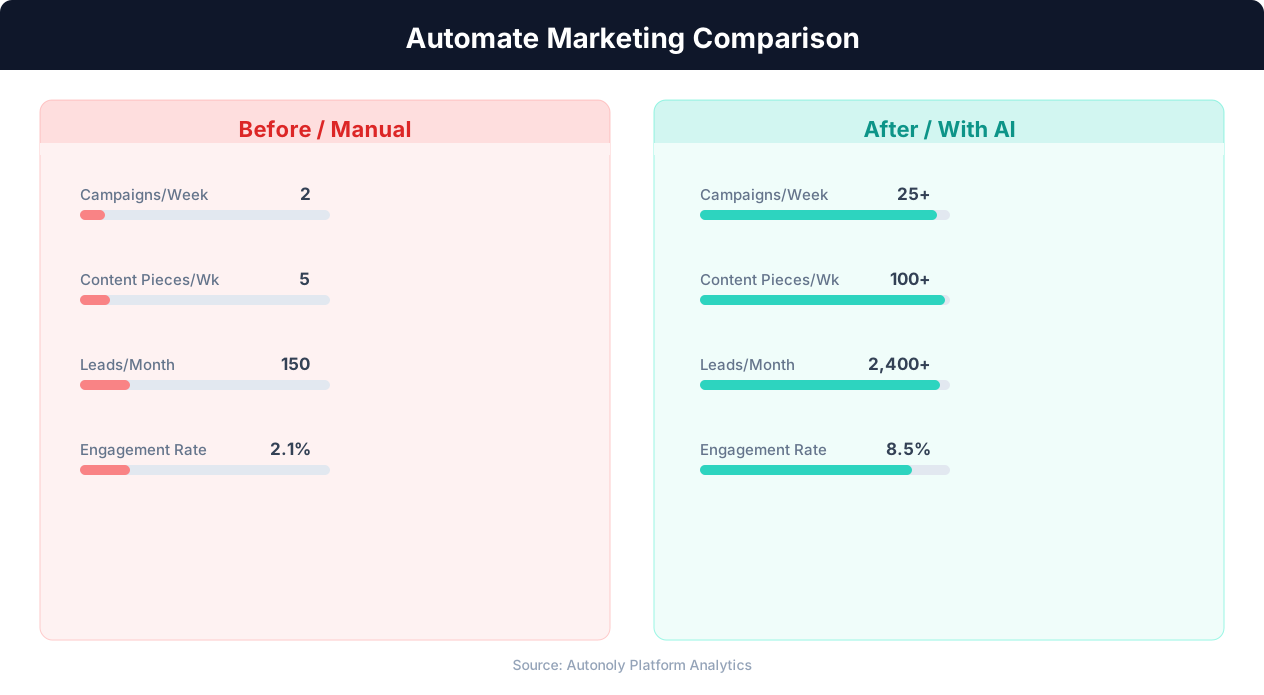
Content production speed in manual vs automated workflows
Key Insight: Companies automating their marketing analytics report 26% higher marketing ROI due to real-time performance tracking and rapid campaign optimization (Forrester).
Scheduling and Automation
Run this workflow daily using the Visual Workflow Builder. A morning Slack message kickstarts your team's day with clear priorities. Add a Friday summary that recaps the week's publishing activity and previews next week's calendar. Use Logic & Flow conditions to skip weekends, customize reminders for different team time zones, or increase reminder frequency during launch weeks. The combination of Google Sheets as your calendar and Slack as your notification layer creates a lightweight but powerful content operations system. See our pricing page for scheduling details.
Further Reading
Explore more about the tools and techniques used in this workflow: Marketing Automation, No Code Automation Guide, Scheduled Execution, Ai Content.