

Why Automate Customer Onboarding Emails?
The first week after a customer signs up is the most critical period for retention — a window that Harvard Business Review research on customer onboarding repeatedly identifies as decisive for long-term value. Studies consistently show that customers who complete key onboarding milestones within the first seven days are three to five times more likely to become long-term users compared to those who are left to figure things out on their own. The gap between a customer who activates and one who churns is often not about product quality — it is about whether they received the right guidance at the right moment during those fragile early days. A product with a 40% activation rate and a product with a 70% activation rate might be identical — the difference is entirely in the onboarding experience.
Yet most companies either send a single generic welcome email or rely on individual account managers to manually guide each new customer — approaches that fail in different ways. The single welcome email dumps too much information at once, and the customer forgets most of it by the time they actually need it. The manual approach works beautifully for the first ten customers but collapses at scale, because account managers get overwhelmed and newer, smaller customers receive inconsistent or delayed guidance. Both approaches result in the same outcome: customers who never experience the product's core value because they got stuck on day two and quietly churned.
The financial impact of poor onboarding is staggering. For a SaaS company with a $100 monthly subscription and a 5% monthly churn rate, improving activation rates by just 10 percentage points through better onboarding can translate to hundreds of thousands of dollars in retained annual revenue. The math is even more compelling for products with annual contracts or high customer acquisition costs — every churned customer represents not just lost revenue but wasted acquisition spend that cannot be recovered.
Automating onboarding sequences with Google Sheets and Gmail integration ensures that every new customer receives a consistent, well-timed series of emails that guide them from signup through activation. The sequence is triggered automatically when a new customer appears in your spreadsheet, and each email is personalized with their specific plan, use case, and account details. The automation scales infinitely — whether you onboard ten customers this month or ten thousand, every single one gets the same high-quality guided experience.
This is especially impactful for SaaS products, subscription services, and any business where early engagement predicts long-term retention. A well-designed onboarding sequence can improve activation rates by 30% or more, directly impacting revenue retention and reducing the pressure on customer success teams to manually rescue disengaged accounts.
How the AI Agent Manages Onboarding
Autonoly's AI Agent Chat monitors your customer spreadsheet in Google Sheets through Browser Automation for new rows — typically new signups. When a new customer is detected, the agent enrolls them in your onboarding sequence by recording their start date and sequence position.
Each day, the agent checks all active onboarding sequences, determines which customers are due for their next email, and sends personalized messages through Gmail. The Data Processing engine personalizes each email with:
Customer's first name
Plan or tier they signed up for
Features most relevant to their use case
Quick-start actions specific to their account type
Links to relevant documentation and tutorials
Designing Your Onboarding Sequence
A typical onboarding sequence includes five to seven emails over the first two weeks:
Day 1: Welcome — Thank them for signing up, set expectations, one quick-start action
Day 2: Getting Started — Step-by-step guide for the first key action in your product
Day 4: Feature Spotlight — Highlight a powerful feature they might not have discovered
Day 7: Check-In — Ask if they need help, link to support resources
Day 10: Power User Tips — Advanced features and best practices
Day 14: Success Story — Customer case study relevant to their use case
The Visual Workflow Builder lets you design each email as a step in the sequence with custom delays between sends. Use Logic & Flow to branch the sequence based on customer attributes — enterprise customers get a different Day 2 email than self-serve customers. Users who signed up for a specific use case receive feature spotlights relevant to their needs.
Tracking Engagement
The agent tracks which emails have been sent to each customer by updating your Google Sheets spreadsheet. Mark when each sequence email is sent and when the customer completes the target action for each step. This gives you a clear view of where customers are in their onboarding journey and where they tend to drop off.
If a customer replies to an onboarding email, the agent detects the response and can pause the automated sequence, allowing a human to take over the conversation. This seamless handoff between automation and personal touch is critical for high-value customers.
What Data You Get
Every onboarding interaction is tracked in your Google Sheets spreadsheet:
Customer Name and Email — The onboarding recipient
Plan Type — Which product tier or subscription they signed up for
Signup Date — When they joined, used to calculate sequence timing
Current Step — Which email in the sequence they have received (Day 1, Day 4, etc.)
Last Email Sent — Timestamp of the most recent onboarding email
Reply Status — Whether the customer has replied to any onboarding email
Sequence Status — Active, paused, completed, or opted out
Days Since Signup — Running count for engagement tracking
Activation Status — Whether the customer has completed the key product action
Measuring Onboarding Effectiveness
Over time, your onboarding data reveals which emails drive the most engagement and which steps have the lowest completion rates. Use this data to iterate on your sequence — rewrite underperforming emails, adjust timing, or add new steps where customers commonly get stuck.
The Data Processing engine can calculate onboarding completion rates by cohort, plan type, and signup source. This segmented analysis shows you which customer segments need more onboarding support and which are self-sufficient.
Integration Options
Connect onboarding with your broader customer success stack. Post new customer signups to Slack so the team celebrates growth and stays aware of onboarding volume. Log onboarding progress to Airtable or Notion for visual pipeline views showing where each customer is in their journey. Chain onboarding completion with the CSAT survey workflow to measure the onboarding experience itself. Connect to Google Sheets dashboards that track activation rates, time-to-value, and cohort retention. Visit the Integrations page for all supported destinations, or browse the templates library for pre-built onboarding sequence templates.
Use Cases
SaaS companies guiding new users through product setup, feature discovery, and activation milestones
Subscription services welcoming new subscribers and setting expectations for delivery schedules and account management
Online course platforms orienting new students with course navigation, community access, and first-lesson prompts
B2B service providers onboarding new clients with project timelines, point-of-contact introductions, and resource links
Membership organizations welcoming new members with benefit guides, event calendars, and community introductions
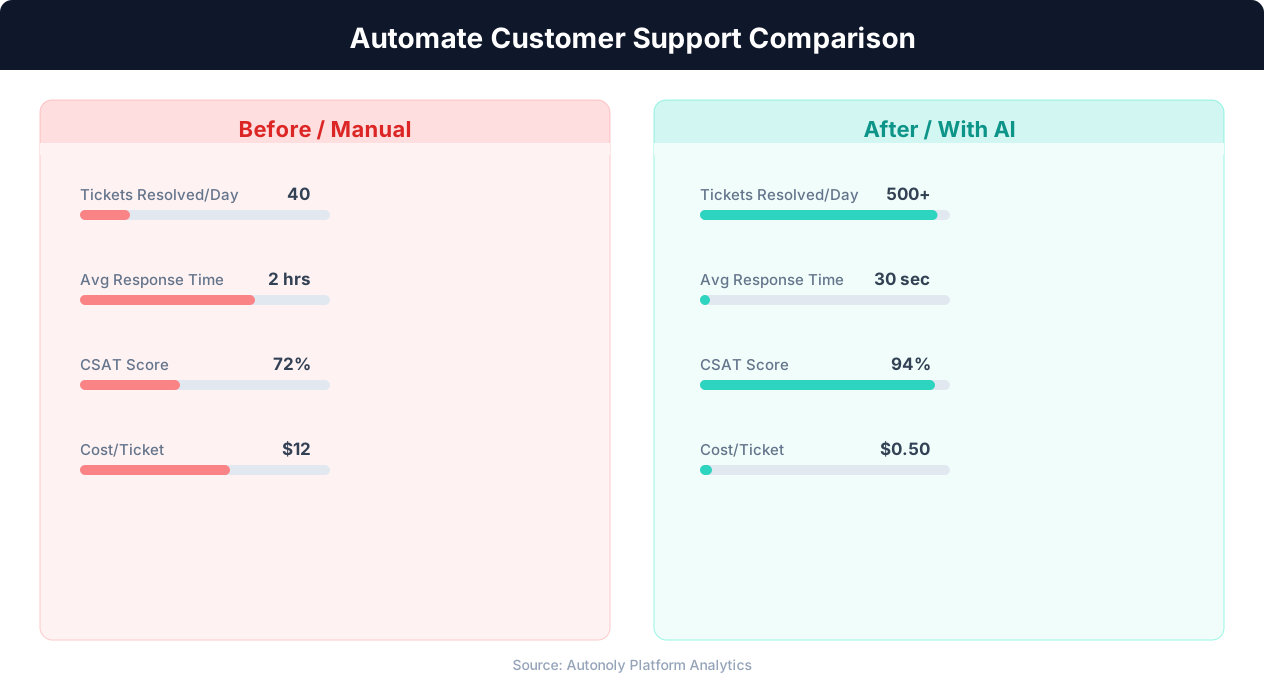
Response time comparison between manual and automated support
Key Insight: AI agents resolve 80% of routine support inquiries automatically, freeing human agents for complex issues that require empathy and judgment (Gartner).
How the AI Agent Does It
The agent reads your customer list from Google Sheets via Browser Automation, identifies new customers and those due for their next onboarding email. The Data Processing engine personalizes each email template with customer-specific data. The agent opens Gmail and sends each email individually through the compose interface. Send events are logged back to the spreadsheet for tracking.
Handling Unsubscribes and Opt-Outs
If a customer replies asking to stop receiving onboarding emails, the agent detects the opt-out request and marks them as unsubscribed in the spreadsheet. No further sequence emails are sent. The agent also respects any unsubscribe links included in the email template.
Key Insight: Automated ticket routing reduces average resolution time by 52% by ensuring issues reach the right specialist on the first assignment (Zendesk Benchmark).
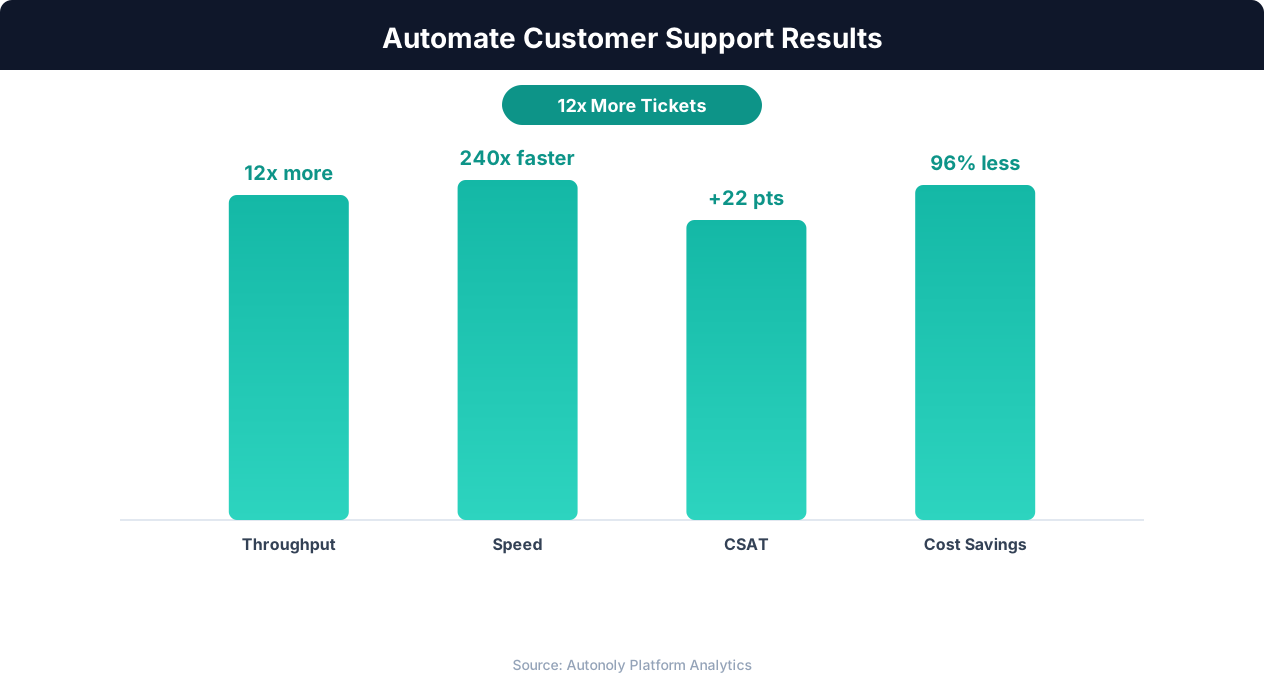
Customer satisfaction scores with AI-powered support automation
Key Insight: The average cost per support ticket drops from $22 to $2 when routine inquiries are handled by AI automation (IBM Customer Experience Report).
Scheduling and Automation
Run this workflow daily using the Visual Workflow Builder. Each day, the agent checks your Google Sheets customer list for new signups and existing customers due for their next email. Personalized emails are sent via Gmail with natural spacing throughout the day. Add Logic & Flow conditions to branch sequences by plan type, pause sequences for customers who reply, and send a Slack notification when a customer completes the full onboarding sequence.
Further Reading
Explore more about the tools and techniques used in this workflow: Automate Email Reports, No Code Automation Guide, Email Campaigns, Scheduled Execution.