


Why Automate CSV-to-Sheets Pipelines?
CSV files remain the universal data exchange format. Vendors send reports as CSVs, analytics platforms export data as CSVs, and databases dump to CSVs. But the data in these files is rarely ready for immediate analysis — columns need renaming, dates need reformatting, duplicates need removing, and the data needs to land in Google Sheets where your team can collaborate on it. Doing this manually every day or week is a waste of skilled human time.
An automated ETL (Extract, Transform, Load) pipeline handles this end-to-end. Autonoly's Data Processing feature provides the transformation engine, while the Google Sheets integration handles the loading. The result is that clean, standardized data appears in your spreadsheet on schedule without anyone touching a file.
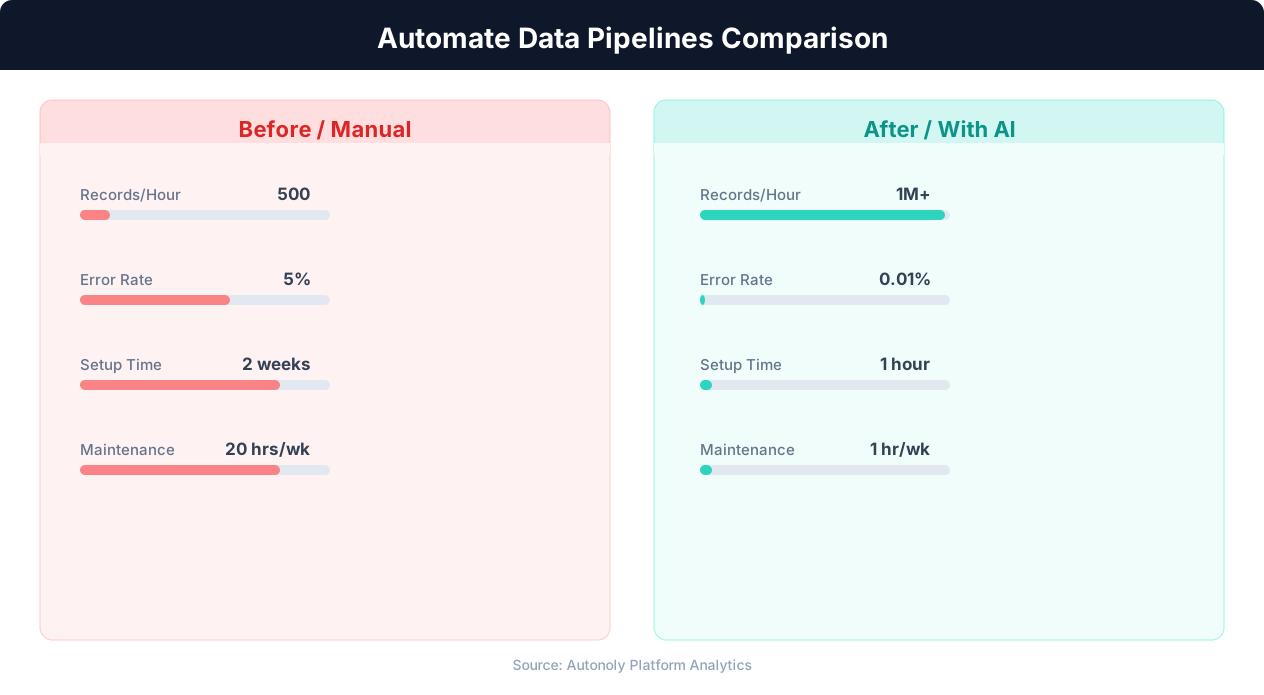
Error rates in manual vs automated data pipelines
Key Insight: Data teams spend 80% of their time on data preparation and pipeline maintenance. Automation can reclaim up to 60% of that time (Anaconda State of Data Science).
How Autonoly Builds CSV ETL Pipelines
The AI Agent Chat lets you describe your pipeline in natural language. You might say "every Monday, download the sales CSV from our vendor portal, clean up the date formats, remove rows with missing revenue, and append to our Google Sheet." The agent builds the complete workflow based on your description.
Extraction from Any Source
CSVs can come from many places. The Browser Automation engine handles downloading CSVs from websites that require login and navigation. The Integrations ecosystem can pull CSVs from email attachments via Gmail, cloud storage via Google Drive, or API responses that return CSV data. The SSH & Terminal feature can fetch files from FTP servers or remote systems.
The agent handles common CSV parsing challenges — files with different delimiters (commas, tabs, semicolons, pipes), character encoding issues (UTF-8, Latin-1, Windows-1252), header rows in unexpected positions, and files with inconsistent column counts.
Transformation Capabilities
Autonoly's transformation engine supports the operations most commonly needed for CSV data. Column operations include renaming columns to match your standard naming conventions, reordering columns, splitting or merging columns, and calculating new derived columns. Row operations include filtering based on conditions, removing duplicates, sorting, and handling missing values through removal or imputation.
Data type transformations handle date format standardization (converting "03/19/2026" to "2026-03-19"), currency parsing (removing symbols and converting to numbers), phone number formatting, and email validation. The Data Extraction capabilities enable pulling additional enrichment data from the web to augment your CSV data.
Loading Strategies
The pipeline supports multiple loading strategies for Google Sheets. Replace mode overwrites the entire sheet with fresh data each run — ideal for reports that should always show the latest version. Append mode adds new rows to the bottom — perfect for accumulating data over time like daily transaction logs. Upsert mode matches rows by a key column and updates existing rows while adding new ones — useful for CRM-style data where records are updated over time.
The Visual Workflow Builder lets you configure these options visually, and the Logic & Flow feature adds conditional branching — for example, routing error rows to a separate sheet for manual review while loading clean rows to the main sheet.
Scheduling and Automation
ETL pipelines are most valuable when they run automatically. Daily schedules ensure your Google Sheet always has yesterday's data. Weekly schedules work for reports that are generated periodically. You can also trigger pipelines on demand when a new file arrives. Learn more about scheduling in our workflow automation glossary.
Connecting to Broader Data Infrastructure
The CSV ETL pipeline is often one component of a larger data infrastructure. Clean data in Google Sheets can feed dashboards, power pivot table analyses, or serve as input for other Autonoly workflows. Visit the templates library for pre-built ETL workflows, and check the pricing page for plan details. For more on data integration patterns, see the API integration glossary and web scraping glossary.
Key Insight: Organizations with automated data pipelines deliver analytical insights 5x faster than those relying on manual data integration (Deloitte Analytics Trends).
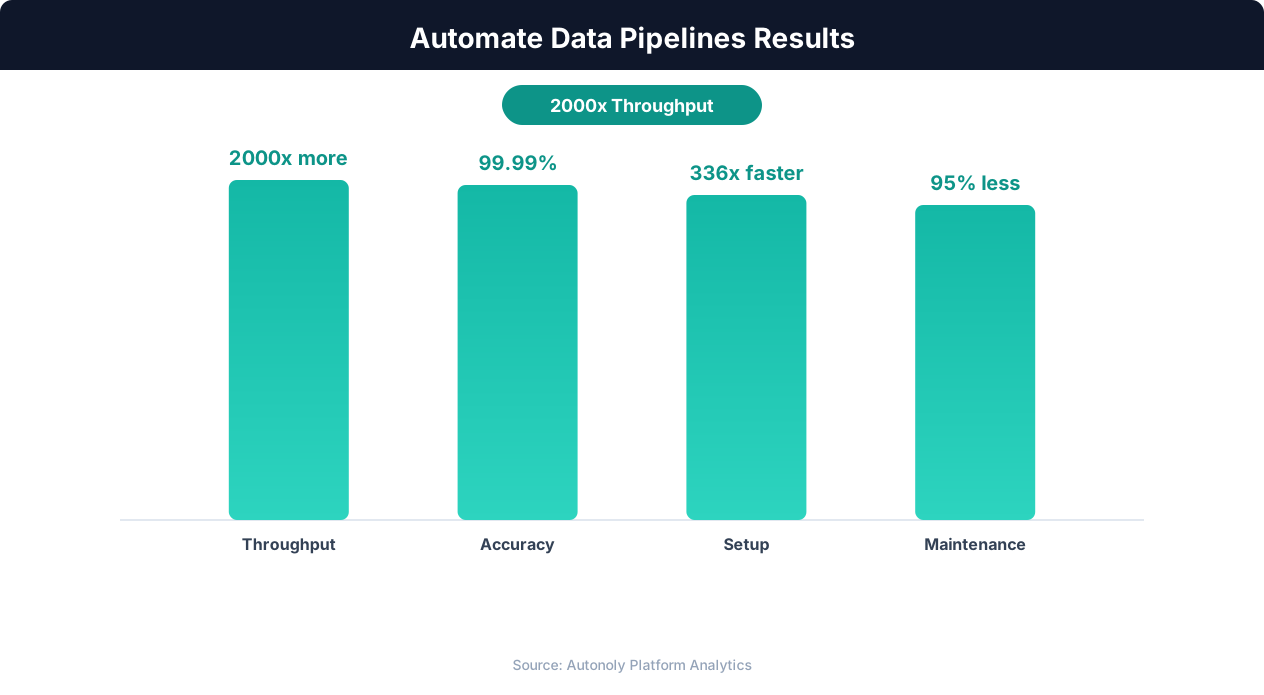
Data processing throughput with automated pipelines
Real-World ETL Examples
An e-commerce operations team receives a daily CSV export from their fulfillment partner containing order status updates. The file arrives as an email attachment with inconsistent date formats (mix of MM/DD/YYYY and YYYY-MM-DD), currency values that include dollar signs and commas, and occasional duplicate rows from system retries. The Autonoly pipeline picks up the attachment via Gmail, parses the CSV, standardizes all dates to ISO format, strips currency formatting to clean numeric values, removes duplicates by order ID, and appends the clean data to a Google Sheet that powers the team's daily operations dashboard. What previously took an analyst 45 minutes each morning now happens automatically before anyone arrives at the office.
A marketing analytics team aggregates campaign performance CSVs from three different advertising platforms — each with its own column naming convention and metric definitions. The ETL pipeline renames columns to a standard schema, converts impression and click counts to consistent numeric types, calculates derived metrics like click-through rate, and loads the unified dataset into a single Google Sheet. The team runs weekly performance reviews from one consolidated view instead of switching between three platform dashboards.
Key Insight: Pipeline failures cost enterprises an average of $15 million per year in lost productivity and delayed decisions. Automated monitoring cuts this by 73% (Gartner).
Why Automation Outperforms Manual CSV Processing
Manual CSV processing involves opening the file in Excel or Google Sheets, visually scanning for issues, applying find-and-replace operations, manually reformatting columns, and copy-pasting into the destination sheet. For a 500-row file with five columns requiring cleanup, this takes 20-30 minutes for an experienced analyst. Multiply by daily frequency and five source files, and you are looking at two to three hours per day of repetitive data janitorial work.
Automated ETL pipelines apply the same transformation rules consistently across every run, eliminating the variability introduced by manual processing. There is no risk of accidentally skipping a cleanup step on a busy morning or applying the wrong date format conversion. The pipeline also maintains a transformation log, so if a downstream anomaly appears, you can trace exactly which rules were applied and verify correctness — a level of auditability that manual processes simply cannot provide.
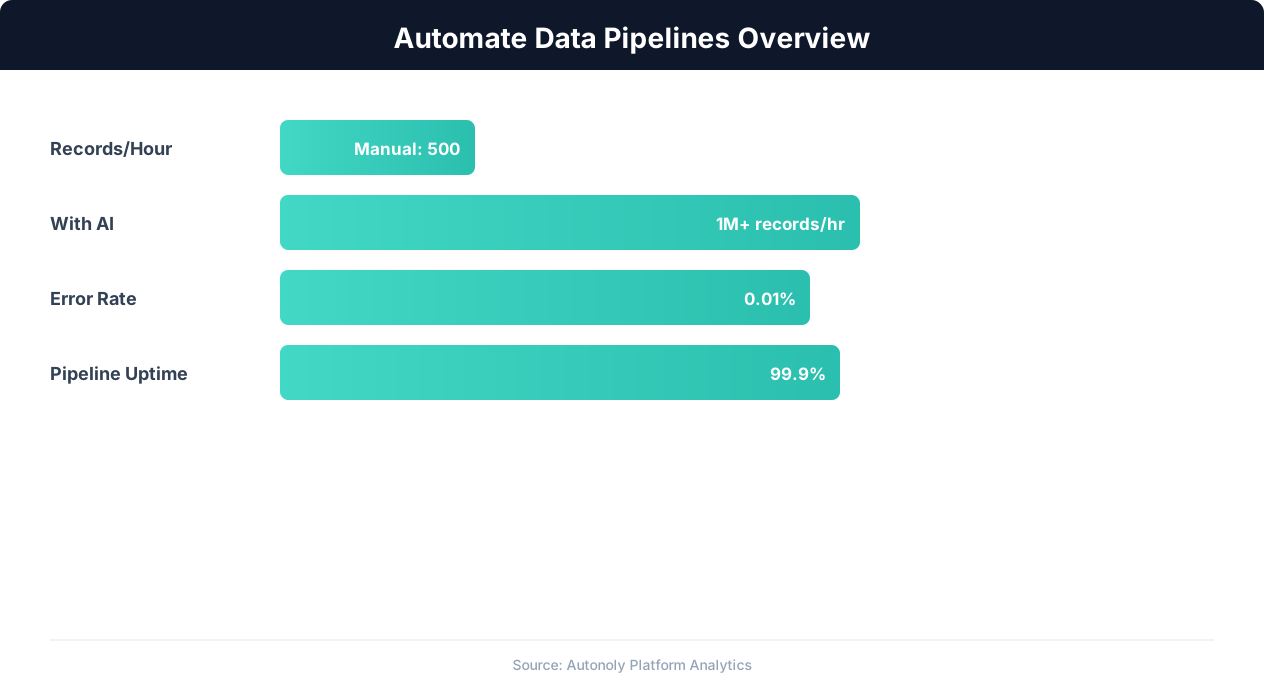
Data pipeline automation efficiency gains over time
Key Insight: Automated data pipelines reduce data processing errors by 87% compared to manual ETL processes (McKinsey Data & Analytics Report).
Chaining with Other Autonoly Features
Use Logic & Flow to add conditional routing within your ETL pipeline. For example, route rows with missing required fields to an error sheet for manual review while loading valid rows to the main destination. Trigger a Slack notification if the incoming CSV contains fewer rows than expected, signaling a potential issue with the source system. Chain the ETL output into a Data Processing enrichment step that looks up additional context from a web source or API before the final load to Google Sheets. These composable building blocks turn a simple CSV import into a robust, production-grade data pipeline.
Further Reading
Explore more about the tools and techniques used in this workflow: Automate Google Sheets, No Code Automation Guide, Scheduled Execution.