


Why Track Amazon Bestseller Rankings?
Amazon's bestseller lists are one of the most valuable signals in e-commerce. They reveal what products consumers are actually buying right now — not what is trending on social media, getting press coverage, or being promoted by influencers, but what people are pulling out their wallets and paying for in real volume. Amazon updates its bestseller rankings hourly based on actual sales velocity, making these lists the closest thing to a real-time demand barometer available to anyone without access to Amazon's internal sales data. For product researchers, private label sellers, brand owners, and market analysts, tracking bestseller movements over time exposes seasonal demand patterns, emerging product categories, and competitive dynamics that are invisible from a single snapshot.
Checking bestseller pages manually once a week gives you a blurry, incomplete picture. Products move on and off the list rapidly — a product that is #3 today might drop to #47 tomorrow if a competitor launches a promotion or a viral TikTok video drives a surge to a different product. Weekly manual checks miss these dynamics entirely, and you end up making product sourcing and launch decisions based on stale data. The difference between checking weekly and tracking daily is the difference between seeing a photograph and watching a movie — the patterns, trends, and opportunities only become visible when you have continuous data points to connect.
With Autonoly's Browser Automation, you capture a complete daily snapshot in Google Sheets that shows exactly how rankings shift over time, revealing the patterns that inform smart product selection, pricing, and launch timing decisions. Over 30 days of daily snapshots, you accumulate 3,000+ data points per category — enough to distinguish genuine trends from random noise and make data-driven decisions with confidence rather than intuition.
The value of bestseller tracking compounds over time. A single day's snapshot tells you what is selling now. A month of daily snapshots reveals seasonal patterns. A quarter of data exposes launch timing windows — when a category's top spots become volatile because existing leaders are cycling out of seasonal relevance. Sellers who invest in continuous bestseller tracking consistently outperform those who rely on one-time research, because they can time their product launches, advertising pushes, and inventory investments to align with market momentum rather than fighting against it.
What Data Gets Captured
For each bestseller, the agent extracts the current rank, product title, brand name, price, average star rating, total review count, ASIN, and category path. When configured for deeper extraction, it can also capture the number of sellers offering the same product, whether it qualifies for Prime shipping, the main product image URL, and the "Best Seller" or "Amazon's Choice" badge status. By capturing this data daily, you can calculate rank velocity (how fast a product is climbing or falling), price elasticity (how price changes correlate with rank movements), review momentum (how quickly new reviews accumulate for trending products), and market entry difficulty (how many reviews the top 10 products have and how quickly that threshold is growing).
Strategic Applications
Product research: Identify product categories where the top sellers have relatively few reviews — these are categories where a new entrant has a realistic shot at competing. Categories dominated by products with 10,000+ reviews and established brands are harder to break into. Track how long new entrants take to climb the rankings in your target categories to set realistic launch timeline expectations.
Competitor monitoring: Track your own products' bestseller ranks alongside competitors using the AI Agent Chat to configure exactly which ASINs to watch. Get alerted through Slack when a competitor overtakes you in ranking so you can investigate and respond — whether that means adjusting pricing, increasing ad spend, running a promotion, or improving your listing copy and images.
Trend detection: Spot products that jump dramatically in rank over a few days — these could indicate viral social media mentions, seasonal demand spikes, or a successful launch strategy you should study and replicate. Historical data in your sheet lets you build formulas and conditional formatting rules that flag unusual rank movements automatically, surfacing opportunities before your competitors notice them.
Pricing intelligence: Combine bestseller data with the scrape-competitor-prices-to-sheets workflow to understand how pricing relates to bestseller positioning across categories. Products at the sweet spot of competitive pricing and strong reviews tend to maintain stable rankings, while products that are overpriced for their review count struggle to hold position.
Seasonal planning: Track bestseller patterns across the full calendar year to identify when demand spikes in your categories. Use Data Processing nodes to calculate year-over-year rank comparisons and seasonal indices that inform your inventory purchasing and advertising budgets.
For Amazon sellers who also sell through Shopify, pair this with your own monitor-shopify-orders-to-sheets data to understand how Amazon bestseller rank movements correlate with your cross-channel sales patterns. Check the templates library for pre-built Amazon monitoring workflows, and visit our pricing page to see how this fits into your plan. For more background on competitive intelligence automation, see our workflow automation glossary.
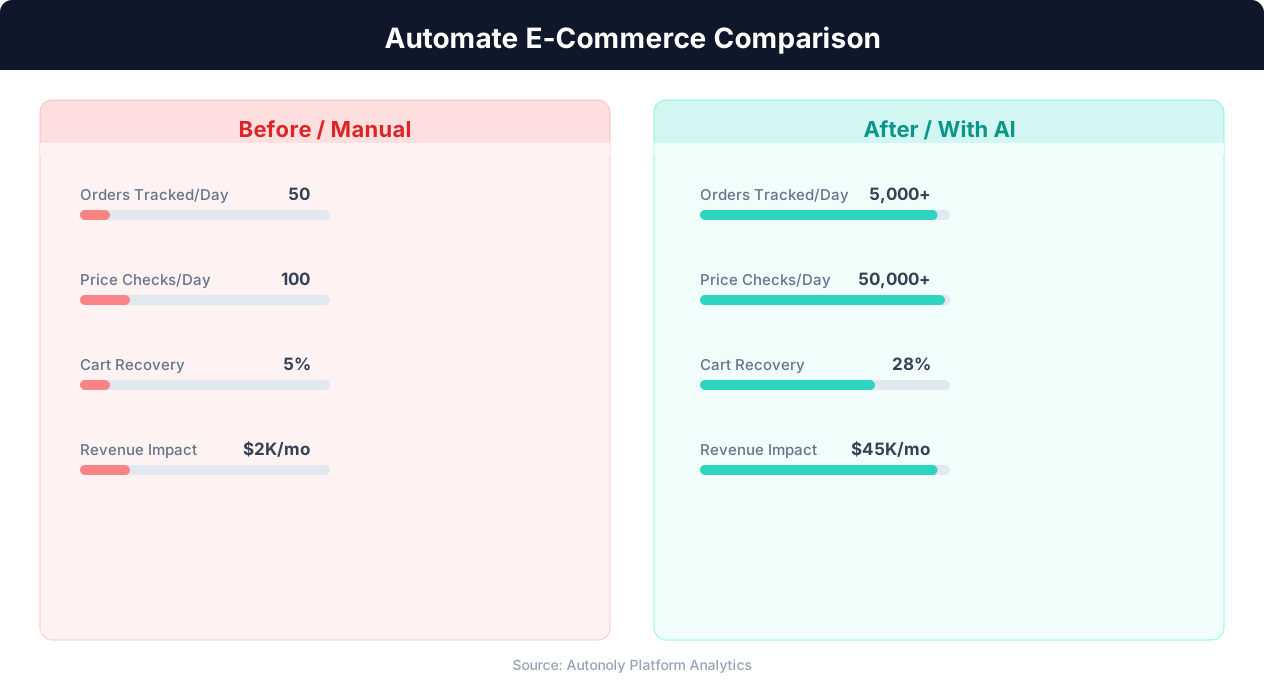
Manual vs automated product listing time comparison
Key Insight: Automated pricing intelligence captures 31% more competitive opportunities by monitoring and responding to market changes in real time (McKinsey Retail Practice).
How the AI Agent Does It
The agent uses Browser Automation to navigate Amazon's bestseller pages in a real Chromium browser. Amazon's bestseller pages are JavaScript-heavy, with lazy-loaded product cards, dynamic content injection, and client-side rendering that static HTTP scrapers cannot capture at all. The agent renders each page fully, scrolls through the complete list to trigger all lazy-loaded content, and extracts structured data from every product card. It handles pagination across multiple bestseller pages (top 50, top 100) and can navigate into subcategories when deeper analysis is needed — for example, drilling from "Electronics" into "Headphones" into "Over-Ear Headphones" to get category-specific rankings.
The Data Extraction engine identifies repeating product elements on the page and extracts consistent fields from each one. Because the agent uses visual pattern recognition powered by the AI Agent Chat intelligence layer rather than hardcoded CSS selectors, it continues working reliably when Amazon updates their page layout — which happens frequently and without notice. The agent handles Amazon's regional variations, currency formatting differences, and locale-specific page structures so you can monitor bestsellers across amazon.com, amazon.co.uk, amazon.de, amazon.co.jp, or any other Amazon marketplace from a single workflow. Edge cases like sponsored product placements mixed into bestseller lists, products with "Currently unavailable" status, and price ranges for multi-variant products are all handled gracefully.
Key Insight: E-commerce businesses using automation grow revenue 2.5x faster than those relying on manual processes (Shopify Commerce Trends).
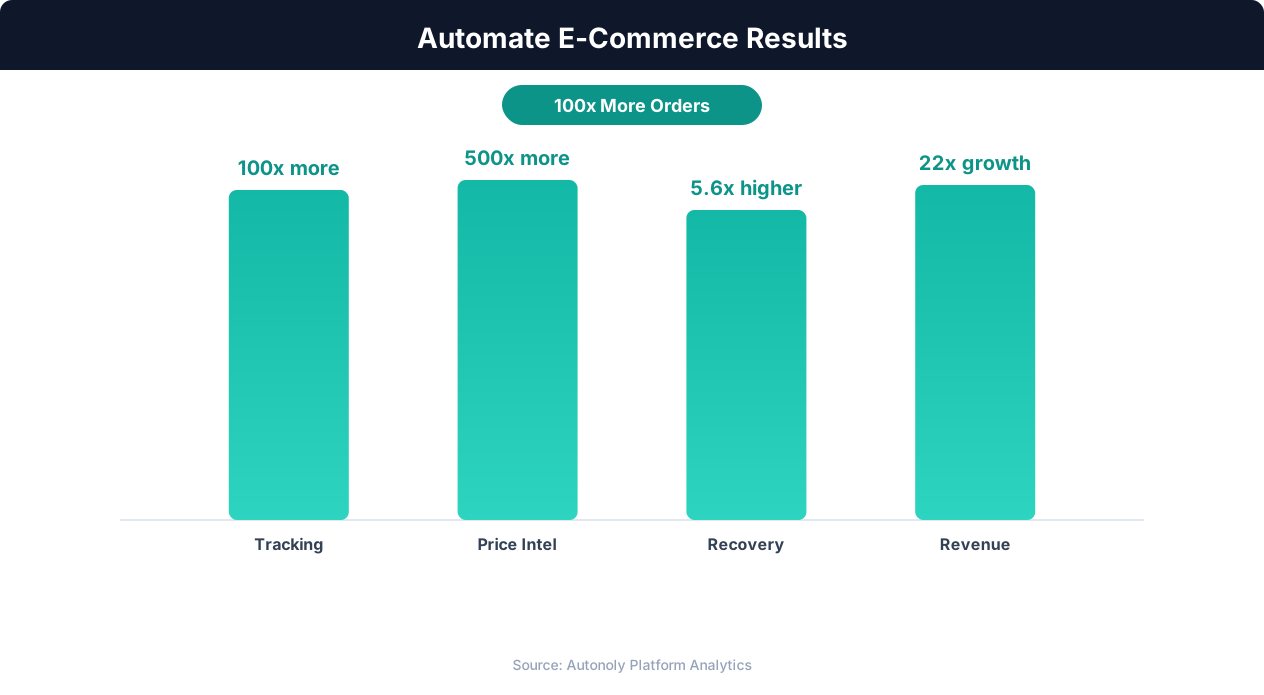
Revenue growth from e-commerce workflow automation
Key Insight: Product listing automation cuts catalog management time by 78%, allowing sellers to scale from 500 to 5,000+ SKUs without additional staff (BigCommerce Research).
Scheduling and Automation
Run this workflow daily to capture a consistent ranking snapshot at the same time each day, ensuring your data is comparable across days without timing-related variation. The cron-based scheduler in the Visual Workflow Builder lets you set the exact time — many sellers prefer early morning runs between 6-7 AM so the data is fresh and ready when they start their day. Each run appends new rows to your Google Sheet with a date stamp, preserving the full history for trend analysis. Differential processing automatically compares each day's rankings against the previous day, calculating rank changes and flagging notable movements so your team can focus on what moved rather than reviewing hundreds of static positions.
Add a Logic & Flow condition to send a Slack alert when any tracked product jumps or drops more than 10 positions in a single day, when a new product enters the top 20 for the first time, or when a product you are considering launching against drops off the list entirely. Chain this workflow with notification steps — a morning Gmail digest summarizing overnight rank changes across all monitored categories, or a Slack message tagging your product team when a competitor's new launch enters the top 50. Over time, the daily snapshots in your Google Sheet build a powerful dataset for spotting seasonal trends, evaluating product launch timing, and making inventory purchasing decisions grounded in actual market demand data rather than guesswork. Use SSH & Terminal to run custom analysis scripts — for example, calculating moving averages to smooth out daily volatility, generating category-level demand indices, or building predictive models for rank movements.
Further Reading
Explore more about the tools and techniques used in this workflow: Ecommerce Price Monitoring, Scrape Amazon Product Data, Scheduled Execution.