


Why Automate Indeed Job Scraping?
Recruiters and hiring managers spend hours every week manually browsing Indeed for new listings. By the time a promising candidate appears, a competitor may have already reached out. Automating the process with Browser Automation eliminates this delay entirely.
Autonoly opens a real browser, navigates Indeed just like a human would, and applies your filters — role title, location, experience level, salary range — before extracting every relevant field. The result is a clean, structured dataset delivered directly to your spreadsheet and communication tools.
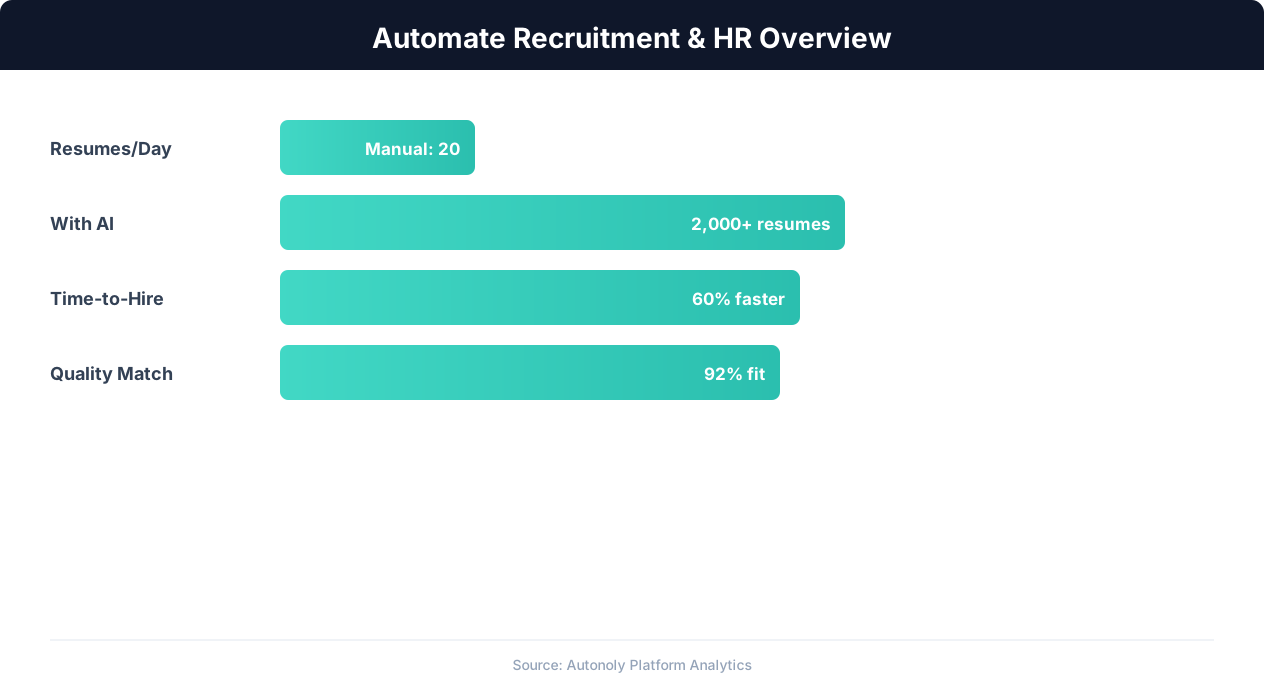
Recruitment automation impact on hiring metrics
Key Insight: Automated resume screening reduces time-to-hire by 43% while improving candidate quality by surfacing qualified applicants human reviewers missed (SHRM Research).
How Autonoly Extracts Indeed Listings
The Data Extraction engine identifies repeating job card patterns on Indeed's search results pages. It captures the job title, company name, estimated salary, location, job type (full-time, contract, remote), and the date posted. Pagination is handled automatically, so you get results across multiple pages without lifting a finger.
Because Autonoly uses a real browser session powered by AI Agent Chat, it handles dynamic content, lazy-loaded elements, and anti-scraping measures that break simple HTTP-based scrapers.
Key Insight: Recruiters spend 23 hours per week on average sourcing candidates manually. Automation reduces this to 5 hours while expanding the candidate pool 4x (LinkedIn Talent Report).
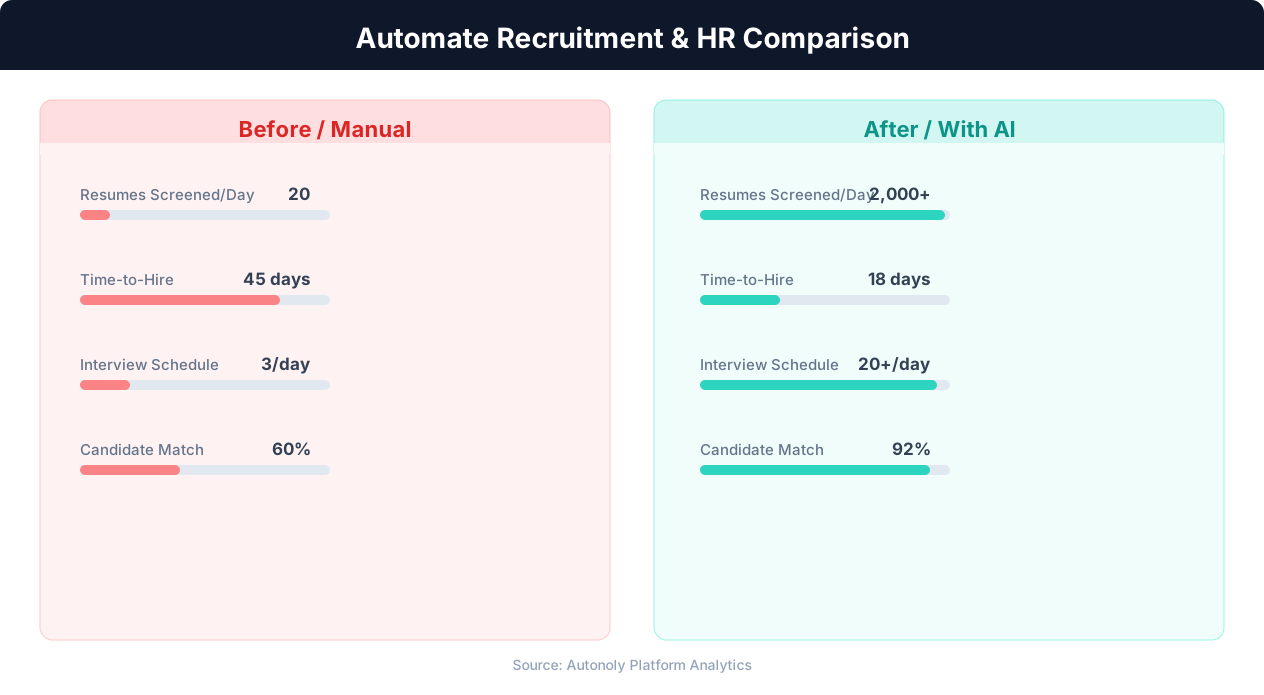
Time-to-hire comparison for manual vs automated recruitment
Saving Results to Google Sheets
Once extracted, each listing is written as a new row in your Google Sheets spreadsheet. Columns map directly to the extracted fields, and you can customize the mapping through the Visual Workflow Builder. Duplicate detection ensures the same job listing is never added twice, even across daily runs.
Google Sheets gives you a living database that your entire recruiting team can access, filter, and annotate in real time. Combine it with conditional formatting and pivot tables to track trends in compensation or hiring volume.
Getting Slack Notifications for High-Value Matches
Not every listing deserves immediate attention. Autonoly lets you define criteria — for example, salary above a threshold or specific keywords in the title — and sends a formatted message to your Slack channel only when a match is found. This turns passive scraping into an active alert system.
The Slack message includes the job title, company, salary, and a direct link back to Indeed so you or your team can act within minutes.
Scheduling and Frequency
Set the workflow to run daily, twice a day, or weekly through the built-in scheduler. Morning runs catch overnight postings, while evening runs capture same-day listings. Explore our templates to find pre-configured scheduling patterns that work for recruiting teams.
Extending the Pipeline with Data Processing
Need to enrich listings with Glassdoor ratings or flag duplicates against your ATS? Use Data Processing nodes to transform, filter, or enrich rows before they hit Google Sheets. The Integrations library connects to CRMs, ATS platforms, and databases so your recruiting pipeline stays in sync.
Filtering by Keywords
Keyword filtering goes beyond simple title matching. Configure the agent to scan the full job description for must-have terms like specific programming languages, certifications, or years of experience. Negative keywords help exclude irrelevant listings — for example, filtering out internship roles when you are targeting senior positions. The Data Processing engine supports regex patterns for flexible matching.
Handling Large Result Sets
When monitoring dozens of role-location combinations, result sets can grow to thousands of rows per week. The agent processes large volumes efficiently, deduplicating across runs and applying your filters before writing to Google Sheets. Use the Visual Workflow Builder to split results by location or role type into separate sheet tabs for easier team review.
Key Insight: Companies using recruitment automation report 67% lower cost-per-hire and 31% lower turnover in the first year due to better candidate matching (Bersin by Deloitte).
Who Benefits Most?
Staffing agencies tracking hundreds of roles across regions, in-house recruiting teams monitoring competitor hiring, and job seekers who want a daily digest all benefit from this automation. Check our pricing page to see which plan fits your volume.
For a deeper understanding of how web scraping works under the hood, visit the web scraping glossary. To explore similar automations, browse our full library of recruitment and data extraction templates.
Specific Use Cases and Examples
Consider a staffing agency specializing in tech placements across the Pacific Northwest. Each morning, the workflow runs at 7 AM, scrapes Indeed for Software Engineer, DevOps, and Data Analyst roles in Seattle, Portland, and Vancouver, and appends roughly 50-80 new listings to the team's shared Google Sheet. By the time recruiters open their laptops, the day's candidates are already organized and ready for outreach. A Slack alert fires immediately for any listing offering above $200K total compensation, ensuring the senior partner sees it first.
Another common scenario involves competitive intelligence. An in-house talent acquisition team at a Series B startup monitors Indeed for roles posted by three direct competitors. When a competitor posts a VP of Engineering role, the Slack notification triggers a discussion about counter-recruiting or adjusting the startup's own hiring roadmap. This kind of real-time market awareness is impossible to maintain manually across dozens of companies and job titles.
How It Compares to Manual Approaches
Without automation, a recruiter typically opens Indeed, types in search criteria, scrolls through two or three pages of results, and copies relevant listings into a spreadsheet. This process takes 20-30 minutes per search and is repeated for every role and location combination. Over a week, a team of five recruiters can spend 10+ hours on this task alone. Autonoly compresses that entire effort into a single scheduled workflow that executes in minutes and never misses a listing.
Manual monitoring also suffers from inconsistency. Different team members may use different search filters, miss pages, or forget to check on busy days. Automated scraping applies identical criteria every single run, guaranteeing complete coverage. The built-in duplicate detection means your spreadsheet stays clean without anyone remembering to check for repeated entries.
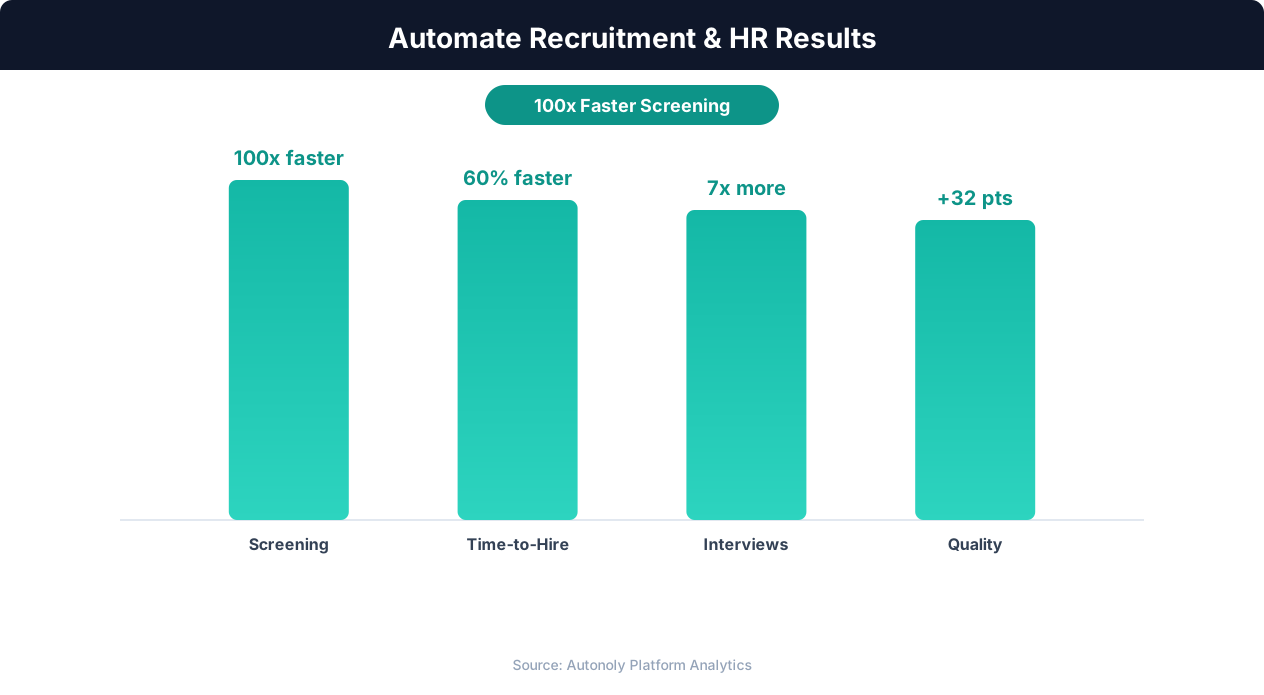
Quality of hire improvements from automated screening
Key Insight: Automated job posting syndication to 50+ platforms increases qualified applicant volume by 88% compared to manual posting on individual boards (iCIMS Research).
Combining with Logic & Flow
For advanced pipelines, use Logic & Flow nodes to route listings based on conditional rules. For example, direct remote-only positions to one Google Sheet tab and on-site roles to another. Flag listings older than seven days for archival. Split high-salary matches to both a Slack channel and an email digest. These branching workflows are configured visually in the Visual Workflow Builder without writing any code.
Further Reading
Explore more about the tools and techniques used in this workflow: Recruiting Automation, Best Web Scraping Tools, Scheduled Execution.