Why Track GitHub Trending Repositories?
GitHub's trending page (github.com/trending) is the pulse of the open source ecosystem. Every day, it surfaces the repositories gaining the most stars, forks, and community attention. For developers, engineering leaders, investors, and developer tool companies, this data is a window into what the global developer community is building, adopting, and excited about.
Technology Landscape Intelligence
The trending page reveals which technologies are gaining momentum in real time. When a new framework, library, or tool trends for multiple days, it signals genuine adoption rather than marketing hype. Tracking trending repos over weeks and months shows you the trajectory of programming languages, frameworks, and paradigms. Is Rust continuing to grow? Are new AI/ML libraries displacing established ones? Which JavaScript frameworks are gaining ground? The trending page answers these questions with data.
Competitive Monitoring for Developer Tools
If you build developer tools, libraries, or infrastructure software, GitHub trending is your competitive intelligence feed. When a competitor's repo starts trending, it means the developer community is paying attention. When an alternative to your product appears on trending, it is an early warning signal. Systematic tracking lets you detect competitive threats weeks or months before they show up in market share reports.
Hiring and Talent Signals
Trending repositories reveal which skills and technologies are in demand. Engineering managers can use this data to inform hiring strategies: if a specific technology is trending consistently, developers with that skill will command premium salaries soon. Conversely, technologies that never appear on trending may be losing community mindshare, affecting the talent pool available for those stacks.
Investment and Market Research
Venture capitalists and analysts track GitHub stars as a leading indicator of developer adoption. A repository that gains 5,000 stars in a week represents genuine organic interest from the developer community. Many successful developer-focused companies (Vercel, Supabase, Hugging Face) built significant GitHub followings before raising major rounds. Tracking trending repos systematically creates a deal flow pipeline based on actual community traction.
Open Source Contribution Opportunities
For individual developers, trending repositories represent the best opportunities for high-impact open source contributions. Contributing to a trending project means your pull requests get seen by thousands of developers, building your reputation and network. Tracking trending repos helps you identify these contribution windows early.
Content and Newsletter Curation
Technical newsletters, podcasts, and YouTube channels use GitHub trending data to curate content. A newsletter editor who tracks trending repos daily never runs out of interesting projects to cover. The daily trending data provides a ready-made pipeline of newsworthy projects, complete with descriptions and star metrics that indicate audience interest. Automating this data collection with Autonoly frees content creators to focus on writing rather than research.
What Data GitHub Trending Provides
GitHub's trending page presents a curated list of repositories organized by time period (daily, weekly, monthly) and optionally filtered by programming language. Each listing contains several data points worth extracting.
Repository Information
- Repository name — In the format
owner/repo-name. The owner is either a user or an organization, which itself is a useful data point. - Description — The repository's one-line description, usually explaining what the project does. Descriptions are written by the repo maintainer and reveal the project's positioning.
- Primary language — The dominant programming language in the repository, displayed with a colored dot. This is the most reliable indicator of what technology ecosystem the project belongs to.
- Total star count — The cumulative number of stars the repository has received since creation. High star counts indicate established projects; low star counts on trending repos indicate breakout newcomers.
- Stars gained in the period — The number of new stars gained during the trending period (today, this week, or this month). This is the most valuable metric because it measures current momentum rather than historical accumulation.
- Fork count — How many times the repository has been forked. A high fork-to-star ratio suggests the project is being actively used and modified, not just bookmarked.
- Contributors — Displayed as avatar thumbnails on the trending page. The number and identity of top contributors indicate the project's development activity and bus factor.
- Repository URL — Direct link to the repository for further investigation.
Derived and Contextual Data
Beyond what is displayed on the page, you can derive additional metrics:
- Trending rank — Position in the daily/weekly/monthly list. Rank 1 gets dramatically more visibility than rank 20.
- Language category — Group languages into ecosystems (frontend, backend, ML/AI, systems, mobile) for higher-level trend analysis.
- Owner type — Whether the repo is owned by an individual or an organization. Organizational repos often have commercial backing.
- Star velocity — Stars gained per day, which normalizes the daily/weekly/monthly metrics for comparison.
- Repeat trending — Whether a repo has appeared on trending before, indicating sustained rather than one-time interest.
Language-Filtered Trending
GitHub trending supports language filters via URL parameters: github.com/trending/python, github.com/trending/rust, github.com/trending/typescript. Scraping multiple language-specific trending pages gives you deeper data within specific ecosystems. A repo might not appear on the overall trending page but could be the top trending Python repo — which is just as relevant if you work in the Python ecosystem.
Step-by-Step: Scraping GitHub Trending With Autonoly
Scraping GitHub's trending page is one of Autonoly's built-in example prompts. It works with a single natural language instruction and produces structured data ready for export.
Step 1: Start a New Agent Session
Open Autonoly and start a new AI agent session. The agent will use browser automation to navigate GitHub and extract data from the rendered trending page.
Step 2: Describe the Scraping Task
Give the agent a clear instruction:
"Go to github.com/trending and scrape all trending repositories for today. For each repo, extract the repository name (owner/repo format), description, primary programming language, total star count, stars gained today, and fork count. Collect all repos on the page."
The agent launches a Chromium browser, navigates to GitHub's trending page, and begins extracting data from each repository listing. You watch the process through the live browser preview.
Step 3: The Agent Navigates the Page
GitHub's trending page is server-side rendered, which means the core content is present in the initial HTML. However, some elements (contributor avatars, star animations) load dynamically. The agent waits for the full page to render, then systematically extracts data from each repository row.
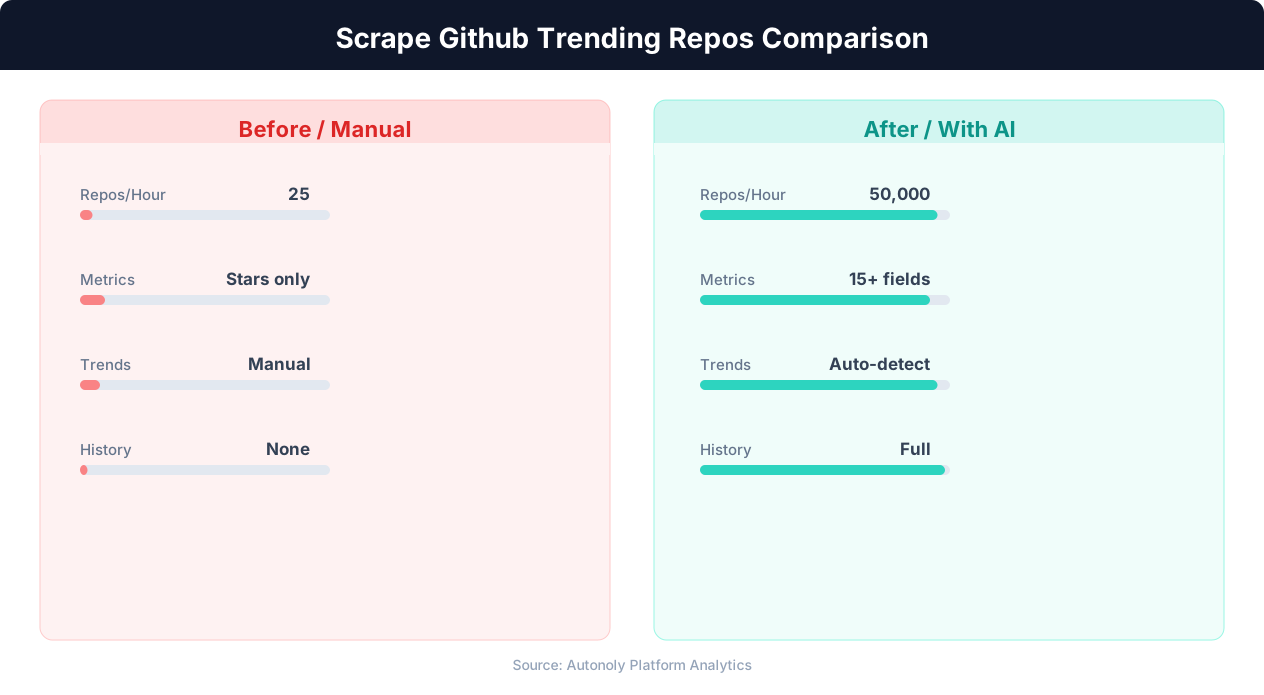
The trending page typically lists 25 repositories. The agent extracts all of them in a single pass without scrolling or pagination, since all 25 are rendered on one page. This makes GitHub trending one of the fastest sites to scrape — the entire extraction completes in under 30 seconds.
Step 4: Extend to Multiple Time Periods
For richer data, extend the scrape to cover all three time periods:
"Also scrape the weekly trending (github.com/trending?since=weekly) and monthly trending (github.com/trending?since=monthly). Add a 'period' column to distinguish daily, weekly, and monthly data."
The agent navigates to each URL and extracts the same data fields, adding a period identifier to each row. This gives you 75 repository entries per scrape (25 daily + 25 weekly + 25 monthly) with clear labeling.
Step 5: Add Language-Specific Scrapes
If you focus on specific technology ecosystems, add language-filtered pages:
"Also scrape github.com/trending/python and github.com/trending/typescript for today's trending repos in those languages."
The agent visits each language-specific trending page and extracts the same fields. This captures repos that may not appear on the overall trending list but are top trending within their language community.
Step 6: Export and Schedule
Export the consolidated data to Google Sheets and set up daily scheduled execution. Over time, your spreadsheet becomes a comprehensive record of GitHub trending activity that you can filter, sort, and analyze for any language, time period, or date range.
Analyzing GitHub Trending Data for Actionable Insights
A database of daily GitHub trending data becomes exponentially more valuable over time. Here are the analyses that produce the most actionable insights.
Language Popularity Tracking
Count the number of trending repos per language per day or week. Plot this over months to see clear language adoption trends. This analysis reveals shifts before they show up in annual developer surveys or Stack Overflow reports. If TypeScript repos are steadily increasing their share of the trending page while JavaScript repos are declining, that trend is actionable intelligence for hiring, stack selection, and product strategy.
Using Autonoly's terminal, run this analysis directly:
"Read the GitHub Trending sheet. For each programming language, count the number of times it appeared in daily trending per week. Plot the top 10 languages over the last 3 months."
The agent writes a pandas script that groups by language and week, calculates frequencies, and generates a trend chart using matplotlib.
Star Velocity Benchmarking
Stars gained per day varies enormously across trending repos. Understanding the distribution helps you benchmark projects and identify outliers. A repo gaining 500 stars per day is exceptionally hot — it might be the next Tailwind CSS or Langchain. A repo gaining 50 stars per day is solidly popular but not extraordinary. Historical star velocity data lets you put any individual repo's performance in context.
Category and Topic Analysis
Beyond programming language, classify repos by topic (AI/ML, web framework, CLI tool, database, DevOps, etc.) based on their descriptions and README content. Track which topics are trending over time. Are AI agent frameworks trending more than AI model training tools? Are developer experience tools gaining ground? This thematic analysis reveals the direction of the ecosystem at a higher level than language alone.
Repeat Trending Analysis
Some repos trend for a single day and disappear. Others appear on the trending page repeatedly over weeks or months, indicating sustained community interest rather than a one-day spike. Track how many unique days each repo appears in your dataset. Repos that trend on 5+ separate days have demonstrated staying power and are worth deeper investigation.
Organizational vs. Individual Projects
Differentiate repos owned by organizations (likely commercially backed) from those owned by individuals (likely side projects or community-driven). Track the ratio over time. An increasing share of organizational repos on trending might indicate that corporate open source is crowding out individual contributors, which has implications for the open source ecosystem.
Early Detection of Breakout Projects
The most valuable signal is identifying a repo early in its breakout trajectory. A repo that appears on daily trending with low total stars (under 1,000) but high stars gained (200+ in one day) is in its initial growth phase. Tracking these early-stage breakouts and monitoring their subsequent trajectory lets you identify important projects before they become mainstream. This is particularly valuable for investors and developer advocates.
Scheduling Daily Scrapes and Managing Long-Term Data
Consistent daily scraping turns ephemeral trending data into a permanent record. Here is how to set up and maintain your GitHub trending scraping pipeline for long-term reliability.
Optimal Scraping Time
GitHub's trending page updates throughout the day as repos gain stars. The "today" trending list at midnight reflects the full day's activity, while mid-day scrapes capture a partial picture. Schedule your daily scrape for late evening US Pacific Time (GitHub's servers are in the US) to capture the most complete daily snapshot.
However, unlike Product Hunt where rankings are final at end of day, GitHub trending is a rolling calculation. The exact time matters less than consistency. Pick a time and stick with it so your data is comparable across days.
Setting Up the Schedule
After testing your GitHub trending workflow manually, enable scheduled execution in Autonoly. Set frequency to daily, choose your preferred time, and enable failure notifications. The workflow will run automatically every day and append results to your Google Sheet.
💡 Key Insight
GitHub hosts over 400 million repositories, with trending repos receiving 10-50x more stars in their first week.
Data Accumulation Rates
Daily scraping of the main trending page (25 repos) plus weekly and monthly produces approximately 75 rows per day, or 2,250 rows per month. Adding language-specific pages (Python, TypeScript, Rust, Go, etc.) at 25 repos each adds substantially more. A comprehensive setup scraping 8 language pages plus the main page generates roughly 225 rows per day or 6,750 per month. Google Sheets handles this comfortably for 12+ months.
Deduplication Strategy
The same repo can appear on daily, weekly, and monthly trending simultaneously, and can appear on both the main page and a language-specific page. You have two options: keep all rows (with period and page labels) for complete historical record, or deduplicate within each daily scrape by repo name and keep only the most detailed entry. For trend analysis, keeping all rows with labels provides more flexibility.
Historical Backfilling
GitHub trending does not have an official archive. The page shows only the current period's data. If you want historical data before you started scraping, third-party datasets and the GitHub API (which provides star history for individual repos) can supplement your scraped data. However, the sooner you start scraping, the sooner you begin building your proprietary dataset.
Combining With the GitHub API
For repos that appear on trending repeatedly, you may want deeper data than the trending page provides: commit activity, issue counts, pull request velocity, release frequency, and contributor growth. The GitHub REST API provides all of this data. Autonoly's terminal can call the GitHub API using Python's requests library or the gh CLI tool, enriching your scraped trending data with repository health metrics.
Practical Use Cases for GitHub Trending Data
Here are specific, actionable ways different audiences use scraped GitHub trending data.
For Engineering Managers: Stack Decision Support
When evaluating a new technology for adoption (a database, a framework, an infrastructure tool), GitHub trending data provides evidence of community momentum. A tool that frequently trends and shows consistent star growth has an active community, which means better documentation, more StackOverflow answers, and easier hiring. Compare candidate technologies by their trending frequency and star velocity over the past 6 months to make data-driven technology choices.
For Developer Advocates: Content Strategy
Developer advocates and technical content creators use trending data to identify what developers are interested in right now. Writing a tutorial about a trending library while it is still hot captures search traffic and community attention. Tracking trending topics over weeks reveals content themes with sustained interest rather than fleeting hype. Plan your blog posts, videos, and conference talks around the topics your data shows are genuinely trending.
💡 Key Insight
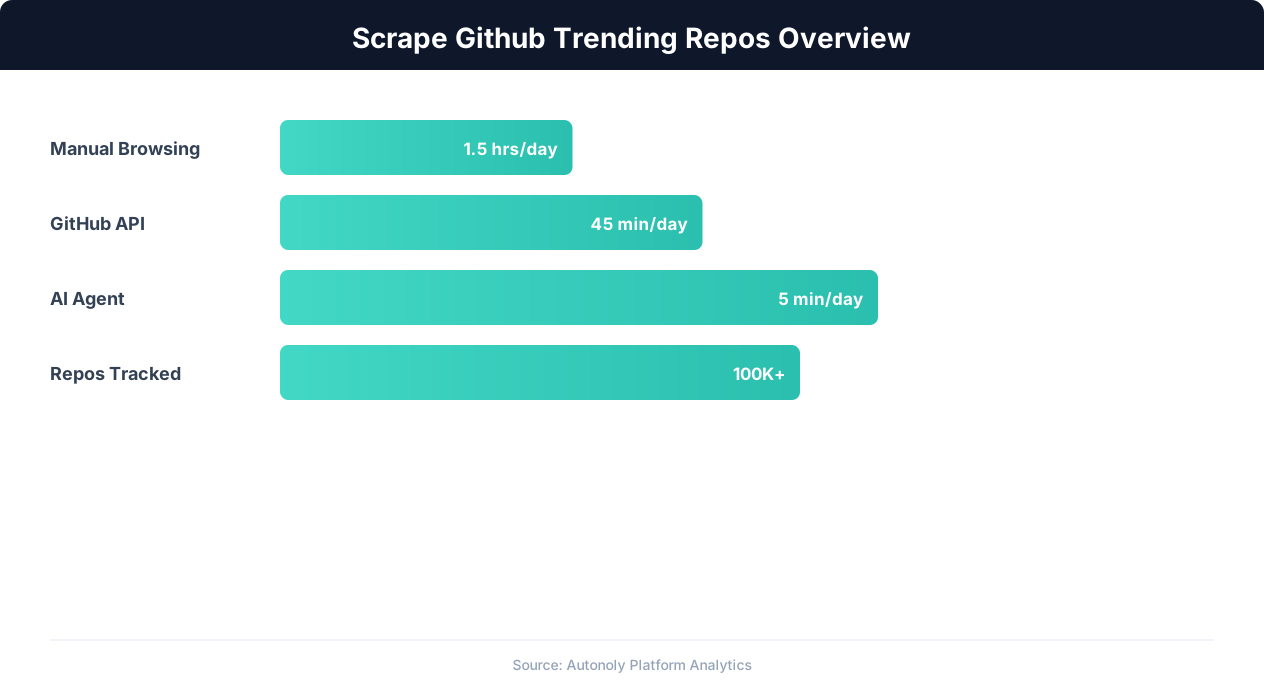
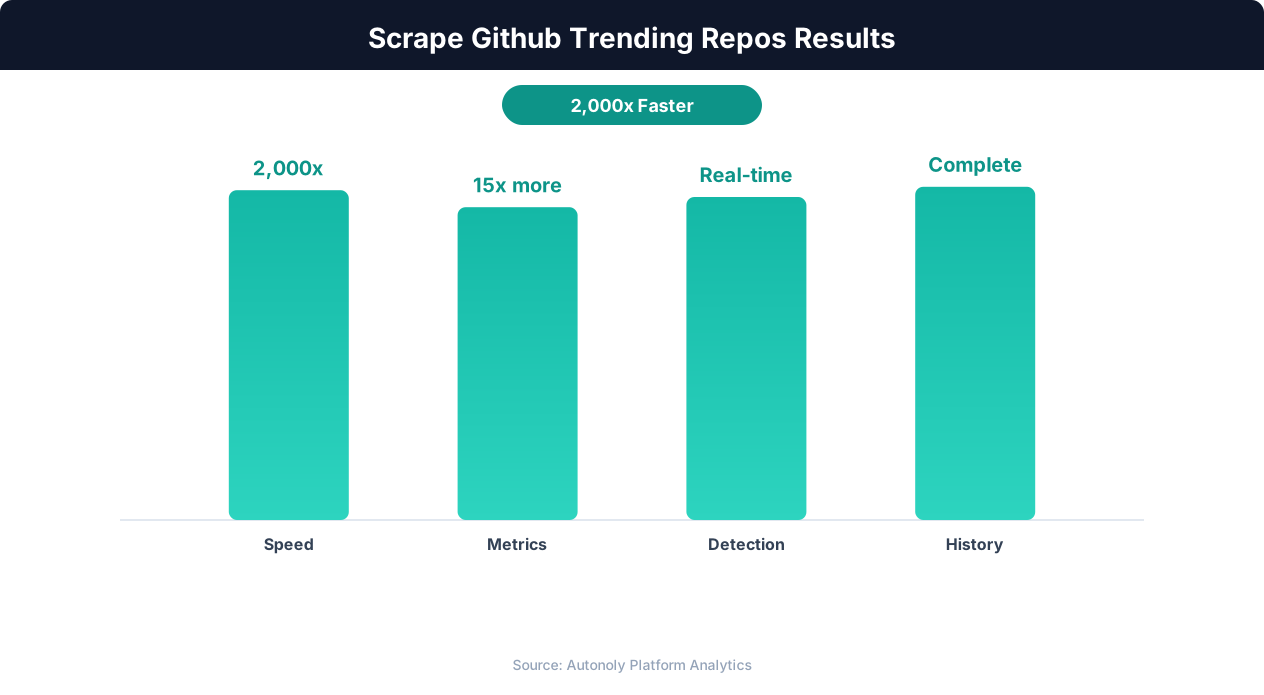
Automated GitHub monitoring helps developers discover relevant tools 3x faster than manual browsing.
For Startup Founders: Market Timing
Open source trends often precede commercial market trends by 12-18 months. The rise of Kubernetes on GitHub trending preceded the explosion of the Kubernetes ecosystem (monitoring tools, managed services, security platforms) by over a year. Docker's trending dominance preceded the container ecosystem boom. Tracking GitHub trends gives founders a window into which infrastructure and developer tool markets will be commercially viable in the near future.
For Investors: Deal Sourcing and Due Diligence
Star velocity is a proxy for developer adoption, which is the leading indicator of commercial viability for developer-focused startups. An investor tracking GitHub trending systematically can identify promising projects before they raise funding, reaching out to founders early in their journey. For due diligence on existing deals, historical trending data shows whether a project's growth is accelerating, steady, or declining.
For Security Researchers: Supply Chain Awareness
Trending repositories often become widely adopted quickly. Security researchers track trending repos to identify new dependencies entering the ecosystem, assess their security practices (code review, vulnerability disclosure policies), and flag potential supply chain risks before they become widespread. A malicious or vulnerable package that trends on GitHub can be in production at thousands of companies within days.
For Recruiters: Skills Mapping
Trending data reveals which technologies are growing in demand. Recruiters who track these trends can proactively build talent pipelines in emerging skills before demand outstrips supply. If a new ML framework trends for three consecutive weeks, it is time to start sourcing candidates with that skill set.
Advanced Scraping Techniques and Enrichment
Beyond basic trending page scraping, advanced techniques yield richer datasets and deeper insights.
README Content Extraction
For repos that appear on trending, navigating to the repository page and extracting the README content provides detailed information about the project's purpose, features, installation instructions, and use cases. The AI agent can summarize each README into a standardized format (one paragraph describing what the project does, key features, target audience) that is useful for quick scanning.
"For each trending repo, visit the repository page and extract a one-paragraph summary of what the project does based on its README."
This adds 5-10 minutes to the scrape time but produces significantly richer data.
License Detection
The license type (MIT, Apache 2.0, GPL, proprietary) affects how a project can be used commercially. Extracting license information from the repository page helps filter trending repos by commercial viability. MIT and Apache licensed projects are safe for commercial use; GPL projects require more careful evaluation.
Issue and PR Activity
For trending repos you want to investigate further, scraping the Issues and Pull Requests tabs reveals how actively the project is maintained. A trending repo with hundreds of open issues and no recent maintainer responses may be experiencing unsustainable growth. A trending repo with active issue triage and regular PR merges indicates healthy project management.
Cross-Platform Correlation
Combine GitHub trending data with Product Hunt scraping and Hacker News front page monitoring to see how projects move across platforms. A project that trends on GitHub, gets posted to Hacker News, and launches on Product Hunt within the same week is having a breakout moment. Multi-platform trending is a stronger signal than single-platform trending.
Automated Digest Reports
Combine your daily GitHub trending scrape with Autonoly's Slack or Discord integration to send a daily digest to your engineering team. The digest lists the day's most notable trending repos with their descriptions and star counts. This keeps the team informed about ecosystem developments without anyone needing to visit GitHub trending manually. A 30-second scan of the daily Slack digest replaces 10 minutes of browsing.
Star History Tracking
For repos that appear on trending multiple times, build a star history by recording their total star count each time you scrape. Plot star count over time to visualize the growth trajectory. Repos with exponential star growth are in a different category from repos that had one viral day and then plateaued. Star history also reveals how trending appearances translate into sustained growth versus temporary spikes.
The agent can use the GitHub API in the terminal to fetch detailed star history for specific repos: "For the top 5 trending repos from this week, fetch their daily star count over the past 30 days using the GitHub API and plot the growth curves." This enriched data adds a temporal dimension that the trending page snapshot alone does not provide.
Automated Weekly Summary Reports
Combine a week of daily trending data into a formatted weekly summary. The agent aggregates the data in the terminal using pandas and generates a report that includes: the most-starred repos of the week, the most common languages, repos that trended on multiple days, and any new entrants that appeared for the first time. Export this summary to Google Sheets or send it via email using Autonoly's Gmail integration. A weekly summary is more digestible than daily data for executives and non-technical stakeholders who want to stay informed about technology trends without daily monitoring.