
Why Automate Shopify Order Tracking?
Managing a Shopify store means constantly monitoring incoming orders, tracking fulfillment status, and keeping your team informed about revenue trends. The built-in Shopify admin works fine for individual order lookups, but it falls short when you need a birds-eye view across hundreds of daily orders — especially if your operations team, accountants, or fulfillment partners live in spreadsheets rather than Shopify. Studies show that the average e-commerce operations manager spends over six hours per week on manual data exports and reconciliation tasks — time that could be spent on strategy, customer experience, or product development.
The cost of stale data is often underestimated. When you manually export orders on Monday morning, the spreadsheet is already outdated by Monday afternoon. Decisions about inventory reordering, marketing spend, and staffing are based on numbers that no longer reflect reality. For stores processing more than fifty orders per day, the gap between Shopify's live data and your team's spreadsheet widens dangerously fast, leading to stockouts, over-ordering, and missed fulfillment SLAs.
Manually exporting orders from Shopify and pasting them into Google Sheets is a repetitive chore that eats hours every week. Copy-paste errors creep in — a misaligned column, a skipped row, a price formatted as text instead of a number — and these small mistakes cascade into broken formulas and inaccurate dashboards. With Browser Automation, Autonoly keeps your spreadsheet continuously updated by syncing new orders every few hours, giving your entire team real-time access to order data without needing Shopify logins. The automation eliminates human error entirely and frees your team to focus on interpreting the data rather than collecting it.
Beyond the immediate time savings, automated order tracking creates a living operational database. Every order that flows into your Google Sheet becomes a queryable record — searchable, sortable, and ready for analysis. Over weeks and months, this historical dataset reveals patterns that are impossible to spot from the Shopify admin alone: which days of the week generate the most orders, which products have the highest return rates, which discount codes actually drive profitable purchases versus margin-eroding ones.
What Data Gets Synced
The AI agent extracts comprehensive order details including order number, date placed, customer name, email, shipping address, line items with SKUs, quantities, unit prices, discount codes applied, subtotal, tax, shipping cost, and total amount. You can also pull fulfillment status, tracking numbers, and payment method. Tell the agent exactly which fields matter to your workflow, and it extracts only those — no unnecessary columns cluttering your spreadsheet.
This structured data in Google Sheets becomes a powerful foundation for pivot tables, revenue dashboards, inventory forecasting, and customer analysis. Teams can build formulas, charts, and conditional formatting rules that update automatically as new order rows appear. A simple SUMIF formula can give you real-time revenue by product category, while conditional formatting highlights unfulfilled orders older than 48 hours so nothing slips through the cracks.
Use Cases
Fulfillment teams use the synced sheet to manage picking and packing queues without granting everyone Shopify admin access. Finance teams reconcile daily revenue against payment processor reports, flagging discrepancies before they become accounting headaches. Marketing teams analyze which products sell best and which discount codes drive the most conversions, feeding insights back into campaign planning. Customer support teams reference order history without switching between apps, resolving inquiries faster and improving customer satisfaction scores.
Agencies managing multiple Shopify stores consolidate orders from all clients into one master sheet, enabling cross-store reporting and benchmarking. Dropshipping businesses use the synced data to automatically forward order details to suppliers. Subscription box companies track recurring order patterns to predict upcoming fulfillment volumes.
For stores processing high volumes, combine this with a Slack notification step to alert your team when high-value orders come in or when order volume spikes unexpectedly. The Integrations ecosystem lets you route order data anywhere your team works. Pair it with Data Processing nodes to calculate running totals, average order values, or customer lifetime value metrics directly within your workflow.
Exporting and Integrating Results
Results can be delivered to multiple destinations simultaneously. Beyond Google Sheets, you can push order data to Notion databases for team wikis, Airtable bases for visual kanban-style order management, or download as Excel files for offline analysis. Check the templates library for pre-built Shopify order sync workflows you can clone and customize in under a minute.
For more background on how order tracking fits into broader e-commerce automation, see our workflow automation glossary. To explore what this costs, visit our pricing page — most Shopify order sync workflows run comfortably within the standard tier.
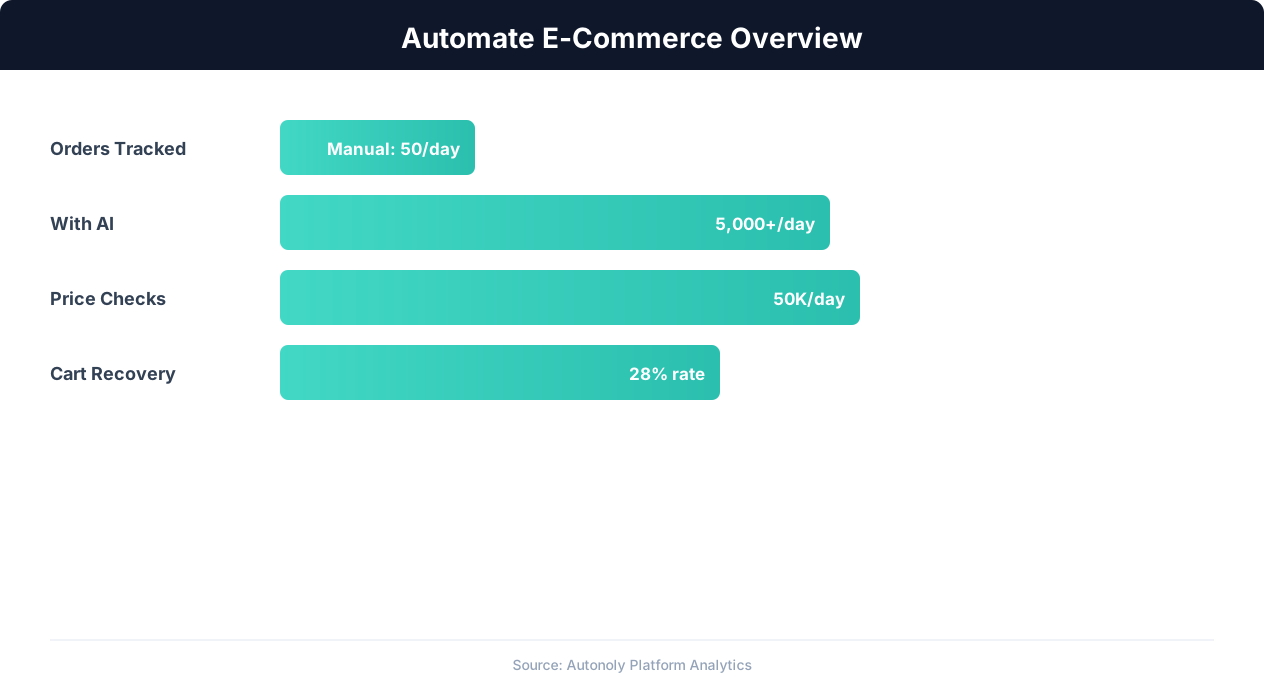
E-commerce automation impact on key performance metrics
Key Insight: E-commerce businesses using automation grow revenue 2.5x faster than those relying on manual processes (Shopify Commerce Trends).
How the AI Agent Does It
Autonoly's AI agent uses Browser Automation to interact with the Shopify admin panel through a real Chromium browser. It logs in with your stored credentials, navigates to the orders section, and applies date filters to isolate new orders since the last sync. The agent reads the order list page, extracting summary data from each row, and when deeper detail is needed — such as line item SKUs, discount breakdowns, or customer notes — it clicks into individual order detail pages to capture every field.
The Data Extraction engine handles Shopify's JavaScript-heavy interface, pagination, and dynamic content loading that would break traditional scrapers or simple API calls. For teams that prefer a direct integration, Shopify also documents an official Admin API that exposes the same order data programmatically. Because the agent uses a real Chromium browser, it renders the admin panel exactly as a human would see it, including dynamically loaded order details, AJAX-powered filters, and lazy-loaded content. The agent maintains state between runs, tracking which orders have already been synced using order IDs as unique keys. This means each scheduled run only processes genuinely new orders, keeping the workflow fast and avoiding duplicate rows in your spreadsheet.
If the agent encounters an unexpected state — a login session that has expired, a Shopify maintenance page, or a network timeout — it retries intelligently rather than failing silently, and logs the issue so you can review it in your AI Agent Chat history.
Key Insight: Automated inventory sync reduces stockouts by 63% and overstock situations by 45%, directly improving margins (National Retail Federation).
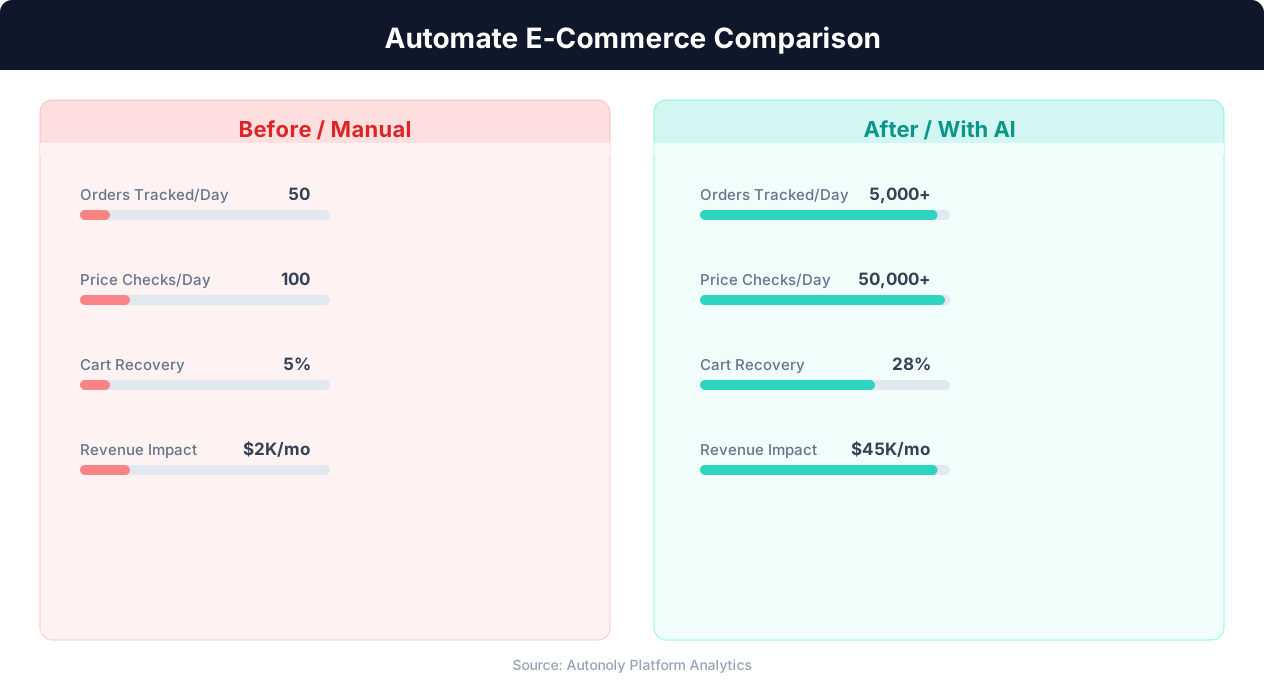
Manual vs automated product listing time comparison
Key Insight: Automated pricing intelligence captures 31% more competitive opportunities by monitoring and responding to market changes in real time (McKinsey Retail Practice).
Scheduling and Automation
Set this workflow to run every 4 hours using the Visual Workflow Builder and never think about manual exports again. The builder lets you configure the exact schedule using cron expressions or simple interval selectors, choose your Google Sheet destination, and add optional downstream steps like sending a Gmail summary digest or posting order counts to Slack. Each run completes in minutes, and you receive a notification if any errors occur. For high-volume stores during peak seasons like Black Friday, temporarily increase frequency to every hour to keep your team's data current.
Add Logic & Flow conditions to trigger alerts when daily order count exceeds a threshold, when a specific product sells out, or when average order value drops below a target — turning a simple data sync into an intelligent monitoring system. You can chain this workflow with other automations: when a high-value order is detected, automatically trigger a personalized thank-you email through Gmail, or when a product variant inventory hits zero, post an urgent restock alert to your purchasing team's Slack channel. The SSH & Terminal feature even lets you run custom Python scripts on the synced data for advanced analytics that go beyond what spreadsheet formulas can handle.
Further Reading
Explore more about the tools and techniques used in this workflow: Automate Google Sheets, No Code Automation Guide, Scheduled Execution.