


Why Automate LinkedIn Job Alerts to Discord?
Job seekers, hiring managers, and career communities all need timely access to new job postings. LinkedIn is the dominant platform for professional job listings, but its built-in alert system is limited — you get email notifications with poor formatting, no customization, and frequent delays. Many tech communities, career groups, and recruiting teams have moved their real-time communications to Discord, making it the natural destination for job alerts.
Autonoly's Browser Automation bridges this gap by monitoring LinkedIn Jobs in real time and delivering formatted alerts to your Discord server. Whether you are running a job-seekers community, a recruiting team channel, or your personal career feed, automated LinkedIn-to-Discord alerts ensure you never miss a relevant opportunity.
How the AI Agent Monitors LinkedIn Jobs
LinkedIn Jobs uses heavy JavaScript rendering, dynamic search filters, and personalized result ordering. Autonoly's AI Agent Chat navigates this complexity by running a real browser session that sees the same results a human visitor would see.
The agent navigates to LinkedIn Jobs, enters your search criteria (job title, keywords, location, company, remote/hybrid/onsite, experience level), sorts by date posted, and uses Data Extraction to pull details from each job listing. It identifies new postings that were not included in the previous run, ensuring only fresh opportunities trigger alerts.
For each new job, the agent can click into the full posting to extract detailed information — complete job description, required qualifications, salary range (when listed), benefits, and company overview. This deeper data creates richer Discord notifications.
What Data You Get
Each Discord notification includes:
Job Title — The role being advertised
Company — Hiring organization name
Location — Office location or remote indicator
Salary Range — When provided by the employer
Experience Level — Entry, mid-level, senior, director, etc.
Posted Date — When the listing was published
Apply Link — Direct URL to the LinkedIn application page
Job Type — Full-time, part-time, contract, internship
The Discord message is formatted with embedded links and clear structure for easy scanning in busy channels.
Customizing Your Job Monitor
The Visual Workflow Builder enables powerful customizations:
Multi-search monitoring: Track several different job searches simultaneously — for example, "Product Manager" in San Francisco AND "Staff Engineer" in New York
Company watchlists: Monitor specific high-priority companies for any new openings
Keyword filtering: Only alert on jobs that include or exclude specific terms in the description
Salary filtering: Use Data Processing to skip postings below a minimum salary threshold
For recruiting teams, add enrichment steps using SSH & Terminal to cross-reference job postings with your ATS and skip roles you have already sourced candidates for.
Scheduling and Frequency
Job postings on LinkedIn appear throughout the day. Schedule your monitoring workflow to run every few hours for near-real-time alerts, or twice daily for a morning and evening digest. The agent tracks which postings it has already processed, so subsequent runs only send notifications for genuinely new listings.
For high-demand roles (like senior engineering positions at FAANG companies), hourly monitoring ensures your community or team sees opportunities within minutes of posting — a significant advantage when popular roles receive hundreds of applications in the first day.
Exporting and Integrating
While Discord is the primary destination, you can add parallel outputs:
[Google Sheets integration](/integrations/google-sheets) — Maintain a searchable archive of all job postings
Excel (.xlsx) — Download periodic snapshots for analysis
[Slack](/integrations/slack) — Post to Slack channels in addition to Discord
[Notion](/integrations/notion) — Build a job tracking database with application status
Browse our templates library for pre-built job monitoring workflows. Visit pricing for execution costs. Learn about automation concepts in our workflow automation glossary. The full Integrations catalog shows all notification destinations.
Use Cases
Career-focused Discord communities use automated job feeds to provide daily value to members, increasing engagement and retention. Recruiting agencies monitor client companies for new openings to proactively pitch candidates. Individual job seekers set up personalized monitors to catch dream roles the moment they are posted. University career services run job feeds for graduating students. Freelance and contract workers monitor for short-term project opportunities matching their skill set.
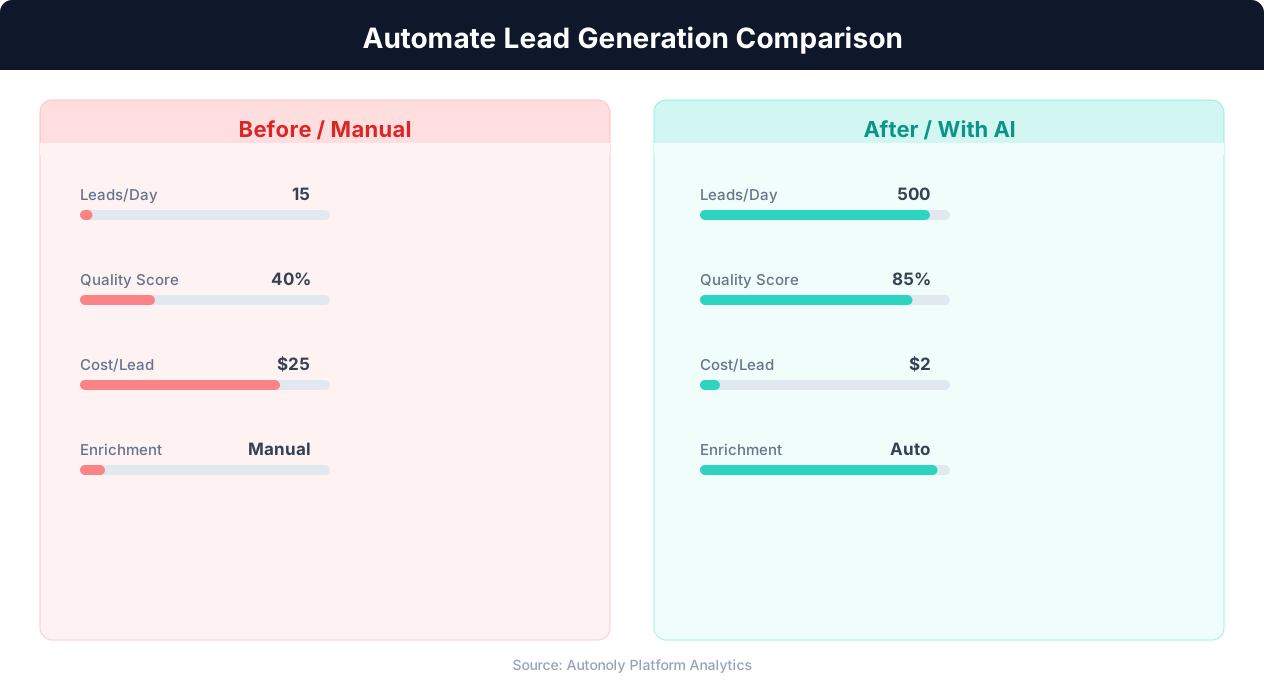
Cost per lead comparison between manual and automated methods
Key Insight: Companies using automated lead scoring see a 77% increase in lead conversion rates by focusing sales effort on the highest-potential prospects (Aberdeen Group).
How the AI Agent Handles This
The AI agent uses Browser Automation to run a full browser session that logs into LinkedIn, navigates the Jobs interface, applies your filters, and scrolls through results exactly as a human would. It maintains state between runs to track which job postings have already been sent, ensuring your Discord channel only receives genuinely new listings. The agent formats each alert with embedded links and structured fields, then pushes the message through the Integrations pipeline to your Discord webhook. If LinkedIn changes its page layout, the agent adapts automatically because it reads the page visually rather than relying on hardcoded selectors.
Deduplication Logic
Each job posting is identified by its unique LinkedIn job ID. The agent stores processed IDs between runs and filters them out before sending notifications, so even if LinkedIn reorders search results, you never receive duplicate alerts.
Key Insight: Lead response time drops from an average of 42 hours to under 5 minutes with automation, increasing contact rates by 900% (InsideSales.com).
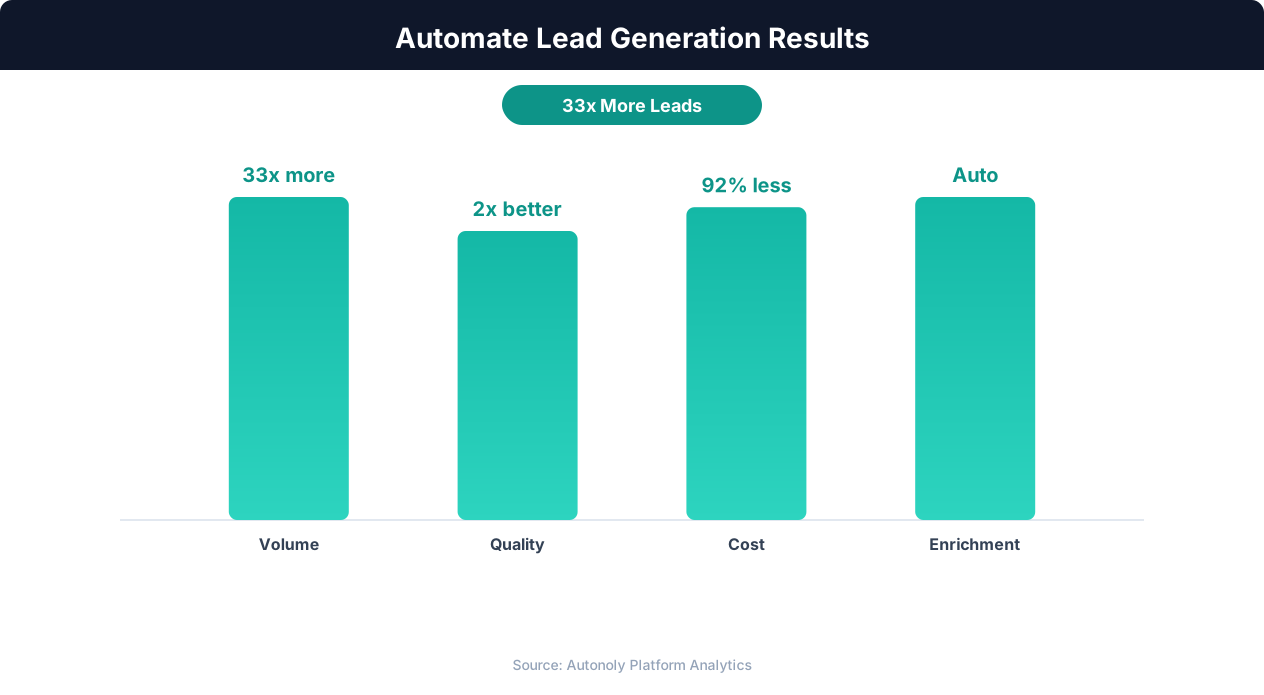
Lead quality scores with automated enrichment and scoring
Key Insight: Automated lead generation produces 50% more sales-ready leads at 33% lower cost per lead compared to manual prospecting (Marketo Research).
What You Can Customize
The Visual Workflow Builder gives you full control over every parameter — from search keywords, locations, and experience levels to the exact format of Discord messages. Add Logic & Flow conditions to route different job types to different Discord channels, or use Data Processing to filter out postings below a salary threshold before they reach your server. You can also add parallel outputs to Google Sheets for archival or Slack for cross-platform notifications. Browse our templates for ready-to-use job monitoring configurations.
Further Reading
Explore more about the tools and techniques used in this workflow: Scrape Linkedin Data, Schedule Automated Workflows, Scheduled Execution.