The Real Concern: You Are Handing Your Keys to a Machine
Let us start with the uncomfortable truth that most AI automation vendors dance around: when you use an AI browser automation platform, you are giving a piece of software your login credentials to business-critical systems. Your CRM. Your accounting software. Your email. Your cloud storage. Potentially your banking portal. Before going further, it helps to understand what automation is and how modern AI automation platforms are architected, so you can judge the real risks.
That is not a trivial thing. And anyone who tells you it is trivial, or waves it away with vague assurances about "enterprise-grade security," is not being honest with you.
Here is what actually happens when you use a platform like Autonoly to automate a task: you describe what you want done in plain English, the AI agent launches a real cloud browser, navigates to the target website, enters your credentials, performs the task, and delivers the results. During that process, your credentials exist in the system. They are transmitted, stored (even briefly), and used. That is a real attack surface, and you deserve to understand it fully before you decide whether the productivity gains justify the risk.
This article is not a sales pitch disguised as a security analysis. We are going to walk through the genuine risks, the realistic mitigations, the things that can still go wrong even with good security practices, and the situations where you should not use AI browser automation at all. By the end, you will have a clear framework for making this decision for your specific business context.
Honest Disclosure
We build an AI browser automation platform (Autonoly), so we have an obvious commercial interest in you feeling comfortable with this technology. We have tried to write this article as honestly as we can, including the parts that are inconvenient for our business. You should still apply your own judgment and consult your security team.
Why This Question Matters Now
AI browser automation is not a niche technology anymore. Businesses across every industry are using AI agents to automate repetitive web-based tasks: data entry, report generation, form submissions, data extraction, cross-platform transfers. The productivity gains are real and substantial. Tasks that took hours can be completed in minutes. Processes that required dedicated staff can run autonomously.
But the adoption curve has outpaced the security conversation. Many businesses are deploying AI automation without fully understanding the security implications, partly because vendors (including us) have been more eager to talk about features than risks. That needs to change, because the risks are real, and they are manageable only if you understand and address them.
The core tension is this: AI browser automation is inherently powerful precisely because it can access and interact with your accounts. That power is the product. You cannot get the benefits without granting the access. The question is not whether to grant access at all, but under what conditions, with what safeguards, and for which use cases.
The Trust You Already Give: Password Managers, SSO, IT Admins, and More
Before we analyze the specific security architecture of AI browser automation, it is worth examining something most people do not think about: the trust you already place in third-party software and services with your credentials.
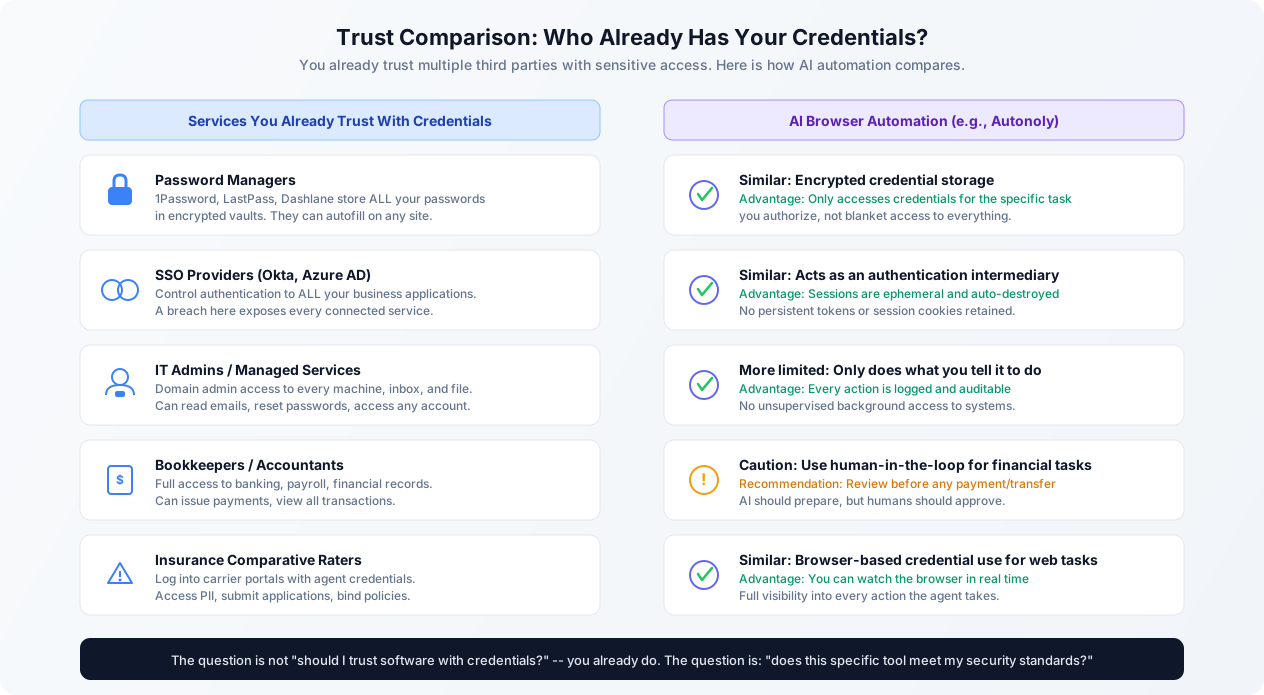
Password Managers
If you use 1Password, LastPass, Bitwarden, or Dashlane, you have already made a significant trust decision. Your password manager stores every credential you have: email, banking, social media, business applications, everything. It can autofill those credentials on any website. A compromise of your password manager vault is a total compromise of your digital identity.
You made that trade-off because the alternative (reusing weak passwords or trying to remember hundreds of unique ones) was worse. The security model of password managers (zero-knowledge encryption, master password derivation, local decryption) makes the risk manageable. But the risk is not zero. LastPass had a significant breach that exposed encrypted vault data. Users with weak master passwords were vulnerable. The trust was real, and so was the consequence when it was violated.
AI browser automation asks for a similar (but actually narrower) trust. A password manager stores all your credentials indefinitely. An AI automation platform typically accesses only the specific credentials needed for a specific task, and (in well-designed systems) does not retain them after the task completes.
SSO Providers
If your business uses Okta, Azure Active Directory, Google Workspace, or any other SSO provider, you have handed a single point of failure to a third party. Your SSO provider controls authentication to every connected application. If your SSO provider is compromised, every business application behind it is compromised. This is not hypothetical: Okta disclosed a breach that exposed customer data, and the blast radius included every application federated through their service.
You accepted this risk because centralized identity management is genuinely better than the alternative of managing separate credentials for every application. The point is not that SSO is bad. It is that you already make substantial trust decisions about credential management, and you evaluate those decisions based on the provider's security posture, not on a blanket refusal to trust anyone.
IT Administrators and Managed Service Providers
Your IT administrator (whether internal or outsourced) typically has domain admin access. They can read any email in your organization. They can reset any password. They can access any file on any company device. They can install software, monitor network traffic, and log into any business application using password reset flows. This is an enormous amount of trust, far more than any AI automation tool asks for.
Managed service providers (MSPs) often have persistent, always-on access to your entire IT infrastructure. They may have remote access tools installed on every company device. And unlike AI automation (which runs a specific task and stops), MSP access is continuous and largely unsupervised.
Bookkeepers, Accountants, and Financial Advisors
If you have a bookkeeper, they likely have login access to your bank accounts, payroll system, and accounting software. They can see every transaction, every employee's salary, and every vendor payment. Many small businesses share their actual banking credentials with their bookkeeper. This is a massive trust relationship that most business owners accept without thinking twice, because they need the help and they trust the person.
Industry-Specific Examples
Insurance agents routinely use comparative rating software that logs into multiple carrier portals with the agent's credentials to pull quotes. The rater software has full access to carrier systems, including policyholder PII, claims data, and the ability to bind coverage. Real estate agents use transaction management platforms that access MLS systems, document signing services, and escrow accounts. Healthcare administrators use practice management software that accesses EHR systems, insurance portals, and billing platforms.
In every case, the business made a rational decision: the productivity benefit justifies the trust, provided the security measures are adequate.
The Real Question
The question is not "should I trust software with my credentials?" You already do, in multiple ways. The question is: "does this specific tool meet the security standard I require, given the sensitivity of the data and the value of the automation?"
Where AI Automation Is Different
That said, AI browser automation is different from these existing trust relationships in important ways, and we should be honest about those differences.
First, AI agents are less predictable than traditional software. A password manager autofills a specific field on a specific page. An AI agent interprets instructions, makes decisions about how to navigate, and interacts with pages in ways that are not fully predetermined. This flexibility is the product's strength, but it introduces a class of risks that deterministic software does not have: the agent could misinterpret an instruction and take an unintended action.
Second, AI browser automation interacts with your accounts in a broader way than most credential-dependent software. It is not just storing or autofilling credentials. It is clicking buttons, filling forms, downloading files, and navigating through multi-step processes. The scope of possible actions is much wider than a password manager's autofill.
Third, the technology is newer. Password managers, SSO providers, and IT management tools have decades of security hardening, penetration testing, and incident response experience. AI browser automation is a newer category, and the security practices are still maturing across the industry.
These differences do not mean AI browser automation is inherently unsafe. They mean you should evaluate it with clear eyes, understanding both the parallels to existing trust relationships and the genuinely novel risk factors.
Security Architecture: How AI Browser Automation Actually Works
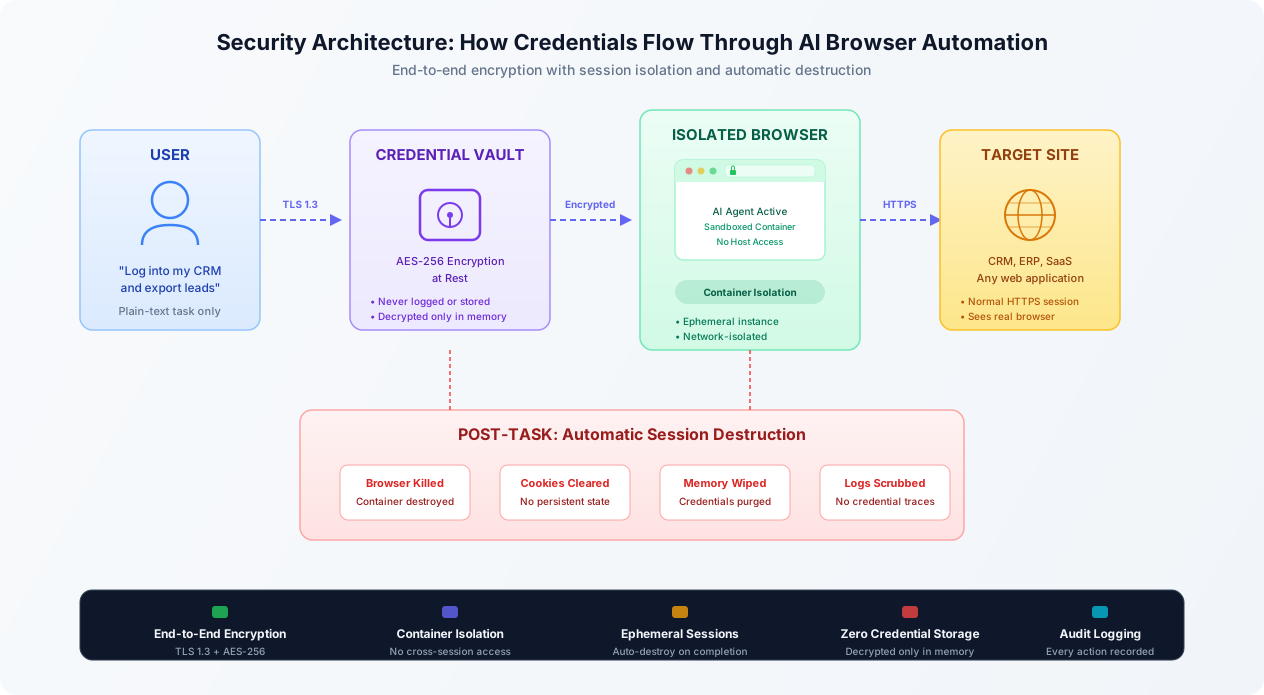
Understanding the security architecture helps you evaluate whether a specific platform's protections are adequate. Here is how a well-designed AI browser automation system handles credentials and sessions, using Autonoly's architecture as a reference point. Other platforms may differ in implementation details, but these are the security properties you should look for.
Credential Storage and Encryption
When you provide credentials to the platform, they should be encrypted immediately using strong encryption (AES-256 is the current standard). The encryption should happen client-side or at the earliest possible point in the pipeline, so credentials spend minimal time in plaintext. The encryption keys should be managed through a proper key management service (AWS KMS, Google Cloud KMS, HashiCorp Vault, or equivalent) with hardware security module (HSM) backing.
Critically, credentials should be encrypted at rest, meaning they are never stored in plaintext in any database, log file, configuration file, or backup. When credentials need to be used (when the AI agent needs to log into a site), they should be decrypted only in memory, only for the duration of the login action, and then wiped from memory immediately afterward.
This is the same approach password managers use, and it is well-understood cryptography. The risk is not in the encryption algorithm (AES-256 is not going to be broken anytime soon). The risk is in implementation: are the keys managed properly? Are there code paths where credentials accidentally appear in logs? Are backups encrypted with the same rigor as the primary database? These implementation details matter more than the headline encryption standard.
Cloud Browser Isolation
The browser where the AI agent performs tasks should run in an isolated environment, separate from other users' sessions and from the platform's own infrastructure. In practice, this means containerized browser instances: each task gets its own container (typically Docker-based) with its own browser process, its own network namespace, and its own filesystem.
Container isolation means that even if an attacker compromised one browser session, they would not be able to access other users' sessions, the platform's credential vault, or the underlying infrastructure. The container has no access to the host system beyond what is explicitly exposed. This is a well-established security pattern used extensively in cloud computing, CI/CD pipelines, and multi-tenant SaaS applications.
The key security property of cloud browser isolation is that your credentials never touch your own machine. The browser runs entirely in the cloud. Your credentials are transmitted from the encrypted vault to the cloud browser over TLS, used within the container, and never sent to your local device. This means that malware on your computer cannot intercept credentials during the automation process (though it could potentially intercept credentials when you initially enter them into the platform, which is a general risk for any web application).
Session Lifecycle and Destruction
A well-designed system follows an ephemeral session model. When a task starts, a fresh browser container is created. When the task completes (or fails, or times out), the container is destroyed, along with everything in it: browser state, cookies, localStorage, session tokens, cached pages, downloaded files, and any credentials that were decrypted in memory. This is not a soft cleanup (clearing cookies within a persistent browser). This is container destruction: the entire filesystem, memory space, and network namespace cease to exist.
This ephemeral model is actually more secure than how most people use their own browsers. Your personal browser retains cookies, session tokens, and cached credentials indefinitely. If your laptop is stolen or compromised, every active session in your browser is exposed. An ephemeral cloud browser has none of those persistent artifacts. When the task is done, there is nothing left to steal.
Network Security
All communication should be encrypted in transit using TLS 1.3 (or at minimum TLS 1.2). This covers: the connection between your browser and the platform, the connection between the platform and the credential vault, and the connection between the cloud browser and the target website. There should be no point in the data flow where credentials travel over an unencrypted connection.
The cloud browser's network access should be restricted. It should be able to reach the target website (necessary to perform the task) but should not have unrestricted internet access. Outbound network restrictions limit the blast radius of a compromise: even if an attacker gained control of the browser container, they could not exfiltrate data to arbitrary destinations.
Audit Logging
Every action the AI agent takes should be logged: pages visited, elements clicked, forms filled (with credential values redacted), files downloaded, data extracted. These audit logs serve two purposes. First, they provide accountability: you can review exactly what the agent did and verify it matched your instructions. Second, they provide forensic capability: if something goes wrong, you can reconstruct what happened, when, and what data was accessed.
The audit logs themselves must not contain sensitive data. Credential values should be redacted or masked in logs. Screenshots (if captured) should not show credential fields in cleartext. This is a common implementation mistake: platforms that log extensively for debugging purposes may inadvertently capture credentials in their log data. Ask your vendor specifically whether their logging pipeline has been audited for credential leakage.
Key Architecture Properties to Verify
When evaluating any AI automation platform, ask these questions: (1) Are credentials encrypted at rest with AES-256 or equivalent? (2) Are browser sessions containerized and isolated? (3) Are containers destroyed after task completion? (4) Are credentials redacted from all logs and screenshots? (5) Is all communication encrypted in transit with TLS 1.3?
What Could Actually Go Wrong: A Threat Model for AI Browser Automation
Security analysis without threat modeling is just marketing. Here are the realistic things that could go wrong when using AI browser automation, ranked roughly by likelihood and severity. We are not going to sugarcoat these.
Threat 1: Credential Exposure Through Platform Breach
What happens: An attacker breaches the AI automation platform itself and gains access to the credential vault. If encryption is properly implemented, they get encrypted credential blobs that they cannot decrypt without the encryption keys. If the keys are also compromised (a much harder but not impossible second step), they get plaintext credentials to all users' accounts.
Likelihood: Low to moderate. Any SaaS platform is a potential breach target. The likelihood depends on the platform's security maturity, which varies enormously across vendors in this space.
Severity: Potentially catastrophic. A credential vault breach could expose credentials to dozens or hundreds of business applications per user.
Mitigation: Proper key management (HSM-backed, with key rotation), minimal credential retention (do not store credentials longer than necessary), and credential scope limitation (only store credentials for specific sites, not a master password). From your side: use dedicated service accounts with limited permissions rather than your personal admin credentials. Enable MFA on every account the AI agent accesses (the agent can handle MFA in many cases, or you can approve MFA challenges as part of a human-in-the-loop flow).
Threat 2: AI Agent Takes Unintended Actions
What happens: The AI agent misinterprets your instructions and performs an action you did not intend. For example, you ask it to "update the pricing on our website" and it changes prices to values you did not specify. Or you ask it to "send the report to the team" and it sends sensitive data to the wrong recipients.
Likelihood: Moderate. AI agents are good but not perfect at interpreting natural language instructions. Ambiguous instructions are particularly risky. The probability of misinterpretation depends on the task complexity and the specificity of your instructions.
Severity: Variable. Ranges from trivial (agent clicks the wrong button, task fails harmlessly) to serious (agent sends confidential data to the wrong people, agent makes unauthorized changes to production systems).
Mitigation: Use specific, unambiguous instructions. Enable human-in-the-loop confirmation for sensitive actions (many platforms, including Autonoly's live browser control, allow you to watch the agent work in real time and intervene if needed). Start with low-risk tasks and expand scope gradually as you build confidence. Use dedicated accounts with permissions limited to exactly what the task requires.
Threat 3: Data Exfiltration Through Compromised Agent
What happens: An attacker manipulates the AI agent (through prompt injection, model poisoning, or platform compromise) to exfiltrate data it accesses during task execution. The agent navigates to your CRM, extracts customer data, and sends it to an attacker-controlled destination.
Likelihood: Low but non-trivial. Prompt injection is a known vulnerability in AI systems. If the target website contains malicious content designed to manipulate AI agents, the agent could potentially be redirected. This is an active area of security research with no complete solution yet.
Severity: High. Data exfiltration could expose customer PII, financial data, or trade secrets, with regulatory, legal, and reputational consequences.
Mitigation: Network restrictions on the browser container (allowlist outbound destinations), monitoring for unusual data transfer patterns, and content filtering on agent outputs. From your side: limit the scope of data the agent can access by using role-restricted accounts.
The Prompt Injection Risk Is Real
Prompt injection -- where malicious content on a web page tricks the AI agent into performing unintended actions -- is an unsolved problem in AI security. No vendor can guarantee complete immunity. Mitigations exist (instruction anchoring, output filtering, action confirmation), but they reduce risk rather than eliminate it. If your threat model cannot tolerate any prompt injection risk, AI browser automation may not be appropriate for your use case today.
Threat 4: Session Hijacking
What happens: An attacker intercepts the session between the AI agent and the target website, gaining access to the authenticated session. This could happen through a compromised network path, a vulnerability in the cloud browser infrastructure, or a man-in-the-middle attack on the TLS connection.
Likelihood: Very low with proper TLS implementation. TLS 1.3 with certificate pinning makes man-in-the-middle attacks extremely difficult. The more realistic vector is a compromise of the cloud infrastructure itself.
Severity: High. Session hijacking gives the attacker full access to whatever account the agent is authenticated to, for the duration of the session.
Mitigation: TLS 1.3 everywhere, certificate validation, ephemeral sessions (so hijacked sessions expire quickly), and IP-binding for sessions where supported.
Threat 5: Insider Threat at the Platform Vendor
What happens: An employee of the AI automation platform abuses their access to view or steal user credentials. This is the same risk that exists with any SaaS vendor, cloud provider, or managed service provider.
Likelihood: Low, but it has happened at major companies. Insider threats are a persistent risk in any organization that handles sensitive data.
Severity: High. An insider with infrastructure access could potentially bypass encryption controls, access credential vaults, or modify the system to capture credentials.
Mitigation: SOC 2 Type II compliance (which includes controls for personnel security, access management, and monitoring), background checks for employees with access to sensitive systems, principle of least privilege for internal access, and audit logging of all administrative actions. From your side: there is limited mitigation available beyond choosing a vendor with strong security governance and verifying their compliance certifications.
Threat 6: Credential Persistence in Unexpected Places
What happens: Despite proper session destruction, credentials persist in unexpected places: swap files, core dumps, log buffers, error reporting services, CDN caches, or third-party monitoring tools. The platform believes credentials were wiped, but copies exist in locations that were not accounted for in the cleanup process.
Likelihood: Moderate. This is a common implementation gap. It is difficult to guarantee that a value is truly wiped from all memory and storage locations in a complex system. Memory-safe handling of sensitive data requires deliberate engineering (secure string types, memory zeroing, swap encryption) that not all platforms implement rigorously.
Severity: Moderate. Credentials in log files or error reports could be discovered by anyone with access to those systems, but exploitation requires specific access and knowledge.
Mitigation: Ask your vendor specifically about their secure credential handling: Do they use secure string types? Do they encrypt swap space? Do they audit error reporting pipelines for credential leakage? Have they had a third-party penetration test that specifically tested for credential persistence?
Best Practices: How to Use AI Browser Automation Safely
If you have decided that the benefits of AI browser automation justify the risks for your use case, here are concrete best practices to minimize your exposure. These are not theoretical recommendations. They are practical steps that meaningfully reduce risk.
1. Use Dedicated Service Accounts
Never give an AI agent your personal admin credentials. Create dedicated service accounts with the minimum permissions required for the specific task. If the agent needs to export leads from your CRM, create an account that has read access to leads and nothing else. No access to billing. No access to user management. No access to integrations or API keys.
This is the principle of least privilege, and it is the single most impactful thing you can do to limit your risk. If the service account is compromised, the attacker gets access to exactly the scope you defined, not your entire administrative domain.
Many business applications support role-based access control (RBAC) that lets you create accounts with precisely scoped permissions. Use it. If the application does not support granular permissions, consider whether the risk of granting full access to an AI agent is acceptable for that specific application.
2. Enable MFA on Everything
Multi-factor authentication should be enabled on every account the AI agent accesses. This creates a security checkpoint that survives credential compromise: even if credentials are leaked, they are useless without the second factor.
Modern AI automation platforms can handle many MFA flows. Time-based one-time passwords (TOTP) can be generated programmatically if you provide the TOTP secret to the platform (which introduces its own key management considerations). Push-based MFA (like Duo or Microsoft Authenticator) can use a human-in-the-loop flow where you approve the push notification while the agent waits. SMS-based MFA is the weakest option and is generally discouraged, but it still adds a layer of protection.
If MFA is not possible for a specific account (some legacy systems do not support it), compensate with other controls: IP allowlisting, shorter session timeouts, and more aggressive credential rotation.
3. Implement Human-in-the-Loop for Sensitive Actions
Not every action needs human approval. Extracting a report? Let it run. Filling out a routine form with predefined data? Automate it fully. But for actions with significant consequences (sending emails, submitting financial transactions, modifying access controls, deleting data), require human confirmation before the agent proceeds.
With platforms like Autonoly, you can watch the AI agent's browser in real time and intervene at any point. Use this capability for new automations until you have confidence in the agent's behavior. Once a workflow is proven reliable, you can reduce oversight for routine tasks while maintaining approval gates for high-impact actions.
4. Rotate Credentials Regularly
Establish a credential rotation schedule for all accounts used by AI automation. Monthly rotation is a reasonable starting point for most business applications. More sensitive accounts (financial systems, admin portals) should be rotated more frequently.
Credential rotation limits the window of exposure if credentials are compromised. Even if an attacker obtains credentials from a breach, they become useless at the next rotation. Automated credential rotation (where the platform can update stored credentials programmatically) is ideal, but manual rotation on a schedule is better than no rotation.
5. Review Audit Logs
Actually review the audit logs. Many businesses enable logging but never look at the logs unless something goes wrong. Regular log review (weekly at minimum) helps you catch anomalies early: unexpected sites being accessed, unusual data volumes being extracted, actions taken outside normal business hours, or tasks running longer than expected.
Look for: tasks that accessed sites you did not expect, large data extractions (which could indicate data exfiltration), failed login attempts (which could indicate credential issues or unauthorized access attempts), and any actions that do not match your defined workflows.
6. Start Small, Expand Gradually
Do not start by automating your most sensitive business processes. Begin with low-risk, high-frequency tasks: data extraction from public-facing pages, report generation from non-sensitive systems, or form filling with non-confidential data. Build confidence in the platform's reliability and security before expanding to more sensitive use cases.
This gradual approach also gives you time to develop internal expertise with the platform, establish monitoring processes, and train your team on security best practices for AI automation. Rushing to automate everything on day one is a recipe for security incidents.
7. Segment Your Automations
Use separate credential sets for different categories of tasks. Credentials used for data extraction should be different from credentials used for data modification. Credentials used for customer-facing systems should be different from credentials used for internal systems. This segmentation limits blast radius: a compromise of one credential set does not expose all your automations.
If the platform supports workflow building, organize your automations by security tier. Tier 1 (public data, read-only) can run fully automated. Tier 2 (internal systems, read-only) should have monitoring. Tier 3 (any system with write access) should require human approval for key actions.
The Minimum Viable Security Posture
At minimum: dedicated service accounts, MFA on every automated account, human-in-the-loop for write operations, and weekly audit log review. This baseline is achievable for any business and eliminates the most common risk scenarios.
Compliance Considerations: SOC 2, HIPAA, GDPR, and Industry Regulations
For many businesses, the security question is not just about risk tolerance but about regulatory compliance. Using AI browser automation may implicate various compliance frameworks, and understanding those implications is essential before you deploy.
SOC 2
SOC 2 (Service Organization Control 2) is the most relevant compliance framework for evaluating AI automation vendors. A SOC 2 Type II report provides independent verification that the vendor has implemented and maintained effective security controls over a sustained period (typically 6-12 months). It covers five trust service criteria: security, availability, processing integrity, confidentiality, and privacy.
If your business is subject to SOC 2 requirements (or if your customers require SOC 2 compliance from you), your AI automation vendor should have their own SOC 2 Type II report. Their compliance does not automatically extend to your compliance, but using a SOC 2-certified vendor demonstrates due diligence in your vendor selection. If the vendor does not have SOC 2 certification, that does not necessarily mean their security is inadequate, but it does mean their security claims have not been independently verified.
Key SOC 2 controls to ask about: access management (how is access to credential vaults controlled?), change management (how are platform updates tested before deployment?), incident response (what happens when a security incident occurs?), and monitoring (how is the platform monitored for anomalies?).
HIPAA
If your business handles protected health information (PHI) and you use AI browser automation to access systems containing PHI, HIPAA applies. This is a strict standard with specific requirements.
The AI automation vendor becomes a Business Associate under HIPAA, and you need a Business Associate Agreement (BAA) in place before any PHI is processed. The vendor must implement HIPAA-required safeguards: encryption of PHI at rest and in transit, access controls, audit logging, and breach notification procedures. The vendor's employees who could potentially access PHI must be trained on HIPAA requirements.
HIPAA Warning
Do not use AI browser automation with systems containing PHI unless the vendor explicitly offers HIPAA compliance, will sign a BAA, and can demonstrate the specific technical safeguards required by the HIPAA Security Rule. Many AI automation vendors do not currently offer HIPAA compliance. Using a non-compliant vendor with PHI is a violation that can result in significant fines.
GDPR
If your business processes personal data of EU residents (or you are an EU-based business), GDPR applies to your AI automation activities. The AI automation vendor becomes a Data Processor under GDPR, and you need a Data Processing Agreement (DPA) that specifies: what personal data is processed, the purpose of processing, the duration of processing, and the vendor's obligations regarding data protection.
Key GDPR considerations for AI browser automation: the vendor must not process personal data for purposes beyond what you have specified (e.g., they should not use data accessed through your automations to train their AI models). You must have a lawful basis for processing any personal data that the AI agent accesses. Data subjects have the right to know that their data is being processed by an AI agent, and the right to request deletion of their data. If the AI agent accesses personal data of EU residents while operating from servers outside the EU, the standard contractual clauses for international data transfers apply.
Industry-Specific Regulations
Financial Services (SOX, PCI DSS): If AI automation accesses financial reporting systems, Sarbanes-Oxley controls on financial data integrity apply. All automated changes to financial data must be auditable and traceable. If the agent processes credit card data, PCI DSS requirements apply, including network segmentation, encryption, and access controls. Most AI automation platforms are not PCI DSS certified, so do not use them to process raw credit card numbers.
Insurance (state regulations): Insurance agencies using AI automation to access carrier portals should verify that automated access does not violate their carrier agreements. Some carriers explicitly prohibit automated access to their portals. Using AI automation in violation of these agreements could jeopardize your carrier appointments.
Legal (attorney-client privilege): If AI automation accesses systems containing privileged communications, consider whether the automation platform vendor's access to that data could waive privilege. This is an evolving area of law, and you should consult with counsel before automating access to privileged systems.
Practical Compliance Steps
Regardless of which specific regulations apply to your business, these steps help ensure compliance when deploying AI browser automation:
Document your use case. Write down what the AI agent will access, what data it will process, and what actions it will take. This documentation is essential for any compliance audit.
Conduct a vendor security assessment. Request the vendor's SOC 2 report, security documentation, and data processing agreement. If they cannot provide these, that is a significant compliance gap.
Implement data minimization. Configure automations to access and extract only the minimum data necessary for the task. Do not pull entire databases when you need a specific report.
Maintain records of processing. GDPR requires a record of processing activities. Keep logs of what data your AI automations access, when, and for what purpose.
Conduct regular reviews. Compliance is not a one-time check. Review your AI automation practices quarterly to ensure they still align with your compliance requirements, especially as the platform adds new features or you expand your automation use cases.
Red Flags and Vendor Evaluation: What to Look For (and Run From)
Not all AI browser automation platforms are built with the same security rigor. Some are startups moving fast and cutting corners on security. Others are established platforms with mature security programs. Here is how to tell the difference.
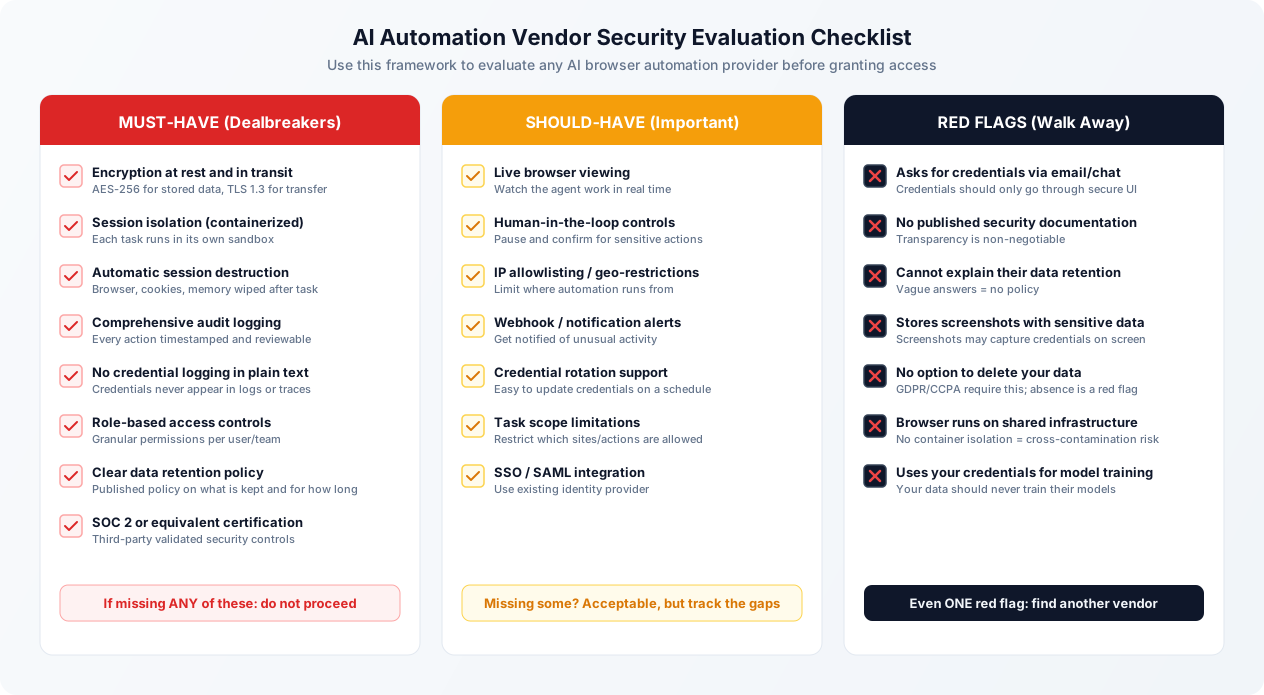
Red Flags That Should Make You Walk Away
They ask for credentials via email, chat, or a shared document. Credentials should only be entered through a secure interface within the platform itself, transmitted over TLS, and encrypted immediately. If a vendor asks you to email them your passwords, they do not have a credential management system, and your credentials will sit in plaintext in someone's inbox.
They cannot articulate their security architecture. Ask the vendor: "How are my credentials stored? What encryption do you use? Are browser sessions isolated? What happens to my data after a task completes?" If they cannot give specific, technical answers, they either do not have these protections or do not understand their own system well enough to be trusted with your credentials.
No published security documentation. A vendor that takes security seriously publishes security documentation: a security whitepaper, a trust page, a data processing agreement, and ideally a SOC 2 report. If none of this exists, security is not a priority for them.
They store screenshots that capture sensitive data. Screenshots of the browser during automation are useful for debugging and auditing, but they can inadvertently capture passwords, PII, financial data, and other sensitive information displayed on screen. Ask whether screenshots are captured, how they are stored, how long they are retained, and whether sensitive regions are redacted. If the vendor captures and retains screenshots indefinitely without redaction, that is a significant data exposure risk.
No option to delete your data. GDPR and CCPA both require data deletion capabilities. But beyond legal requirements, the ability to delete your data (credentials, task history, extracted data) is a basic security control. If the vendor cannot or will not delete your data on request, consider how long your credentials and business data will persist in their systems.
Browser sessions run on shared infrastructure without isolation. If the vendor runs multiple users' browser sessions on the same machine without container isolation, there is a risk of cross-contamination: one user's session could potentially access another user's data. This is a fundamental architecture problem that cannot be fixed with incremental patches.
Your data is used for model training. Some AI platforms use customer data (including the data accessed through automations) to train or improve their AI models. This means your business data, customer information, and credential usage patterns could end up influencing the model's behavior for other users. Ask explicitly whether your data is used for training, and get the answer in writing.
Positive Signals That Build Confidence
SOC 2 Type II certification. This is the gold standard for SaaS security validation. A Type II report (as opposed to Type I) means the controls have been verified over a sustained period, not just at a point in time.
Public bug bounty program. Vendors who run bug bounty programs are inviting security researchers to find vulnerabilities. This demonstrates confidence in their security and a commitment to continuous improvement.
Transparent incident history. A vendor that has disclosed and resolved past security issues is more trustworthy than one that claims to have never had any. Every software company has vulnerabilities; the question is whether they handle them responsibly.
Encryption at rest and in transit with documented key management. Specific documentation about how encryption keys are managed (HSM backing, key rotation schedules, key access controls) indicates a mature security program.
Regular third-party penetration testing. Annual or more frequent penetration testing by an independent security firm, with results available to customers under NDA, demonstrates proactive security validation.
Live browser viewing. The ability to watch the AI agent work in real time is both a usability feature and a security feature. It gives you visibility into exactly what the agent is doing with your credentials. Platforms like Autonoly that offer real-time browser viewing provide an additional layer of transparency that purely headless automation cannot match.
Questions to Ask During Vendor Evaluation
Here is a concrete list of questions to send to any AI automation vendor before you commit. Their answers (and their willingness to answer) will tell you a lot about their security maturity.
1. How are credentials encrypted at rest? What encryption standard and key management approach do you use?
2. Are browser sessions containerized? What isolation technology do you use?
3. What happens to browser state, cookies, and memory after a task completes?
4. Do credentials ever appear in plaintext in any log, trace, error report, or screenshot?
5. Do you have SOC 2 Type II certification? If not, what third-party security assessments have you completed?
6. Will you sign a Data Processing Agreement (for GDPR compliance)?
7. Will you sign a Business Associate Agreement (for HIPAA compliance, if applicable)?
8. Is customer data used to train your AI models?
9. What is your data retention policy? Can I delete all my data on request?
10. What is your incident response process? How and when would you notify me of a breach?
A vendor that answers all of these questions specifically and transparently is one you can evaluate on the merits. A vendor that deflects, gives vague answers, or refuses to answer is one you should avoid regardless of how impressive their product demo looked.
When NOT to Use AI Browser Automation: Drawing the Line
AI browser automation is a powerful tool, but it is not appropriate for every use case. Here are the situations where the risks outweigh the benefits, regardless of how good the vendor's security is.
Do Not Automate: Financial Trading and Transaction Authorization
Any system where the AI agent could autonomously initiate financial transactions (stock trades, wire transfers, payment authorizations) carries unacceptable risk from misinterpretation. An AI agent that misreads a number, misinterprets an instruction, or encounters an unexpected UI change could execute a transaction you did not intend. The speed of AI automation means the mistake happens before you can intervene.
Financial data extraction and report generation? Generally fine. Preparing transactions for human approval? Fine with human-in-the-loop. But fully autonomous financial transaction execution is a bright line you should not cross.
Do Not Automate: Medical Records Without a BAA
Accessing electronic health records, patient portals, or any system containing PHI without a proper Business Associate Agreement is a HIPAA violation. Full stop. If your AI automation vendor does not offer HIPAA compliance and a BAA, do not use their platform to access medical records. The fines for HIPAA violations can be enormous, and "we did not know" is not an accepted defense.
Even with a BAA in place, be extremely cautious about automating access to medical records. The sensitivity of the data and the regulatory requirements mean that any mistake (data sent to the wrong recipient, data retained longer than necessary, data accessed without proper authorization) has serious consequences.
Do Not Automate: Government and Military Systems
Systems subject to FedRAMP, ITAR, CMMC, or other government security frameworks have strict requirements about how they are accessed, from where, and by what systems. Most AI automation platforms do not meet these requirements. Using unauthorized automation tools to access government systems could violate federal regulations and jeopardize your government contracts or clearances.
Do Not Automate: Legal Systems With Privileged Content
Case management systems, document management systems containing privileged communications, and e-discovery platforms contain information protected by attorney-client privilege or work product doctrine. Granting a third-party AI platform access to this data could potentially waive privilege. Until the legal landscape around AI access to privileged content is clearer, avoid automating access to systems that contain privileged legal materials.
Do Not Automate: Systems Where Errors Are Irreversible
Some actions cannot be undone: publishing content to a public website, sending emails to customers, submitting regulatory filings, closing financial accounts, or deleting data. If the AI agent makes an error in any of these actions, the consequences are immediate and potentially severe. These tasks should either be avoided entirely or implemented with mandatory human approval before the final action.
The Reversibility Test
Before automating any task, ask: "If the AI agent does this wrong, can we undo it?" If the answer is yes (wrong data can be corrected, wrong report can be regenerated), automation is reasonable. If the answer is no (sent email cannot be unsent, published content cannot be unpublished, deleted records cannot be recovered), require human-in-the-loop confirmation or do not automate.
The Safe Zone: Where AI Browser Automation Excels
For balance, here are the use cases where AI browser automation provides substantial value with manageable risk:
Data extraction and reporting. Pulling data from web applications, generating reports, aggregating information across multiple sources. Read-only operations with low risk and high time savings. This is the sweet spot for AI automation.
Form filling with predefined data. Entering data from spreadsheets into web forms, submitting applications with known-good data, populating CRM records. The data is predetermined, so the risk of AI misinterpretation is minimal.
Cross-platform data transfer. Moving data from one system to another (CRM to spreadsheet, email attachments to document management, web data to database) through platform integrations. High-frequency, tedious tasks that humans hate and AI handles well.
Monitoring and alerting. Checking websites for changes, monitoring competitor pricing, tracking regulatory updates, verifying that published content is correct. Read-only, low-risk, high-value.
Routine administrative tasks. User provisioning, access reviews, report distribution, and other IT administrative tasks that follow predictable patterns and have well-defined outcomes.
The common thread in safe use cases: they are either read-only, operate on non-sensitive data, have reversible outcomes, or include human checkpoints for critical actions.