
What is Cross-Session Learning?
Cross-session learning cycle: run automation, capture what worked, apply knowledge to future runs
Every automation tool you have used before — Zapier, Make, n8n, UiPath, custom Python scripts — is stateless. Run 1 and Run 100 execute with identical knowledge. The tool does not remember that the CAPTCHA on that government portal is always a slider. It does not know that the pagination on that e-commerce site breaks if you click too fast. It does not recall that the login form on that supplier portal has a hidden honeypot field that triggers bot detection if filled.
Autonoly remembers all of this. Cross-session learning means every automation run teaches the system something, and that knowledge is automatically applied to future runs. Your automations get faster, more accurate, and more reliable over time — without you configuring, training, or tuning anything.
This is Autonoly's deepest competitive advantage. Other tools can match individual features — browser control, data extraction, AI content generation. No other automation platform learns from its own execution history and improves autonomously.
What "Learning" Actually Means (Technically)
Let's be precise about what is happening, because "AI that learns" is a phrase that usually means nothing.
Cross-session learning is not fine-tuning a language model. It is not reinforcement learning from human feedback. It is not a neural network being retrained on your data. It is a structured knowledge base that stores operational metadata from each automation run and applies it as context for future runs.
Here is what gets stored after each completed session:
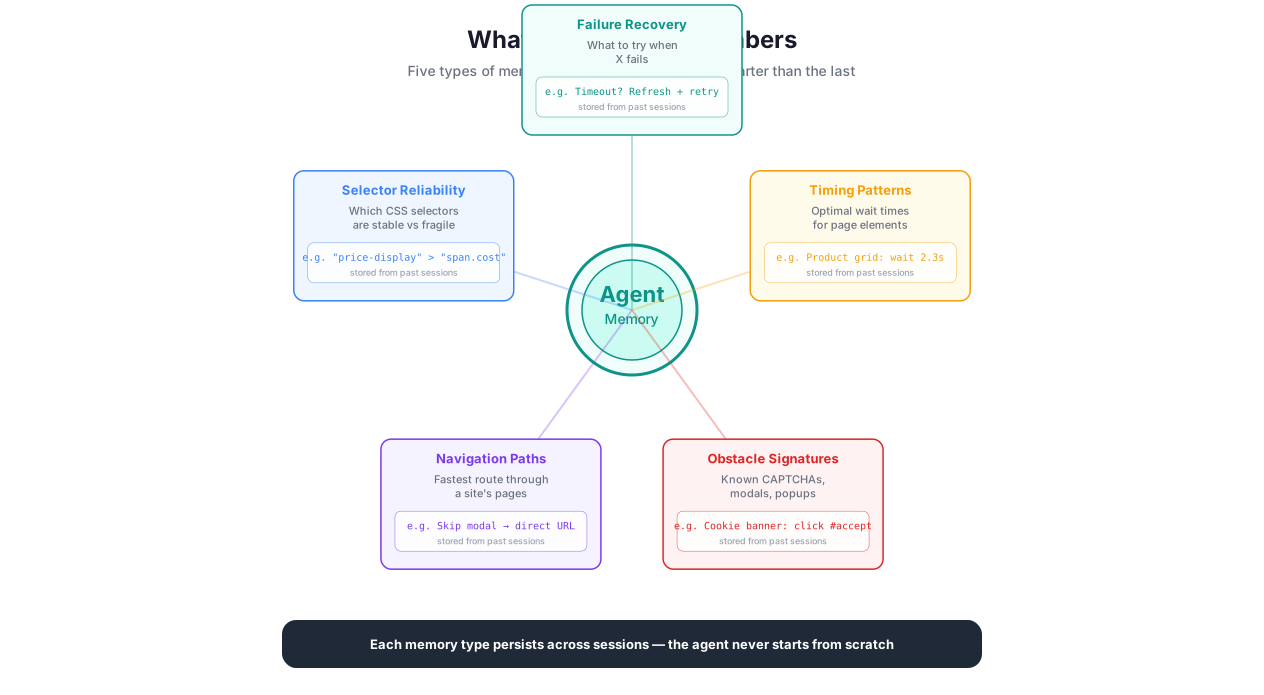
Selector reliability scores. For every CSS selector the agent used during a session, the system records whether it successfully found the target element. A selector that worked gets a positive score for that domain. A selector that failed gets a negative score. On future runs, the agent tries high-scoring selectors first and avoids known-broken ones. This simple mechanism eliminates the most common cause of automation failure: stale selectors.
Navigation path maps. The system records the sequence of page navigations that successfully reached the target content. "Homepage -> Advanced Search -> Filter by date -> Page 1 of results" becomes a stored path. On future runs, the agent skips the exploratory navigation and goes directly to the known-good path.
Obstacle signatures. When the agent encounters and overcomes an obstacle — a cookie consent popup, a CAPTCHA, a login wall, an anti-bot challenge — the obstacle type and the successful resolution strategy are stored per domain. "Domain: example-gov-portal.gov, Obstacle: slider CAPTCHA on login page, Resolution: coordinate-based drag from position (120, 340) to position (380, 340)." Next time, the agent recognizes the obstacle immediately and applies the known resolution without trial and error.
Timing patterns. Some websites require specific timing to work reliably. A page might need 3 seconds for its JavaScript to finish rendering. A form submission might need a 500ms delay between filling fields to avoid triggering rate limiting. An infinite scroll might need exactly 4 scroll events to load all content. These timing parameters are stored and applied automatically.
Extraction field mappings. When the agent successfully maps extracted data to the fields you requested (product name, price, rating), the mapping between DOM selectors and field names is stored. This is particularly valuable for sites with complex, non-obvious DOM structures where finding the right selector for "price" required multiple attempts.
Failure records. Equally important: the system records what did not work. If a particular approach caused a bot detection trigger, produced corrupted data, or led to an error page, that approach is flagged as failed and deprioritized. The agent does not repeat mistakes.
The Compound Effect in Practice
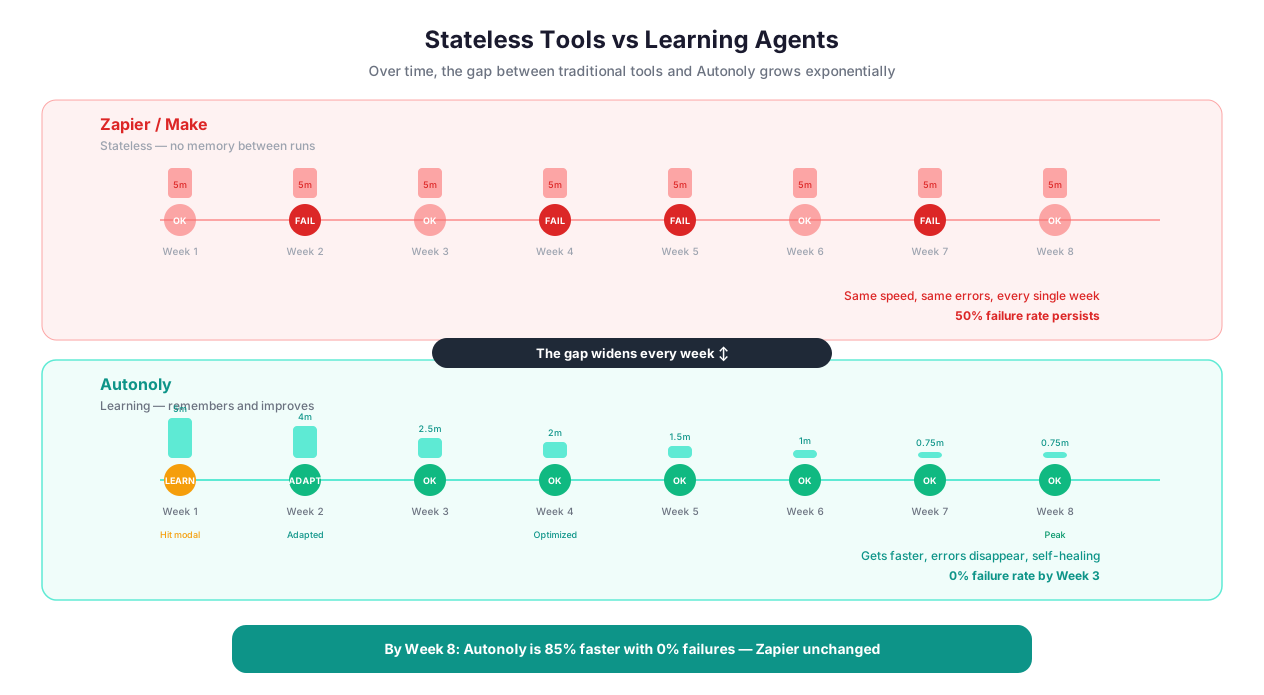
Comparison showing stateless automation repeating the same work vs learning agent improving with each run
Here is a real scenario that illustrates the compound effect:
Week 1: First run on a government contract database. The agent has never seen this site before. It loads the homepage, finds the search page (two wrong clicks before finding the right navigation link), enters search criteria (the date picker has an unusual format that takes two attempts), processes the results (pagination uses "Load More" buttons instead of page links, requiring a different scrolling strategy), and extracts data from each result (the price field is rendered in a <span> inside a <td> inside a <div> with a randomized class name). Total time: 7 minutes. Two mid-session corrections needed.
Week 2: Second run, same site. The agent knows the navigation path (directly to the search page, skipping the wrong links). It knows the date picker format. It knows to use scroll-and-click for pagination instead of looking for page links. It knows the correct selector path for the price field. Total time: 2 minutes 15 seconds. Zero corrections needed.
Week 4: Fourth run. The government portal deployed a minor UI update — the search button changed from "Search" to "Find Contracts" and moved to a slightly different position. The old selector fails. The agent falls back to AI Vision, finds the new button visually, clicks it, and caches the new selector. Total time: 2 minutes 40 seconds (the 25-second delay was the single vision fallback). Next week's run will be back to 2 minutes.
Week 8: The site adds a CAPTCHA. The government portal introduces a slider CAPTCHA on the search page. The agent hits it for the first time, uses vision to identify the slider, drags it to the correct position, and records the obstacle signature. Next week, the CAPTCHA is handled in 200ms without vision because the agent knows exactly where the slider is and where to drag it.
By week 8, this automation runs faster than a human could do it manually, handles edge cases that would break any static automation, and requires zero maintenance despite two site changes.
Speed Is Not the Only Improvement
The numbers get better across every dimension:
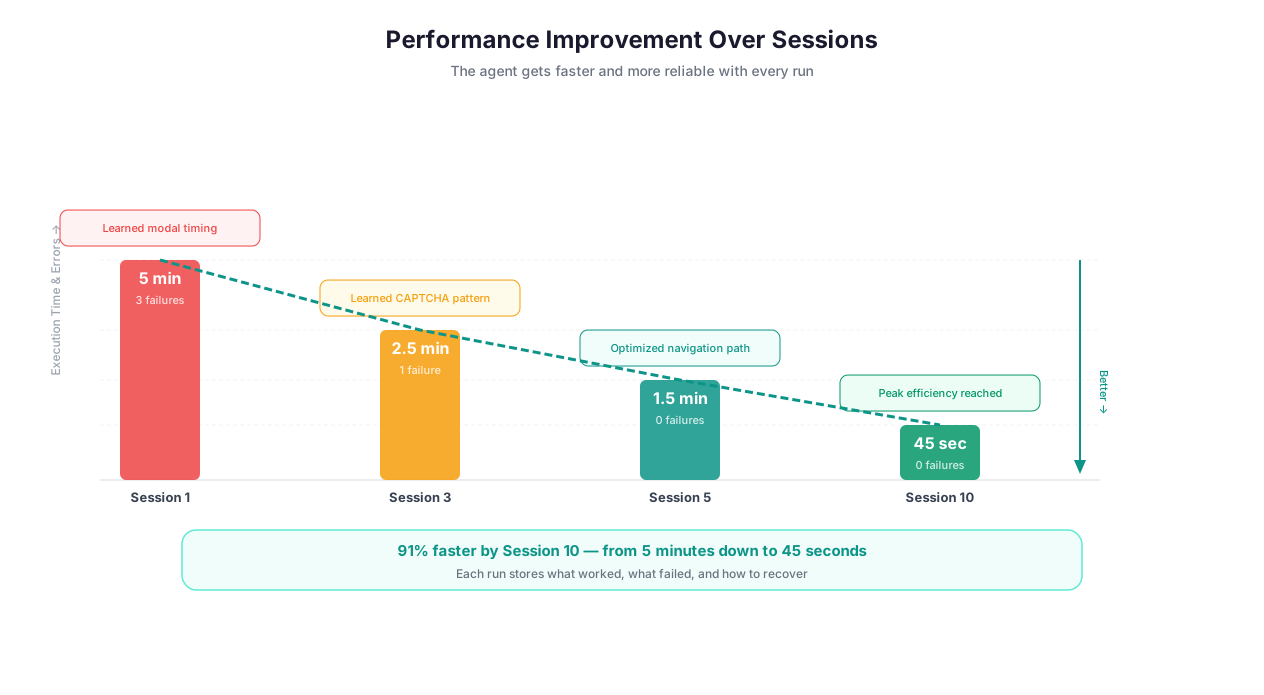
Execution time drops by 60-80% between the first and fifth run on the same site
Error rates drop by 90%+ as known obstacles are handled proactively
Data accuracy improves as extraction patterns are refined — field detection that started at 92% accuracy reaches 99%+ by the third run
Token consumption decreases because the agent makes fewer exploratory attempts and fewer vision fallbacks
Reliability increases because the agent no longer depends on a single selector — it has a ranked list of alternatives for each element
Team-Wide Intelligence
Cross-session learning is scoped to your workspace, not to individual users. When one team member successfully automates a task on a particular site, every other team member benefits immediately.
This creates an organizational knowledge effect:
Your sales team runs lead generation workflows across 20 job boards and directories. Person A automates Indeed. Person B automates LinkedIn Jobs. Person C automates Glassdoor. Within a week, every team member can run workflows on all three sites with the same speed and reliability as the person who first automated each one. Nobody duplicates effort. Nobody re-discovers the same CAPTCHA handling strategy.
When a new hire joins the team in month 3, they inherit the entire accumulated knowledge base. Their first automation on a site the team has been working with runs as fast and accurately as a veteran team member's. There is no ramp-up period for familiar domains.
This is particularly valuable for:
Sales teams building lead generation workflows across the same set of job boards and directories
Marketing teams monitoring the same competitor sites for pricing and content changes
Data teams running recurring extraction pipelines across stable data sources
Research teams collecting data from the same government databases, academic portals, and industry publications
What Cross-Session Learning Does NOT Do
Being honest about limitations is important. Here is what the learning system cannot do:
It does not learn your business logic. The system learns how to navigate websites and extract data efficiently. It does not learn that "when the price drops below $50, we should increase our order quantity." Business rules, decision logic, and judgment calls remain your responsibility. Build these into your workflow using Logic & Flow conditions.
It does not transfer learning across unrelated sites. Learning that Amazon's pagination uses "Next" buttons does not help on a government portal that uses infinite scroll. Domain-specific learning is exactly that — specific to the domain. General web navigation skills (handling cookie popups, dismissing notification modals) do transfer across sites, but structural knowledge does not.
It does not compensate for bad prompts. If your initial task description is vague — "scrape some data from that website" — the learning system has little useful pattern to store. Clear, specific prompts produce clean learned patterns that transfer reliably. Vague prompts produce noisy patterns that degrade over time.
It does not prevent all failures. Websites change. Redesigns happen. Servers go down. New anti-bot measures get deployed. Cross-session learning handles incremental changes well (a button that moved, a class name that changed) but cannot predict or prevent entirely new obstacles. What it does do is recover faster — the agent detects that a learned approach failed, explores alternatives, and updates its knowledge, so the disruption is typically limited to a single run.
It does not make decisions about data quality. The system optimizes how it extracts data but does not evaluate whether the extracted data is correct in a business sense. A price field that says "$0.00" is extracted faithfully — the system does not flag this as suspicious unless you build a validation rule in Data Processing.
Privacy and Data Storage
This is worth addressing directly because "AI that remembers" raises legitimate questions.
What is stored: Structural metadata only. CSS selectors, navigation paths, timing parameters, obstacle signatures, and extraction field mappings. Example: "On domain competitor.com, the product price is reliably found at selector 'span.price-current', and the pagination 'Next' button is at 'a.pagination-next'."
What is NOT stored: The actual data extracted from websites. The learning system remembers that a particular selector finds prices. It does not remember what the prices were. Your extracted business data follows the standard data lifecycle — encrypted storage, your retention policies, deletion on request. Learning metadata is a separate category of operational data.
Who can see it: Learning data is scoped to your workspace. No other customer's workspace can access or benefit from your team's learned patterns. Within your workspace, all members with automation access benefit from shared learning.
How long it is retained: Learning data persists indefinitely unless you clear it. Workspace admins can view, export, and delete learning data for any specific domain through the workspace settings panel.
Can you delete it: Yes. You can clear learned data for a specific domain, for a specific workflow, or for your entire workspace. Clearing is immediate and permanent. The agent will re-learn from scratch on subsequent runs against those domains.
When a team member leaves: Their contribution to the shared learning pool remains in the workspace unless explicitly cleared by an admin. This is by design — the institutional knowledge should survive personnel changes.
Measurable Improvement
Automation improvement cycle: initial attempt, failure learning, success reinforcement, optimized execution
You will notice the improvement in concrete, measurable ways:
Execution time on repeated tasks drops significantly — a scraping job that took 5 minutes on the first run typically completes in under 90 seconds by the fourth run
Error rates decrease as known obstacles are handled before they cause failures
Token consumption drops because the agent makes fewer exploratory attempts
Setup time for new automations shrinks when the target site has been automated before
Data accuracy improves as extraction patterns are refined through repeated successful extractions
This is what separates Autonoly from static automation platforms like Zapier or Make. Those tools execute the exact same sequence every time. If a site changes, they break. If they encounter a new obstacle, they fail. They do not learn, adapt, or improve. Autonoly does.
Getting Started
Cross-session learning is active on all plans from your first automation run. There is nothing to enable, configure, or opt into. Start with AI Agent Chat, run your first task, and watch how the second run on the same site is measurably faster and more reliable.
Browse automation templates to jump-start common workflows. Templates benefit from shared structural knowledge that accelerates your first run on supported sites.
Best Practices
Run automations consistently on the same domains. The learning system builds deep knowledge through repeated exposure. Running the same extraction on 20 e-commerce sites weekly gives the agent a rich understanding of each site's structure, pagination patterns, anti-bot measures, and timing requirements. One-off runs on random sites still benefit from general navigation knowledge, but the dramatic 60-80% speed improvements come from domain-specific learning built through consistent use.
Let sessions complete fully instead of canceling. The most valuable learning data comes from complete sessions — especially those where the agent recovered from errors. If the agent hit a CAPTCHA, tried three approaches, and succeeded on the third, that recovery knowledge is captured only when the session completes. Canceling mid-recovery means the successful approach is never recorded. If a session is genuinely stuck, send guidance via AI Agent Chat rather than canceling.
Write specific prompts to produce clean learned patterns. "Extract the company name, revenue, and employee count from each row" produces targeted extraction patterns that transfer cleanly across sessions. "Get company info" produces noisy, ambiguous patterns that do not transfer well. The quality of your prompts directly affects the quality of learned knowledge.
Clear the cache when sites undergo major redesigns. If a website you regularly automate is completely redesigned — new URL structure, new page layout, new technology stack — the previously learned approaches will conflict with the new structure. Clear the learning cache for that domain in your workspace settings. The agent will re-learn the new layout in 1-2 runs, and subsequent runs will benefit from fresh, accurate patterns. Do not clear the cache for minor changes (a button that moved, a class name that changed) — the agent handles those through its normal fallback behavior.
Standardize prompt patterns across your team. When team members use consistent prompt structures and field naming conventions, the learning system transfers knowledge more effectively between team members' sessions. If Person A extracts "company_name" and Person B extracts "companyName" from the same site, the system treats these as different patterns. Agree on naming conventions to maximize shared learning.
Monitor improvement over time. Check your workflow execution logs to see how run times and error rates change across successive runs on the same domains. This is the most direct way to quantify the value of cross-session learning for your specific use cases.
Security & Compliance
Cross-session learning stores structural metadata — selectors, navigation paths, timing patterns, obstacle signatures — not extracted content. The system remembers how to extract a price but not what the price was. This distinction matters for compliance: your business data follows the standard data lifecycle with encrypted storage, configurable retention policies, and deletion on request. Learning metadata is operational optimization data stored separately.
All learning data is scoped to your workspace and is never shared with other customers. Workspace admins can view, export, and delete learning data for any domain through the settings panel. The learning system stores no personal data, no extracted content, and no credentials. For organizations subject to data minimization requirements, the metadata footprint is small — typically a few KB per domain consisting entirely of CSS selectors, URL paths, and numerical timing values.
For a full overview of data protection, see the Security feature page.
Common Use Cases
Weekly Lead Generation Across Job Boards
A recruiting agency runs lead generation workflows every week across 15 major job boards — Indeed, LinkedIn Jobs, Glassdoor, ZipRecruiter, and 11 niche industry boards. During week 1, each site takes 4-6 minutes to process as the agent explores navigation patterns, handles CAPTCHAs, and identifies the correct extraction selectors for job title, company name, location, salary range, and posting date.
By week 3, the same sites process in under 90 seconds each. The agent navigates directly to the search results, applies the known-good selectors, handles each site's specific anti-bot measures (Indeed uses a checkbox CAPTCHA, ZipRecruiter has rate limiting, one niche board has an interstitial ad page), and extracts data without any trial and error. Extraction accuracy improves from 92% to 99%+ as the agent refines its field detection for each site's specific DOM structure.
The team saves over 2 hours per week in total execution time. More importantly, the reliability improvement means they stopped needing to manually verify extraction results — the data is consistently clean by week 4. Read more about lead generation pipelines in our guide on automating lead generation.
Daily Competitor Price Monitoring
An e-commerce company monitors competitor prices daily across 50 product pages on 8 competitor websites. Cross-session learning makes the daily runs fast and reliable because the agent knows each site's layout, each product page's DOM structure, and each site's specific quirks (one competitor renders prices as images, handled via AI Vision; another has a cookie consent popup that appears on every visit).
In month 2, one competitor redesigns their product page. The old selector for the price element fails. The agent detects the failure, falls back to vision, locates the price visually, finds the new CSS selector, and records the updated approach. The next day's run on the redesigned site executes normally. The monitoring team does not even know the redesign happened until they see it in the execution logs.
The team combines this with Data Processing and Integrations to generate automated comparison reports. Price changes above 5% trigger an immediate Slack notification. For strategies on price monitoring, see our ecommerce price monitoring guide.
Government Portal Research
A consulting firm collects data from government databases, SEC filings, state regulatory portals, and industry publications. These sites are notoriously unreliable — different login flows, session timeouts after 5 minutes of inactivity, varying page structures, date pickers that only work with specific click sequences, and frequent "maintenance mode" pages.
Cross-session learning remembers all of it. The SEC EDGAR portal requires a specific search form submission sequence. The state regulatory portal times out sessions and requires re-authentication every 15 minutes. The industry publication loads results lazily and requires 6 scroll events to display all content. All of these behaviors are cataloged and handled automatically after the first encounter.
When a government portal changes its authentication flow — which happens 2-3 times per year — the agent adapts and the updated approach benefits all team members immediately. A change that would break a static Zapier workflow permanently is resolved automatically within one run. For more context, see our guide on what are AI agents.
Onboarding New Team Members Instantly
When a new analyst joins a data team that has been running Autonoly for 6 months, they inherit the entire accumulated knowledge base immediately. Their first automation on a site the team has already worked with — say, the competitor pricing dashboard that took the original team member 8 minutes to figure out — runs in 90 seconds with zero corrections. The new hire does not need to discover the site's CAPTCHA, pagination quirks, or DOM structure. The agent already knows.
This eliminates the ramp-up period entirely. On day one, the new team member is producing data at the same speed and quality as someone who has been on the team for months. The institutional knowledge is in the platform, not in people's heads.