
Why Automate CSAT Surveys?
Customer satisfaction scores are the most direct measurement of your support team's effectiveness, yet most teams collect them inconsistently — even though support platforms like Zendesk have made post-resolution CSAT surveys a standard part of the service workflow. When surveys are sent manually, they only go out for some tickets — usually the ones the agent remembers to follow up on. This creates a dangerous selection bias that skews your data in a flattering direction. Agents are more likely to request feedback after interactions they feel went well, and less likely after difficult conversations. The result is an artificially inflated CSAT score that masks real problems. The tickets that fall through the cracks are often the ones where satisfaction was lowest — exactly the interactions you most need to learn from.
The impact of incomplete CSAT data compounds over time. Without a complete picture, support managers cannot identify underperforming agents who need coaching, because the worst interactions are systematically excluded from measurement. Product teams miss signals about recurring pain points, because the customers most affected are the ones least likely to receive surveys. Leadership makes resource allocation decisions based on a satisfaction number that does not reflect reality. Industry research suggests that companies measuring satisfaction inconsistently overestimate their scores by 15-20% compared to those with complete, unbiased measurement — a gap that creates false confidence while real customer dissatisfaction grows unchecked.
Automating CSAT surveys with Gmail integration ensures that every single resolved ticket receives a follow-up survey. No exceptions, no forgotten tickets, no bias. You get a complete dataset that accurately represents your support quality across all agents, categories, and customer segments. This unbiased data is the foundation for meaningful improvement — you cannot fix problems you do not know about, and you cannot measure improvement without a reliable baseline.
The timing matters too. Surveys sent within 24 hours of resolution get significantly higher response rates than those sent days later — up to three times higher according to customer experience research. The interaction is still fresh in the customer's mind, and they are more willing to take a moment to provide feedback. Automation ensures perfect timing every time, without anyone having to remember or manage a follow-up queue. This consistency not only improves response rates but also produces more accurate feedback, because customers are recalling the actual experience rather than a faded impression.
How the AI Agent Sends Surveys
Autonoly's AI Agent Chat monitors your ticket tracking system for recently closed tickets. This could be a Google Sheets spreadsheet where you log support interactions, email labels indicating resolved conversations, or any web-based ticketing dashboard. The agent identifies tickets that were resolved since the last run and that have not yet received a survey.
The Data Processing engine personalizes each survey email with details from the support interaction:
The customer's name
The subject of their support request
The support agent who resolved the ticket
The resolution date
This personalization increases response rates because the customer immediately recalls the specific interaction being referenced, rather than receiving a generic "How was your experience?" email.
Survey Design
The survey email keeps things simple to maximize completion rates. A typical CSAT survey includes:
A one-line question: "How satisfied were you with the support you received?"
A 1-5 star rating scale with clickable options
An optional text field for comments
The agent name and ticket reference for context
The Visual Workflow Builder lets you customize the survey template, scale type (1-5 stars, 1-10 NPS, thumbs up/down), and follow-up logic. For example, customers who rate 1-2 can automatically receive a follow-up email asking for more details about what went wrong.
Collecting and Analyzing Responses
Survey responses are logged to your Google Sheets spreadsheet alongside the original ticket data. Each response row includes the customer email, ticket reference, satisfaction score, any comments, and the response timestamp. Over time, this builds a comprehensive CSAT dataset.
The Data Processing engine can calculate running averages — CSAT by agent, by category, by week, and by customer segment. Use Logic & Flow to trigger alerts when the rolling average drops below a threshold or when a specific agent receives multiple low scores.
Acting on Low Scores
The most valuable feature of automated CSAT collection is the ability to act on negative feedback immediately. When a customer responds with a low score, the agent can:
Post an alert to Slack so a manager can follow up personally
Add the customer to a "needs attention" list in Google Sheets
Trigger a personalized apology email with an escalation path
This closed-loop feedback system turns CSAT surveys from a passive measurement tool into an active customer recovery mechanism.
What Data You Get
Every survey interaction is tracked comprehensively in your Google Sheets spreadsheet:
Customer Email — The survey recipient for follow-up and segmentation
Ticket Reference — Which support interaction the survey relates to
Agent Name — The support agent who handled the ticket
Satisfaction Score — The rating given (1-5 stars, NPS, or your custom scale)
Comments — Free-text feedback from the customer
Response Timestamp — When the customer completed the survey
Survey Sent Date — When the survey email was delivered
Ticket Category — The type of issue (technical, billing, account) for segmented analysis
Resolution Time — How long the ticket took to resolve, correlated with satisfaction
Response Rate Optimization
The agent tracks survey response rates and can adjust timing based on your data. If weekday surveys get higher response rates than weekend ones, the Logic & Flow engine delays weekend ticket surveys to the following Monday morning. These small optimizations compound into significantly higher response rates over time.
Customizing Your Workflow
The Visual Workflow Builder lets you build sophisticated feedback loops beyond simple surveys. Add conditional follow-up paths based on the score received — customers rating 4-5 get a thank-you email with a request to leave a public review on G2 or Trustpilot, while customers rating 1-2 get an immediate apology email with a link to schedule a call with a manager. Insert a delay step so surveys go out at optimal times — for example, morning sends on business days tend to get higher response rates than evening or weekend sends.
You can also create different survey templates for different ticket categories. Technical support resolutions might ask about the agent's technical knowledge, while billing inquiries might ask about speed of resolution. This category-specific feedback gives you more actionable insights than a one-size-fits-all survey.
Integration Options
Connect your CSAT data with other customer success workflows. Feed low scores directly into the negative feedback escalation workflow via Slack for immediate follow-up. Export satisfaction trends to Airtable or Notion for team-wide dashboards that combine CSAT with ticket volume, resolution time, and agent workload. Correlate satisfaction scores with customer retention data to quantify the revenue impact of support quality. Visit the Integrations page for all supported destinations, or browse the templates library for pre-built CSAT workflow templates.
Use Cases
SaaS companies measuring support satisfaction to reduce churn and identify at-risk accounts
E-commerce businesses tracking post-purchase support quality across order, return, and product inquiries
Professional services firms gathering client feedback after project milestones and deliverables
Healthcare organizations collecting patient satisfaction data for compliance and quality improvement
Financial services companies measuring satisfaction for regulatory reporting and service benchmarking
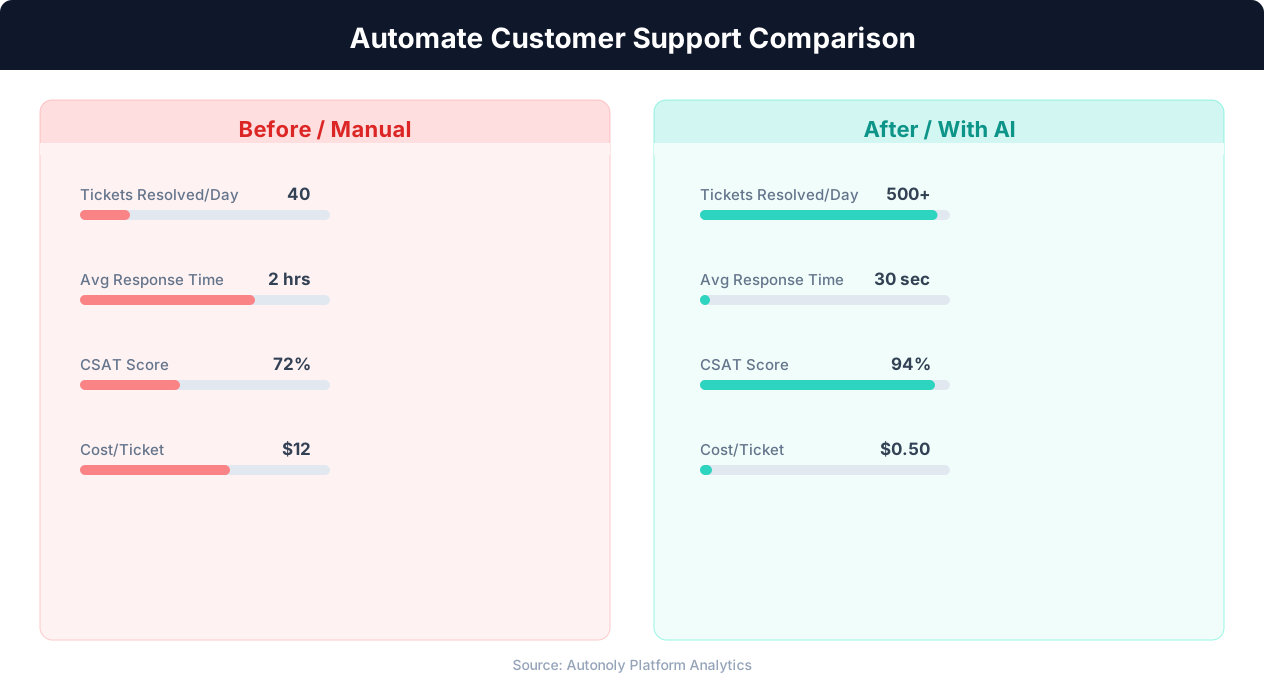
Response time comparison between manual and automated support
Key Insight: Automated ticket routing reduces average resolution time by 52% by ensuring issues reach the right specialist on the first assignment (Zendesk Benchmark).
How the AI Agent Does It
The agent monitors your ticket tracking system via Browser Automation, identifies recently resolved tickets, and reads the relevant details — customer email, ticket subject, agent name, and resolution date. The Data Processing engine personalizes the survey email template with these details. The agent then opens Gmail and sends each survey individually through the compose interface, ensuring deliverability matches manually sent emails.
Preventing Survey Fatigue
The agent tracks survey history per customer to prevent sending multiple surveys in a short period. If a customer had three tickets resolved this week, they receive only one survey for the most recent interaction, not three.
Key Insight: Companies using support automation report 35% higher customer satisfaction scores due to faster response times and 24/7 availability (Forrester Research).
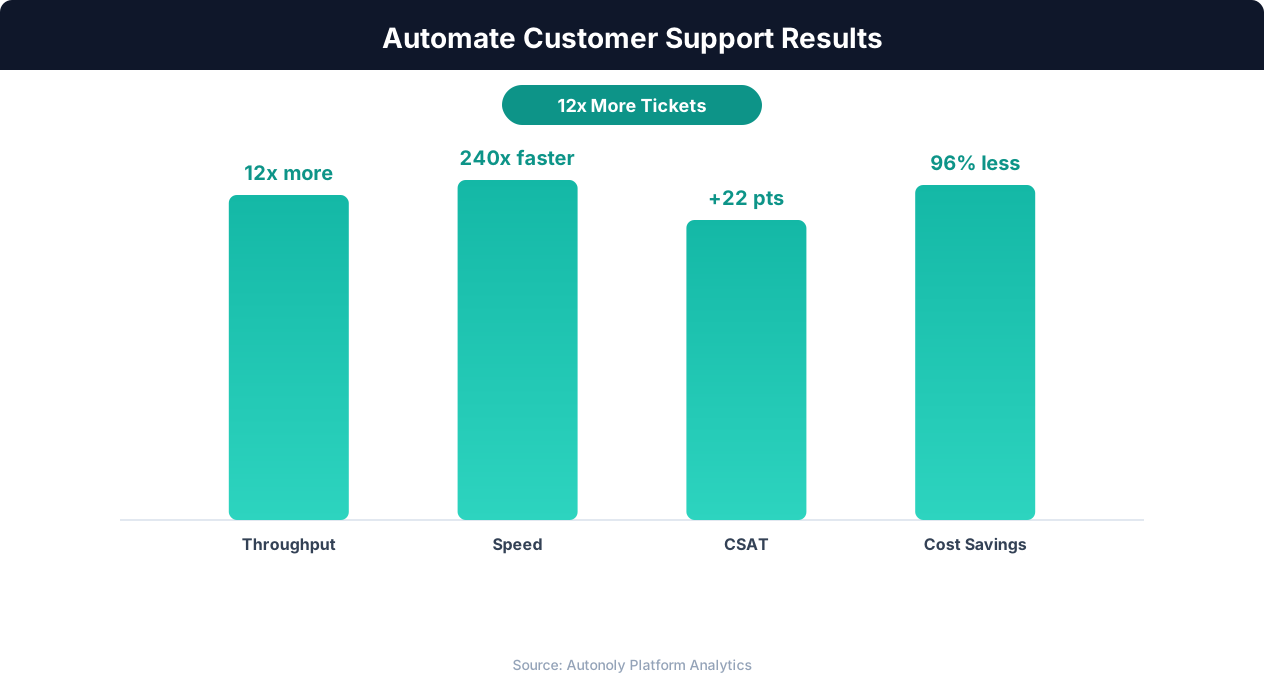
Customer satisfaction scores with AI-powered support automation
Key Insight: AI agents resolve 80% of routine support inquiries automatically, freeing human agents for complex issues that require empathy and judgment (Gartner).
Scheduling and Automation
Run this workflow daily using the Visual Workflow Builder. The agent checks for tickets resolved in the past 24 hours and sends surveys via Gmail. Responses are collected and logged to Google Sheets. Add Logic & Flow conditions to route low scores to Slack for immediate manager follow-up, creating a closed-loop feedback system that turns every negative experience into a recovery opportunity.
Further Reading
Explore more about the tools and techniques used in this workflow: Automate Email Reports, No Code Automation Guide, Email Campaigns, Form Automation, Scheduled Execution.