Manual Data Extraction Is Dead: Why AI Changes Everything
Every business runs on data. And every business, regardless of size or industry, spends an astonishing amount of time manually extracting, cleaning, and reformatting data from diverse sources — websites, PDFs, emails, spreadsheets, images, and databases. A 2025 IDC study found that knowledge workers spend 2.5 hours per day searching for and extracting data, costing U.S. businesses an estimated $3.1 trillion annually in lost productivity.
The irony is painful: the data exists. It is right there — on a web page, in a PDF, in an email attachment. But it is trapped in the wrong format, in the wrong system, or behind a UI that was designed for human reading, not programmatic access.
💡 Key Insight
According to Deloitte's 2025 Digital Transformation Survey, 82% of organizations still rely on manual data extraction for at least some critical business processes. The top reason: the source data exists in formats that traditional automation tools cannot handle — PDFs, web pages without APIs, scanned documents, and unstructured emails.
Traditional approaches to data extraction each have critical limitations:
| Approach | What It Does | Where It Fails |
|---|---|---|
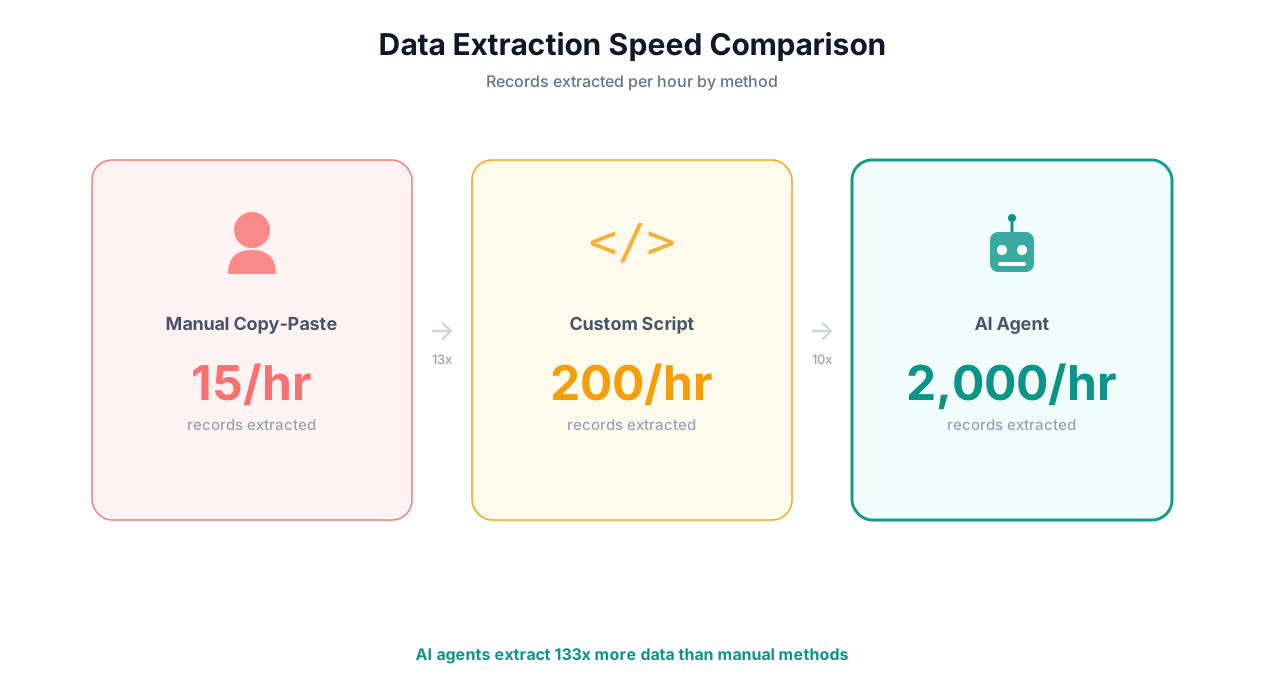
| Manual copy-paste | Human reads source, types into destination | Slow (15-30 records/hour), error-prone (3-5% error rate), does not scale |
| Traditional web scrapers | Script follows hard-coded rules to extract HTML elements | Breaks when sites change layout, cannot handle JavaScript-rendered content, requires developer maintenance |
| OCR software | Converts images/scanned PDFs to text | Poor accuracy on complex layouts, cannot understand document structure or extract meaning |
| ETL tools | Programmatic data pipelines between structured databases | Requires structured input — cannot handle web pages, PDFs, or unstructured sources |
| API integrations | Direct data transfer between connected systems | Only works with systems that have APIs — 40% of business tools lack APIs |
AI data extraction eliminates these limitations by combining the visual understanding of a human reader with the speed and scale of software. An AI extraction agent can look at a web page, PDF, email, or image, understand what it is looking at, identify the relevant data, extract it, and structure it into the format you need — all without custom scripts, hard-coded rules, or developer involvement.
This is not incremental improvement over traditional scraping. It is a category shift: from rule-based extraction that requires technical expertise and constant maintenance to intelligent extraction that anyone can set up and that adapts automatically to source changes.
What AI Data Extraction Can Do: Five Source Types
AI-powered extraction handles five categories of data sources that together cover virtually every data extraction need a business encounters.
1. Web Data Extraction
AI agents extract structured data from any website — including JavaScript-heavy single-page applications, dynamically loaded content, and sites with anti-bot protection. Unlike traditional scrapers that rely on CSS selectors, AI extraction understands page semantics: it knows that "$29.99/mo" is a price, that a table with column headers represents structured data, and that a block of text with a name, title, and company is a person's profile.
What you can extract:
- Product data: prices, descriptions, specifications, reviews, ratings from Amazon, eBay, Shopify stores, or any e-commerce site
- Business data: company profiles, contact information, employee counts from LinkedIn, Crunchbase, and company websites
- Real estate data: listings, prices, property details from Zillow, Redfin, and MLS systems
- Financial data: stock prices, SEC filings, earnings data from financial portals
- Job data: postings, salaries, requirements from Indeed, LinkedIn, and company career pages
- Search results: rankings, snippets, PAA from Google and other search engines
See our comprehensive web scraping automation guide and extraction templates for ready-to-use workflows.
2. PDF Data Extraction
PDFs are the most common format for business documents — invoices, contracts, financial reports, regulatory filings, academic papers — yet they are among the hardest to extract data from programmatically. AI extraction handles all PDF types:
- Native PDFs: Text-based PDFs where the text is selectable. AI extraction reads the text and understands document structure (headers, tables, paragraphs, lists) to extract data accurately.
- Scanned PDFs: Image-based PDFs (scanned documents). AI uses OCR combined with layout understanding to read text from images and reconstruct document structure.
- Mixed-format PDFs: Documents containing text, tables, images, charts, and forms. AI handles each element type appropriately.
The key advance over traditional OCR: AI extraction does not just read characters — it understands what the data means. It knows that "Invoice #12345" is an identifier, that the column of numbers under "Amount" represents monetary values, and that "Due Date: April 15, 2026" is a deadline. This semantic understanding eliminates the post-processing that traditional OCR requires.
For a deep dive, see our PDF data extraction guide.
3. Email Data Extraction
Emails contain enormous amounts of valuable business data: orders, invoices, shipping notifications, meeting details, customer inquiries, and status updates. AI extraction reads emails and attachments, identifies relevant data, and structures it.
What you can extract:
- Order confirmations: order numbers, items, quantities, prices, shipping addresses
- Invoice attachments: invoice numbers, line items, amounts, due dates (from PDF/image attachments)
- Meeting invitations: dates, times, attendees, agenda items
- Customer inquiries: topic, urgency, requested action, customer identifier
- Shipping notifications: tracking numbers, carriers, estimated delivery dates
4. Spreadsheet Data Extraction and Transformation
While spreadsheets are already structured, they often need transformation: merging data from multiple sheets, cleaning inconsistent formats, deduplicating records, enriching with external data, or converting to different schemas. AI agents handle these transformations conversationally.
What you can do:
- Merge and deduplicate records across multiple spreadsheets
- Standardize inconsistent formats (dates, phone numbers, addresses, names)
- Enrich spreadsheet data with web-sourced information (e.g., add company size and industry for a list of company names)
- Convert between schemas (map columns from one format to another)
- Generate summary statistics and reports from raw data
See our Excel data processing guide for detailed examples.
5. Image Data Extraction
AI vision capabilities enable extraction from images — business cards, receipts, whiteboards, screenshots, charts, and diagrams. The agent uses vision models to read text, interpret visual elements, and structure the extracted information.
What you can extract:
- Business card data: name, title, company, phone, email, address
- Receipt data: vendor, date, items, amounts, tax, total
- Whiteboard content: meeting notes, diagrams, action items
- Screenshot data: error messages, dashboard metrics, UI content
- Chart data: values from bar charts, line graphs, and pie charts
📊 By the Numbers
AI-powered data extraction achieves 95-99% accuracy across web, PDF, and email sources — compared to 85-92% for traditional OCR and 95-97% for human manual extraction (humans are more accurate but 50-100x slower). The accuracy gap between AI and human extraction has effectively closed.
How AI Extraction Differs From Traditional Scraping: A Technical Comparison
AI-powered data extraction is fundamentally different from traditional web scraping in architecture, capability, and maintenance requirements. Understanding these differences helps you evaluate tools and set appropriate expectations.
Architecture Differences
Traditional scraping works like this: a developer inspects a web page, identifies the HTML elements that contain the target data (using CSS selectors or XPath), writes a script that navigates to the page and extracts content from those specific elements, and sets up scheduling and error handling. If the page structure changes, the developer must update the selectors manually.
AI extraction works like this: you describe the data you want in plain English ("extract product names, prices, and ratings"). An AI agent navigates to the page, reads the page content through both DOM parsing and visual understanding, identifies the target data based on semantic meaning (not element location), and extracts and structures it. If the page structure changes, the agent adapts automatically because it finds data by meaning, not by position.
| Dimension | Traditional Scraping | AI Extraction |
|---|---|---|
| Data identification | CSS selectors / XPath (position-based) | Semantic understanding (meaning-based) |
| Handles layout changes | No — breaks immediately | Yes — adapts automatically |
| JavaScript rendering | Requires headless browser setup | Built-in (full browser engine) |
| Dynamic content | Complex wait strategies needed | Agent waits and interacts naturally |
| Anti-bot handling | Manual proxy/fingerprint management | Human-like interaction patterns, automated handling |
| Multi-page navigation | Hard-coded click sequences | Agent reasons about navigation |
| Setup time | Hours to days (developer required) | Minutes (describe in English) |
| Maintenance | Ongoing developer time (weekly for active sites) | Self-healing, minimal maintenance |
| Skill required | Python/JS, HTML/CSS knowledge, XPath | None (natural language) |
Accuracy Comparison
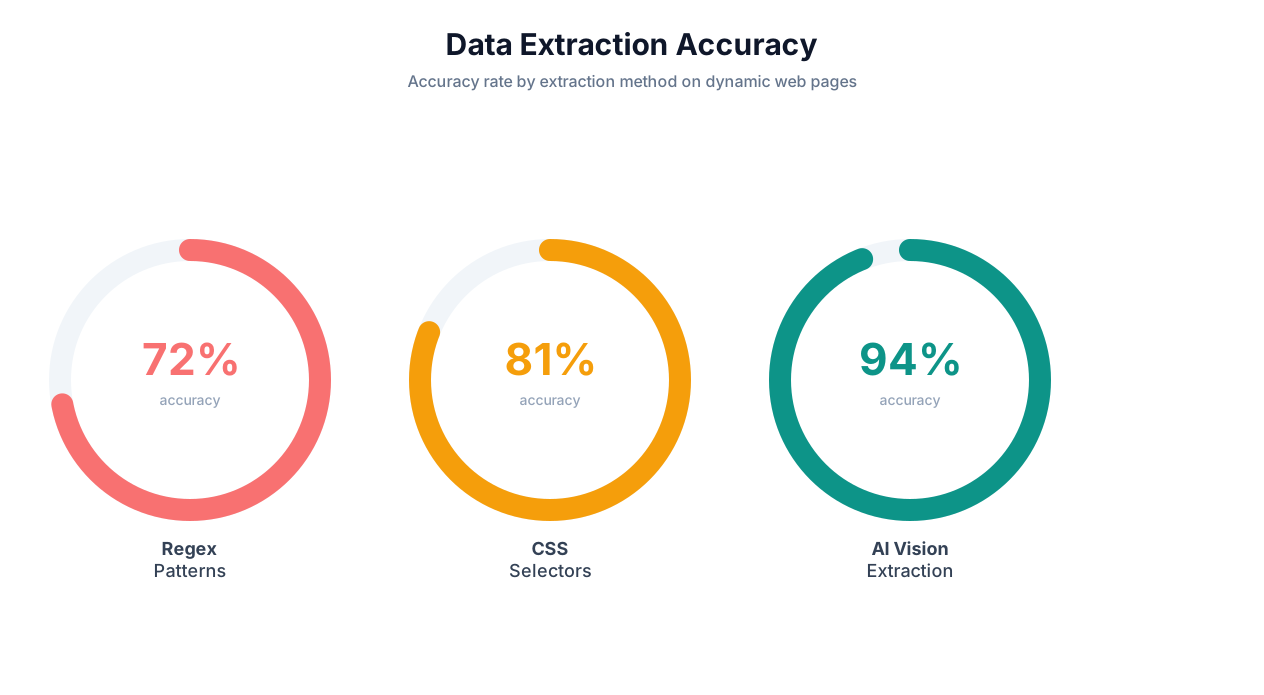
AI extraction's semantic approach delivers meaningfully better accuracy for several data types:
| Data Type | Traditional Scraping Accuracy | AI Extraction Accuracy | Why AI Is Better |
|---|---|---|---|
| Structured tables (HTML) | 95-98% | 97-99% | Understands merged cells, implicit headers |
| Product pricing | 88-94% | 96-99% | Identifies prices even when positioned unusually |
| Contact information | 80-90% | 94-98% | Recognizes names, emails, phones in any format |
| PDF tables | 70-85% (OCR) | 92-97% | Understands table structure, not just text |
| Unstructured web text | 75-85% | 93-97% | Understands meaning and context of text blocks |
| Multi-format invoices | 60-80% (OCR) | 91-96% | Handles any invoice layout without templates |
The accuracy advantage of AI extraction is most pronounced for unstructured and semi-structured data — the types of data that traditional scraping handles worst. For perfectly structured HTML tables with stable selectors, traditional scraping is nearly as accurate. But those ideal conditions represent a small fraction of real-world extraction tasks.
Cost Comparison
Traditional scraping has lower per-execution costs (no LLM inference), but higher setup and maintenance costs (developer time). AI extraction has higher per-execution costs but dramatically lower setup and maintenance costs.
| Cost Component | Traditional Scraping | AI Extraction |
|---|---|---|
| Initial setup | $500-5,000 (developer time per site) | $0-10 (describe task, run once) |
| Monthly maintenance | $200-1,000 per site | $0-50 (self-healing) |
| Per-execution cost | $0.001-0.01 | $0.05-0.50 |
| Total cost (1 site, 1 year, daily runs) | $3,100-17,000 | $600-6,000 |
For most businesses extracting data from 5-20 sources, AI extraction is 50-75% cheaper than traditional scraping when total cost of ownership (including developer time) is considered.
5 High-Value Use Cases for AI Data Extraction
These five use cases represent the highest-ROI applications of AI data extraction, based on real deployments across hundreds of businesses.
Use Case 1: Competitor Pricing Intelligence
The challenge: An e-commerce brand sells 500 products and competes with 12 major retailers. Tracking competitor prices manually across 6,000 product-site combinations is impossible.
The AI extraction solution: An agent visits each competitor's website daily, navigates to product pages (handling different site architectures, JavaScript rendering, and dynamic pricing), and extracts current prices, availability status, and promotion details. Data is delivered to a Google Sheets dashboard with price change highlighting.
Key capabilities used:
- Web scraping across 12 different site architectures
- Product matching (identifying the same product across different naming conventions)
- Price normalization (handling different currency formats, per-unit vs bulk pricing)
- Change detection (flagging only meaningful price changes)
ROI: The brand adjusted pricing on 47 products based on competitive intelligence in the first month, generating an estimated $180,000 in additional revenue. The extraction cost: approximately $150/month in platform fees.
Use Case 2: Lead List Building From Multiple Sources
The challenge: A B2B sales team needs to build targeted prospect lists with company name, contact person, title, email, phone, company size, and recent funding — data scattered across LinkedIn, Crunchbase, company websites, and press releases.
The AI extraction solution: An agent searches for companies matching specific criteria (industry, size, location, funding stage), visits each source to extract relevant data points, deduplicates across sources, and compiles a structured lead list. The agent uses live browser control to navigate LinkedIn and Crunchbase, and direct extraction for company websites.
ROI: A sales team of 5 reps was spending a collective 25 hours/week on manual lead research. AI extraction reduced this to 2 hours/week of review and refinement — saving 1,196 hours/year at an average cost of $65/hour = $77,740 in annual savings.
⚠️ Important Note
When extracting data from LinkedIn or other platforms with usage restrictions, always comply with the platform's Terms of Service. Use extraction for legitimate business research purposes, stay within reasonable usage limits, and only collect publicly available data. Read our legal guide for details.
Use Case 3: Financial Document Processing
The challenge: A private equity firm analyzes 200+ portfolio company financial reports quarterly. Each report is a PDF with different formatting — different table layouts, different metric names, different fiscal year conventions. Analysts spend 15-20 minutes per report extracting key metrics into a standardized comparison spreadsheet.
The AI extraction solution: An agent processes each PDF report, identifies key financial metrics (revenue, EBITDA, net income, cash position, headcount) regardless of formatting differences, normalizes the data (converting quarterly to annual, standardizing currency), and populates a master comparison spreadsheet.
Key capabilities used:
- PDF data extraction with semantic understanding of financial terms
- Cross-document normalization (different formats, same output schema)
- Anomaly detection (flagging unusual values for human review)
ROI: 200 reports × 15 minutes each = 50 hours per quarter reduced to 3 hours of review. Annual savings: 188 hours of analyst time at $100/hour = $18,800.
Use Case 4: Academic and Market Research Compilation
The challenge: A market research firm compiles industry reports by gathering data from 50-100 sources: industry publications, government statistics portals, trade association websites, company annual reports, and academic papers. Manual compilation takes 2-3 weeks per report.
The AI extraction solution: An agent systematically visits each source, extracts relevant statistics, quotes, and data points, organizes them by topic and source, and produces a structured research database. The researcher then uses this database to write the final report — focusing on analysis and narrative rather than data gathering.
ROI: Report compilation time reduced from 2-3 weeks to 3-4 days. The firm increased report output from 4 per quarter to 10, generating $150,000 in additional revenue per quarter.
Use Case 5: Compliance and Regulatory Data Collection
The challenge: A multi-state financial services firm must monitor regulatory changes across 50 state regulatory websites, 5 federal agencies, and 12 self-regulatory organizations. Changes can affect licensing requirements, reporting obligations, and operational procedures.
The AI extraction solution: An agent visits each regulatory website daily, extracts new publications, rule changes, enforcement actions, and guidance documents. It classifies each item by relevance to the firm's business lines, summarizes key changes, and delivers a daily digest to the compliance team with links to source documents.
ROI: Replaced a full-time compliance analyst ($85,000/year) dedicated to regulatory monitoring. Also reduced regulatory response time from "discovered during quarterly review" to "discovered same day" — preventing an estimated $200,000 in potential compliance violations.
Accuracy and Quality: Ensuring Your Extracted Data Is Reliable
Data extraction is only valuable if the extracted data is accurate. Inaccurate extraction is worse than no extraction at all — it creates downstream errors, bad decisions, and eroded trust in automation. Here is how to ensure extraction quality.
Sources of Extraction Errors
Understanding where errors come from helps you build appropriate validation:
| Error Type | Description | Frequency | Mitigation |
|---|---|---|---|
| Misidentification | Agent extracts the wrong field (e.g., shipping price instead of product price) | 2-5% on first run, <1% with learning | Clear task descriptions, field validation rules |
| Partial extraction | Agent extracts most data but misses some records (e.g., gets 47 of 50 products) | 3-8% on complex pages | Count validation, comparison against expected totals |
| Format errors | Data extracted correctly but in wrong format (e.g., date as text instead of date) | 5-10% without format specs | Specify output formats in task description |
| OCR errors | Character misreads in scanned PDFs or images | 1-3% with modern AI OCR | Confidence scoring, human review for low-confidence items |
| Hallucination | Agent generates data that does not exist in the source | <1% with good platforms | Source verification, screenshot logging |
Quality Assurance Framework
Implement this four-layer quality framework for production extraction workflows:
Layer 1: Schema Validation
Define the expected output schema — field names, data types, required vs optional fields, value ranges. The extraction system validates every output against this schema before delivery. Records that fail validation are flagged for review.
Layer 2: Statistical Validation
Compare extraction outputs against expected statistical properties: expected record count (±10%), value distributions (no outliers beyond 3 standard deviations), completeness rates (all required fields populated). Anomalies trigger alerts.
Layer 3: Sample Verification
For each extraction run, randomly verify 5-10% of extracted records against the source. This catches systematic errors that statistical validation might miss — for example, consistently extracting the wrong column from a table.
Layer 4: Cross-Source Validation
When the same data is available from multiple sources (e.g., a company's revenue from both their website and Crunchbase), compare extracted values across sources. Discrepancies indicate either a source error or an extraction error — both worth investigating.
💡 Key Insight
The most effective quality assurance strategy is aggressive validation on the first 10 runs of any new extraction workflow, followed by lighter monitoring once accuracy is proven. Most extraction errors are systematic (the same mistake repeated), not random — so catching them early eliminates them permanently.
Improving Accuracy Over Time
AI extraction accuracy improves through three mechanisms:
- Task description refinement: The more specific your extraction instructions, the more accurate the output. "Extract prices" is vague; "Extract the monthly subscription price shown in the pricing card labeled 'Business Plan', formatted as a number without currency symbols" is precise.
- Cross-session learning: Autonoly's cross-session learning remembers which extraction approaches worked for specific sites and applies that knowledge to future runs. Accuracy typically improves 5-15% between the first and fifth runs on a given source.
- Feedback loops: When you correct an extraction error, the agent learns from the correction and avoids the same mistake in future runs. This creates a virtuous cycle where accuracy asymptotically approaches human-level performance.
Setup Guide: Building Your First AI Extraction Pipeline With Autonoly
Setting up an AI data extraction pipeline with Autonoly takes 5-10 minutes. Here is a complete walkthrough.
Step 1: Define Your Extraction Target
Answer these questions before starting:
- Source: What website, PDF, or data source are you extracting from?
- Data points: What specific fields do you need? (Be as specific as possible)
- Volume: How many records per extraction run? (10 products? 500 leads? 1,000 listings?)
- Format: What format should the output be in? (Spreadsheet columns, JSON, CSV)
- Destination: Where should the data go? (Google Sheets, email, database, file)
- Schedule: How often? (Once, daily, weekly, on-demand)
Step 2: Describe the Extraction to the AI Agent
Open the AI agent chat and describe your extraction task. A good description follows this template:
"Go to [URL]. Extract [specific data fields] from [what part of the page]. [Any special instructions for navigation, pagination, or filtering]. Put the data in [destination] with columns for [field1, field2, field3...]. [Schedule if recurring]."
Example:
"Go to g2.com/categories/crm. Extract the product name, overall rating, number of reviews, and pricing tier for each CRM listed on the first 5 pages. Navigate through pagination. Put the data in a Google Sheet with columns: Product Name, Rating, Review Count, Pricing. Run this every Monday at 8 AM."
Step 3: Review the Generated Workflow
The agent shows the extraction workflow it has built. Review:
- Navigation steps (correct URL, pagination handling)
- Data fields (all requested fields identified)
- Output format (columns match your specification)
- Error handling (what happens if a field is missing or a page fails to load)
Modify through conversation: "Also extract the company description" or "Skip products with fewer than 50 reviews."
Step 4: Run and Validate
Execute the extraction and watch through the live browser view. Verify:
- Correct number of records extracted
- Data accuracy on a sample of 5-10 records (compare against the source)
- Format correctness (dates formatted correctly, numbers not stored as text)
- Completeness (no missing fields)
Step 5: Automate and Scale
Once validated:
- Confirm the schedule for recurring runs
- Set up Slack or email notifications for completion and errors
- Add more extraction targets using the same pattern
- Build downstream workflows that consume the extracted data (enrichment, analysis, reporting)
Advanced Extraction Patterns
| Pattern | Description | Example |
|---|---|---|
| Multi-source merge | Extract from multiple sites, merge into single dataset | Combine pricing from Amazon, Walmart, and Target for the same products |
| Enrichment pipeline | Extract base data, then visit additional sources to add fields | Extract company names from a directory, then visit each company's website to add employee count and revenue |
| Change detection | Extract data daily, compare against previous, flag changes | Monitor competitor pricing pages for price drops |
| Cascading extraction | Extract links from an index page, then extract data from each linked page | Get all product URLs from a category page, then extract details from each product page |
| Conditional extraction | Extract only records matching specific criteria | Extract job postings only in specific cities or for specific roles |
Output Formats and Integrations: Where Your Extracted Data Goes
Extracted data is only useful if it reaches the right system in the right format. Autonoly supports multiple output destinations and formats to fit any data pipeline.
Output Destinations
| Destination | Best For | Setup |
|---|---|---|
| Google Sheets | Collaborative analysis, dashboards, lightweight databases | Connect Google account, select sheet |
| CSV/Excel file | Local analysis, import into other tools, archival | Specify filename and download location |
| JSON | Developer workflows, API consumption, database import | Specify schema or let AI determine structure |
| Delivering reports and summaries to stakeholders | Specify recipients and format preferences | |
| Slack | Team notifications, alerts, quick data sharing | Select channel or direct message |
| Webhook | Custom integrations, triggering downstream workflows | Provide endpoint URL and payload format |
| CRM (HubSpot, Salesforce) | Lead enrichment, contact updates, deal data | Map extracted fields to CRM fields |
| Database (PostgreSQL, MySQL) | Structured storage, complex queries, production systems | Connection string, table mapping |
Data Transformation Capabilities
Between extraction and output, AI agents can transform data to match your needs:
- Format conversion: Convert dates, currencies, phone numbers to standardized formats
- Deduplication: Remove duplicate records based on key fields
- Enrichment: Add calculated fields (e.g., percentage change from previous extraction)
- Filtering: Exclude records that do not match criteria
- Aggregation: Summarize data (averages, totals, counts by category)
- Normalization: Standardize data across different source formats
These transformations can be specified in your task description or added to the workflow after the extraction step. For complex transformations, the code sandbox supports custom Python scripts.
📊 By the Numbers
The most popular output destination among Autonoly users is Google Sheets (62%), followed by email (18%), webhook/API (11%), and direct database (9%). Teams typically start with Google Sheets for simplicity and migrate to database or API outputs as their extraction pipelines mature.
Building Data Pipelines
For production data extraction, you will want to build complete pipelines that chain extraction, transformation, and delivery:
- Extract: AI agent collects raw data from source(s)
- Validate: Schema and statistical validation checks
- Transform: Clean, normalize, enrich, and format data
- Load: Deliver to destination system(s)
- Notify: Alert team of completion, flag anomalies
- Archive: Store extraction run metadata for auditing
This extract-validate-transform-load-notify pattern is the foundation of reliable data extraction at scale. Each step is configurable within Autonoly's workflow builder, and the entire pipeline can be scheduled to run on any cadence.
Frequently Asked Questions
Common questions about AI-powered data extraction.
How accurate is AI data extraction compared to manual extraction?
AI data extraction achieves 95-99% accuracy across most source types — comparable to skilled human extractors (95-97%) but 50-100x faster. The remaining 1-5% of errors are typically edge cases: unusual formatting, ambiguous data, or degraded source quality (blurry scans, poorly formatted PDFs). Quality assurance workflows catch most of these before they reach your output systems.
Can AI extract data from scanned or image-based PDFs?
Yes. AI extraction combines OCR (optical character recognition) with layout understanding to read text from images and reconstruct document structure. Modern AI OCR achieves 97-99% character accuracy on good-quality scans and 90-95% on degraded scans. For critical documents, confidence scoring identifies characters that may have been misread.
How does AI extraction handle websites that change their layout frequently?
AI extraction uses semantic understanding rather than hard-coded selectors. When a website changes its layout, the agent identifies data by meaning ("this looks like a product price") rather than position ("the text in div.price-box span.final"). This self-healing capability handles most layout changes automatically. Major site redesigns may require 1-2 runs for the agent to learn the new structure.
What is the cost of AI data extraction compared to manual extraction?
AI extraction costs $0.05-0.50 per page or web page processed, depending on complexity. Manual extraction costs $0.50-5.00 per page when factoring in labor at $25-50/hour and typical extraction speeds of 5-30 pages per hour. AI extraction is 5-50x cheaper per record for ongoing extraction tasks, with the gap widening at higher volumes.
Can I extract data from password-protected websites?
Yes. AI agents can log into websites using credentials you provide (stored encrypted), maintain authenticated sessions, and extract data from behind login walls. Multi-factor authentication is supported for TOTP-based methods. Always ensure that extracting data from a logged-in session complies with the website's Terms of Service.