The Multi-Carrier Quoting Problem Every Agent Knows
Every independent insurance agent knows the drill. A new client calls in needing homeowners and auto coverage. The agent takes down their information — name, address, date of birth, driving history, vehicle details, property characteristics, claims history, current coverage limits. Then the real work begins: logging into one carrier portal after another to get competitive quotes. Understanding what automation is and how business process automation applies to repetitive portal work shows why this is so ripe for automation.
Progressive Commercial has one login flow. Travelers Agent Portal has another. Hartford's portal requires a different set of credentials and presents forms in a completely different layout. Nationwide's quoting interface asks for information in a different order than Liberty Mutual's. Safeco wants vehicle information formatted one way; Encompass wants it another way. Each portal has its own session timeout, its own quirks, its own mandatory fields that other carriers do not require.
The Manual Quoting Workflow
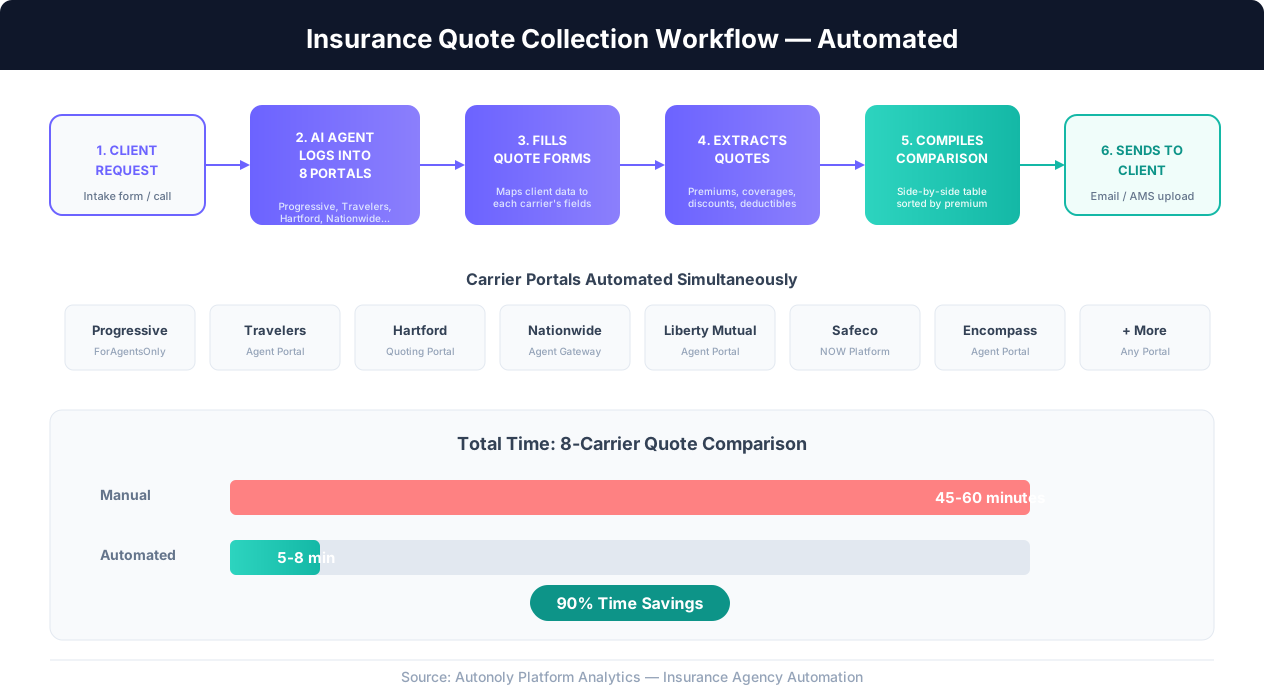
For a single client requesting auto and home quotes from eight carriers, the typical workflow looks like this:
- Collect client information: Phone call or intake form captures personal details, vehicle information, property details, claims history, and coverage preferences. This takes 10-15 minutes.
- Log into carrier portal #1: Open the browser, navigate to the carrier's agent portal, enter credentials, handle any multi-factor authentication prompts. Wait for the dashboard to load.
- Navigate to new quote: Find the quoting section (different carriers bury this in different places), select the line of business, and start a new application.
- Fill the quote form: Enter client data field by field. Each carrier asks for slightly different information in a different order. Some use dropdowns, others use radio buttons, others use free-text fields. Many require multiple pages of data entry.
- Review and submit: Check the entered information, select coverage options, and submit for a quote. Wait for the rating engine to return results (sometimes instant, sometimes 30-60 seconds).
- Record the quote: Copy the premium amount, coverage details, deductibles, and any available discounts into a spreadsheet or comparative rater.
- Repeat steps 2-6 for carriers #2 through #8.
- Compile comparison: Organize all quotes into a comparison format the client can understand, highlighting the best options.
- Present to client: Send the comparison via email or review it over the phone.
The Time Cost Is Staggering
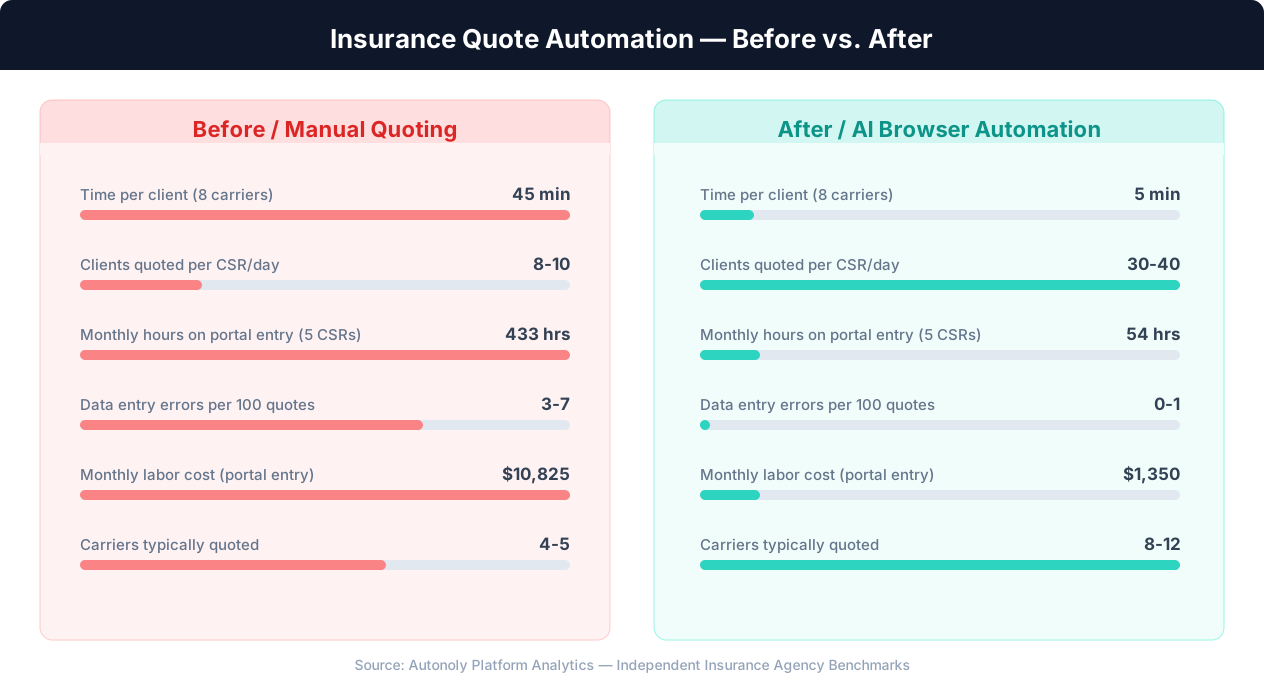
Each carrier portal takes 5-8 minutes to complete: login, navigation, data entry, submission, and result recording. For eight carriers, that is 40-64 minutes of repetitive data entry per client. An agency quoting 10 new clients per day spends 6-10 hours daily just entering the same information into different websites.
And that is just the initial quote. When the client asks to adjust coverage limits, change deductibles, or add a vehicle, the agent goes back through each portal to re-quote. When a carrier's portal has a session timeout (Hartford's is notoriously short), the agent starts the entire entry process over.
The Real Cost
An agency with 5 CSRs spending 4 hours daily on portal data entry is burning over 5,000 hours per year on work that produces zero unique value. At $25/hour fully loaded, that is $125,000 annually spent on copy-pasting the same client data between websites.
Why Traditional Solutions Fall Short
This problem is not new, and the insurance industry has tried to solve it. Comparative raters like EZLynx, Applied Rater, and TurboRater connect to some carriers via API or proprietary integrations. But these raters only cover a subset of carriers, often exclude commercial lines, and frequently break when carriers update their systems. Many agents still cannot get all their carriers into a single rater.
Integration platforms like Zapier and Make cannot help here either. Carrier portals do not offer public APIs for quoting. There is no webhook to trigger, no REST endpoint to call, no OAuth flow to configure. The only way to get a quote from most carrier portals is the same way a human does it: open a browser, log in, fill out forms, and read the results off the screen.
This is the exact use case that AI browser automation was built for.
Why Browser Automation Is the Only Solution for Carrier Portals
Insurance carrier portals exist in a category of software that has resisted automation for decades: complex, authenticated web applications with no programmatic access. Understanding why browser automation is the only viable approach requires understanding why every other approach fails.
No APIs Exist
Unlike modern SaaS platforms that offer REST APIs, carrier quoting portals were designed exclusively for human interaction. Progressive's ForAgentsOnly portal, Travelers' agent dashboard, Hartford's quoting system, Nationwide's agent portal, and Liberty Mutual's quoting interface all require a human to interact with their web UI. There is no documented API, no developer portal, no API keys to generate.
Some carriers offer IVANS downloads or ACORD form integration through agency management systems, but these are limited to policy data exchange — not real-time quoting. The quoting engines themselves are locked behind browser-based interfaces.
Traditional RPA Cannot Handle Portal Complexity
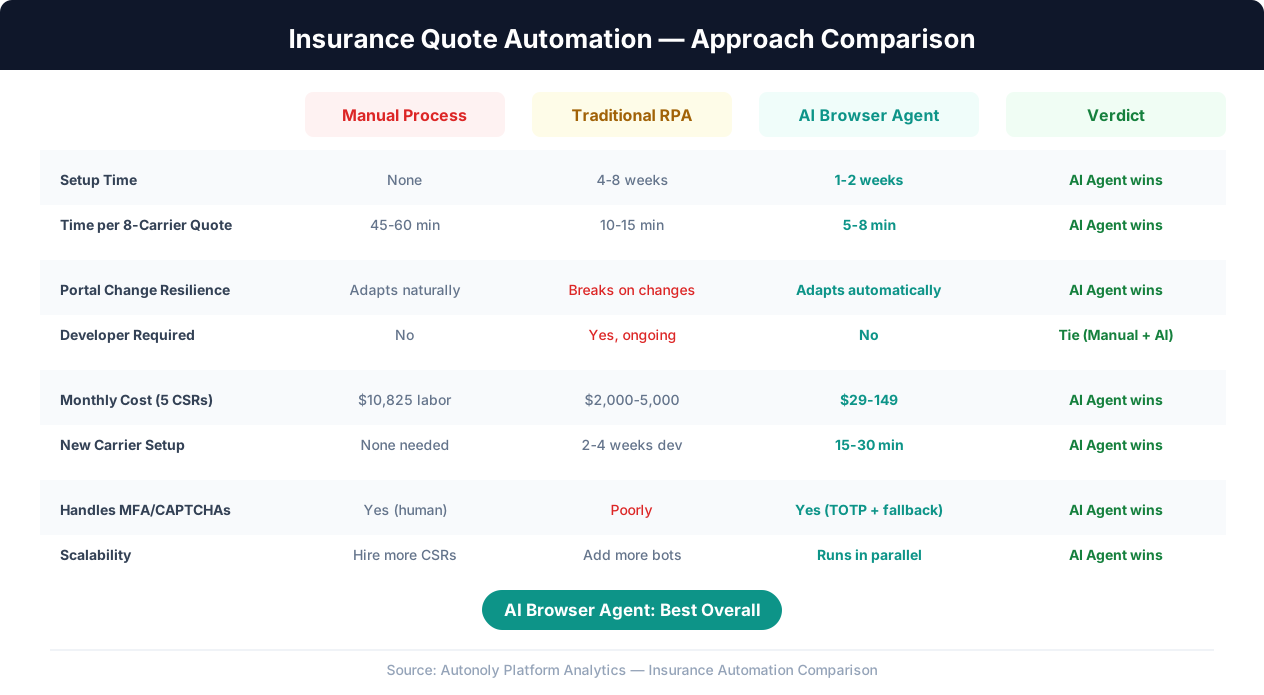
Traditional Robotic Process Automation (RPA) tools like UiPath or Automation Anywhere can automate browser interactions, but they struggle with the variability of carrier portals. Traditional RPA relies on exact element selectors — specific button IDs, CSS classes, or XPath expressions that identify each form field. When a carrier updates their portal UI (which happens frequently), every selector breaks and the automation stops working until a developer manually updates each one.
Carrier portals present additional RPA challenges:
- Dynamic form fields: Many portals show or hide fields based on previous answers. Selecting "commercial auto" versus "personal auto" on Progressive changes the entire form structure. Traditional RPA scripts cannot adapt to conditional form layouts without extensive branching logic.
- Multi-step quoting flows: Carriers like Travelers break the quoting process into 5-7 steps across multiple pages. Each step may have different loading patterns, validation messages, and navigation elements. A rigid RPA script that expects step 3 to look exactly like it did last month will fail when the carrier reorders fields or adds a new validation.
- Session management: Portal sessions expire, require periodic re-authentication, or present unexpected security prompts. A human handles these interruptions naturally. A traditional RPA bot crashes.
- CAPTCHA and bot detection: Some carrier portals implement anti-automation measures that defeat simple browser automation. These require more sophisticated approaches that mimic genuine human interaction patterns.
AI Browser Automation: The Right Tool
AI browser automation, as implemented by platforms like Autonoly, approaches carrier portals the way a human does but with machine speed and consistency. Instead of relying on brittle CSS selectors, the AI agent sees the page visually and understands what each form field is asking for, regardless of its technical implementation.
When Travelers changes the layout of their quote form, the AI agent recognizes that the "Date of Birth" field has moved from the left column to the right column and fills it in the new location. When Progressive adds a new required field for "Years of driving experience," the AI reads the label and fills the value from the client data. When Hartford's session times out mid-quote, the agent detects the login page, re-authenticates, and resumes where it left off.
Why This Matters
AI browser automation does not need carrier cooperation or API access. It works with any portal that a human agent can access through a web browser — today, without waiting for carriers to build integrations that may never come.
This is fundamentally different from screen-scraping or macro-based automation. The AI understands the intent of each interaction ("enter the client's date of birth"), not just the mechanism ("click element #dob-field and type 03/15/1985"). This semantic understanding is what makes it resilient to portal changes and adaptable across different carriers without carrier-specific programming.
Building an Insurance Quote Collection Workflow Step by Step
Here is how to build an automated quote collection workflow that handles the full pipeline from client data intake to comparison delivery. The workflow has four stages: data preparation, portal automation, quote extraction, and comparison assembly.
Stage 1: Client Data Preparation
The workflow begins with structured client data. Whether the client fills out an online intake form, the agent enters information during a phone call, or the data comes from your agency management system (Applied Epic, Vertafore AMS360, HawkSoft), the output is a standardized client record containing everything the carrier portals will need:
| Data Category | Fields | Used By |
|---|---|---|
| Personal | Full name, DOB, SSN (last 4), marital status, occupation | All carriers |
| Address | Street, city, state, zip, residence type, years at address | All carriers |
| Vehicles | Year, make, model, VIN, annual mileage, usage, garaging address | Auto carriers |
| Drivers | Name, DOB, license #, license state, violations, accidents | Auto carriers |
| Property | Year built, square footage, construction type, roof material/age, heating type | Home carriers |
| Claims history | Date, type, amount, carrier, status | All carriers |
| Coverage preferences | Liability limits, deductibles, optional coverages | All carriers |
Autonoly can pull this data from a Google Sheet, your agency management system (via browser automation if no API exists), or a form submission. The key is normalizing the data into a format that the automation can map to any carrier's form fields.
Stage 2: Portal Automation
For each carrier in the client's target list, the workflow executes a quoting sequence:
- Login: Navigate to the carrier portal, enter agent credentials, handle MFA if required. The automation stores credentials securely and handles session management.
- Start new quote: Navigate to the quoting section, select the appropriate line of business (personal auto, homeowners, umbrella), and initiate a new application.
- Fill application form: The AI agent maps client data fields to the carrier's form fields. "Date of birth" on Progressive maps to the same client data as "DOB" on Travelers and "Birth Date" on Hartford. The agent fills each field, handles dropdowns by searching for the matching option, selects radio buttons, and checks checkboxes as needed.
- Handle conditional logic: When a carrier's form presents conditional fields ("Do you have a pool?" triggers pool-related questions), the agent reads the condition, checks the client data, and responds appropriately.
- Submit and wait: Submit the completed application for rating. Some carriers return quotes instantly; others require 10-30 seconds of processing. The agent waits for results to appear.
Stage 3: Quote Extraction
Once the carrier returns a quote, the automation extracts the results:
- Premium amounts: Annual premium, semi-annual, quarterly, and monthly payment options
- Coverage details: Liability limits, comprehensive and collision deductibles, uninsured/underinsured coverage, medical payments
- Available discounts: Multi-policy, good driver, homeowner, paperless, pay-in-full, loyalty
- Carrier-specific notes: Surcharges, exclusions, required endorsements, credit tier information
The extracted data is structured into a consistent format regardless of how each carrier presents it. Progressive might show the premium in a summary box at the top of the page; Travelers might display it in a table at the bottom. The AI agent finds and extracts the relevant numbers from wherever they appear.
Stage 4: Comparison Assembly
After all carriers have been quoted, the workflow compiles a comparison spreadsheet or document:
- One row per carrier, columns for premium, coverage limits, deductibles, and discounts applied
- Sorted by annual premium (lowest to highest) or by best coverage value
- Highlights showing which carrier is cheapest, which offers the best coverage, and which provides the best discounts
- Optionally formatted as a branded PDF that the agent can send directly to the client
The comparison can be saved to Google Sheets, uploaded to the agency management system, or emailed directly to the client — all within the same automated workflow.
Handling Carrier-Specific Portal Challenges
Each carrier portal has its own quirks, and building a robust quoting automation means handling the specific challenges each one presents. Here is what to expect from the major carriers and how AI browser automation addresses each challenge.
Progressive ForAgentsOnly
Progressive's agent portal is one of the more automation-friendly interfaces. The quoting flow is relatively linear, with clear form fields and consistent labeling. However, Progressive uses dynamic address verification that pops up a modal to confirm the standardized address, and their vehicle identification flow auto-populates fields from VIN lookup, which can delay the automation if not handled with appropriate waits. The AI agent monitors for these modals and address confirmation dialogs, clicking through them as a human would.
Travelers Agent Portal
Travelers presents a multi-step quoting wizard that spans five to seven pages depending on the line of business. Each step has client-side validation that prevents proceeding until all required fields are filled. Travelers also uses extensive dropdown menus for selections like "construction type" and "roof material" where the exact option text may differ from how the client described it ("Asphalt Shingles" vs. "Composition/Asphalt" vs. "Architectural Shingles"). The AI agent selects the closest matching option from each dropdown, adapting to Travelers' specific terminology.
Hartford
Hartford's quoting portal is known for aggressive session timeouts. Agents frequently report being logged out mid-quote if they pause to look up information. For an automated workflow, this means the agent must work efficiently through the form without unnecessary delays. If a timeout does occur, the automation detects the redirect to the login page, re-authenticates, and navigates back to the in-progress quote (Hartford preserves partial quotes in most cases).
Nationwide Agent Gateway
Nationwide's portal includes a comprehensive risk assessment section that asks questions other carriers do not, particularly around prior insurance history and reasons for shopping. The automation needs access to this additional client data or sensible default responses for optional questions. Nationwide also requires selecting specific agency codes for multi-location agencies, which the automation handles by configuring the correct agency identifier in the workflow settings.
Liberty Mutual
Liberty Mutual's quoting interface is heavily JavaScript-driven with asynchronous form updates. Changing one field (like zip code) triggers background requests that update available coverage options and pricing tiers. A traditional RPA tool that fills fields in rapid succession would miss these asynchronous updates. AI browser automation naturally handles this by observing the page state after each interaction and waiting for loading indicators to resolve before proceeding to the next field.
Safeco (Liberty Mutual Subsidiary)
Safeco uses a cleaner, more modern interface than many legacy carrier portals, but it requires specific coverage tier selections early in the process that affect which options appear later. The automation must be configured with the agent's preferred starting coverage tier (typically "Standard" or "Preferred") to ensure the right options are available throughout the quoting flow.
Carrier Portal Updates Are Not a Problem
When carriers redesign their portals — and they do, regularly — AI browser automation adapts automatically. The agent recognizes "Date of Birth" whether it is in a text input, a date picker, or a set of three dropdowns for month, day, and year. No manual selector updates, no developer intervention, no downtime.
Handling Multiple Lines of Business
Many clients need quotes for multiple lines — personal auto plus homeowners, or commercial auto plus general liability plus workers' compensation. Some carriers offer multi-line quoting within a single session where information entered for the auto quote carries over to the home quote. Others require starting fresh for each line of business. The automation handles both patterns: when a carrier supports multi-line, it navigates to add the additional line within the existing quote; when a carrier requires separate quotes, it starts a new quoting session for each line.
Security, Compliance, and Credential Management
Insurance agents handle sensitive personal information — Social Security numbers, driver's license numbers, financial data, health information for life and disability quotes. Any automation system that processes this data must meet strict security and compliance requirements.
Credential Security
The automation needs access to agent portal credentials for each carrier. This is the most common concern agencies raise, and it is a legitimate one. Here is how a properly designed automation handles credentials:
- Encrypted credential storage: Portal credentials are stored using AES-256 encryption at rest, never in plain text. The encryption keys are managed separately from the stored credentials, following the principle of key separation.
- No credential sharing: Each agent's credentials are accessible only to their own automation workflows. Agency administrators cannot view individual agent passwords — only add or rotate them.
- Session isolation: Each automation run uses an isolated browser session that is destroyed after completion. No cookies, cached credentials, or session tokens persist between runs.
- MFA support: For carriers that require multi-factor authentication, the automation can either use TOTP-based authenticator codes (if the agent configures a shared TOTP secret) or pause and request the agent to provide the MFA code before proceeding.
Client Data Protection
Client personal information flowing through the automation must be protected in transit and at rest:
| Protection Layer | Implementation | Standard |
|---|---|---|
| Data in transit | TLS 1.3 encryption for all connections | Industry standard |
| Data at rest | AES-256 encryption for stored client records | SOC 2 compliant |
| Data retention | Client data purged after quote completion (configurable) | Data minimization |
| Access controls | Role-based access, audit logging | NAIC compliance |
| Browser isolation | Cloud browser sessions, no local data storage | Zero-trust architecture |
Carrier Terms of Service Considerations
A critical question agencies ask: "Does automating portal logins violate carrier terms of service?" The answer requires nuance:
Most carrier agent agreements authorize the agent to access the portal for the purpose of quoting and servicing policies. The agent is the one accessing the portal — the automation is a tool the agent uses, similar to how a comparative rater accesses carrier systems on the agent's behalf. The agent's credentials are used, the agent authorizes each run, and the agent reviews the results.
That said, agencies should review their specific carrier agreements and consult with their compliance officer. Some carriers may have explicit restrictions on automated access. In practice, carrier portals have been accessed by comparative raters and agency management systems using similar browser-based automation for over a decade, and this is widely accepted in the industry.
Compliance Best Practice
Keep an audit log of every automated portal interaction. Record the timestamp, carrier, agent credentials used, client identifier, and action performed (quote, endorsement, policy check). This audit trail demonstrates that all access was authorized and purposeful — essential for compliance reviews and E&O considerations.
E&O Insurance Implications
Agents sometimes worry about Errors and Omissions implications of automated quoting. The key considerations are:
- Accuracy verification: The automation extracts quote data, but the agent must review the quotes before presenting to the client. Automated data entry errors, while rare with AI, should be caught in the review step.
- Coverage adequacy: The automation fills in coverage options based on the agent's specifications, but the agent remains responsible for ensuring the coverage recommendations are appropriate for the client's needs. Automation handles the data entry — professional judgment remains the agent's domain.
- Documentation: Automated workflows produce complete logs of what data was entered, which carriers were quoted, and what results were returned. This documentation is more thorough than most manual processes and actually strengthens the agent's E&O position by providing a clear record of due diligence.
Measuring the ROI: Time Savings and Revenue Impact
The return on investment for quote automation is straightforward to calculate because the time savings are dramatic and directly translate to either cost reduction or revenue increase.
Time Savings Per Quote
Based on real-world measurements from agencies that have implemented browser automation for quoting:
| Metric | Manual Process | Automated Process | Savings |
|---|---|---|---|
| Time per carrier quote | 5-8 minutes | 45-90 seconds | 80-85% |
| Time for 8-carrier comparison | 45-60 minutes | 5-8 minutes | 85-90% |
| Re-quotes (coverage changes) | 30-45 minutes | 3-5 minutes | 90% |
| Data entry errors per 100 quotes | 3-7 errors | 0-1 errors | 85-95% |
| Quotes completed per CSR per day | 8-12 clients | 25-40 clients | 3x capacity |
Cost Savings Calculation
For a typical independent agency with 5 CSRs handling personal lines quoting:
- Current state: Each CSR spends approximately 4 hours per day on portal data entry for quoting. That is 20 CSR-hours per day, 5,200 hours per year.
- Automated state: With automation handling the portal interaction, each CSR spends approximately 30 minutes per day on quoting tasks (reviewing results, handling exceptions, customizing coverage options). That is 2.5 CSR-hours per day, 650 hours per year.
- Time recovered: 4,550 hours per year — equivalent to 2.2 full-time employees.
- Cost savings: At a fully loaded cost of $25/hour per CSR, that is $113,750 per year in labor cost savings alone.
Revenue Impact
The time savings from quote automation do not just reduce costs — they unlock revenue growth that was previously impossible:
- More quotes per day: A CSR who can handle 30 clients per day instead of 10 triples the agency's quoting capacity without hiring additional staff. More quotes mean more policies written.
- Faster response times: When a prospect requests quotes, the agency that responds in 30 minutes wins the business over the agency that takes until the next day. Automation enables same-hour quote delivery for most requests.
- More carriers per quote: When quoting is manual, agents often skip carriers they consider unlikely to be competitive — checking 4-5 carriers instead of 8-10. With automation, running all carriers takes minimal additional time, and the "unlikely" carrier sometimes has the best rate. More carriers quoted means better prices for clients, which means higher close rates.
- Higher retention: Automated re-quoting at renewal makes it trivial to market existing clients across all carriers annually. Agents who re-market every renewal find better rates more often, keeping clients happy and reducing defection to competitors.
Real Agency Impact
Agencies that automate multi-carrier quoting typically see a 20-35% increase in new policies written within the first six months — not from marketing more, but from quoting faster and quoting more carriers per prospect.
Break-Even Analysis
At Autonoly's pricing, the break-even point for most agencies is reached within the first month. An agency that saves even 10 CSR-hours per week at $25/hour recovers $1,000/month in labor alone — before accounting for additional revenue from faster quoting and higher close rates. The ROI compounds as the agency scales: adding more carriers, more lines of business, and more CSRs to the automated workflow requires minimal incremental cost.
Implementation Guide: Getting Your Agency Started
Moving from manual portal hopping to automated quoting does not require a massive technology overhaul. Here is a practical implementation plan that gets your agency quoting automatically within one to two weeks.
Week 1: Setup and Pilot
Day 1-2: Data preparation. Create a standardized client intake template in Google Sheets or your preferred format. This template should capture every field that your most demanding carrier requires. It is better to collect extra information upfront than to interrupt the automation because a carrier needs a field you did not capture.
Day 3-4: First carrier automation. Start with your most-quoted carrier — the one your CSRs log into most often. Using Autonoly's AI agent, describe the quoting workflow: "Log into [carrier portal URL] with these credentials. Navigate to new personal auto quote. Fill in the client information from my spreadsheet. Submit the quote and extract the premium amount, coverage details, and available discounts." The AI agent builds and executes the workflow, and you validate the results against a manual quote.
Day 5-7: Expand to three carriers. Add your second and third most-quoted carriers to the workflow. Each additional carrier takes less time to configure because the client data mapping is already established — you are just teaching the agent the new carrier's portal layout and form flow.
Week 2: Scale and Optimize
Day 8-10: Add remaining carriers. Expand to your full carrier list. With the pattern established from the first three carriers, additional carriers typically take 15-30 minutes each to configure and validate.
Day 11-12: Build the comparison output. Configure the workflow to compile all extracted quotes into a formatted comparison spreadsheet. Add sorting by premium, coverage highlighting, and any agency-specific branding you want on client-facing documents.
Day 13-14: CSR training and parallel running. Have CSRs run the automation alongside their manual process for a few days to build confidence. They should compare automated quotes against manual quotes to verify accuracy. Once accuracy is confirmed (expect 98%+ match rates), transition to automation-primary with manual spot-checking.
Ongoing Optimization
After the initial setup, optimization is continuous but low-effort:
- Handle new carriers: When your agency appoints with a new carrier, adding them to the automation takes 30-60 minutes.
- Adjust for portal changes: When a carrier updates their portal, the AI agent usually adapts automatically. For significant redesigns, a brief re-configuration session may be needed.
- Expand to commercial lines: Commercial quoting involves more complex forms but follows the same pattern. Start with your most common commercial class (e.g., small business BOP) and expand from there.
- Integrate with your AMS: Connect the automation to your agency management system so client data flows directly from your AMS to the quoting workflow and results flow back. If your AMS has an API, use it. If not, browser automation handles the AMS interaction too.
Start Small, Scale Fast
You do not need to automate every carrier on day one. Start with your top three carriers, validate accuracy, and expand. Most agencies have their full carrier panel automated within two weeks of starting.
Common Implementation Questions
"What if a carrier blocks automated access?" Autonoly uses real cloud browser sessions with natural interaction patterns, not headless scripts. The browser sessions are indistinguishable from a human agent using the portal. In practice, agencies report zero carrier-initiated blocks.
"Can I still manually intervene during a quote?" Yes. The automation runs in a visible browser window that agents can observe and take over at any point. If a carrier presents an unusual situation the automation has not seen before, the agent can step in, complete the interaction manually, and the automation learns from the intervention.
"What about commercial lines with complex class codes?" Commercial quoting is more complex but follows the same principles. The AI agent handles class code selection, business classification, and the more detailed forms that commercial lines require. Start with simpler commercial classes and expand as you build confidence.
Beyond Quoting: Other Insurance Workflows to Automate
Once your agency has automated multi-carrier quoting, the same AI browser automation platform can tackle other portal-dependent workflows that consume CSR and agent time.
Policy Endorsements and Changes
When a client adds a vehicle, changes an address, or adjusts coverage limits, the agent must log into the carrier portal, navigate to the existing policy, make the change, and issue the endorsement. This process takes 10-20 minutes per change per carrier. Automation reduces it to under 2 minutes: the agent provides the change details, and the workflow logs into the carrier portal, navigates to the policy, makes the modification, and confirms the endorsement.
Renewal Re-Marketing
Best-practice agencies re-market their clients across carriers at every renewal to ensure they still have the best rate. Manual re-marketing means re-quoting the client across all carriers — the same 45-60 minute process as the initial quote, repeated for every renewing policy. With automation, renewal re-marketing becomes systematic: the workflow pulls expiring policies from your AMS, re-quotes each one across all carriers, and flags any policies where a competing carrier beats the current rate by more than a threshold (say, 10%). The agent reviews only the flagged renewals, dramatically reducing the time spent on renewals that do not need action.
Claims Status Checking
Clients call to ask about claim status. The agent logs into the carrier's claims portal, looks up the claim, and relays the information. This can be automated: the workflow checks claim status on a schedule (daily or upon client request), extracts the status and any updates, and can even send the client a proactive email update when the status changes.
Certificate of Insurance Issuance
Commercial clients frequently need certificates of insurance issued for landlords, general contractors, or contract requirements. The agent logs into the carrier portal, navigates to the certificate section, enters the certificate holder information, selects the coverages to include, and downloads or emails the certificate. This process takes 10-15 minutes per certificate. Automation handles it in under a minute: the agent provides the certificate holder details, and the workflow completes the portal interaction.
Loss Run Requests
When quoting clients who are moving from another carrier, agents need loss runs (claims history reports) from the client's current carrier. These are often requested through carrier portals. Automating the request submission — and monitoring for the completed loss run to become available — eliminates a time-consuming back-and-forth process.
Building a Comprehensive Automation Strategy
The pattern is consistent across all these workflows: an agent needs to interact with a carrier portal that has no API, performing repetitive data entry and extraction. Each workflow automated saves time that compounds across the entire agency. An agency that automates quoting, endorsements, renewal re-marketing, and certificate issuance can reallocate hundreds of hours per month from portal data entry to client relationships, sales, and growth — the activities that actually build the business.
Start with quoting because it has the highest volume and the most immediate ROI. Then expand to endorsements (the second most common portal interaction), then renewals (the highest-value automation for client retention), and continue adding workflows as each one proves its value. The visual workflow builder makes it straightforward to create and modify these automations without coding, and the data entry automation patterns used for quoting transfer directly to these additional use cases.