Overview of Both Tools: Two Approaches to Browser Automation
Bardeen and Autonoly both promise to automate the tedious browser work that eats your day — but they take fundamentally different architectural approaches to the problem. Understanding these differences is essential before you invest time building workflows on either platform.
Bardeen launched in 2020 as a Chrome extension that automates repetitive browser tasks. It pioneered the idea of a lightweight, extension-based automation layer that lives inside your browser. You install the extension, connect your apps, and build "playbooks" that automate sequences of actions across tabs. Bardeen has grown to support AI-powered features including natural language workflow creation and AI-assisted data extraction.
Autonoly is an AI-native automation platform built from the ground up around AI agents. Rather than scripting browser actions step by step, you describe what you want in plain English and an AI agent builds and executes the workflow. The agent uses live browser control to interact with any website — not through a browser extension, but through a full cloud-based browser session that you can watch in real time.
Both tools aim to save you hours of manual browser work. But the way they get there — and the ceiling of what they can handle — differs significantly.
📊 By the Numbers
Browser-based automation is the fastest-growing segment of the automation market, projected to reach $19.6 billion by 2027. Chrome extensions account for roughly 30% of individual user automations, while cloud-based browser automation dominates team and enterprise deployments.
This comparison is designed to be genuinely balanced. Bardeen is an excellent tool for certain use cases — particularly quick personal automations that live entirely within the Chrome browser. We will be clear about where Bardeen wins and where Autonoly offers advantages. The right choice depends entirely on what you are trying to automate, how complex your workflows are, and whether you need team collaboration features.
| Attribute | Bardeen | Autonoly |
|---|---|---|
| Founded | 2020 | 2025 |
| Architecture | Chrome extension | Cloud-based AI agent platform |
| Setup method | Install Chrome extension | Sign up, describe task |
| Automation approach | Playbooks (step-by-step) | AI agent (describe outcome) |
| Primary users | Individual professionals, sales reps | Teams, ops managers, agencies |
| Free tier | Yes (limited credits) | Yes (limited runs) |
The broader context matters too. Browser automation is increasingly important because more business work happens in browsers than ever before. A 2025 Forrester study found that the average knowledge worker spends 67% of their work time in a web browser — managing SaaS tools, filling forms on portals, researching competitors, and moving data between cloud applications. Any tool that can automate browser work has a massive addressable problem to solve.
Let us dig into the architectural differences that drive most of the practical differences between these two tools.
Architecture Comparison: Chrome Extension vs Full Platform
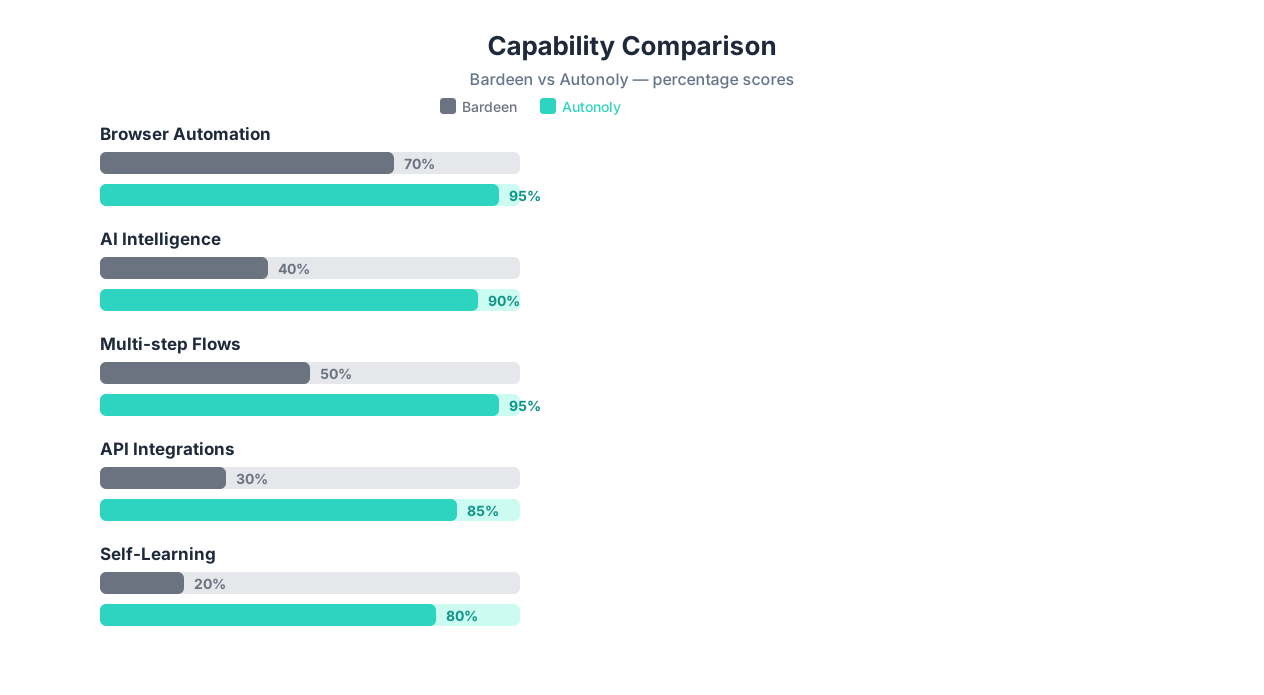
The single most important difference between Bardeen and Autonoly is architectural. Bardeen runs as a Chrome extension inside your local browser. Autonoly runs AI agents in the cloud with their own browser sessions. This distinction ripples through every aspect of how the tools work.
Bardeen: The Extension Model
Bardeen installs as a Chrome extension that injects itself into your browser. When you run a playbook, Bardeen manipulates the tabs and pages in your current Chrome session. This means:
- Your computer must be on — Bardeen runs in your browser, so if you close Chrome or shut down your laptop, automations stop
- Chrome-only — Bardeen does not work in Firefox, Safari, Edge, or any other browser (though Chromium-based browsers like Brave may work)
- Local context — Bardeen has access to your logged-in sessions, cookies, and local data, which simplifies authentication
- Resource usage — Complex automations consume your local CPU, memory, and bandwidth
- Single machine — Automations run on the machine where Chrome is open, limiting scalability
Autonoly: The Cloud Agent Model
Autonoly runs AI agents in cloud-based browser sessions. When you describe a task to the AI agent, it launches a remote browser, executes the workflow, and returns results. This means:
- Runs 24/7 — Agents execute in the cloud regardless of whether your computer is on
- Browser-agnostic — You interact through a web dashboard, not a browser extension
- Scalable — Run multiple agents simultaneously on different tasks
- Observable — Watch agent execution through live browser view from any device
- Requires credential setup — Since agents run remotely, you need to provide credentials for authenticated workflows
What the Architecture Means in Practice
The extension vs platform architecture creates real tradeoffs that affect daily use:
| Scenario | Bardeen (Extension) | Autonoly (Cloud) |
|---|---|---|
| Run automation overnight | Only if Chrome stays open on your machine | Runs automatically in the cloud |
| Run while traveling | Only from the machine with Bardeen installed | From any device with a browser |
| Team sharing | Share playbook templates; each person runs locally | Shared workspace; anyone can run, monitor, edit |
| Scale to 10 parallel tasks | Limited by your machine's Chrome tabs | 10 parallel cloud agents |
| Access logged-in sites | Uses your existing Chrome sessions (easy) | Requires credential configuration (extra step) |
| Handle CAPTCHAs | You see and solve them in your browser | AI-assisted CAPTCHA handling or human-in-the-loop |
💡 Key Insight
Bardeen's extension model is genuinely simpler for quick, personal automations. If you just need to scrape a page you are already looking at or automate a form you fill daily in Chrome, the extension model removes the credential-setup step entirely. Autonoly's cloud model wins when you need reliability (24/7 execution), scale (parallel agents), or team collaboration.
Neither architecture is objectively better — they serve different needs. A solo sales rep who wants to automate LinkedIn prospecting from their laptop may prefer Bardeen's simplicity. An operations team that needs 15 automated workflows running on schedule across multiple sites will need Autonoly's cloud infrastructure.
A Note on Data Privacy
The architecture difference also affects data handling. Bardeen processes data locally in your browser — your scraped data, form inputs, and credentials stay on your machine (though Bardeen's servers handle some processing). Autonoly processes data in the cloud, meaning your workflows and their outputs pass through Autonoly's infrastructure. Both approaches have security implications: local processing gives you more control, while cloud processing enables encryption, audit trails, and centralized credential management. For sensitive workflows, review each platform's security documentation and data handling policies before committing.
Feature-by-Feature Comparison: 18 Capabilities Compared
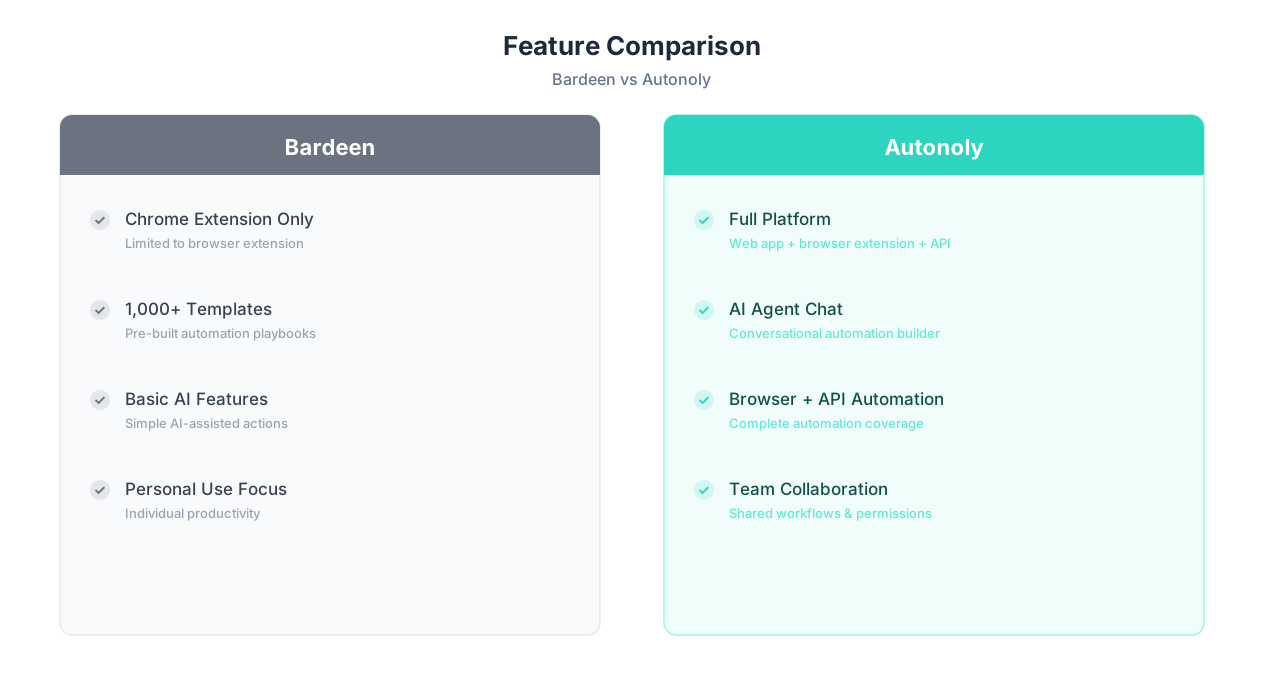
Beyond architecture, Bardeen and Autonoly differ across dozens of specific features. Here is a detailed breakdown of 18 capabilities that matter most for browser automation.
| Feature | Bardeen | Autonoly | Winner |
|---|---|---|---|
| Natural language workflow creation | Yes — AI generates playbooks from descriptions | Yes — AI agent chat builds workflows | Tie |
| Visual workflow builder | Yes — drag-and-drop playbook editor | Yes — visual workflow builder | Tie |
| Browser automation | Chrome extension (local browser) | Cloud browser (remote, observable) | Depends on use case |
| Scheduled execution | Limited — requires Chrome open | Full cron-based scheduling | Autonoly |
| 24/7 unattended execution | No — requires your browser running | Yes — cloud agents run independently | Autonoly |
| API integrations | 30+ native integrations | API + browser hybrid approach | Bardeen (more pre-built) |
| Works on non-Chrome browsers | No | Yes (web dashboard) | Autonoly |
| Parallel execution | Limited (single browser) | Multiple concurrent agents | Autonoly |
| Self-healing when sites change | Basic retry logic | LLM-based adaptive reasoning | Autonoly |
| Cross-session learning | No | Yes — agents improve over time | Autonoly |
| PDF data extraction | Limited | Full AI-powered PDF extraction | Autonoly |
| Team collaboration | Template sharing | Shared workspaces, role-based access | Autonoly |
| Data scraping | Good — built-in scraper module | Advanced — AI-guided web scraping | Autonoly |
| Form filling | Good — template-based | Advanced — AI maps fields intelligently | Autonoly |
| Free tier | Yes — generous for basic use | Yes — limited runs | Bardeen |
| Setup speed (first automation) | 2-5 minutes | 2-5 minutes | Tie |
| Mobile access | No (Chrome desktop only) | Yes (web dashboard from any device) | Autonoly |
| LinkedIn automation | Strong — purpose-built features | Supported via browser automation | Bardeen |
⚠️ Important Note
Feature counts alone do not tell the full story. Bardeen's LinkedIn-specific features are highly polished for sales teams — it was designed with that use case in mind. Autonoly can automate LinkedIn through general browser control, but Bardeen's dedicated LinkedIn playbooks are more streamlined for sales prospecting specifically.
Where Bardeen Genuinely Excels
Credit where it is due — Bardeen has meaningful advantages in several areas:
- LinkedIn and sales workflows: Bardeen's playbooks for LinkedIn lead scraping, connection requests, and CRM enrichment are purpose-built and polished. If LinkedIn prospecting is your primary use case, Bardeen's templates get you running faster.
- Chrome-native simplicity: Because Bardeen runs in your browser, there is no credential configuration for sites you are already logged into. You literally right-click and automate.
- Free tier generosity: Bardeen's free plan includes enough credits for casual personal use, making it accessible for individuals experimenting with automation.
- Pre-built integrations: Bardeen's native integrations with tools like Notion, Google Sheets, HubSpot, and Slack are ready to go without configuration.
Where Autonoly Genuinely Excels
Autonoly's advantages center on power, reliability, and scale:
- 24/7 cloud execution: Workflows run on schedule regardless of whether your computer is on — critical for business-critical automations.
- AI adaptability: When websites change layouts, Autonoly's AI agents reason about the new UI rather than failing on broken selectors.
- Complex multi-step workflows: Workflows spanning 10+ steps across multiple websites with conditional logic, error handling, and data transformation. Where Bardeen playbooks can feel cumbersome at this scale (building each step manually), Autonoly's AI agent generates the entire workflow from a single description.
- Team features: Shared workspaces, audit logs, and role-based access for teams that need to collaborate on automations.
- Document processing: Full PDF extraction, spreadsheet manipulation, and data entry automation beyond what a browser extension can handle.
Use Case Comparison: 5 Real Scenarios Head-to-Head
Features on paper are one thing — real-world performance is another. Here are five common automation scenarios and how each tool handles them.
Scenario 1: Scrape 50 LinkedIn Profiles and Enrich CRM Records
| Aspect | Bardeen | Autonoly |
|---|---|---|
| Setup time | 5-10 minutes (pre-built playbook) | 5-10 minutes (describe to agent) |
| Execution | Runs in your Chrome — you see tabs opening | Runs in cloud — watch via live view |
| LinkedIn compliance | Extension-visible to LinkedIn | Cloud browser with realistic behavior |
| CRM integration | Native HubSpot/Salesforce connectors | API or browser-based CRM updates |
| Best for this task? | Bardeen wins — purpose-built for this exact workflow | Capable but less specialized |
Verdict: Bardeen wins this scenario. LinkedIn sales prospecting is Bardeen's flagship use case, and their pre-built playbooks are specifically optimized for it.
Scenario 2: Monitor 20 Competitor Pricing Pages Daily
| Aspect | Bardeen | Autonoly |
|---|---|---|
| Setup time | 20-30 minutes (build for each site) | 5 minutes (describe all 20 sites) |
| Scheduled execution | Requires Chrome open at scheduled time | Runs automatically at 6 AM daily |
| Site changes | Breaks if pricing page layout changes | AI adapts to new layouts automatically |
| Scale | 20 tabs cycling through sites | 20 parallel cloud agents |
| Best for this task? | Workable but fragile | Autonoly wins — cloud scheduling + adaptive scraping |
Verdict: Autonoly wins this scenario. Daily monitoring requires 24/7 reliability that a browser extension cannot guarantee.
Scenario 3: Fill Out Government Permit Applications
| Aspect | Bardeen | Autonoly |
|---|---|---|
| Multi-page forms | Can handle with step-by-step playbooks | AI maps data fields automatically |
| Authentication | Uses your logged-in session (easy) | Requires credential configuration |
| CAPTCHAs | You solve them in-browser | AI-assisted or human-in-the-loop |
| Error recovery | Fails and retries from start | AI reasons about the error and adapts |
| Best for this task? | Workable for occasional use | Autonoly wins — intelligent form filling |
Verdict: Autonoly wins for frequent form filling across multiple portals. Bardeen is fine if you fill one government form once a month.
💡 Key Insight
The pattern is clear: Bardeen excels at quick, Chrome-centric workflows — especially LinkedIn and sales tasks. Autonoly excels at reliable, scheduled, multi-site automations that need to run without your computer being on. Neither is universally better.
Scenario 4: Extract Data From 100 PDF Invoices Weekly
| Aspect | Bardeen | Autonoly |
|---|---|---|
| PDF processing | Limited — browser-based only | Full AI-powered PDF extraction |
| Batch processing | One at a time | Batch processing of 100+ PDFs |
| Output | Google Sheets (manual mapping) | Structured data to any destination |
| Accuracy | Basic text extraction | AI understands invoice structure |
| Best for this task? | Not suited for high-volume PDF work | Autonoly wins — purpose-built for document processing |
Verdict: Autonoly wins decisively. PDF processing at scale is outside Bardeen's core capability.
Scenario 5: Automate Personal Tab Management and Quick Lookups
| Aspect | Bardeen | Autonoly |
|---|---|---|
| Speed | Instant — runs in current tab | Requires cloud session launch |
| Integration | Right-click context menu in Chrome | Open dashboard, describe task |
| Overhead | Zero — extension is always there | Requires switching to Autonoly |
| Best for this task? | Bardeen wins — instant, in-context | Overkill for quick lookups |
Verdict: Bardeen wins this scenario. For quick, ad-hoc browser tasks, the extension model is faster and more convenient. There is no setup, no dashboard to switch to, and no cloud session to wait for. The extension is always there, ready to act on whatever page you are looking at.
The Pattern Behind These Results
A clear pattern emerges from these five scenarios. The deciding factors are not about which tool is "better" in the abstract — they are about three concrete variables:
- Does the task need to run unattended? If yes, Autonoly wins (cloud execution).
- Is the task Chrome-specific and ad-hoc? If yes, Bardeen wins (extension convenience).
- Does the task involve documents, data processing, or multi-site scale? If yes, Autonoly wins (platform capabilities).
Most users can answer these three questions about any given task and immediately know which tool fits better. The honest answer for many teams is "both" — Bardeen for quick personal automation, Autonoly for scheduled team workflows.
Use Case Summary
| Use Case | Better Tool | Why |
|---|---|---|
| LinkedIn prospecting | Bardeen | Purpose-built playbooks |
| Competitor monitoring (scheduled) | Autonoly | 24/7 cloud execution |
| Government form filling | Autonoly | AI-powered form mapping |
| PDF invoice extraction | Autonoly | Document processing capability |
| Quick personal automation | Bardeen | Instant, zero-overhead |
Pricing Comparison: What You Actually Pay
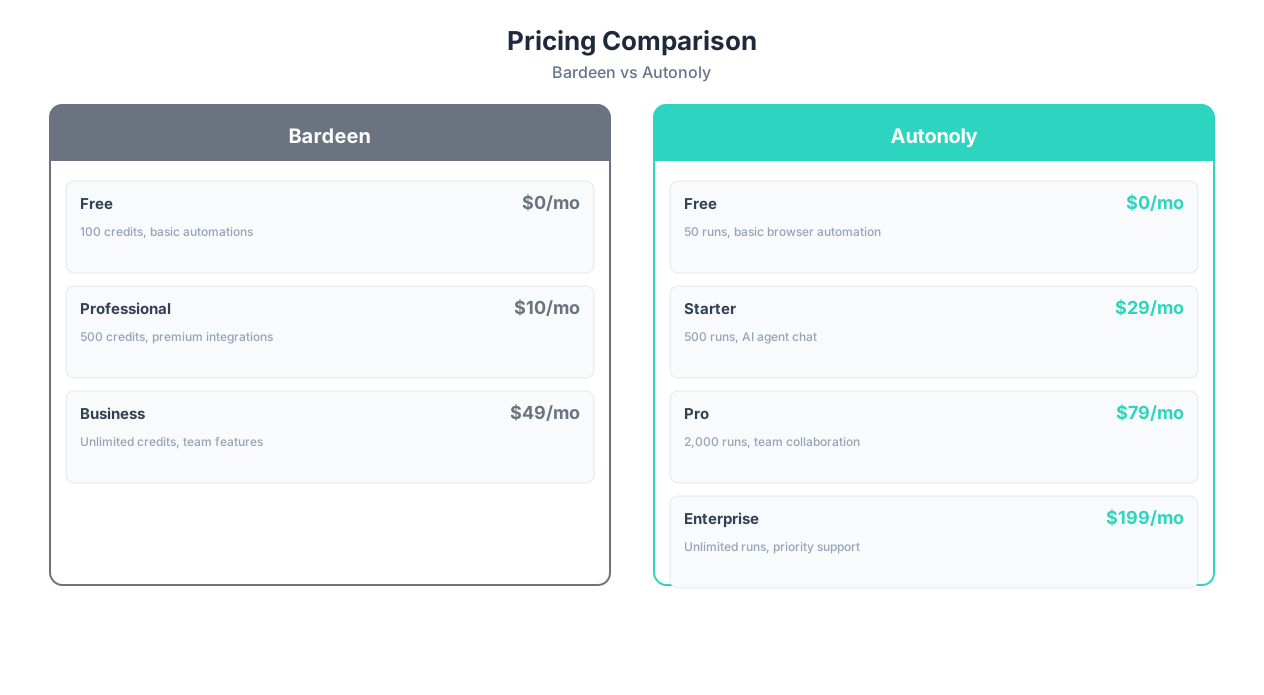
Pricing models differ significantly between Bardeen and Autonoly, making direct comparison tricky. Here is a breakdown of what you actually pay at different usage levels.
| Plan | Bardeen | Autonoly |
|---|---|---|
| Free | Free — limited credits, basic playbooks | Free — limited agent runs |
| Individual | $10/month — more credits, premium features | $49/month — unlimited workflows, 500 runs |
| Professional | $15/month — unlimited credits | $79/month — 2,000 runs, team features |
| Business/Team | Custom pricing | $299/month — 10,000 runs, advanced features |
📊 By the Numbers
For a single user running 5-10 simple browser automations per week, Bardeen's $10-15/month plans offer excellent value. For a team of 3-5 people running 20+ scheduled automations daily, Autonoly's $79-299/month plans provide better per-workflow economics due to cloud execution and shared workspaces.
Hidden Cost Factors
Sticker price does not tell the whole story. Consider these often-overlooked cost factors:
| Cost Factor | Bardeen Impact | Autonoly Impact |
|---|---|---|
| Your computer must be on | Electricity and machine wear | No impact — cloud-hosted |
| Maintenance time | Higher — manual fixes when playbooks break | Lower — AI self-healing |
| Team scaling | Each user needs own subscription + Chrome | Shared workspace, add seats |
| Complex workflow setup | Hours of manual playbook building | Minutes of natural language description |
| Failed automation recovery | Manual investigation and re-running | AI-assisted retry and adaptation |
For individual users on a tight budget, Bardeen's $10-15/month is hard to beat. For teams that need reliable, scheduled automation, Autonoly's pricing delivers better total cost of ownership when you factor in maintenance time and reliability. Read our detailed pricing page for the latest plans.
ROI Comparison by User Type
The return on investment depends heavily on your use case and volume:
| User Type | Typical Monthly Cost | Typical Monthly Time Saved | Effective Hourly Cost | Better Value |
|---|---|---|---|---|
| Solo sales rep (5 automations) | Bardeen: $15 / Autonoly: $49 | 8-12 hours | Bardeen: $1.50/hr / Autonoly: $4.90/hr | Bardeen |
| Marketing team of 3 (15 automations) | Bardeen: $45 / Autonoly: $79 | 30-45 hours | Bardeen: $1.25/hr / Autonoly: $2.10/hr | Bardeen (if all Chrome-based) |
| Operations (20 scheduled automations) | Bardeen: $45 / Autonoly: $79 | 40-60 hours | Bardeen: N/A (cannot schedule reliably) / Autonoly: $1.60/hr | Autonoly |
| Agency (50+ workflows, multi-site) | Bardeen: custom / Autonoly: $299 | 100+ hours | Autonoly: $2.99/hr | Autonoly |
The takeaway: if your automations run manually in Chrome and you are a small team, Bardeen's pricing is hard to beat. The moment you need scheduled execution, multi-site workflows, or team collaboration, Autonoly's higher sticker price delivers more value per dollar. For a deeper dive into automation platform pricing across the market, see our complete platform comparison.
When to Choose Bardeen: The Right Tool for the Right Job
Bardeen is the better choice when your automation needs align with its strengths. Here are the specific scenarios where Bardeen is the right tool:
1. You Live in Chrome and Want Instant Automation
If your entire workflow happens in Chrome — browsing, email, CRM, spreadsheets — Bardeen's always-present extension means zero context switching. Right-click, run a playbook, done. You never leave your browser. For people who want to automate the page they are currently looking at, nothing beats the extension model.
2. LinkedIn Sales Prospecting Is Your Primary Use Case
Bardeen has invested heavily in LinkedIn automation. Their pre-built playbooks for scraping profiles, sending connection requests, enriching CRM records, and managing outreach sequences are polished and battle-tested. If LinkedIn prospecting is 80% of what you want to automate, Bardeen has a meaningful head start.
3. Budget Is Tight and Needs Are Simple
At $10-15/month (or free for basic use), Bardeen is one of the most affordable browser automation tools available. If you need 3-5 simple automations for personal use, the price-to-value ratio is excellent.
4. You Do Not Need Scheduled, Unattended Automation
If all your automations are triggered manually — "I want to scrape this page right now" — the fact that Bardeen requires Chrome to be open is irrelevant. The limitation only matters for scheduled, background tasks.
💡 Key Insight
Bardeen is ideal for the "personal productivity power user" — someone who wants to speed up their own daily browser work without involving a team, setting up cloud infrastructure, or paying for enterprise features they will never use.
5. You Want Quick Wins With Minimal Learning Curve
Bardeen's template library gets you running in minutes. Pick a playbook, connect your accounts, and go. The learning curve is genuinely shallow for basic use cases. If you value getting started in 5 minutes over advanced capabilities you might need later, Bardeen delivers.
Bardeen's Ideal User Profile
- Individual contributor (sales, marketing, recruiting)
- Chrome-primary workflow
- LinkedIn-heavy prospecting
- Budget under $20/month
- Manual trigger (not scheduled) automations
- Simple 3-5 step workflows
When to Choose Autonoly: Beyond What an Extension Can Do
Autonoly is the better choice when your needs exceed what a browser extension can deliver. Here are the specific scenarios where Autonoly wins:
1. You Need Automations to Run 24/7 on Schedule
If your workflows need to execute at 6 AM daily, check a website every hour, or process incoming data on a trigger — you need cloud execution. Autonoly's agents run on schedule regardless of whether your computer is on. For business-critical automations, this is non-negotiable.
2. You Are Automating Across Many Websites
A competitor monitoring workflow that checks 20 pricing pages, a form-filling workflow that submits applications to 8 portals, a web scraping pipeline that extracts data from 50 sources — these multi-site workflows benefit from Autonoly's parallel cloud agents and AI-driven adaptability.
3. Websites Change Frequently and Break Your Automations
Bardeen playbooks use selectors that break when websites update their UI. If you are tired of fixing broken automations every few weeks, Autonoly's AI agents use LLM reasoning to adapt to layout changes automatically. The agent sees the page, understands what changed, and adjusts — without manual intervention.
4. You Need Document Processing Beyond the Browser
If your workflow involves PDF data extraction, spreadsheet automation, email processing, or file management, you need a full platform — not a browser extension. Autonoly handles the complete data pipeline from source to destination.
5. You Work as a Team
Shared workspaces, audit logs, role-based access, and centralized automation management matter when multiple people need to create, monitor, and maintain workflows. Bardeen's template sharing is lightweight; Autonoly's team features are built for collaborative automation management.
⚠️ Important Note
If you are currently using Bardeen and hitting its limits — automations breaking, unable to schedule unattended runs, need for team collaboration — you do not necessarily need to abandon Bardeen entirely. Some teams use Bardeen for quick personal tasks and Autonoly for scheduled, team-wide automations. The tools can coexist.
6. You Want AI to Build Your Workflows, Not Just Run Them
Bardeen has added AI-assisted workflow creation, but Autonoly was built AI-first. The AI agent chat interprets complex, multi-step task descriptions and creates complete workflows with error handling, conditional logic, and data transformation. For complex automation needs, describing the outcome is faster than manually building each step.
Autonoly's Ideal User Profile
- Operations teams, agencies, growing businesses
- Need 24/7 scheduled automation
- Multi-site workflows (monitoring, scraping, form filling)
- Document processing requirements (PDFs, spreadsheets)
- Team collaboration needed
- Tired of maintaining broken playbooks
- Complex workflows with 10+ steps
Migration Path: Growing Beyond an Extension
Many automation users start with Bardeen and eventually outgrow the extension model. Common triggers for migration include:
- Realizing that automations stop when you close your laptop for the weekend
- Needing to share and manage automations across a team of 5+ people
- Building workflows that span 10+ websites and break when any one of them updates
- Requiring document processing (PDFs, batch spreadsheets) alongside browser automation
- Being asked by management to provide audit logs and execution reports
If you are hitting these limits, transitioning to Autonoly does not require abandoning your automation approach — you can describe the same workflows to the AI agent and have them running in the cloud within minutes. The concepts transfer; only the execution model changes.
The Bottom Line
Both tools are good at what they do. Bardeen is a focused, affordable browser extension that excels at personal Chrome automation — especially for sales teams. Autonoly is a full-featured AI agent platform that handles complex, scheduled, multi-site automations for teams. Choose based on your specific needs, not marketing claims.
If you are unsure, start with the free tiers of both. Run your most important automation on each platform and see which experience fits your workflow better. The right answer depends entirely on your use case.
For more automation platform comparisons, read our Zapier vs Make vs n8n vs Autonoly deep dive, our guide to the best AI agent platforms, or our complete guide to automation without coding.
Frequently Asked Questions
Can I use Bardeen and Autonoly together?
Yes. Some teams use Bardeen for quick, ad-hoc Chrome automations (like scraping a page they are looking at) and Autonoly for scheduled, multi-site workflows that need to run 24/7. The tools serve different niches and can complement each other.
Does Bardeen work on browsers other than Chrome?
Bardeen is a Chrome extension. It may work on Chromium-based browsers like Brave or Edge, but it does not support Firefox or Safari. Autonoly is browser-agnostic — you access it through a web dashboard that works on any browser.
Which tool is easier to learn?
Both have low learning curves for basic use. Bardeen's pre-built playbooks get you running in minutes. Autonoly's natural language interface ("describe what you want") is equally intuitive. The learning curve diverges for complex workflows — Bardeen requires manual step-by-step building, while Autonoly's AI handles complexity automatically.
Can Autonoly handle LinkedIn automation like Bardeen?
Autonoly can automate LinkedIn through browser control, but Bardeen's LinkedIn-specific playbooks are more polished for sales prospecting workflows. If LinkedIn is your primary automation target, Bardeen's dedicated features give it an edge for that specific use case.
What happens to my Bardeen automations if my computer is off?
They do not run. Bardeen executes in your local Chrome browser, so the computer must be on with Chrome open for automations to trigger. Autonoly's cloud-based agents run independently of your local machine.
Is Autonoly more expensive than Bardeen?
Autonoly's individual plan ($49/month) costs more than Bardeen's premium plan ($10-15/month). However, Autonoly includes cloud execution, scheduled runs, team features, and AI adaptability that Bardeen does not offer. For teams and businesses, Autonoly's total cost of ownership is often lower due to reduced maintenance time and higher reliability.