


Why Automate Yelp Business Extraction?
Yelp hosts over 200 million reviews for businesses across virtually every local service category — restaurants, home services, healthcare, automotive, beauty, professional services, and more. For sales teams targeting local businesses, market researchers studying local economies, and competitive analysts mapping market landscapes, Yelp data provides unmatched depth of information about business quality, customer satisfaction, and market presence.
Manually browsing Yelp to build business lists means clicking through dozens of result pages, copying information one listing at a time. Autonoly's Browser Automation eliminates this tedium by automatically extracting structured business data into Google Sheets where you can filter, sort, analyze, and act on it.
How the AI Agent Extracts from Yelp
Yelp's website features dynamic content loading, interactive maps, and JavaScript-heavy rendering that defeats basic scraping approaches. Autonoly's AI Agent Chat runs a real browser session that handles all of this complexity transparently.
The agent navigates to Yelp, enters your search criteria (business type, location, price range), and uses Data Extraction to pull data from each business card in the search results. It handles Yelp's pagination automatically, scrolling through all available results.
For richer data, the agent navigates into individual business pages to extract complete profiles — full business descriptions, photo counts, amenity lists, business hours, price ranges, highlighted reviews, and owner responses. This creates comprehensive business profiles far beyond what summary cards show.
What Data You Get
A standard Yelp extraction includes:
Business Name — Official listing name
Rating — Average star rating (1-5)
Review Count — Total number of reviews
Address — Full street address
Phone Number — Business phone
Category — Primary and secondary Yelp categories
Price Range — Dollar sign rating ($, $, $$, $$)
Business Hours — Operating schedule
Yelp URL — Direct link to the Yelp listing
Additional fields like amenities, highlighted reviews, photos, and owner information are available from detail pages.
Customizing Your Yelp Extraction
The Visual Workflow Builder enables sophisticated Yelp data workflows:
Multi-category extraction: Scrape restaurants, salons, and contractors in a single workflow for comprehensive local market mapping
Competitive analysis: Extract all businesses in your category within a defined radius to map the competitive landscape
Review analysis: Pull review text for sentiment analysis using Data Processing or Python scripts via SSH & Terminal
Quality filtering: Only extract businesses above a minimum rating or review threshold
For sales prospecting, chain the extraction with an enrichment step to append business owner names, LinkedIn profiles, or email addresses from other sources.
Scheduling and Market Monitoring
Local business landscapes change constantly — new businesses open, ratings shift, and businesses close. Schedule monthly scrapes to maintain an accurate picture of your target market. Track rating changes over time to identify businesses gaining or losing customer satisfaction — useful signals for both competitive analysis and sales targeting.
Restaurants and hospitality businesses benefit from weekly monitoring, as their ratings can shift quickly with seasonal traffic patterns.
Exporting and Integrating
Yelp data flows to multiple destinations:
[Google Sheets integration](/integrations/google-sheets) — Live collaborative business database
Excel (.xlsx) — Download for CRM import and offline analysis
[Notion](/integrations/notion) — Build a searchable local market database
[Airtable](/integrations/airtable) — Create visual maps and pipeline views of local businesses
Browse our templates library for pre-built Yelp scraping workflows. Visit pricing for execution costs. For context on automation concepts, see our workflow automation glossary. The Integrations page covers all available output options.
Use Cases
Sales teams targeting local service businesses use Yelp data to build qualified prospect lists ranked by review quality and market presence. Marketing agencies prospect potential restaurant or retail clients by analyzing their online reputation and identifying those who could benefit from marketing services. Franchise consultants analyze local market saturation by mapping existing businesses in a category. Investors evaluate local business health by tracking rating trends across neighborhoods. Real estate developers assess commercial areas by analyzing the mix and quality of nearby businesses.
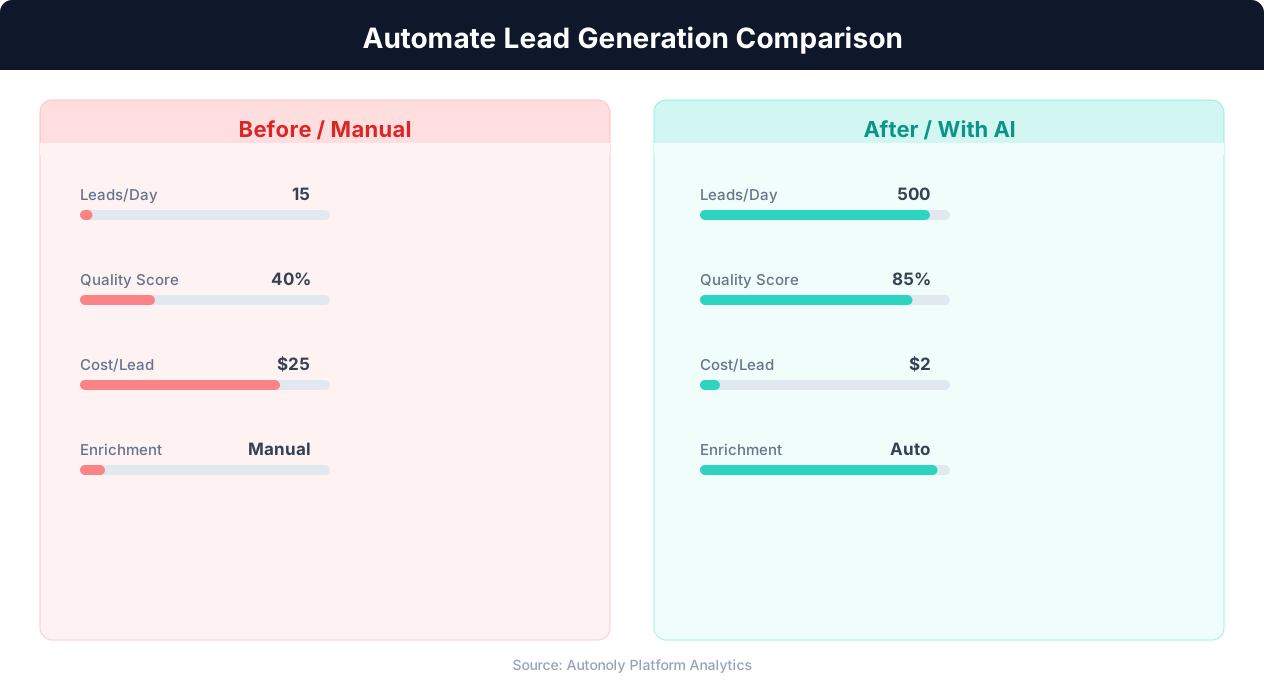
Cost per lead comparison between manual and automated methods
Key Insight: Automated lead generation produces 50% more sales-ready leads at 33% lower cost per lead compared to manual prospecting (Marketo Research).
How the AI Agent Handles This
The AI agent opens Yelp in a real browser session using Browser Automation, which allows it to handle Yelp's JavaScript-heavy rendering, dynamic map views, and interactive filter controls seamlessly. It enters your search criteria, scrolls through results, paginates automatically, and optionally clicks into individual business pages for detailed profiles. The Data Extraction engine identifies the repeating listing pattern and pulls consistent fields from every card. Because the agent adapts to page layout changes in real time, your workflows keep running even when Yelp updates its interface.
Handling Yelp's Dynamic Content
Yelp loads results lazily and uses map-based interfaces that require scrolling and interaction to reveal all listings. The agent handles all of this transparently, ensuring complete data collection across every results page.
Key Insight: Companies using automated lead scoring see a 77% increase in lead conversion rates by focusing sales effort on the highest-potential prospects (Aberdeen Group).
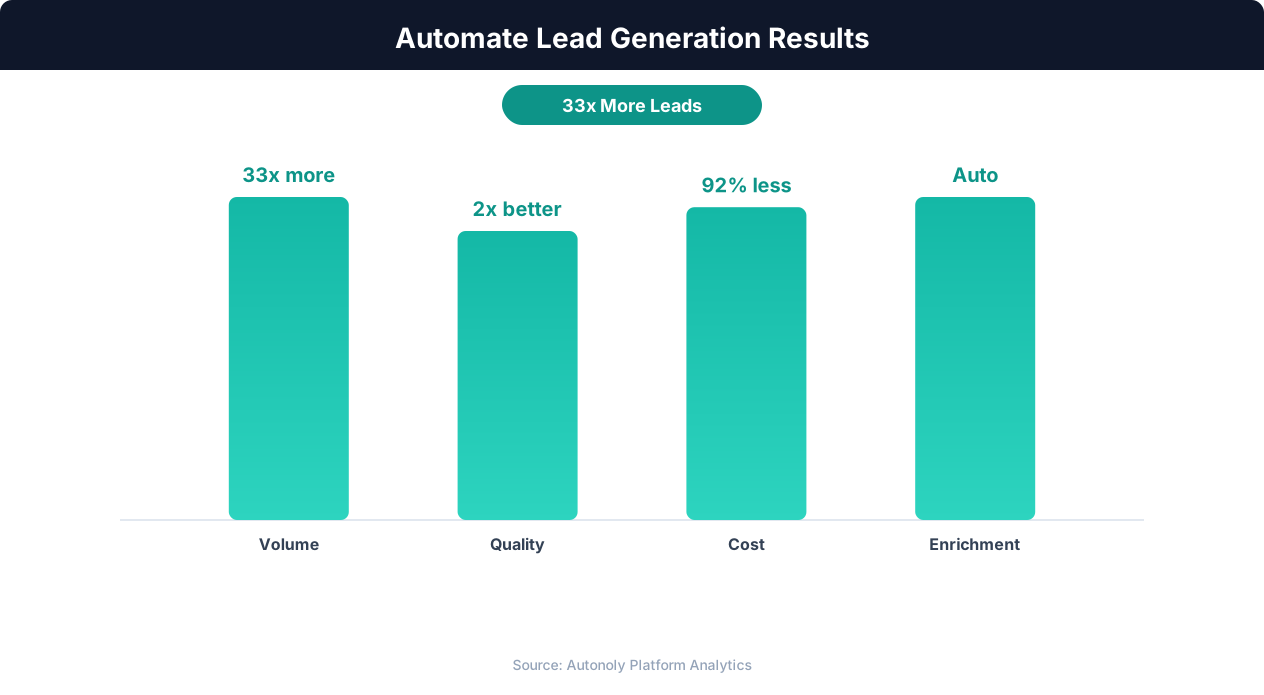
Lead quality scores with automated enrichment and scoring
Key Insight: Automated multi-channel lead generation captures 3x more prospects by simultaneously monitoring LinkedIn, websites, directories, and industry databases (HubSpot Research).
Scheduling and Recurring Runs
Schedule monthly or weekly Yelp extractions through the Visual Workflow Builder to track how local business landscapes evolve over time. Each run captures the current state of ratings, review counts, and business details, building a historical dataset that reveals trends in customer satisfaction and market activity. Use Logic & Flow to flag businesses whose ratings have dropped significantly since the last run — a valuable signal for competitive analysis or sales targeting. Combine Yelp data with Data Processing steps to enrich listings with additional context from Google Maps or industry directories. Check our templates for pre-built Yelp monitoring workflows.
Further Reading
Explore more about the tools and techniques used in this workflow: Automate Lead Generation, Web Scraping Best Practices.