


Why Automate Amazon Product Scraping?
Amazon hosts hundreds of millions of product listings across thousands of categories. Whether you are running competitive pricing analysis, sourcing products for resale, monitoring market trends, or conducting academic research, manually copying product data from Amazon is impractical at any meaningful scale. Automating this process with Autonoly's Browser Automation lets you collect structured product data in minutes.
E-commerce sellers use Amazon product data to track competitor pricing, identify gaps in the market, and optimize their own listings. Market researchers analyze product trends, seasonal pricing shifts, and customer sentiment at scale. Procurement teams compare specifications and pricing across suppliers. All of these workflows start with getting the raw data into a spreadsheet.
How the AI Agent Scrapes Amazon
Traditional Amazon scrapers rely on brittle CSS selectors that break whenever Amazon updates their layout — which happens frequently. Autonoly's AI Agent Chat takes a fundamentally different approach. You describe what you want in plain English, and the agent figures out how to navigate the site and identify the relevant data.
The agent launches a real Chromium browser session, navigates to Amazon, enters your search query or category URL, and begins extracting product data. The Data Extraction engine recognizes the repeating product card pattern on search results pages, identifying each listing and pulling consistent fields from every card.
Amazon's search results are heavily JavaScript-rendered, with lazy-loaded images, dynamic pricing, and sponsored placement injections. Because Autonoly runs a real browser, it renders all of this content identically to how you would see it, ensuring complete and accurate data capture.
The agent automatically handles pagination, clicking through to subsequent pages of results until it has collected the number of products you specified. It can also navigate into individual product detail pages to extract deeper information like bullet-point features, product dimensions, seller information, and Best Sellers Rank.
What Data You Get
A standard Amazon product export includes:
Product Title — Full product name as displayed on Amazon
Price — Current listing price, including deal pricing
Rating — Average star rating (1-5)
Review Count — Total number of customer reviews
ASIN — Amazon Standard Identification Number
Availability — In-stock status and estimated delivery
Seller — Sold by and fulfilled by information
Category — Product category breadcrumb
Image URL — Link to the primary product image
You can request additional fields by simply asking the agent — specifications tables, bullet features, coupon availability, or subscription pricing are all extractable.
Customizing Your Extraction
The Visual Workflow Builder transforms a one-time scrape into a repeatable pipeline. Common customizations include:
Multi-keyword scraping: Run the same extraction across dozens of search terms in a single workflow
Price filtering: Only extract products within a certain price range
Category drilling: Start from a top-level category and drill into subcategories
Review filtering: Focus on products with a minimum number of reviews for statistical relevance
Chain a Data Processing step after extraction to calculate metrics like price-per-unit, rating-to-review ratios, or competitive position scores. Use SSH & Terminal to run Python analysis scripts on the extracted data.
Scheduling and Price Monitoring
Amazon prices change constantly — sometimes multiple times per day. Set up a daily or weekly schedule to track pricing trends over time. Each run appends new data to your existing spreadsheet or creates timestamped snapshots, giving you a historical pricing database.
Combine scraping with Autonoly's monitoring capabilities to receive alerts when a competitor drops their price below a threshold, when a product goes out of stock, or when a new competitor enters your category.
Exporting and Integrating
Deliver your Amazon product data wherever you need it:
Excel (.xlsx) — Direct download from the dashboard
[Google Sheets integration](/integrations/google-sheets) — Auto-update a shared pricing sheet
[Airtable](/integrations/airtable) — Build a product database with rich filtering and views
[Notion](/integrations/notion) — Feed product research into your team's knowledge base
Visit our templates library for ready-made Amazon scraping workflows. For details on execution limits and cost, check our pricing page. Learn more about the concepts behind automated data collection in our workflow automation glossary.
Common Use Cases
Dropshippers use this to find trending products with high demand and low competition. Amazon sellers monitor their own listings alongside competitor listings to stay competitive on price. Market analysts track category-level trends to forecast demand. Affiliate marketers collect product data to build comparison content at scale.
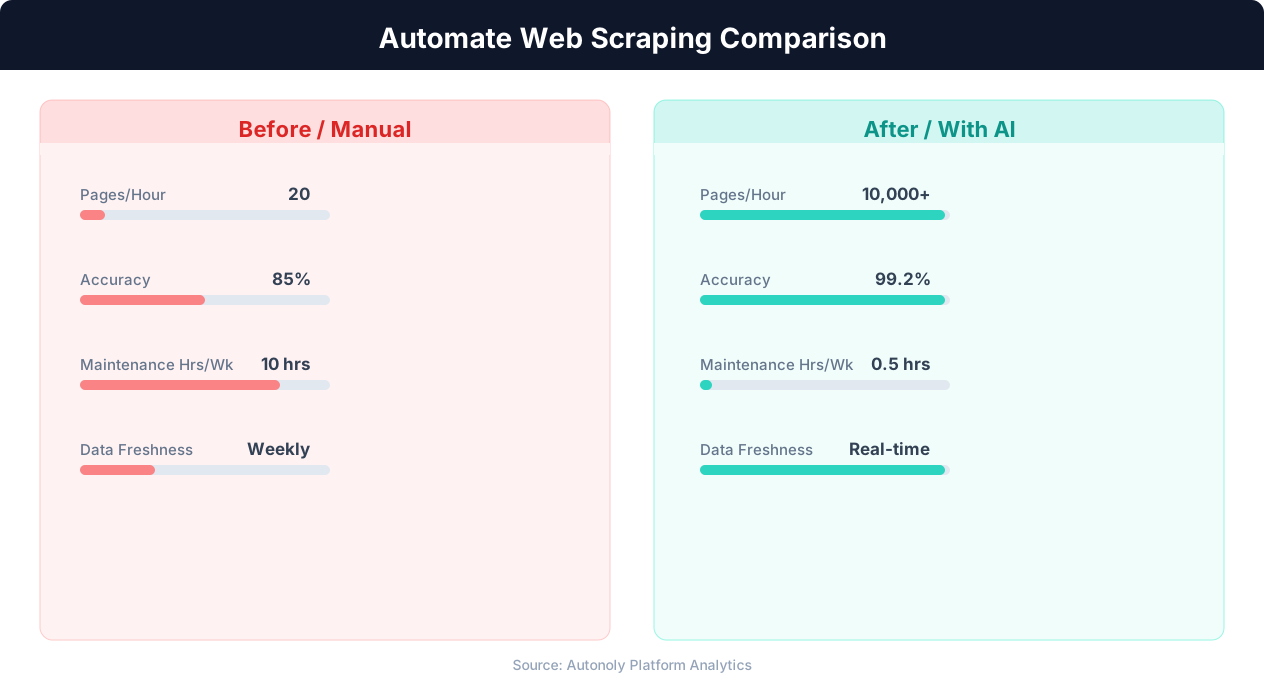
Data extraction speed for manual vs AI-powered scraping
Key Insight: Automated web scraping collects data from 1,000+ pages per hour — a task that would take a human researcher over 200 hours to complete manually (Bright Data Report).
How the AI Agent Does It
Unlike traditional Amazon scrapers that rely on fragile CSS selectors and break with every site update, Autonoly's AI agent uses Browser Automation to launch a real Chromium browser and navigate Amazon exactly like a human shopper. You describe what products you want in plain English, and the agent interprets your request, runs the search, and identifies the repeating product card pattern on the results page. It automatically handles Amazon's JavaScript-rendered content, sponsored listing injections, and lazy-loaded images. The Data Extraction engine pulls consistent fields from every product card, and the agent pages through results until your target count is reached.
Adapting to Site Changes
Because the agent understands page structure semantically rather than relying on hardcoded selectors, it adapts when Amazon changes their layout. This means your scraping workflows keep working without manual maintenance — a significant advantage over script-based tools that require constant updates.
Key Insight: 68% of traditional web scrapers break within 2 months due to website changes. AI-powered extraction adapts automatically, reducing maintenance by 85% (Oxylabs Research).
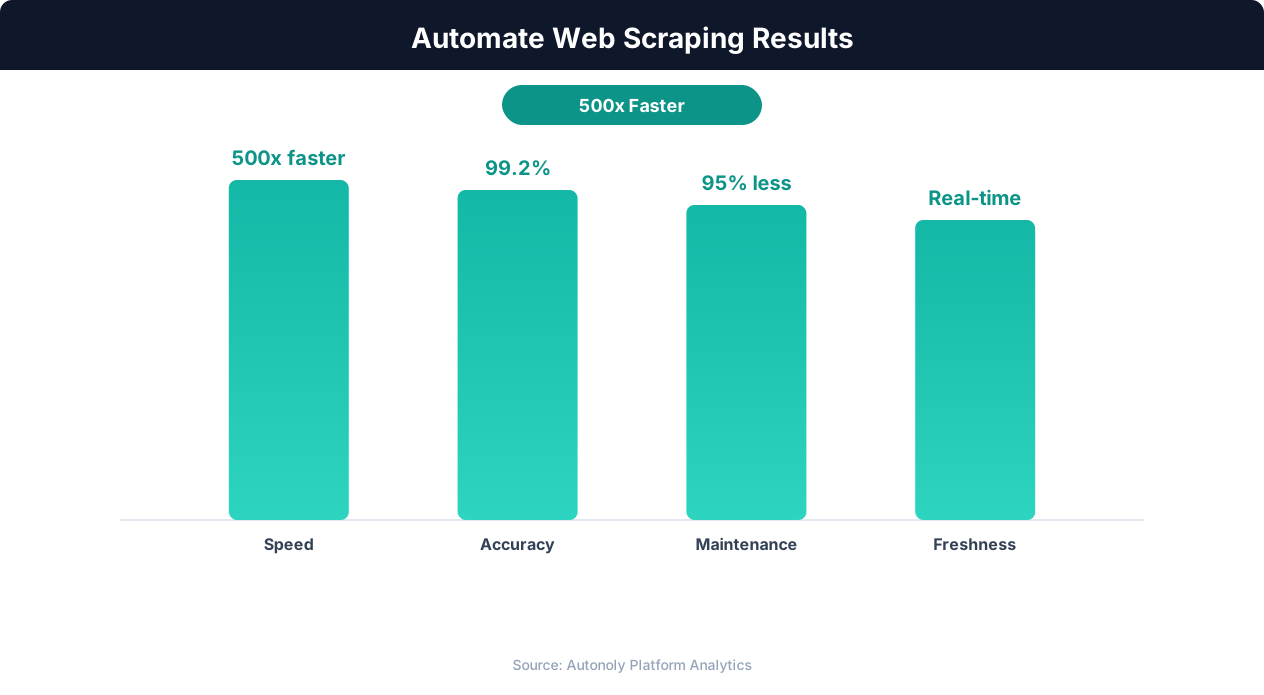
Data quality metrics for automated web scraping pipelines
Key Insight: AI-powered web extraction achieves 94% accuracy vs 72% for regex-based scrapers, while handling dynamic JavaScript-rendered content automatically (Diffbot Research).
Customize Your Output
The Visual Workflow Builder gives you full control over how your Amazon product data is processed and delivered. Add Data Processing steps to calculate derived metrics like price-per-unit, margin estimates, or competitive position scores. Use Logic & Flow conditions to filter out products below a minimum review count or above a maximum price point before they reach your spreadsheet. You can route results to multiple destinations simultaneously — download an Excel file while also appending rows to a shared Google Sheets dashboard. For teams that need advanced analysis, pipe the raw data through a Python script using SSH & Terminal to generate charts, run regression models, or feed results into your existing BI tools.
Further Reading
Explore more about the tools and techniques used in this workflow: Scrape Amazon Product Data, Best Web Scraping Tools, Scheduled Execution.