


Why Track GitHub Trending Repositories?
The GitHub Trending page is the pulse of the developer ecosystem. New frameworks, tools, and libraries that gain traction today become the industry standards of tomorrow. For engineering teams, CTOs, and developer advocates, tracking trending repositories provides early visibility into emerging technologies, popular open-source tools that could accelerate development, and competitive intelligence about what the broader community is building.
But checking GitHub Trending manually every day is easy to forget and hard to make consistent. By automating this with Autonoly, your entire team benefits from a shared, curated feed of what is happening in the open-source world — delivered directly to Slack where discussions already happen.
The value compounds over time. A daily archive of trending repositories becomes a searchable record of what the developer community was excited about on any given day. This historical data is invaluable for spotting macro trends — like the rise of Rust-based developer tooling, the explosion of AI agent frameworks, or the growth of edge computing libraries — that a single-day snapshot cannot reveal.
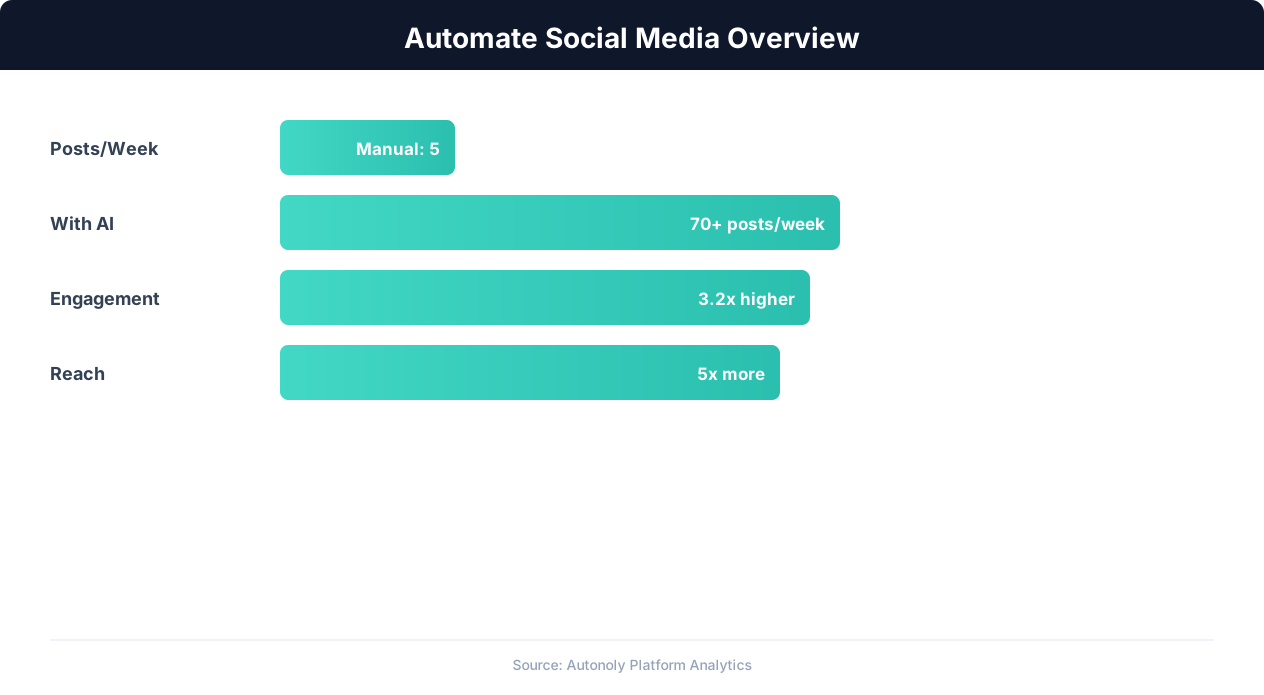
Social media automation impact on engagement metrics
Key Insight: Brands using social media automation post 3x more consistently and see 47% higher engagement rates due to optimal timing and frequency (Sprout Social Index).
How Autonoly Scrapes GitHub Trending
The AI Agent Chat makes setup simple — tell the agent which languages or topics you care about, how many repos to include, and which Slack channel to post to. The agent creates the entire workflow.
Using Browser Automation, the agent navigates GitHub's trending page with a full Playwright browser. This handles GitHub's JavaScript-rendered interface correctly, including the language filter dropdowns, time period selectors, and dynamically loaded repository cards. The Data Extraction engine pulls structured data from each trending repository card. Because the agent uses a real Chromium browser, it sees the page exactly as you would — including content loaded lazily or behind client-side routing.
What Data Gets Captured
Each repository entry includes the repository name and owner, description, primary programming language, star count and today's star gain, fork count, contributor count, and the repository URL. For enhanced digests, the agent can also visit individual repository pages to capture README excerpts, latest release information, and topic tags.
The Data Processing feature can calculate additional metrics — rate of star growth, comparison with previous day's trending list to highlight new entries, and categorization by domain (web framework, CLI tool, AI/ML, DevOps, etc.).
Curated Slack Digests
The Slack integration supports rich message formatting. Each repository gets a card-style layout with the name as a clickable link, description, star count with today's gain, language badge, and a brief "why it's trending" note based on the AI's analysis. Repositories are grouped by language or domain category, making it easy for team members to find what is relevant to them.
You can configure the message to mention a specific channel, use a custom bot name and icon, or thread daily digests under a parent message. The digest header shows the date and trending category, while the footer links directly back to the GitHub trending page.
Customization for Your Team
Different teams care about different ecosystems. A Python team wants to see trending Python repositories, while a frontend team cares about JavaScript and TypeScript. Autonoly's Logic & Flow feature lets you create filtered digests for different Slack channels — #python-devs gets Python trends, #frontend gets JS/TS trends, and #engineering-all gets the full list.
You can also set minimum star thresholds to filter out very new or niche repositories, focus on specific GitHub topics (machine-learning, react, kubernetes), or exclude repositories from organizations you do not find relevant. For advanced filtering, use keyword matching on descriptions to surface only repos mentioning "AI", "LLM", or "agent".
Building a Technology Radar
Beyond daily digests, saving trending data to Google Sheets over time creates a technology radar. You can track which technologies gain traction consistently, which are flash-in-the-pan trends, and how the ecosystem evolves over months and quarters. The Visual Workflow Builder makes it easy to add a Sheets destination alongside the Slack delivery, building a historical dataset perfect for quarterly tech radar reviews.
For teams that want to go deeper, the SSH & Terminal feature can clone trending repositories and run automated analysis — checking dependency counts, code quality metrics, or test coverage — adding technical depth to your trend reports.
Who Uses This Automation
Engineering managers use the daily digest to surface relevant tools during team meetings and sprint planning. Developer relations teams track which projects are gaining mindshare in the community. Venture capital analysts monitor trending repos as a leading indicator of developer interest in specific technology categories. Open-source maintainers track their own projects' trending appearances and compare against competitors.
Scheduling and Consistency
Daily delivery in the morning ensures your team starts the day informed about what is new in the developer world. Weekly summaries work for less frequent updates. The scheduling system handles weekends and holidays consistently. Visit the templates library for pre-built GitHub monitoring workflows, and check the pricing page for plan details. For more on web data collection, see our web scraping glossary. The Integrations ecosystem lets you route trending data to any tool in your stack.
Further Reading
Explore more about the tools and techniques used in this workflow: Web Scraping Best Practices, Schedule Automated Workflows, Scheduled Execution.