

Why Automate Social Media Cross-Posting?
Maintaining an active presence across multiple social media platforms is essential for modern marketing — brands that post consistently across three or more channels see significantly higher audience reach and engagement than those focused on a single platform, a pattern borne out in social benchmarking data published by HubSpot. But the mechanics of cross-posting are brutally tedious. Each platform has different character limits (280 for Twitter, 3,000 for LinkedIn, 63,206 for Facebook), different image aspect ratio requirements, different hashtag conventions, and different formatting expectations. Manually logging into Twitter, LinkedIn, Facebook, and Instagram to post adapted versions of the same content takes 15 to 30 minutes per post. For teams publishing daily across four platforms, that is five to ten hours lost each week to repetitive publishing tasks that add no creative value.
The manual approach also creates inconsistency. When posting is a chore, some platforms get neglected. Your LinkedIn might have daily posts while your Twitter goes quiet for a week. Audience growth on neglected platforms stalls, and the sporadic posting pattern signals to both algorithms and followers that the account is not actively maintained. Consistency matters more than perfection in social media — a brand that posts reliably every day outperforms one that posts brilliantly once a week.
Automating cross-posting with Browser Automation handles the mechanical work — logging into each platform, composing the post with platform-appropriate formatting, uploading media, and publishing it. Your team focuses on creating great content while the agent handles distribution. The creative team writes one piece of content, and the automation ensures it reaches every audience in the format that performs best on each platform.
Unlike traditional social media scheduling tools like Buffer, Hootsuite, or Sprout Social that require $50-300 per month subscriptions and lock you into their ecosystem, Autonoly posts directly through each platform's native web interface. This means your posts benefit from full native reach with no third-party limitations on features like polls, carousels, link previews, or platform-specific post types. There is no "posted via Third Party App" attribution that can reduce engagement.
How the AI Agent Cross-Posts
Autonoly's AI Agent Chat reads your content from its source — a Google Sheets content calendar, a document, or a direct text prompt. It then adapts the content for each target platform using the Data Processing engine:
Twitter/X: Trimmed to 280 characters with relevant hashtags, a compelling hook, and a link
LinkedIn: Professional tone with paragraph formatting, industry hashtags, and thought leadership positioning
Facebook: Conversational tone with an engaging opening line, image, and call-to-action
Instagram: Visual-first caption with line breaks, story elements, and relevant hashtags grouped at the end
The agent opens each platform in a real Chromium browser through Browser Automation, navigates to the compose interface, enters the adapted content, attaches any images or media assets, and clicks publish. Because it uses the native posting interface, every post type is supported — text posts, image posts, links with rich previews, and platform-specific formats like LinkedIn articles or Twitter threads.
What Data You Get
Every cross-posting run is tracked comprehensively:
Content Source — Which piece of content was posted
Platform — Where it was published
Post URL — Direct link to the live post for verification
Publish Timestamp — Exact time the post went live
Adapted Content — The platform-specific version that was posted
Media Attached — Which images or files were included
Status — Published successfully, failed, or queued
Customizing Your Workflow
The Visual Workflow Builder lets you define adaptation rules for each platform. Rather than posting identical content everywhere (which audiences can spot and find lazy), configure meaningful adaptations:
Add a question hook for Twitter to drive engagement and replies
Include a personal anecdote or industry opinion for LinkedIn to feel authentic and thought-leader-worthy
Add a clear call-to-action for Facebook to drive clicks and comments
Optimize hashtag sets per platform for discoverability — industry hashtags on LinkedIn, trending hashtags on Twitter
Use Logic & Flow to skip certain platforms for specific content types. A technical deep-dive might go on LinkedIn and Twitter but not Instagram. A visual product showcase might go on Instagram and Facebook but not Twitter. A job posting goes to LinkedIn only. This intelligent routing ensures each platform receives content that fits its audience expectations.
Scheduling Posts
While you can trigger cross-posting on demand, the real power comes from scheduling. Queue up a week's worth of content in your Google Sheets calendar with one row per post, columns for the content text, images, target platforms, and desired posting time. The agent checks the calendar daily and publishes whatever is scheduled for today at the specified times.
This batch approach lets you dedicate one focused session to content creation and let the automation handle daily distribution. You can also set optimal posting times per platform — early morning for LinkedIn when professionals check their feeds, midday for Twitter when engagement peaks, and evening for Facebook when users browse casually.
Integration Options
After publishing, the agent logs each post URL and timestamp back to your spreadsheet, creating a complete publishing record. Chain with other workflows — trigger cross-posting automatically when a blog post is published, or when your content calendar workflow marks an item as "Ready to Publish." Post publishing confirmations to Slack so your team knows content went live. Connect to Notion or Airtable for content performance dashboards. Visit the Integrations page for all supported connections, or browse the templates library for pre-built social media workflows.
Use Cases
Marketing teams maintaining consistent daily presence across four or more social platforms
Content creators maximizing the reach of each piece of content across their audience channels
Marketing agencies managing social media publishing for multiple clients from centralized calendars
E-commerce brands posting product launches, promotions, and customer stories across all channels simultaneously
B2B companies distributing thought leadership content across LinkedIn, Twitter, and industry-specific platforms
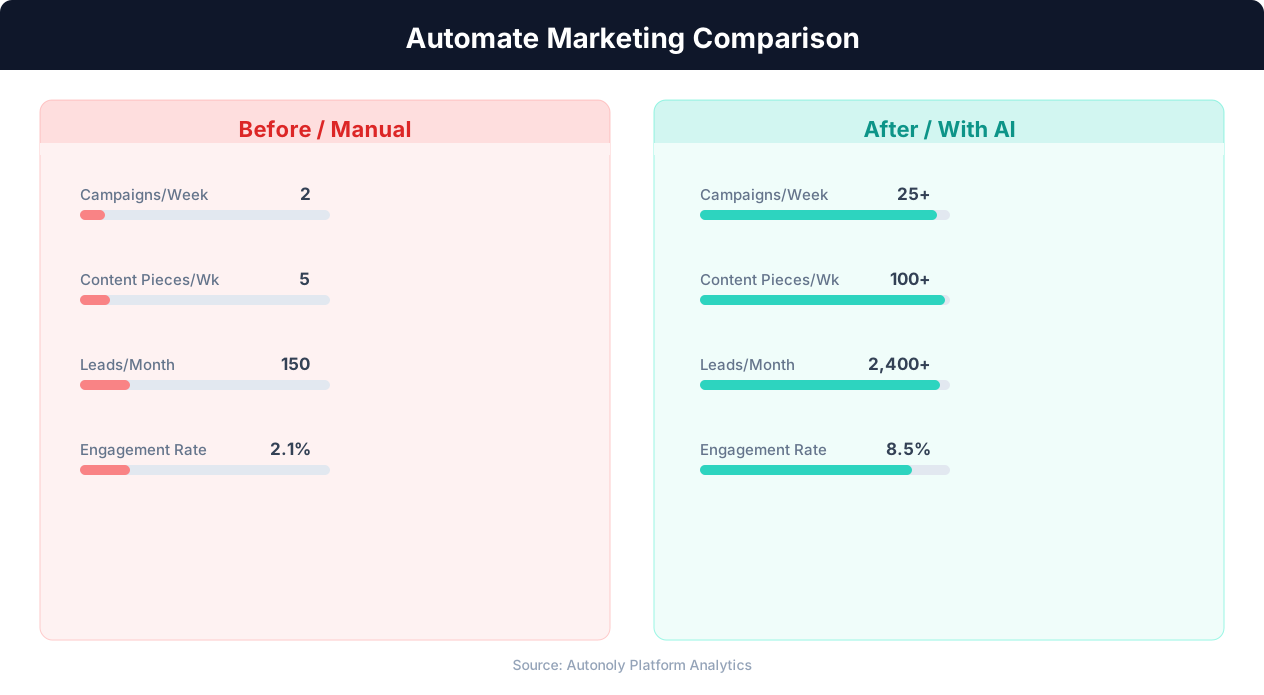
Content production speed in manual vs automated workflows
Key Insight: Marketing teams using automation see 451% more qualified leads and a 14.5% increase in sales productivity (Annuitas Group).
How the AI Agent Does It
The agent reads your content from its source, adapts it per platform using the Data Processing engine, then opens each social media platform in a real Chromium browser via Browser Automation. It navigates to the compose/post interface, enters the content, uploads any media assets, and publishes. Post confirmation URLs are collected and logged back to your spreadsheet or sent to Slack.
Handling Platform Authentication
The agent manages login sessions for each social media platform. You authenticate once, and the agent maintains sessions across runs. If a session expires, it re-authenticates automatically. Two-factor authentication prompts are handled seamlessly.
Key Insight: Automated content repurposing saves marketing teams 12+ hours per week while increasing content output by 3x across channels (Content Marketing Institute).
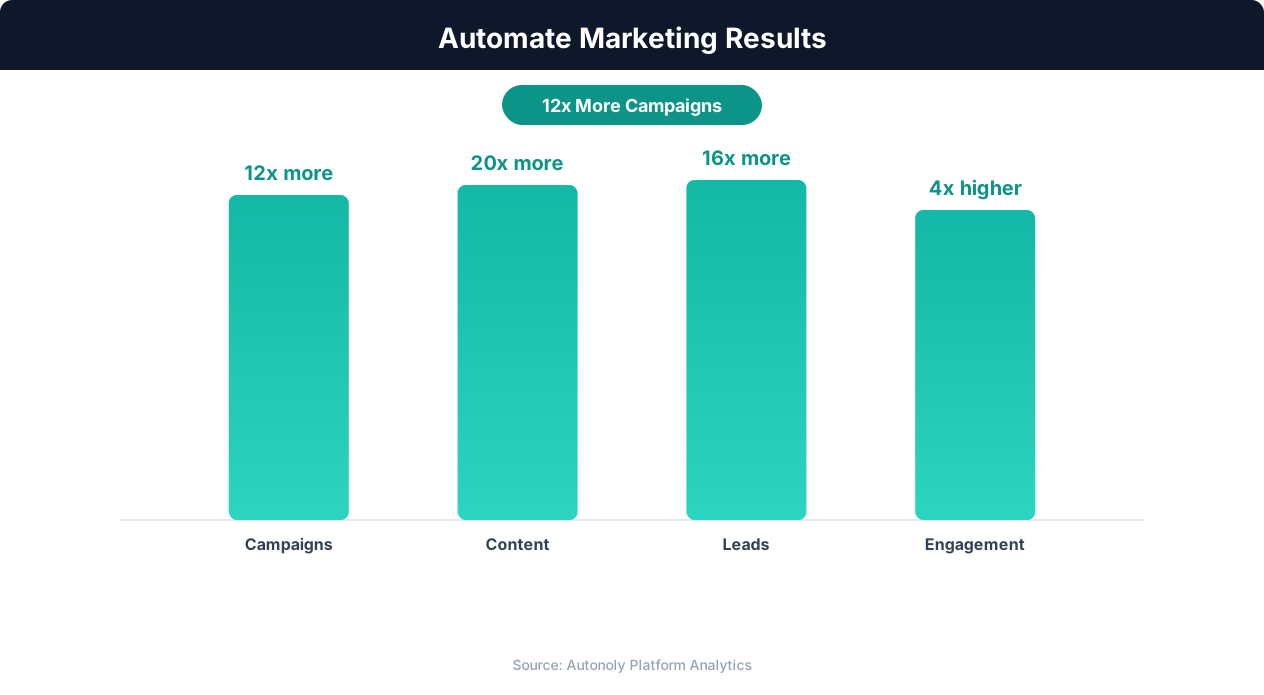
Marketing team productivity gains from automation
Key Insight: 63% of marketers say their biggest challenge is generating traffic and leads. Automation addresses this by running campaigns 24/7 without manual intervention (HubSpot State of Marketing).
Scheduling and Automation
Run this workflow daily using the Visual Workflow Builder. The agent reads your content calendar in Google Sheets, identifies posts scheduled for today, adapts them for each target platform, and publishes them at the optimal times you define. Add Logic & Flow conditions to skip holidays, adjust posting frequency based on engagement data, or trigger a Slack notification when all posts for the day are published. See our pricing page for daily workflow run details.
Further Reading
Explore more about the tools and techniques used in this workflow: Marketing Automation, No Code Automation Guide, Scheduled Execution.