


Why Automate ML Pipelines?
Machine learning generates tremendous value, but the gap between running a notebook experiment and delivering results to stakeholders remains a persistent challenge. Data scientists spend significant time on the "last mile" — formatting outputs, generating reports, setting up scheduled runs, and managing infrastructure. Automating this pipeline means your ML models run on schedule, results reach the right people automatically, and you can focus on improving models rather than managing delivery.
Autonoly bridges this gap by providing a complete execution environment for Python scripts combined with automated delivery via Gmail. The SSH & Terminal feature provides secure container execution with popular ML libraries pre-installed, so you do not need to manage servers, Docker containers, or cloud compute instances yourself.
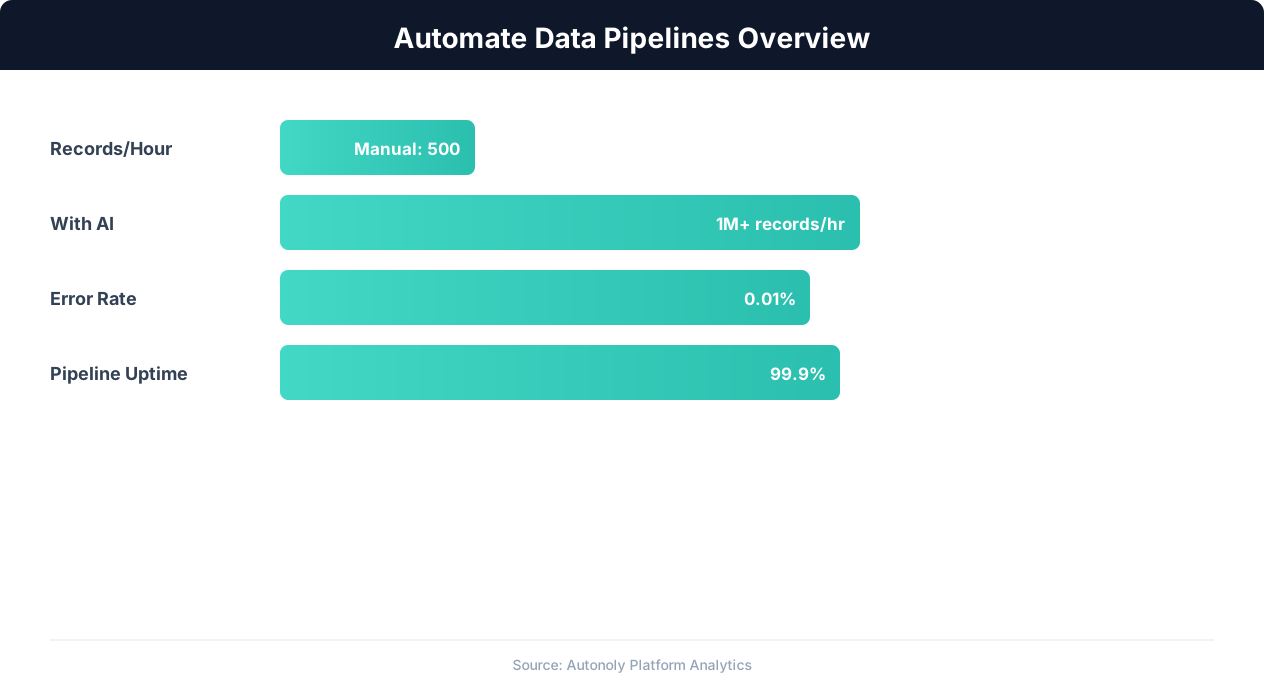
Data pipeline automation efficiency gains over time
Key Insight: Automated data pipelines reduce data processing errors by 87% compared to manual ETL processes (McKinsey Data & Analytics Report).
How Autonoly Runs ML Pipelines
The AI Agent Chat lets you describe your ML task in natural language. You might say "cluster my customer data into segments using K-means and email me the results" or "run a sentiment analysis on these product reviews and send a summary report." The agent generates the appropriate Python code, installs any required packages, and executes the script.
Container Execution Environment
Scripts run in an isolated container with access to Python's full scientific computing stack — NumPy, pandas, scikit-learn, matplotlib, seaborn, XGBoost, and more. The agent handles package installation automatically based on what your script imports. This is powered by the SSH & Terminal feature, which provides a secure execution environment that is completely isolated from other users.
The Browser Automation engine can also be chained into the pipeline — for example, scraping training data from a website, then feeding it into a Python ML model, then emailing the results. This combination of web data collection and ML processing is uniquely powerful.
What Results Look Like
The email report is formatted for non-technical stakeholders. It includes a summary of what the model did, key findings and predictions in plain language, statistical metrics (accuracy, precision, recall, R-squared, etc.), and any generated visualizations as image attachments. Raw data can be attached as CSV or Excel files for stakeholders who want to dig deeper.
For classification tasks, the report includes confusion matrices and per-class performance. For regression, it shows prediction intervals and residual plots. For clustering, it presents cluster profiles with key distinguishing features. The Data Processing capabilities ensure that outputs are clean and well-formatted regardless of the model type.
Customization and Pipeline Design
The Visual Workflow Builder lets you design multi-step ML pipelines visually. A typical pipeline might include data ingestion from Google Sheets or a web scrape, preprocessing and feature engineering in Python, model training or inference, result formatting and report generation, and email delivery with optional Slack notification.
Each step is a node in the workflow, making it easy to modify individual components without rebuilding the entire pipeline. The Logic & Flow feature adds conditional logic — for example, only sending an alert email if the model detects an anomaly or if prediction confidence drops below a threshold.
Scheduling Automated ML Runs
Most ML pipelines benefit from regular execution. Customer segmentation models should re-run weekly as new data arrives. Anomaly detection should run daily. Forecasting models might run monthly to generate next-quarter predictions. Autonoly's scheduling system handles all of these cadences reliably.
Connecting to Data Sources and Destinations
The pipeline is not limited to email delivery. Results can also be written to Google Sheets, uploaded to Google Drive, or posted to Slack channels. The Data Extraction feature can feed the pipeline with web data, and the Integrations ecosystem provides connectivity to databases, APIs, and cloud storage. Visit the templates library for pre-built ML pipeline workflows, and check the pricing page for execution limits. For background on data processing, see the workflow automation glossary, web scraping glossary, and API integration glossary.
Key Insight: Data teams spend 80% of their time on data preparation and pipeline maintenance. Automation can reclaim up to 60% of that time (Anaconda State of Data Science).
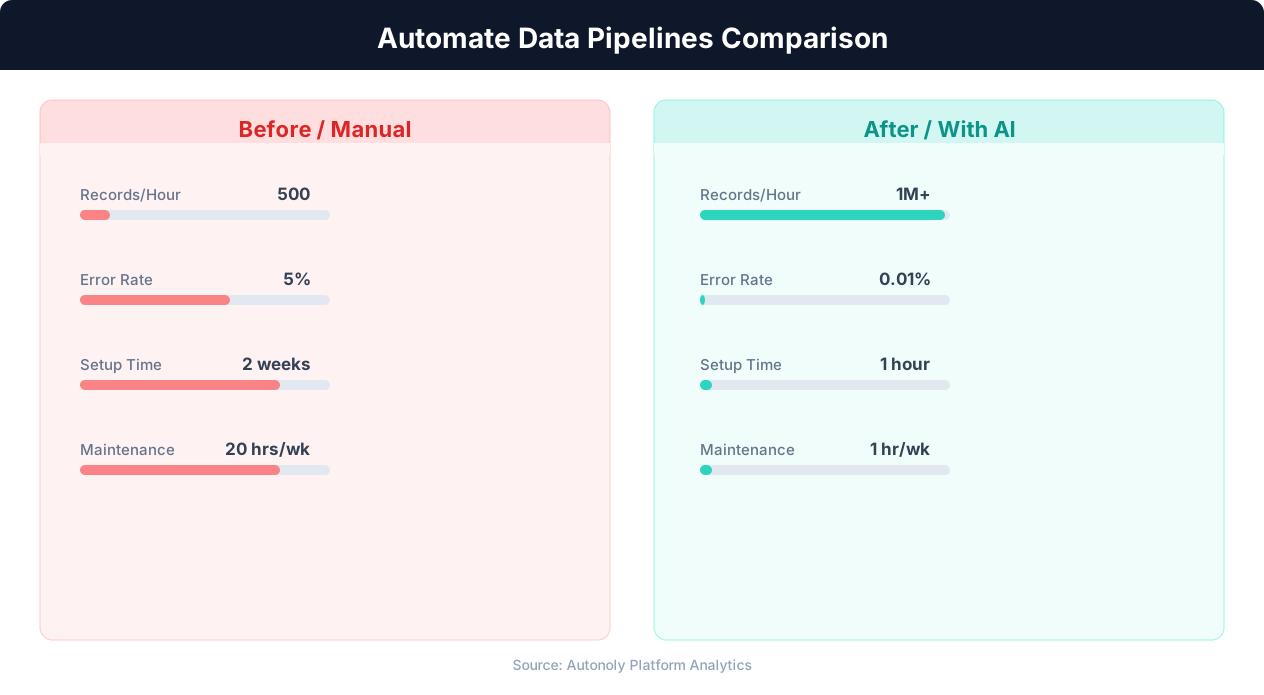
Error rates in manual vs automated data pipelines
Key Insight: Pipeline failures cost enterprises an average of $15 million per year in lost productivity and delayed decisions. Automated monitoring cuts this by 73% (Gartner).
How to Customize Your Pipeline
Every ML project has unique requirements, and Autonoly adapts to yours. The Visual Workflow Builder lets you modify pipeline steps without writing boilerplate code. Swap out the data source — replace a Google Sheets input with a web scrape or API call. Add preprocessing steps like feature scaling, encoding categorical variables, or handling class imbalance. Insert validation nodes that compare new model outputs against a baseline and only send the email when results meet quality thresholds.
Handling Large Datasets
For datasets that exceed memory limits, the SSH & Terminal container supports chunked processing, streaming reads, and efficient libraries like Dask or Vaex. You can configure the agent to split data into batches, process each batch independently, and merge results before formatting the final report. This approach scales from small CSV files to multi-gigabyte datasets without changing the pipeline structure.
Iterating on Model Parameters
Data scientists frequently experiment with hyperparameters, feature sets, and model architectures. Use Logic & Flow to run multiple configurations in sequence and compare results in a single email report. The agent can include performance metrics for each configuration, highlighting the best-performing setup. This turns Autonoly into a lightweight experiment tracking system that delivers results directly to stakeholders.
Further Reading
Explore more about the tools and techniques used in this workflow: Ai Workflow Automation, No Code Automation Guide, Scheduled Execution.