
The Integration Paradox: 7,000 Connectors and You Still Can't Automate Your Workflow
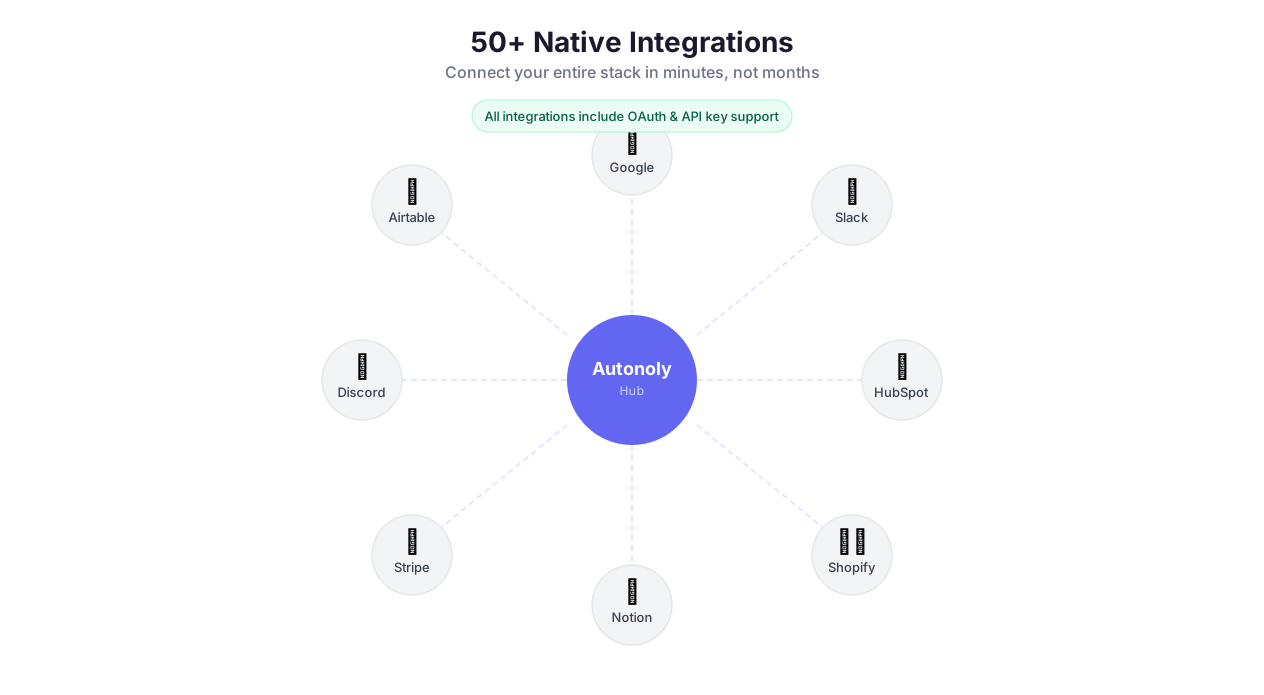
50+ connected apps and services
Zapier has 7,000+ integrations. Make has 1,800+. And somehow, the one connection you actually need — syncing your niche CRM to your invoicing tool with custom field mapping — is not there. Or it exists but only supports "new record" triggers, not "updated record." Or it connects but cannot handle nested objects in the payload.
This is the integration paradox: platforms optimize for breadth (logo count on the marketing page) at the expense of depth (actually solving the workflow). You end up with a Zapier plan that connects Salesforce to Slack but cannot pass a custom object field because the integration was built by a third-party partner in 2019 and never updated.
Autonoly takes a different approach. We offer 50+ native integrations for the tools that matter most — Google Workspace, Slack, Discord, HubSpot, Salesforce, Shopify, Notion, Airtable, Stripe, Twilio, and more — each built for deep, bidirectional data access. For everything else, you have three fallback layers: browser automation that can operate any web app with a UI, API & HTTP requests for any service with an endpoint, and webhooks for event-driven connections. Between these four approaches, there is no app you cannot connect.
The result: fewer integrations on paper, zero gaps in practice.
Three Types of Integration — and When to Use Each
Most automation users do not think about this, but understanding the difference saves hours of frustration.
Native Integrations (Pre-built, Fast, Reliable)
Native integrations are purpose-built connectors. Autonoly handles authentication, rate limiting, pagination, error recovery, and data formatting for you. Connecting Google Sheets takes one OAuth click. Sending a Slack message is a single node with a channel dropdown.
Use native integrations when: the app is in the supported list, you want the fastest setup, and the integration covers your use case (read, write, update, delete). This covers 80% of workflows.
The gotcha: native integrations are opinionated. They expose the most common operations, not every edge case. If you need to call a specific Slack API method that the native node does not expose — say, updating a user group membership — you will need to drop down to the HTTP request node for that specific call while keeping native Slack nodes for everything else.
Browser Automation (Any Site, Any UI, Maximum Flexibility)
Browser automation can interact with any web application that has a user interface. No API required. No integration required. If a human can click through it, Autonoly can automate it.
Use browser automation when: the service has no API, the API is too limited, you need to interact with a legacy web portal, or you are dealing with a site that actively blocks API access (some government portals, banking dashboards, internal tools).
The gotcha: browser automation is slower than API calls (seconds vs. milliseconds) and more fragile if the UI changes. Use it as a bridge — automate the workflow with the browser now, then switch to native or API integration when one becomes available.
API & HTTP Requests (Custom, Powerful, Universal)
The API & HTTP node connects to any service with a REST or GraphQL API. Full control over headers, authentication, request bodies, and response parsing. This is the escape hatch that makes "we don't have an integration for that" a non-issue.
Use API requests when: you need fine-grained control, the service has an API but not a native integration, you are working with internal or private APIs, or you need to call a specific endpoint that the native integration does not expose.
The gotcha: you need to read the API documentation, handle authentication yourself, and manage pagination and rate limits. Autonoly's built-in retry logic and throttling help, but you are doing more manual configuration than with native integrations.
The Hybrid Pattern
The most powerful workflows mix all three. A real example: pull leads from HubSpot (native integration), visit each lead's website with browser automation to check for specific technology signals, call the Clearbit API (HTTP request) for company enrichment, then update the HubSpot record (native integration) with the combined data. Three integration types in one workflow, each used where it is strongest.
The 50+ Native Integrations
Google Workspace
Google Workspace is the most-used integration suite on Autonoly, and for good reason — Sheets, Gmail, and Drive cover the majority of data output needs for automation workflows.
Google Sheets is the default destination for data extraction workflows. Read cells and ranges to use as input data. Write rows, update cells, append extracted data, or overwrite entire ranges. Create new spreadsheets per workflow run for daily reports. Work across multiple tabs — read from one and write to another in a single workflow.
Here is something most platforms get wrong: Autonoly's Sheets integration handles cell formatting, not just raw values. Insert a date and it renders as a date, not a string. Insert a number and it is right-aligned, not left-aligned text. This sounds trivial until you hand a report to your CFO and every column needs manual reformatting.
Gmail sends emails with HTML templates, file attachments, dynamic personalization, and batch sending. Pair it with data extraction and AI content generation to build automated outreach pipelines. The key differentiator: Gmail integration sends from your actual Gmail account, so replies come back to your inbox — unlike tools like Mailchimp that send from a platform domain.
Google Drive uploads files, creates folder structures automatically (by date, category, project name), and manages sharing permissions as part of your workflow.
CRM & Sales
HubSpot — full contact, company, and deal management. Create contacts, update deal stages, log activities, and trigger workflows from HubSpot events. The integration pulls custom properties, not just standard fields, so your workflow sees the same data your sales team does.
Salesforce — object-level CRUD for leads, contacts, accounts, opportunities, and custom objects. SOQL query support for complex data retrieval. The Salesforce integration handles the platform's notoriously complex authentication (OAuth 2.0 with instance URL management) so you do not have to.
E-Commerce
Shopify — order management, product data, customer records, and inventory. Read order details, update fulfillment status, create products, and sync inventory counts. Shopify's rate limit is 2 calls/second on the basic plan — Autonoly's throttling handles this automatically.
Stripe — payment data, customer management, invoice creation, and subscription handling. The real power is combining Stripe with webhooks: Stripe sends a "payment.succeeded" event, and your workflow updates three systems simultaneously.
Communication
Slack — channel messages, rich Block Kit layouts (sections, buttons, structured data), thread replies, and DM support. The Block Kit integration matters: instead of posting a plain text blob, you can send formatted tables, action buttons, and collapsible sections that make automation outputs actually readable.
Discord — channel messages, rich embeds (formatted cards with titles, descriptions, colors, and fields), and webhook support. Discord webhooks are simpler to set up than Slack — no bot configuration required.
Twilio — SMS and WhatsApp messaging. Send transactional messages, OTP codes, and notifications programmatically. Useful for order confirmations, appointment reminders, and two-factor authentication workflows.
Databases & Knowledge Bases
Notion — create pages with rich content, update database rows, and query records with filters. Notion's API has a 2,000-character limit on rich text blocks — Autonoly handles content splitting automatically for long-form outputs.
Airtable — full CRUD operations, view filtering, and relation linking across tables. Airtable's API returns a maximum of 100 records per request — the integration handles pagination transparently so you get the full dataset.
Supabase — direct PostgreSQL access through Supabase's API layer. Row-level security policies are respected, so your automation has the same access controls as your application.
Additional Integrations
The full list includes Jira, Linear, GitHub, Asana, Trello, Calendly, Typeform, Mailchimp, SendGrid, Intercom, Zendesk, Freshdesk, Zoom, Webflow, WordPress, Zapier Webhooks (yes, you can receive Zapier webhooks in Autonoly), and more. New integrations ship monthly based on user requests.
How to Request New Integrations (and What to Do in the Meantime)
Requesting a new integration is straightforward — submit it through the dashboard or community forum. Integrations with 10+ votes get prioritized for the monthly release cycle.
But here is the practical advice: do not wait. Use browser automation as a bridge. If you need to connect to a tool that lacks a native integration and has no public API, browser automation can log in and interact with it today. When the native integration ships, you swap in the faster, more reliable native node and the rest of your workflow stays identical.
This is how teams avoid the "we can't automate that yet" trap that plagues every other platform.
Authentication: OAuth vs. API Key vs. Browser Session
Understanding authentication tradeoffs prevents the most common integration failures.
OAuth (Google, Slack, Notion, HubSpot, Salesforce) — the gold standard. You click "Connect," authorize in a popup, and Autonoly handles token refresh automatically. OAuth tokens expire (typically every hour), but Autonoly refreshes them before expiration. You never re-authenticate unless you revoke access from the provider's side. The downside: OAuth scopes are fixed at connection time. If you need additional permissions later (say, Google Sheets read-only initially but now you need write access), you must reconnect with expanded scopes.
API Keys (Stripe, SendGrid, Airtable, Notion, Discord) — simpler than OAuth but with a critical tradeoff: API keys do not expire automatically, which means they are valid until someone rotates them. If an API key leaks, it is a security incident. Autonoly stores all API keys in the encrypted credential vault with AES-256 encryption, and they are never exposed in logs, the workflow canvas, or error messages. Rotate API keys quarterly as a hygiene practice.
Browser Session (any web app via browser automation) — the most flexible but least durable authentication method. Browser automation logs in with your credentials and maintains a session like a real browser. Sessions can expire, CAPTCHAs can interrupt, and MFA prompts can block automation. Use browser session auth only when OAuth and API keys are not available.
Building Multi-Tool Workflows: The Real Power
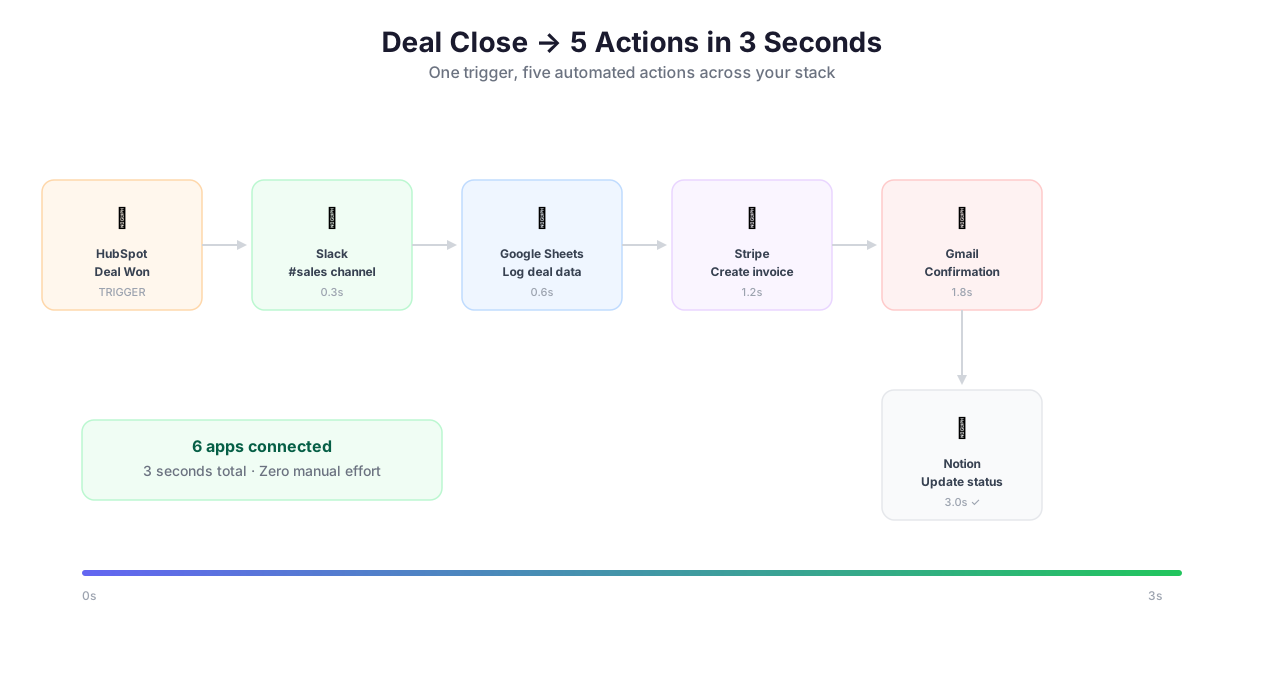
Trigger, process, and sync integration workflow
Single-integration workflows are useful. Multi-integration workflows are transformative. Here is the pattern that separates simple automation from business-critical infrastructure:
"HubSpot deal closes -> Slack notification -> Google Sheets update -> Stripe invoice created -> email confirmation"
This five-step workflow touches four different services and runs in under 30 seconds. A webhook from HubSpot triggers the workflow when a deal moves to "Closed Won." The workflow reads the deal details (amount, contact, company), posts a celebratory message to Slack's #revenue channel with the deal amount and sales rep name, appends a row to the Google Sheets revenue tracker with the full deal data, calls the Stripe API to create and send an invoice, and sends a confirmation email to the customer via Gmail with the invoice link.
Before Autonoly, this required a Zapier plan with four separate Zaps (because Zapier cannot natively chain across workflows without paying for multi-step), or a custom Node.js script maintained by a developer. Now it is a single visual workflow that anyone can build, modify, and monitor.
More Integration Patterns
Scrape, Process, Deliver: Extract data from a website, process with Python, save to Google Sheets, then notify your team on Slack
Monitor, Alert, Act: Watch a competitor's pricing page with browser automation, detect changes, and post a Slack alert with a summary
Collect, Analyze, Report: Pull reviews from multiple sites, classify sentiment with AI content tools, generate an executive summary, and email it to stakeholders via Gmail
Design these pipelines visually in the Visual Workflow Builder, or describe them in plain English using AI Agent Chat. Browse the templates library for pre-built integration workflows you can deploy in minutes.
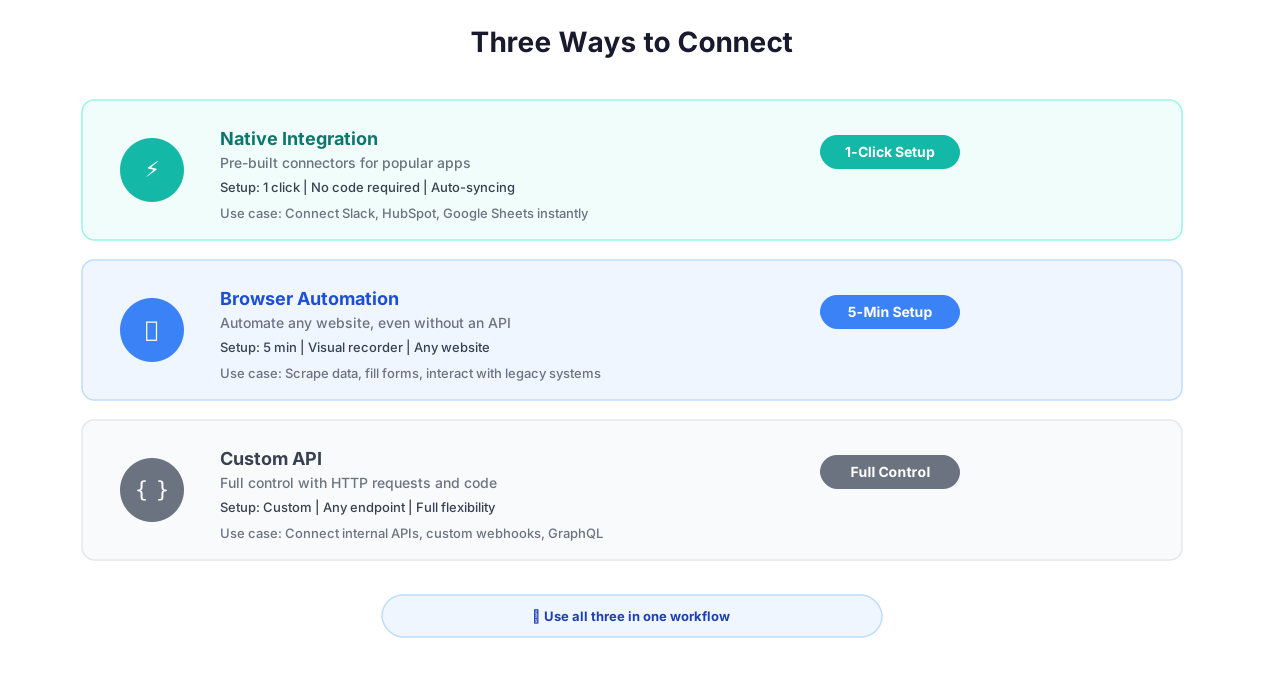
Native integrations vs Zapier vs raw API comparison
Best Practices
Getting the most value from integrations requires understanding how they fail — because every integration will fail eventually.
Use native integrations for common tools; reserve [API & HTTP](/features/api-http) for everything else. Native integrations handle authentication refresh, rate limiting, pagination, and error recovery automatically. The Google Sheets native node retries on 429 (rate limit) and 503 (service unavailable) errors with exponential backoff. The same API call via HTTP request node requires you to build that retry logic yourself. Only switch to HTTP requests when you need to call a specific endpoint the native integration does not expose.
Test integration permissions before building complex workflows. After connecting an OAuth account, run a simple test — write a single row to Google Sheets, send a test Slack message, create a test Notion page. Verify that permissions are correct and the connection is stable before building a 20-node workflow on top of it. A permission issue discovered mid-execution wastes time, credits, and occasionally corrupts partial data in destination systems.
Configure Slack notifications for signal, not noise. Sending every workflow event to Slack creates notification fatigue. The Slack channel where everyone has muted notifications is providing zero value. Reserve Slack alerts for actionable events: workflow failures, threshold-breaking changes, high-priority data discoveries. For routine completions, use a daily digest or a dedicated low-priority channel. Combine with Logic & Flow conditional branches to route different alert levels to different channels.
Organize Google Sheets outputs with consistent naming conventions. When automations create or write to Google Sheets, use a standardized naming pattern that includes the workflow name, date, and run ID. This prevents Drive clutter and makes debugging easy. For recurring workflows, append rows to the same sheet rather than creating a new one per run — unless you specifically need version-separated outputs for compliance or audit purposes.
Use bidirectional integrations to build closed-loop workflows. Read a list of URLs from Google Sheets, extract data from each with browser automation, and write results back to the same sheet in new columns. Read tasks from Notion, process them with AI Content, and update the original records with enriched data. This closed-loop pattern keeps your data centralized and eliminates the spreadsheet sprawl that plagues most automation setups. For strategies on building Google Sheets-centric automations, see our guide on automating Google Sheets.
Plan for OAuth token revocation. Users change passwords. IT admins rotate service accounts. Google occasionally invalidates all OAuth tokens during security incidents. Build your workflows to handle auth failures gracefully — a Logic & Flow error handler should catch 401 errors and send you an alert to re-authorize, rather than silently failing and losing data.
Security & Compliance
Integration security centers on how credentials are stored, transmitted, and used. All OAuth tokens, API keys, and webhook URLs are stored in the encrypted credential vault with AES-256 encryption. Credentials are decrypted only at the moment of execution and are never logged, displayed in the UI, or included in error messages. OAuth tokens are refreshed automatically before expiration, so you never need to re-authorize unless you revoke access from the provider's side.
Data flowing to integration targets is transmitted over encrypted TLS 1.3 connections directly to the provider's API. Autonoly does not store copies of successfully delivered data — it exists in the target service and in your encrypted execution log. This is an important distinction: if you send data to Google Sheets, the data lives in Google Sheets. Autonoly retains only the execution metadata (timestamp, success/failure, row count) in encrypted logs.
Webhook URLs generated by Autonoly support HMAC signature validation to prevent spoofed requests. For inbound data from external services, the webhook handler verifies the signature before processing the payload. For a comprehensive overview of Autonoly's security architecture, including credential management, execution isolation, and audit logging, visit the Security feature page. For teams evaluating Autonoly against other integration platforms, our comparison guide on Zapier vs Make vs n8n vs Autonoly covers security differences.
Common Use Cases
Automated Sales Reporting Pipeline
A sales operations team pulls deal data from Salesforce (native integration), pipeline activity from HubSpot (native integration), and revenue metrics from Stripe (native integration). Data flows through Data Processing where it is normalized, aggregated, and formatted, then into a Google Sheets dashboard with separate tabs for daily, weekly, and monthly views. Every morning at 8 AM, a Slack summary posts top metrics — new deals, total pipeline value, closed revenue — to the #sales channel. The weekly executive summary is generated by AI Content and delivered via Gmail with the Google Sheets link embedded. What used to require a junior analyst spending three hours every Monday morning now runs automatically. See our guide on automating email reports.
Multi-Channel Content Distribution
A content team publishes a new blog post and needs to distribute it across five channels simultaneously: post a summary to Slack, create a Notion page in the content calendar, add a row to the Google Sheets content tracker, send a Discord announcement to the community server, and schedule a promotional email via Email Campaigns. A single workflow reads the blog post URL, extracts the title and summary with Data Extraction, and distributes to all channels using parallel branches. The Slack post includes Block Kit formatting with the title, excerpt, and a "Read More" button. The Notion page includes the full post metadata and a link back to the original. What previously required manual copy-pasting across five tools now takes one click.
Customer Feedback Collection and Routing
An e-commerce company collects product reviews from Amazon, G2, and Trustpilot using Data Extraction. Reviews are classified by AI Content for sentiment (positive, neutral, negative) and topic (product quality, shipping, customer service, pricing). Positive reviews with a sentiment score above 0.8 are pushed to a "Testimonials" Notion database for marketing use. Negative reviews with specific complaints are routed to Slack channels by department — shipping issues to #logistics-alerts, product defects to #engineering-bugs, service complaints to #support-escalations. Monthly summaries are generated and delivered via Gmail to the product team with trend analysis. The entire pipeline runs on a weekly schedule and processes hundreds of reviews automatically. For more on building feedback analysis workflows, see our marketing automation guide.
Event-Driven Inventory Alerts
An e-commerce store receives webhook events from Shopify whenever inventory levels change. Logic & Flow checks if any product has dropped below the reorder threshold (which varies by product and is stored in a Google Sheet). Below-threshold products trigger three simultaneous actions: a Slack alert to the #procurement channel with product name, current stock, and reorder quantity; an email to the supplier with a pre-formatted reorder request; and a Google Sheets log entry for the purchasing team's records. When stock is replenished, a follow-up webhook updates the tracking sheet and posts a confirmation to Slack. The entire system runs without human intervention and has reduced stockout incidents by 90% for teams that deploy it.
Check the pricing page for details on integration limits and available connectors per plan.