

Why Automate Cold Email Outreach?
Cold email remains one of the highest-ROI channels for B2B sales, recruiting, partnerships, and fundraising. But the bottleneck is never the strategy — it is the execution. Writing genuinely personalized emails for hundreds of prospects takes days of work. A sales rep who needs to reach 200 prospects per week faces a brutal choice: spend 40+ hours writing thoughtful, individualized emails, or resort to generic mail-merge templates with {first_name} placeholders that get ignored because recipients can spot a mass email instantly. The inbox is a competitive environment, and generic outreach gets treated like noise.
The math is simple and unforgiving. A well-personalized cold email gets a 5-15% reply rate. A generic template gets 1-2%. If you are reaching 200 prospects per week, that is the difference between 10-30 conversations and 2-4 conversations. Over a quarter, personalized outreach can generate 10x more pipeline than template blasts — but only if you can actually produce personalized emails at volume. Without automation, most teams settle for the template approach because they simply do not have the hours to write custom messages for every prospect. The opportunity cost is enormous: the pipeline you could have built, the deals you could have closed, the partnerships you could have formed — all lost to a capacity constraint that automation solves immediately.
Autonoly bridges this gap by combining the personalization quality of hand-written emails with the efficiency of automation. The AI agent reads each contact's details from your Google Sheets and generates a unique email that references their company, role, recent news, or specific pain points — then sends it through Gmail so it appears in your normal sent folder. Recipients see a thoughtful, relevant message that feels like it was written just for them, because in a meaningful sense, it was. Every email is a unique composition, not a template with swapped variables.
The time savings are dramatic. What previously took a full day of focused writing — crafting 50 personalized emails — now completes in under 30 minutes of setup time. The agent handles the creative work while you focus on responding to the replies that come back. For teams scaling outreach to hundreds or thousands of contacts per month, this is the difference between needing a team of SDRs and having one person manage the entire outreach pipeline.
How the AI Agent Personalizes at Scale
The AI Agent Chat reads your contact spreadsheet and your email template or guidelines. For each row, it generates a distinct email by weaving in the recipient's specific details. This goes far beyond simple variable replacement — the agent restructures sentences, adjusts the value proposition based on the prospect's industry, and varies the opening line so no two emails read the same way. If your spreadsheet includes a "Company Description" or "Recent News" column, the agent incorporates those details naturally into the message, referencing specific achievements, products, or initiatives that demonstrate genuine familiarity with the prospect's business.
You provide the core messaging framework: your value proposition, the ask (meeting, demo, introduction), and any constraints (word count, tone, specific phrases to include or avoid). The agent handles the rest, producing emails that pass the "would I respond to this?" test. You can provide multiple messaging angles and the agent selects the most relevant one for each prospect based on their industry, role, or company stage.
Using Data Extraction and Browser Automation, the agent can also enrich your contact list before sending. If your spreadsheet has company names but lacks details, the agent can research each company's website to find relevant talking points — recent blog posts, product launches, hiring signals, or funding announcements — and incorporate them into the email. This research step transforms a basic contact list into a deeply personalized outreach campaign without any manual effort. The enrichment data is saved back to your sheet, so you have it for future campaigns even if you do not use it all in the first email.
Sending with Natural Timing
The agent does not blast all emails at once. It spaces sends across a configurable time window — for example, 30 to 90 seconds between each email, during business hours only. This mimics natural human sending behavior and protects your Gmail sender reputation, which depends on the SMTP delivery signals that providers watch closely. You can configure the daily sending limit to stay well within Gmail's thresholds — typically 100-150 per day for warm accounts, ramping up gradually for new sending accounts. The agent also varies send times slightly within each window so the pattern does not appear mechanical to email providers.
Each sent email is logged back to your Google Sheet with the timestamp, subject line used, and a status column. When a recipient replies, the agent detects it and updates the row to "Replied" so you can prioritize your responses. Bounced emails are flagged immediately so you can clean your list. The real-time tracking means you always know exactly where your campaign stands without refreshing dashboards or pulling reports manually.
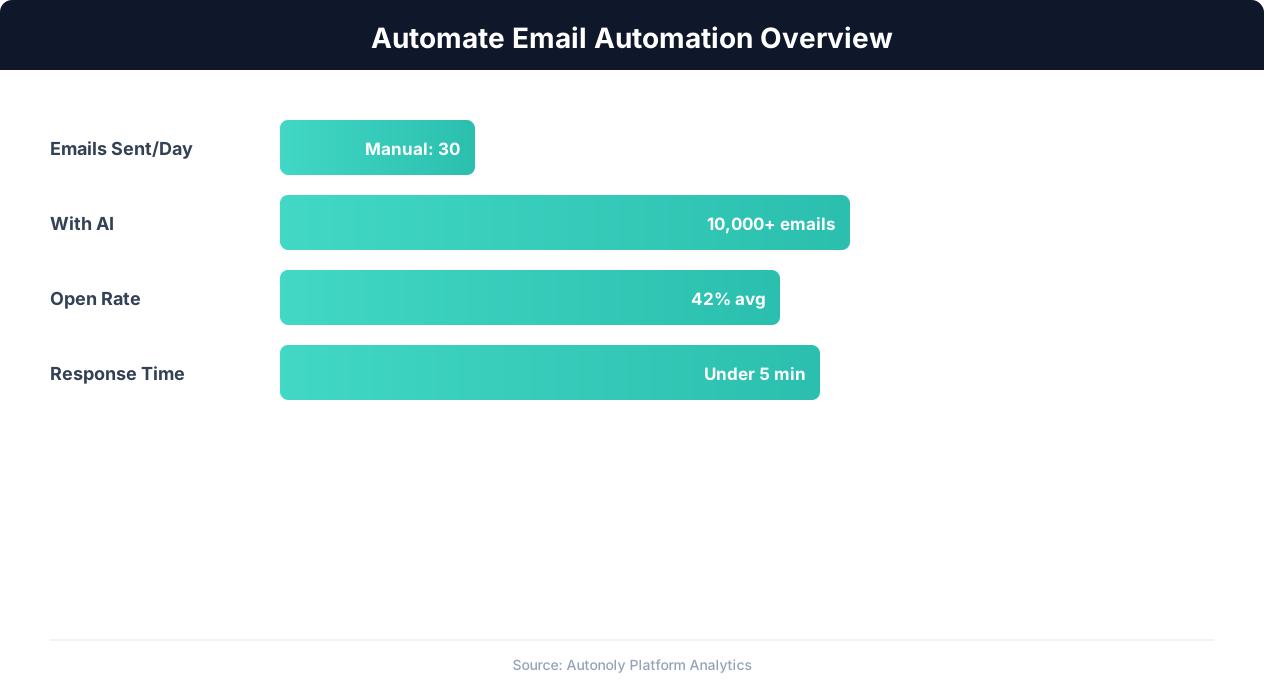
Email automation impact on engagement metrics
Key Insight: Triggered behavioral emails convert 4x better than scheduled newsletters, with automated cart abandonment emails recovering 15% of lost sales (Moosend Research).
What Data You Get
Your Google Sheet becomes a complete outreach dashboard. Every row tracks the prospect name, email, company, personalization details, the generated email text, send timestamp, current status (Pending, Sent, Replied, Bounced), and reply date if applicable. Export this data for pipeline reporting, or connect it to your CRM via Data Processing for seamless handoff to your sales workflow. Over multiple campaigns, this data reveals which industries respond best, which messaging angles drive the highest reply rates, and which days and times produce the most engagement.
Building Your Contact List
For best results, pair this workflow with Autonoly's lead generation tasks. Use Browser Automation to scrape prospect data from LinkedIn, company directories, or industry databases, then feed that data directly into your outreach sheet. This creates a complete pipeline from lead discovery to first contact — entirely automated. Add a Data Processing step to deduplicate contacts against your existing CRM so you never email someone who is already in your pipeline.
The Visual Workflow Builder lets you chain these steps: scrape leads, clean and deduplicate the list with Data Processing, validate email addresses with the list cleaning workflow, generate personalized emails, and send — all in a single automated pipeline. Browse the templates library for pre-built outreach workflows tailored to sales prospecting, recruiting, and partnership development.
Compliance and Best Practices
The agent supports CAN-SPAM and GDPR compliance features: include unsubscribe links, honor opt-out requests automatically, and maintain suppression lists. Add a Logic & Flow step to check each recipient against your do-not-contact list before sending. The agent also skips any row where the email field is empty or malformed, preventing wasted sends. For GDPR-regulated markets, the agent can include consent language and track the legal basis for each contact.
Track your outreach metrics in the Google Sheet — send rate, reply rate, and bounce rate — to iterate on your messaging. The agent can generate A/B variants of your emails so you can test different subject lines or CTAs across segments of your list. After a campaign completes, chain it with the follow-up email workflow to automatically re-engage non-responders. Use SSH & Terminal to push campaign results to your analytics database for long-term trend analysis across campaigns.
Scheduling and Execution
This task runs as a one-time operation by default — connect your sheet, generate emails, and send the batch. For teams with continuously growing prospect lists, schedule it to run daily or weekly using cron-style scheduling, processing only new rows added since the last run. The agent tracks which rows have been processed using a status column, ensuring no prospect receives duplicate outreach. Each run produces a completion report showing sends, bounces, and any errors, delivered via Slack notification or Gmail summary.
For large campaigns spanning multiple days, the agent maintains progress across runs — if you add 500 contacts but your daily sending limit is 150, the agent sends 150 per day across four days, updating each row's status as it goes. A notification chain confirms each day's batch completion and flags any deliverability issues that need attention. See pricing for sending volume details per plan.
Further Reading
Explore more about the tools and techniques used in this workflow: Automate Lead Generation, Automate Email Reports, Email Campaigns, Ai Content.