

Why Automate Invoice PDF Extraction?
Accounts payable teams process hundreds of invoices monthly, each arriving as a PDF with a slightly different layout. Manually keying in vendor names, invoice numbers, line items, amounts, and due dates is one of the most error-prone tasks in finance. Studies show that manual data entry has an error rate of approximately 1%, which sounds small until you realize that means 10 errors per 1,000 invoices processed. A mistyped amount can lead to overpayments or underpayments. A missed due date cascades into late payment fees, strained vendor relationships, and potentially lost early-payment discounts that your terms entitled you to. Over the course of a year, these small errors accumulate into material financial discrepancies that distort your reporting and erode confidence in your financial controls.
The time cost is equally punishing. An experienced AP clerk can manually process about 5-8 invoices per hour when handling varied formats — reading each PDF, identifying the relevant fields, typing values into a spreadsheet, and double-checking the entry. At that rate, processing 200 invoices per month consumes 25-40 hours of skilled labor. That is essentially one full-time employee's week, every month, spent on pure data transcription that adds zero analytical value. Those are hours your finance team could spend on vendor negotiations, cash flow optimization, and strategic financial planning.
The reconciliation burden hits hardest at month-end and quarter-end, when finance teams are already stretched thin. Errors introduced during manual entry surface as discrepancies during close, triggering time-consuming investigation cycles. A $50 transposition error on one invoice can take an hour to trace when it causes a variance in your AP aging report. During audit season, incomplete or inconsistent invoice records create additional stress and can result in compliance findings that damage your organization's standing.
Automating invoice extraction with Autonoly eliminates these risks entirely. The AI agent reads each PDF — regardless of format — and maps the data into consistent columns in Google Sheets. Whether your invoices come from freelancers using handmade templates, SaaS vendors with minimalist receipts, or enterprise suppliers with multi-page detailed invoices, the agent handles the variation without needing a separate template for each vendor. The result is accurate, structured invoice data available within hours of receipt, not days. Your AP process transforms from a manual bottleneck into an automated pipeline that scales effortlessly with your business.
How the AI Agent Reads Invoices
Autonoly's AI Agent Chat uses document intelligence to parse invoice PDFs. Unlike basic OCR tools that extract raw text and leave you to sort it out, the agent understands the semantic structure of an invoice. It identifies:
Header fields: Invoice number, invoice date, due date, PO number
Vendor details: Company name, address, tax ID, bank details
Line items: Description, quantity, unit price, and line total for each item
Summary fields: Subtotal, tax amount (broken down by rate if applicable), discounts, and grand total
Payment terms: Net 30, Net 60, or specific payment instructions
Currency: Detected from symbols, codes, or contextual clues in the document
The Data Extraction engine handles both text-based PDFs (where text is selectable) and scanned invoices (where text is embedded in images). Because the PDF specification — now an open ISO standard maintained by the PDF Association — allows almost unlimited layout freedom, no two vendors structure their invoices the same way. For scanned documents, the agent applies OCR before running the extraction logic, ensuring no invoice format is left behind. The agent processes each field independently, so a partially readable invoice still yields whatever data can be extracted, with unclear fields flagged for manual review rather than silently omitted. A confidence score accompanies each extracted value, letting your team prioritize which invoices to verify manually.
Handling Invoice Format Variation
The biggest challenge with invoice processing is that no two vendors use the same layout. The agent does not rely on fixed coordinates or templates — it reads the document like a human would, identifying labels ("Invoice #", "Total Due", "Bill To") and their associated values regardless of where they appear on the page. It handles invoices in multiple languages for common label patterns and recognizes both left-to-right and table-based layouts. The agent also handles multi-page invoices where line items span across pages, stitching the table back together in the output.
When the agent encounters a new vendor for the first time, it may take an extra moment to map the layout. On subsequent invoices from the same vendor, extraction is near-instant because the agent recognizes the format. The Visual Workflow Builder lets you review and correct any extraction errors, and the agent learns from your corrections to improve future accuracy. Over time, your extraction accuracy improves as the agent accumulates experience with your specific vendor ecosystem.
Structuring the Output
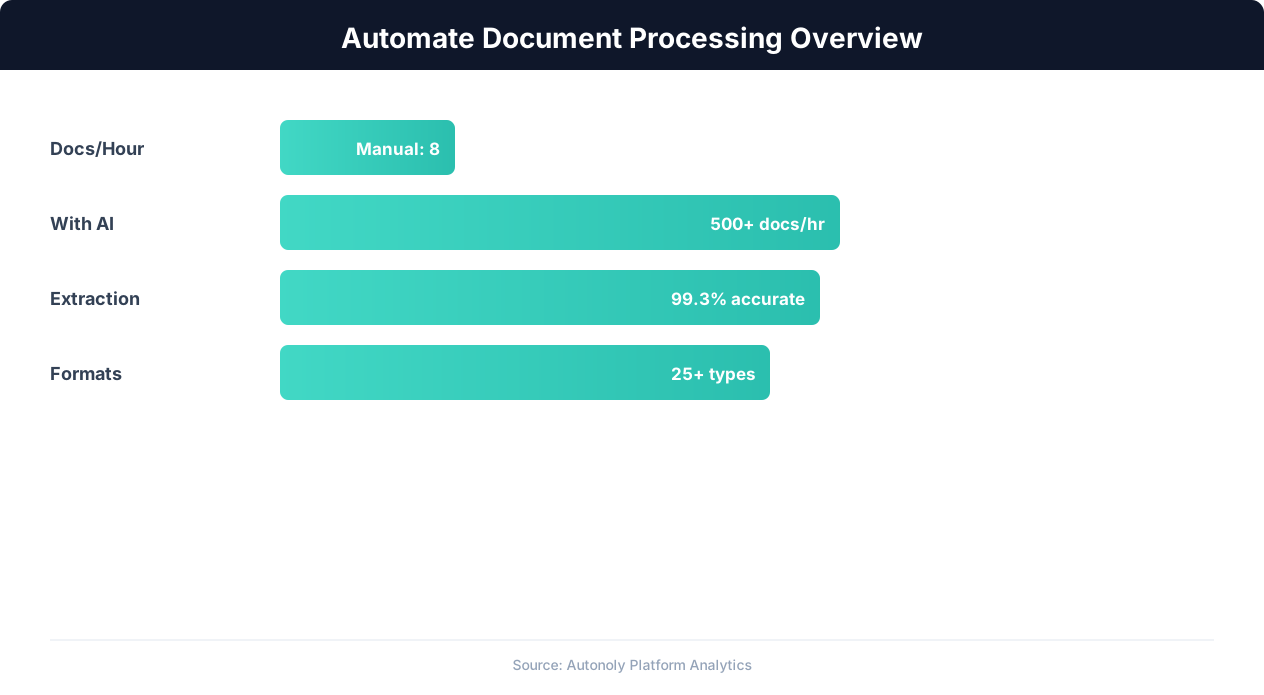
Document processing automation time savings by document type
Key Insight: Knowledge workers spend 2.5 hours per day searching for and managing documents. Automation reduces this to under 30 minutes (IDC Research).
You control how data lands in your Google Sheet. Two common configurations:
Summary view: One row per invoice with columns for invoice number, vendor, date, total, due date, and status. Ideal for AP tracking and cash flow forecasting. Add computed columns for days-until-due and early-payment discount eligibility.
Line-item view: One row per line item with the invoice header fields repeated. Useful for expense categorization, departmental chargebacks, and detailed spend analysis. This view makes it easy to pivot by category, department, or GL code.
Add a Data Processing step to normalize vendor names (catching variations like "Acme Corp" vs "ACME Corporation" vs "Acme Inc."), convert currencies, or categorize expenses by GL code. Use Logic & Flow to flag invoices that exceed a threshold amount or are approaching their due date. Browse the templates library for pre-built invoice processing workflows for common AP scenarios.
Integration Options
Chain this workflow with other automation steps for a complete AP pipeline. After extraction, the agent can post a Slack notification to your finance channel when a high-value invoice arrives, or send a summary to the approver via Gmail. Connect to Airtable or Notion for teams that prefer those tools over spreadsheets. Use Browser Automation to automatically download invoice PDFs from vendor portals before extraction, creating a fully hands-free AP intake process. Use SSH & Terminal to push extracted data to your accounting database or ERP system. The complete pipeline — from invoice receipt to data availability — runs without human intervention.
Use Cases
Accounts payable automation: Process vendor invoices from email attachments or a shared Drive folder. Extract amounts and due dates into a tracking sheet, flag overdue invoices, and notify the AP team via Slack when action is required. Automatically calculate payment priority based on discount terms and due dates.
Spend analysis: Extract line-item data from all invoices to build a comprehensive spend database. Analyze vendor concentration, category spend trends, and pricing changes over time using the structured spreadsheet data. Identify opportunities for consolidation or renegotiation that are invisible when invoices sit as unstructured PDFs.
Audit preparation: Maintain a complete, searchable log of every invoice processed, with extracted data linked back to the original PDF. When auditors need documentation, the data is already organized and accessible. The extraction timestamp and confidence scores provide an audit trail that demonstrates consistent processing controls.
Scheduling and Monitoring
The workflow runs daily by default, scanning your invoice source (Drive folder or email attachments) for new PDFs using differential processing — only files added since the last run are evaluated. Each run logs the number of invoices processed, any that could not be parsed, and the total amount extracted. Review the log in the Autonoly dashboard to catch anomalies early. A notification chain can alert your AP team via Slack when processing completes, and flag any invoices that failed extraction for manual attention. The notification includes a summary of total invoice value processed, giving your finance team instant visibility into incoming obligations.
For high-volume periods like month-end, increase the frequency to every 4 hours using cron-style scheduling. The agent handles batch processing efficiently — 100 invoices typically complete in under 15 minutes. Over time, the processing log becomes a complete audit trail of every invoice received, extracted, and loaded into your financial systems. See pricing for volume limits and processing frequency per plan.
Further Reading
Explore more about the tools and techniques used in this workflow: Automate Data Entry, No Code Automation Guide, Pdf Ocr, Integrations.