

Why Automate Lease Renewal Reminders?
Lease expirations that sneak up on you create expensive problems — vacancy and turnover costs that the National Association of Realtors consistently flags as among the largest controllable expenses in rental management. If a tenant decides not to renew and you only find out at the last minute, you face a vacancy with no time to market the unit, schedule showings, or screen replacement tenants. The cost of an unexpected vacancy is significant — lost rent for the vacant period, turnover expenses for cleaning and repairs, marketing costs, and the administrative time to process a new tenant. For a property renting at $1,500 per month, even one month of unplanned vacancy represents a major hit to your annual return on that unit.
On the flip side, if you forget to initiate the renewal conversation with a good tenant, they might assume you are not interested in keeping them and start looking elsewhere. The best tenants — those who pay on time, maintain the unit, and communicate professionally — are the ones you most want to retain, and a proactive renewal approach signals that you value the relationship. Early communication also gives you time to negotiate terms, propose modest rent adjustments, and address any tenant concerns before they escalate into a move-out decision.
Automating lease renewal reminders with Google Sheets and Gmail gives you a systematic early warning system that works every month without fail. You define the reminder windows — 90 days, 60 days, 30 days before expiration — and the AI agent handles the rest. Every month, it checks your lease ledger, identifies which tenants fall into each reminder window, sends appropriately staged communications, and logs everything back to your spreadsheet. You always have time to act because you always know what is coming.
This workflow is essential for landlords managing multiple units, property management companies with dozens or hundreds of leases, and real estate investors who need to forecast vacancy and turnover costs for financial planning. Even a landlord with just four or five units benefits from the automation — it removes the mental burden of tracking lease dates and ensures you never miss a critical deadline. Visit our templates library for pre-built lease renewal workflows you can deploy in minutes.
How the AI Agent Tracks Renewals
Your lease ledger in Google Sheets serves as the single source of truth. Each row contains a tenant's name, email, phone, unit number, lease start date, lease end date, monthly rent, and renewal status. The agent reads this sheet monthly and calculates how many days remain until each lease expires. The Data Processing engine compares each lease's remaining days against your configured reminder windows — a lease expiring in 88 days falls within the 90-day window and triggers the first reminder, and subsequent stages fire on later monthly runs.
Each reminder email is personalized with the tenant's name, unit, current rent, lease end date, and any proposed renewal terms you have specified. The agent sends these through Gmail so they come from your email address. You can choose whether reminders go to you (so you initiate the conversation), directly to the tenant, or both. The agent also updates a "Reminder Sent" column in your spreadsheet, tracking which reminder stage each tenant has received and preventing duplicate reminders. Use the AI Agent Chat to adjust reminder windows or email templates through natural conversation.
What Data You Get
Your lease renewal tracker provides complete pipeline visibility:
Tenant Name — Who the lease belongs to
Unit / Property — Which unit is approaching expiration
Lease End Date — When the current lease expires
Days Remaining — Calculated automatically each run
Reminder Stage — 90-day, 60-day, 30-day, or not yet triggered
Renewal Status — Pending, renewed, non-renewal, or month-to-month
Proposed Terms — New rent amount or term length if applicable
Last Contact Date — When the most recent reminder was sent
Customizing Your Workflow
The Visual Workflow Builder lets you build a complete renewal pipeline beyond simple reminders. Use Logic & Flow conditions to handle different scenarios: skip reminders for auto-renewing tenants and just send a confirmation, include proposed rent increases in 90-day notices, send month-to-month conversion offers to flexible tenants, or deliver non-renewal notices for units slated for renovation. Add escalation logic so that if a tenant has not responded to the 90-day and 60-day reminders, the 30-day email takes a more urgent tone and includes move-out instructions as a backup.
Integration Options
Add a Slack notification to alert your leasing team when a tenant reaches the 30-day mark without a signed renewal. Deliver monthly summary reports via Gmail to property owners showing renewal rates, projected vacancy, and estimated turnover costs. Log all renewal pipeline data in Google Sheets for portfolio-wide analysis. The Data Processing engine generates dashboard-style summaries for quarterly financial planning. Visit the Integrations page for all connection options.
Use Cases
Independent landlords tracking lease expirations across a small portfolio to prevent surprise vacancies
Property management companies running renewal pipelines for hundreds of leases with tiered communication
Real estate investors forecasting vacancy rates and turnover costs for financial modeling
Commercial landlords managing longer-term lease expirations with extended notice periods
Student housing operators coordinating mass lease renewals on annual academic cycles
Legal Compliance
Many jurisdictions require specific notice periods for lease non-renewals or rent increases. Your reminder windows should be configured to meet or exceed these legal requirements. The workflow serves as documentation that timely notice was provided, with email timestamps and spreadsheet logs creating an audit trail that protects you in disputes.
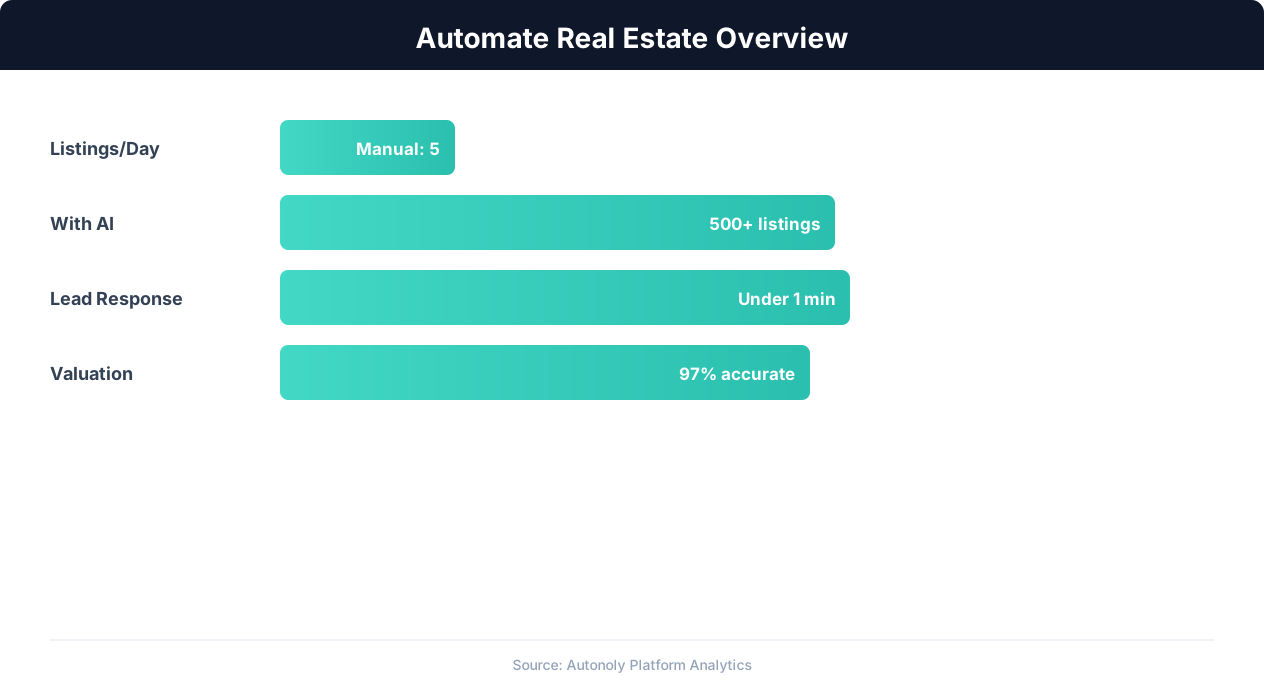
Real estate automation impact on agent productivity
Key Insight: AI-powered property matching increases client satisfaction by 43% by surfacing relevant listings faster than manual MLS searches (RealTrends Report).
How the AI Agent Does It
The agent reads your lease ledger from Google Sheets each month and calculates days remaining for every active lease. The Data Processing engine identifies leases falling within your configured reminder windows and generates personalized emails for each one. Emails are sent through Gmail and send status is logged back to the spreadsheet. The agent tracks which reminder stage has been sent for each lease — 90-day, 60-day, or 30-day — and only sends the next appropriate stage, never repeating a stage that was already delivered.
Key Insight: Automated market analysis reports generate 5x more seller leads by positioning agents as local market experts with data-driven insights (Tom Ferry Research).
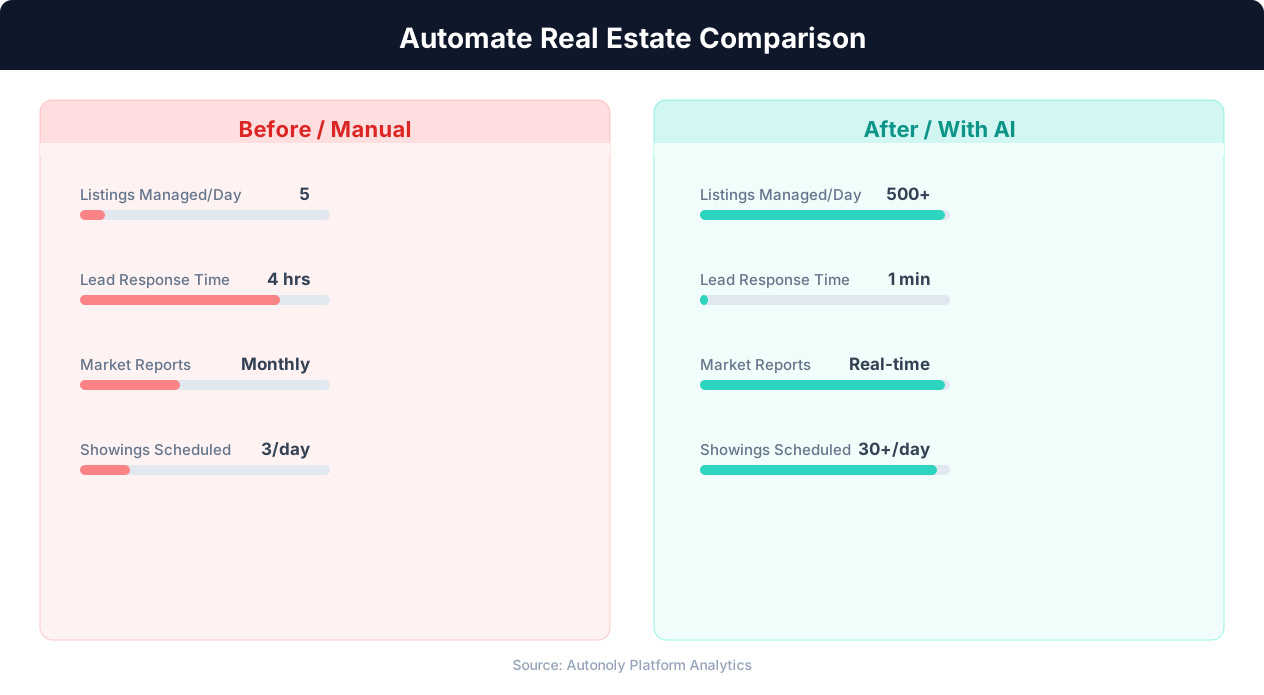
Lead response time for manual vs automated real estate workflows
Key Insight: Automated listing syndication saves agents 15+ hours per week on data entry while ensuring listings appear on all major portals within minutes (Inman Research).
Scheduling and Automation
The workflow runs monthly, typically on the first of each month, aligning naturally with lease cycles and giving you a regular rhythm for reviewing upcoming expirations. The Visual Workflow Builder lets you adjust the schedule to biweekly or weekly if your portfolio size demands more frequent checks. Each monthly run produces a summary report showing all leases in each reminder window, tenants who have confirmed renewal, and any leases expiring without a decision.
Add Logic & Flow conditions to handle auto-renewals, rent increases, and non-renewal scenarios differently. Generate monthly summary reports and route urgent cases to Slack for immediate team attention. For large portfolios, the Data Processing engine generates forward-looking reports with renewal rates, projected vacancy, and estimated turnover costs. Check pricing to see how many automated runs are included in your plan.
Further Reading
Explore more about the tools and techniques used in this workflow: Real Estate Automation, Automate Email Reports, Email Campaigns, Scheduled Execution.