

Why Automate Parent Newsletters?
Consistent parent communication is foundational to a healthy school community — family engagement being a priority the U.S. Department of Education consistently links to improved student outcomes. Parents who feel informed are more engaged, more supportive of school initiatives, and more likely to participate in events and volunteer. Research consistently shows that parent engagement correlates with improved student academic performance, better behavior, and higher graduation rates. The weekly newsletter is often the primary touchpoint between a school and its families — and when it arrives reliably every week, parents develop a habit of reading it and acting on the information inside. When it arrives sporadically or not at all, families feel disconnected and disengaged.
But producing a polished weekly newsletter is time-consuming — gathering content from multiple teachers, formatting it attractively, managing distribution lists, and actually sending it on schedule. In many schools, the newsletter responsibility falls on a single person — an office administrator, a communications coordinator, or even a principal who already has a full plate. When that person is sick, on vacation, or overwhelmed with other priorities, the newsletter simply does not go out. Families notice the silence, and the trust that consistent communication builds erodes quickly. The manual process also creates bottlenecks: teachers have updates to share but no easy way to contribute, and the person assembling the newsletter spends more time chasing content than actually producing it.
Automating the newsletter pipeline with Google Sheets and Gmail separates content creation from delivery logistics. Teachers and administrators contribute content to a shared spreadsheet throughout the week, and the automation handles assembly and distribution every Friday. No one has to remember to compile, format, and send — it just happens. The person who used to spend two hours assembling the newsletter now spends zero, and the newsletter goes out reliably every single week regardless of who is in the building. Use the AI Agent Chat to set up and customize your newsletter workflow through natural conversation.
This workflow works for elementary schools, middle schools, high schools, private schools, after-school programs, and any educational organization that communicates regularly with parents. Browse our templates library for pre-built newsletter workflows you can customize in minutes.
How the AI Agent Builds and Sends Newsletters
Your editorial calendar lives in Google Sheets. Each row represents a content item: a headline, body text, category (announcement, event, class highlight, reminder), the date it should be included, and optionally the contributing teacher or department. Throughout the week, staff add items to the calendar as they come up — an upcoming field trip, a lunch menu change, a classroom achievement to celebrate.
When the weekly workflow runs, the agent reads all content items tagged for the current week. The Data Processing engine groups items by category and assembles them into a structured email newsletter. Announcements appear at the top, followed by upcoming events with dates and details, class highlights, and a reminders section at the bottom.
The agent then reads the parent distribution list from a roster tab in the same spreadsheet. The list includes parent names and email addresses, optionally organized by class or grade level. For schools that want to send slightly different newsletters to different grades, the Logic & Flow engine filters content by grade and sends targeted versions.
Emails are sent through Gmail from the school's official email address. The newsletter appears as a clean, well-organized email — not a raw dump of spreadsheet data. Each section has clear headers, and event dates are formatted consistently.
Customizing Your Workflow
The spreadsheet-based content calendar makes it easy for multiple contributors to participate without conflicting. A fifth-grade teacher adds a class highlight, the front office posts a schedule change, and the PTA chair announces a fundraiser — all in the same shared sheet. The agent compiles everything into a cohesive newsletter regardless of who contributed it.
You can also maintain recurring items that appear every week — like a principal's greeting, the lunch menu link, or after-school program information. Mark these as "recurring" in the spreadsheet and the agent includes them automatically without anyone needing to re-enter them each week.
The Visual Workflow Builder lets you add an editorial review step. Before the newsletter sends, the agent can email a preview to the principal or communications coordinator for approval. Only after approval does the final version go out to parents. This safety net ensures nothing inappropriate or incorrect reaches families.
For larger schools, a one-size-fits-all newsletter may not serve parents well. Use Logic & Flow conditions to create segmented newsletters:
By grade level: Elementary parents receive K-5 content, middle school parents get 6-8 content.
By class: Each homeroom teacher's highlights go only to their students' parents.
By interest: Parents who opted into sports updates or arts updates get additional sections relevant to their interests.
Personalization extends to the greeting — each email can address the parent by name and reference their child's name or class. These small touches make mass communication feel personal.
Scheduling and Automation
The newsletter sends weekly, typically Friday afternoon so parents have the weekend to read it and plan for the upcoming week. The Visual Workflow Builder lets you choose the exact day and time. Some schools prefer Sunday evening sends so the newsletter is the first thing in parents' inboxes Monday morning.
Each weekly run pulls only content tagged for that specific week. Past content is archived in the spreadsheet but not included in future sends. This keeps newsletters current and prevents stale information from recycling.
If a week has no new content (e.g., during school breaks), the agent can either skip the send or deliver a brief "no updates this week" message, depending on your preference.
For special communications — emergency notices, weather closures, or time-sensitive announcements — trigger an immediate send outside the regular schedule through the Visual Workflow Builder. This gives you both a reliable weekly cadence and the flexibility to communicate urgently when needed.
What Data You Get
Your newsletter tracking spreadsheet provides complete distribution visibility:
Week Number — Which weekly edition was sent
Content Items — Number of content entries included
Recipients — Total parents on the distribution list
Send Timestamp — When the newsletter was delivered
Delivery Failures — Count and email addresses that bounced
Content Contributors — Which teachers and staff contributed items
Integration Options
Send newsletters through Gmail with your school's official email address for professional branding. Maintain all content and distribution data in Google Sheets for easy collaboration across staff. Add a Slack notification to your staff channel when the newsletter goes out, confirming distribution and flagging any delivery failures. Visit the Integrations page for all connection options.
Use Cases
Elementary schools keeping parents informed about classroom activities, field trips, and volunteer opportunities
Middle and high schools communicating schedule changes, extracurricular updates, and college prep events
Private schools maintaining premium communication standards with polished weekly updates
After-school programs sharing program highlights, schedule reminders, and registration deadlines
PTA and parent organizations distributing meeting agendas, fundraiser updates, and community event information
Tracking Engagement
After each send, the agent logs the distribution count and any delivery failures to your spreadsheet. Over time, you can identify parents with invalid email addresses and follow up to collect correct contact information. For schools that want deeper engagement data, include trackable links in the newsletter to measure which content sections parents interact with most.
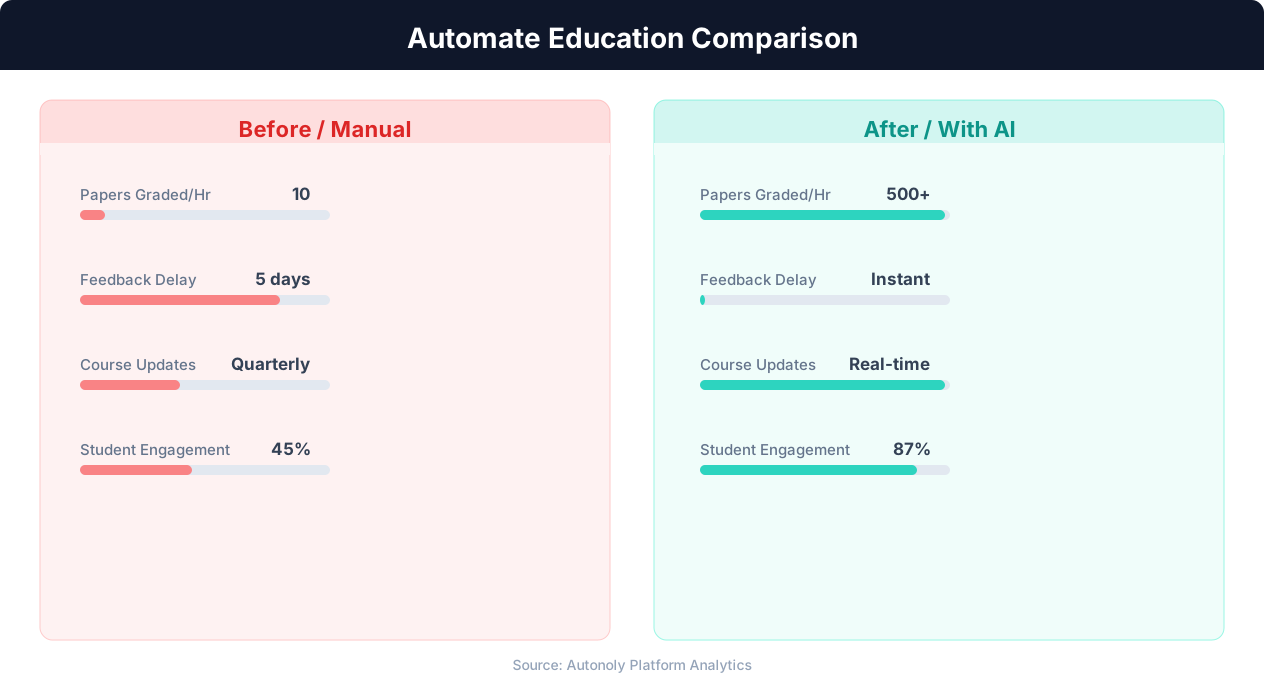
Time savings for educators using automated workflows
Key Insight: Automated grading and feedback systems improve student performance by 18% by providing instant, consistent feedback on assignments (EdTech Magazine).
How the AI Agent Does It
The agent reads the current week's content entries from your Google Sheets editorial calendar. The Data Processing engine groups items by category and assembles a formatted newsletter email. Parent email addresses are pulled from the roster tab, and the newsletter is sent through Gmail. Send counts and delivery status are logged back to the spreadsheet. Multiple teachers and staff add content throughout the week without coordination overhead — the agent compiles all entries into a unified newsletter, applying consistent formatting regardless of who wrote each section.
Key Insight: Institutions using enrollment automation see 34% higher conversion rates from inquiry to enrollment due to faster, more personalized responses (NACAC).
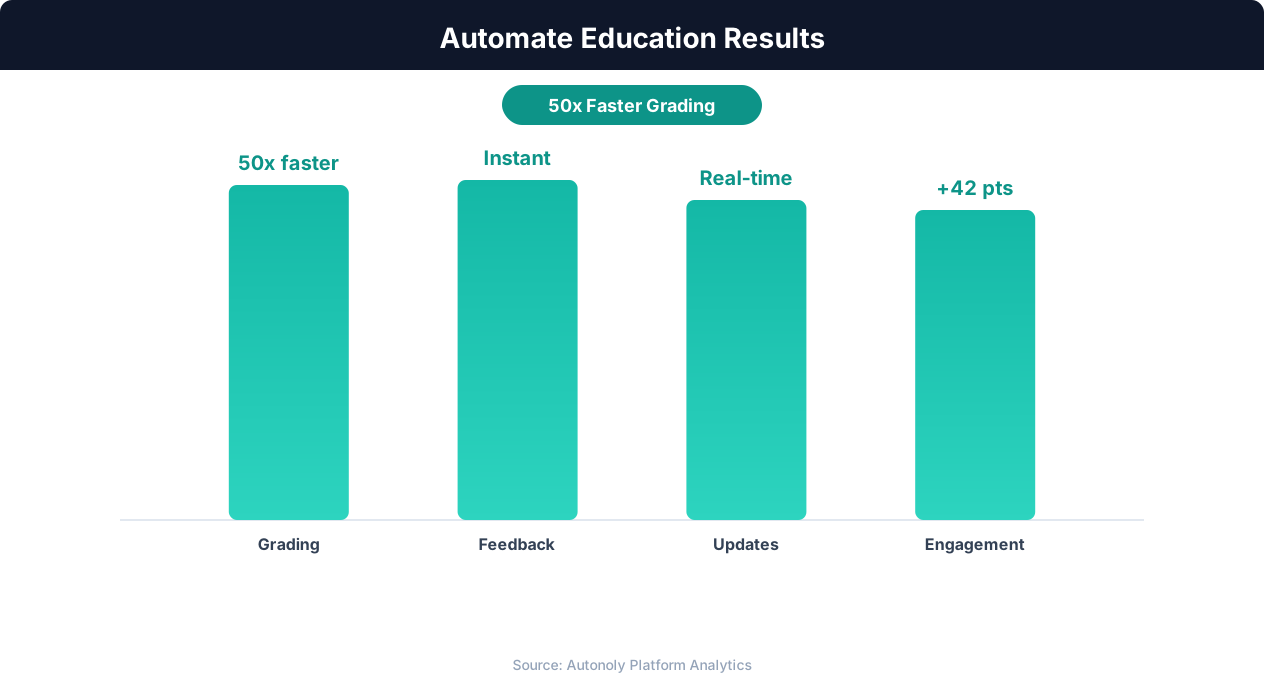
Student engagement improvements from automation
Key Insight: Teachers spend 50% of their working hours on non-teaching tasks like grading and admin. Automation can reclaim up to 13 hours per week (McKinsey Education Report).
Scheduling and Automation
Send newsletters weekly on Friday afternoon using the Visual Workflow Builder so parents have the weekend to read and plan for the upcoming week. Some schools prefer Sunday evening sends so the newsletter is the first thing in parents' inboxes Monday morning. Each weekly run pulls only content tagged for that specific week — past content is archived but not included in future sends. If a week has no new content during school breaks, the agent can either skip the send or deliver a brief message, depending on your preference.
Add Logic & Flow conditions to segment by grade level, include recurring items automatically, and trigger editorial approval previews before final distribution. For special communications — emergency notices, weather closures, or time-sensitive announcements — trigger an immediate send outside the regular schedule. Check pricing to see how many automated runs are included in your plan.
Further Reading
Explore more about the tools and techniques used in this workflow: Automate Email Reports, No Code Automation Guide, Email Campaigns, Ai Content, Scheduled Execution.