


Why Monitor Competitor Prices?
Pricing intelligence is one of the most valuable inputs for any business that operates in a competitive market. Whether you sell software subscriptions, physical products, or professional services, knowing when a competitor adjusts their pricing gives you the ability to respond strategically rather than reactively. Manual price checking is tedious, inconsistent, and simply does not scale when you have dozens or hundreds of competitor products to track.
Automating this process with Browser Automation ensures that every price change is captured the moment it happens, without anyone on your team spending time refreshing web pages. The data flows directly into your team's communication hub via the Slack integration, making pricing intelligence a natural part of your daily workflow.
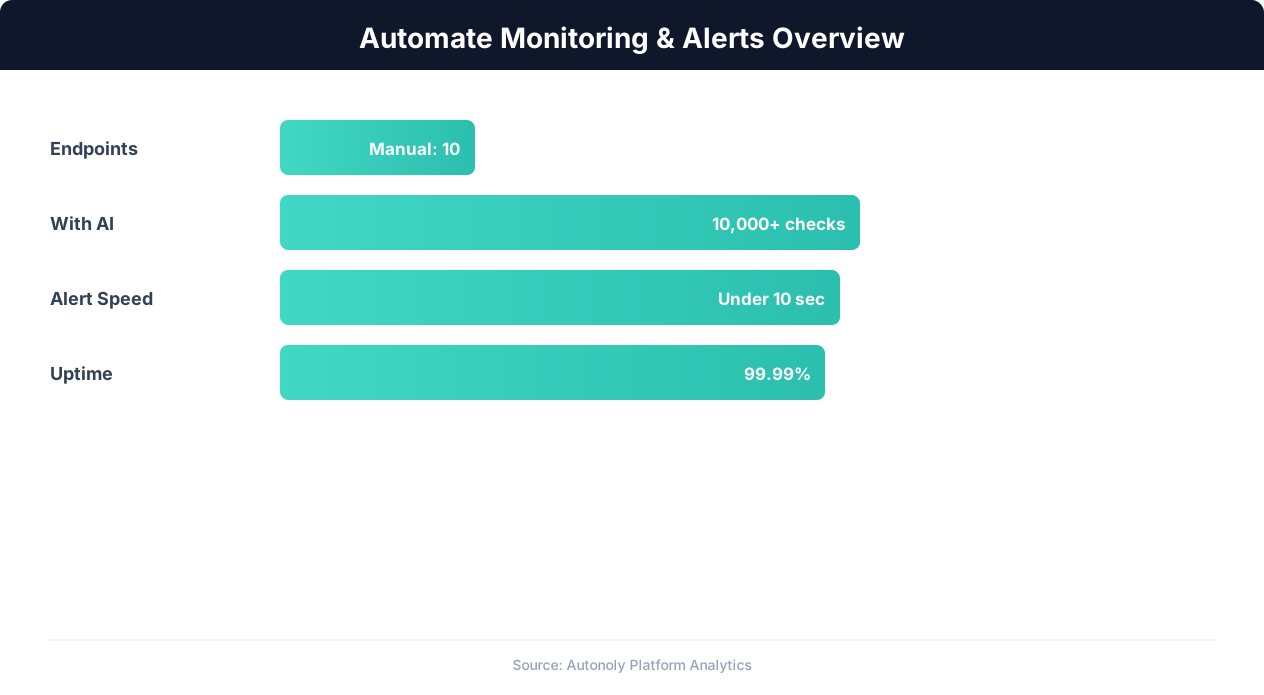
Monitoring automation detection rates across alert types
Key Insight: Automated monitoring detects issues 60x faster than manual checks, reducing mean time to detection from hours to seconds (PagerDuty State of Digital Operations).
How Autonoly's AI Agent Handles Price Monitoring
Traditional price monitoring tools require you to configure CSS selectors, set up parsing rules, and maintain brittle scraping scripts. Autonoly takes a fundamentally different approach. You describe what you want in plain English through the AI Agent Chat, and the agent figures out how to extract the data.
The agent uses a full Playwright-powered browser to render competitor pages completely — including JavaScript-heavy single-page applications, lazy-loaded content, and dynamically generated pricing tables. This means it works on virtually any website, regardless of the frontend technology used. If a competitor redesigns their pricing page, the AI adapts automatically because it understands page structure semantically rather than relying on hardcoded selectors.
What Data You Get
Each monitoring run produces structured data that includes the product or plan name, current price, currency, any promotional or discounted pricing, and the timestamp of extraction. When prices change, the Slack notification includes a clear comparison showing the previous price versus the new price, the percentage change, and a direct link to the source page so your team can verify immediately.
You can also configure the agent to save historical pricing data to Google Sheets or Excel files, giving you a complete pricing timeline for trend analysis. This historical data is invaluable for understanding competitor pricing strategies over weeks and months.
Customization Options
Autonoly gives you full control over how monitoring works. You can set the frequency — hourly, daily, or weekly — depending on how volatile competitor pricing tends to be. You can define thresholds so you only receive alerts for significant changes (for example, price drops greater than 5%). You can monitor specific products or entire pricing pages. And you can route alerts to different Slack channels based on the competitor or product category.
The Visual Workflow Builder lets you add conditional logic to your monitoring pipeline. For example, you might want to automatically update your own pricing spreadsheet when a competitor drops below a certain threshold, or trigger an email to your sales team when a competitor raises prices — creating an opportunity for outreach. With Logic & Flow capabilities, these branching scenarios are straightforward to configure.
Scheduling and Reliability
Price monitoring is only valuable when it runs consistently. Autonoly's scheduling system ensures your monitoring tasks execute reliably on your chosen cadence. If a website is temporarily unavailable or throws an error, the agent retries automatically and reports any persistent issues. You can learn more about scheduling patterns in our workflow automation glossary.
Connecting to Your Broader Stack
The Slack alert is just the starting point. Autonoly's Integrations ecosystem lets you pipe pricing data into Google Sheets for collaborative analysis, send summary reports via Gmail, or push structured data to Airtable for a database-style view. You can even use Data Processing nodes to calculate averages, flag outliers, or generate formatted comparison tables before the data reaches its destination.
For teams that want deeper analysis, the SSH & Terminal feature lets you run Python scripts on the extracted data — computing price elasticity metrics, generating visualizations, or feeding the data into machine learning models. Check our templates library for pre-built pricing analysis workflows, and visit the pricing page to find the plan that fits your monitoring volume.
Why Teams Choose Autonoly for Price Monitoring
The combination of AI-powered extraction, real browser rendering, and native Slack delivery makes Autonoly uniquely suited for competitor price monitoring. Unlike purpose-built price tracking SaaS tools that only work on supported websites, Autonoly works on any site because it uses the same browser technology a human would. And because the AI agent adapts to page changes automatically, you spend zero time maintaining scrapers. For more on how web scraping works under the hood, see our web scraping glossary.
Key Insight: Organizations with automated monitoring experience 78% fewer critical incidents due to early warning detection and proactive alerting (Datadog Infrastructure Report).
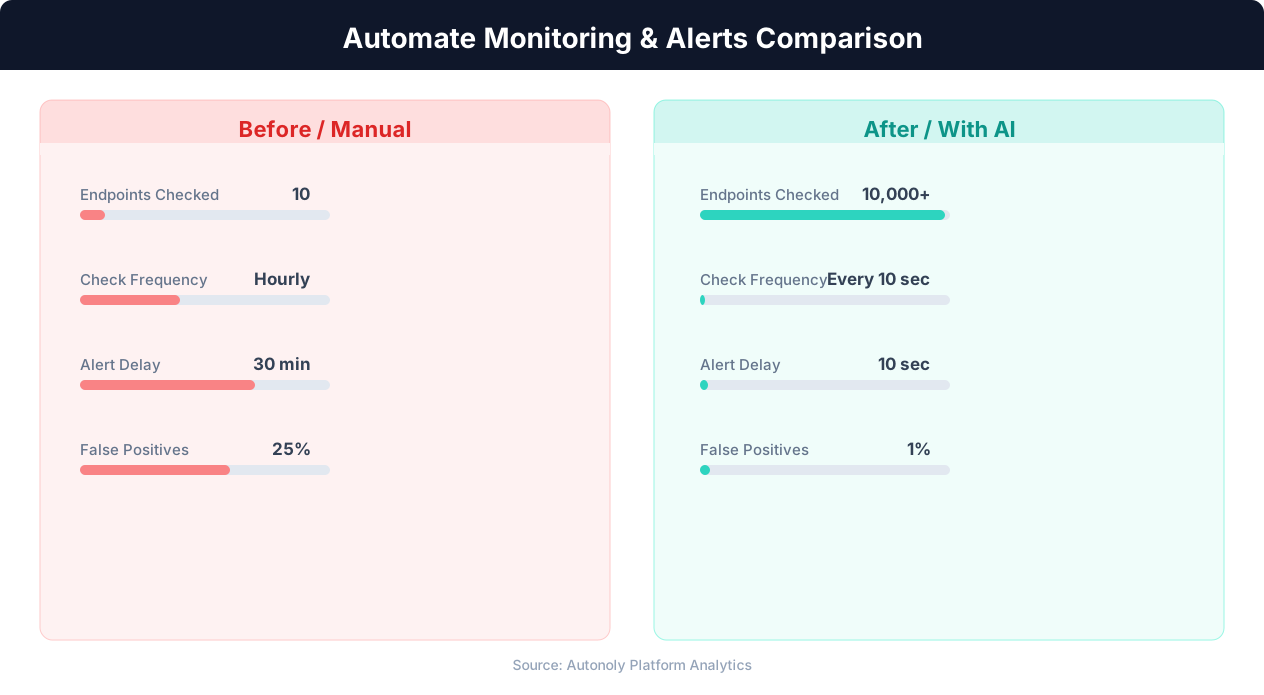
Mean time to detection for manual vs automated monitoring
Key Insight: 91% of enterprises report that automated monitoring has eliminated blind spots in their infrastructure that manual checks consistently missed (Splunk Observability Report).
Getting Started
Setting up competitor price monitoring takes just a few minutes. Open the AI Agent Chat, paste the URLs of the pricing pages you want to monitor, and describe the data you need. The agent builds the full workflow — browser navigation, data extraction, comparison logic, and Slack delivery — automatically. You can customize every aspect in the Visual Workflow Builder, from monitoring frequency to alert thresholds. Check the templates library for pre-built competitor monitoring workflows, and visit the pricing page to find the plan that fits your team's needs.
Further Reading
Explore more about the tools and techniques used in this workflow: Ecommerce Price Monitoring, Best Web Scraping Tools, Website Monitoring, Scheduled Execution.