


Why Automate Directory Scraping for Leads?
Online business directories are goldmines for sales prospecting, market research, and competitive analysis. Platforms like Yellow Pages, Yelp, Clutch, G2, industry-specific directories, and local chamber of commerce sites contain millions of business listings with contact details, descriptions, and often reviews. But manually browsing these directories to build prospect lists is incredibly slow — a task that Autonoly's Browser Automation handles in a fraction of the time.
Whether you are building a targeted prospect list for a specific industry vertical, mapping the competitive landscape in a geographic area, or collecting vendor information for procurement, automated directory scraping delivers structured, actionable data at scale.
How the AI Agent Scrapes Directories
Business directories come in every shape and size — from modern React-based platforms to legacy PHP sites with basic HTML tables. Autonoly's AI Agent Chat adapts to any directory because it uses a real browser and intelligent page interpretation rather than hardcoded selectors.
Tell the agent which directory to scrape and what type of businesses to find. It navigates to the site, enters search criteria, and uses Data Extraction to identify the repeating business listing pattern. The agent handles pagination, infinite scroll, and map-based directory interfaces seamlessly.
For richer data, the agent clicks into individual business pages to extract detailed profiles — full descriptions, specialties, employee counts, founding year, social media links, and customer reviews. This depth of information transforms a basic contact list into a qualified prospect database.
What Data You Get
A standard directory scrape export includes:
Company Name — Business name as listed in the directory
Address — Physical location, street address, city, state, zip
Phone Number — Primary business phone
Website — Company website URL
Category — Business type or industry classification
Rating — Average review rating (when available)
Review Count — Number of customer reviews
Description — Business description or tagline
Additional fields vary by directory — some include employee count, revenue range, founding year, certifications, or service areas.
Customizing Your Directory Scraping
The Visual Workflow Builder supports sophisticated directory scraping workflows:
Multi-directory aggregation: Scrape the same business type across Yelp, Yellow Pages, and industry directories, then deduplicate results
Geographic targeting: Scrape businesses in specific zip codes, cities, or states for localized prospecting
Quality filtering: Use Data Processing to filter results by minimum rating, review count, or other quality indicators
Enrichment chains: After scraping, enrich listings with LinkedIn company data or website technology stacks using additional extraction steps
Run Python scripts via SSH & Terminal to score and prioritize leads based on custom criteria — company size, online presence strength, or proximity to existing customers.
Scheduling and List Building
For sales teams running ongoing prospecting, schedule weekly directory scrapes to continuously discover new businesses. Directories add new listings regularly, and existing listings update their information. Regular scrapes ensure your prospect database stays current and complete.
Combine directory data with your CRM to identify which businesses in a market you have not yet contacted, focusing outreach on untapped opportunities.
Exporting and Integrating
Directory data exports to multiple destinations:
Excel (.xlsx) — Standard format for sales prospect lists and bulk CRM import
[Google Sheets integration](/integrations/google-sheets) — Collaborative prospecting with distributed sales teams
[Notion](/integrations/notion) — Build a territory database with linked company records
[Airtable](/integrations/airtable) — Create visual pipeline views for account management
Check our templates library for pre-built directory scraping workflows. Visit pricing for execution details. Explore the workflow automation glossary for foundational concepts. See all export destinations on the Integrations page.
Use Cases
Sales teams build prospect lists by scraping industry directories for businesses in their target vertical and geography. Marketing agencies prospect potential clients by scraping directories of businesses in categories they serve. Commercial real estate agents scrape business directories to identify growing companies that may need more space. Insurance brokers build lead lists of local businesses for commercial policy outreach. Service companies identify potential customers in their service area by scraping local business directories.
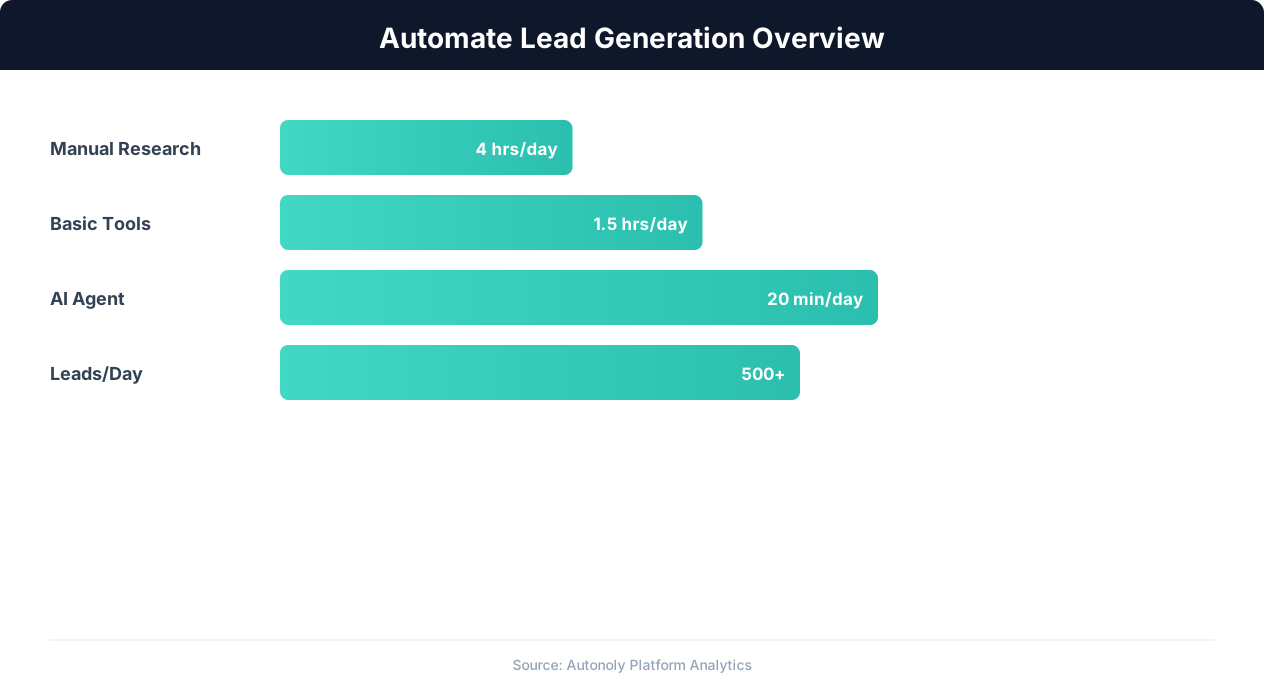
Lead generation automation funnel performance metrics
Key Insight: Automated multi-channel lead generation captures 3x more prospects by simultaneously monitoring LinkedIn, websites, directories, and industry databases (HubSpot Research).
How the AI Agent Handles This
The AI agent uses Browser Automation to visit any online directory — Yellow Pages, Yelp, Clutch, BBB, or niche industry sites — and intelligently extract business listings without requiring any site-specific configuration. Because it runs in a real browser, it handles JavaScript-rendered content, infinite scroll, map-based interfaces, and CAPTCHA challenges that defeat traditional scraping tools. The agent identifies the repeating pattern of business cards on each page and systematically extracts consistent fields across all results. When you chain multiple directories in the Visual Workflow Builder, the Data Processing engine automatically deduplicates records by matching company name and address across sources.
Adapting to Any Directory Layout
Unlike hardcoded scrapers that break when a site redesigns, the AI agent interprets page structure in real time. Whether the directory uses a card grid, a table layout, or a list view, the agent adapts and extracts the same structured fields consistently.
Key Insight: Automated lead generation produces 50% more sales-ready leads at 33% lower cost per lead compared to manual prospecting (Marketo Research).
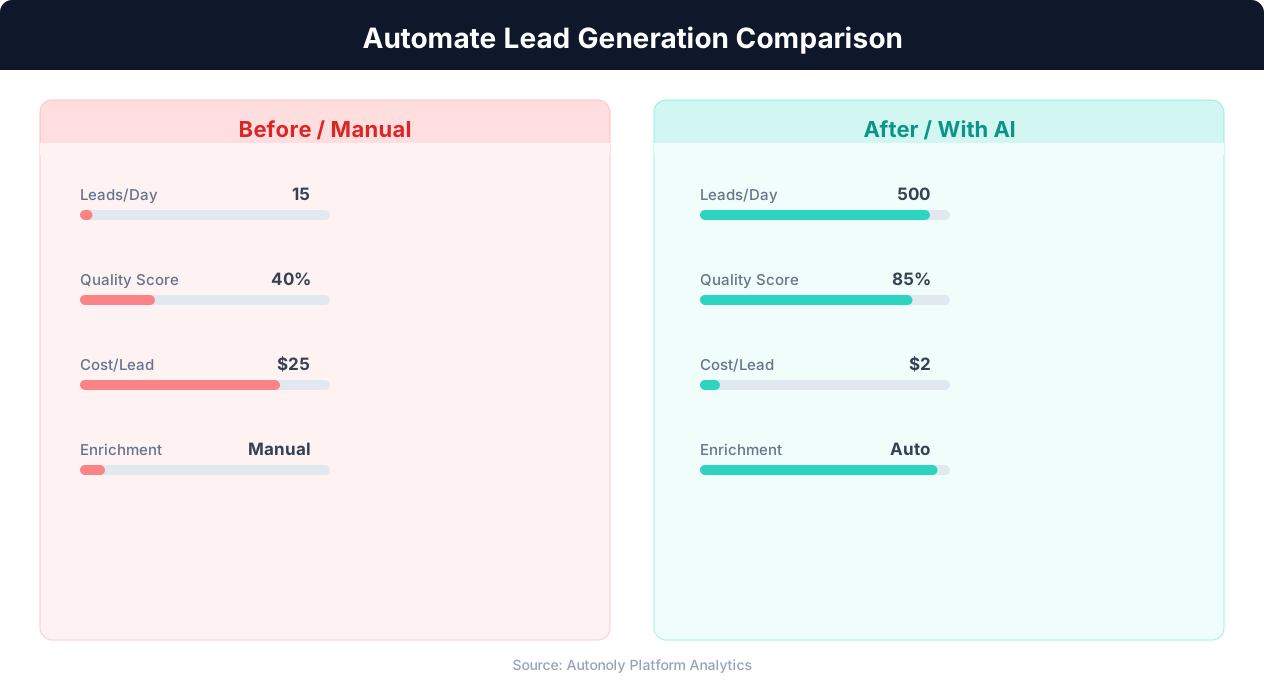
Cost per lead comparison between manual and automated methods
Key Insight: Lead response time drops from an average of 42 hours to under 5 minutes with automation, increasing contact rates by 900% (InsideSales.com).
Scheduling and Recurring Runs
Set up weekly or monthly scraping schedules through the Visual Workflow Builder to keep your prospect database current as new businesses open and existing listings update. Each run identifies new entries since the last execution, so your team always works with fresh data. Use Logic & Flow to automatically route high-quality leads — those above a rating threshold or in a priority category — to your CRM or outreach pipeline. Browse our templates for ready-made directory scraping workflows covering common verticals and geographies.
Further Reading
Explore more about the tools and techniques used in this workflow: Automate Lead Generation, Best Web Scraping Tools.