Overview: Two Tools, Two Different Problems
Browse.ai and Autonoly both help you extract data from websites without writing code. But they solve fundamentally different problems. Understanding the distinction before you invest time in either platform will save you from hitting walls later. For the bigger picture of what automation can do beyond data extraction, our workflow automation guide covers how scraping fits into end-to-end processes.
Browse.ai is a no-code web scraping and monitoring tool. You train a "robot" by pointing and clicking on the data you want from a webpage, and Browse.ai extracts that data on a schedule. It excels at structured data extraction, change detection, and recurring scraping jobs. Think of it as a focused, purpose-built scraping machine.
Autonoly is an AI-powered browser automation platform. You describe a task in plain English, and an AI agent executes it in a cloud browser. Autonoly can scrape data, but it can also fill forms, submit applications, process PDFs, manage spreadsheets, navigate multi-step workflows, and interact with any website the way a human would. Think of it as a general-purpose browser worker that can do anything you do in a browser.
The key difference is scope. Browse.ai answers the question: "How do I get data off this website?" Autonoly answers a broader question: "How do I automate the things I do in a browser?"
Key Distinction
Browse.ai is a scraping tool that reads data from websites. Autonoly is a browser automation platform that reads and writes — it can scrape data, but also fill forms, click buttons, upload files, navigate dashboards, and execute multi-step processes across multiple sites.
This comparison is designed to be genuinely balanced. Browse.ai is an excellent tool for its core use case. If all you need is structured web scraping and change monitoring, Browse.ai may be the better and more affordable choice. We will be explicit about where Browse.ai wins and where Autonoly offers capabilities that a pure scraping tool cannot match.
| Attribute | Browse.ai | Autonoly |
|---|---|---|
| Primary function | Web scraping and monitoring | Full browser automation |
| How you build | Point-and-click robot training | Describe task to AI agent |
| Execution | Cloud-based robots | Cloud-based AI agents |
| Can scrape data | Yes (core feature) | Yes (one of many features) |
| Can fill forms | No | Yes |
| Can process documents | No | Yes (PDFs, spreadsheets) |
| Free tier | Yes (generous) | Yes (limited runs) |
| SOC 2 compliant | Yes | In progress |
| Best for | Recurring data extraction | Complex browser workflows |
Both tools run in the cloud, which means neither requires your computer to be on. Both offer no-code interfaces. But the overlap ends at data extraction — everything beyond scraping is where the tools diverge dramatically. Let us dig into the specifics.
Architecture: Robot Training vs AI Agent
The architectural difference between Browse.ai and Autonoly shapes everything about how the tools work, what they can handle, and where they break down.
Browse.ai: The Trained Robot Model
Browse.ai uses a "robot training" approach. You navigate to a webpage, open the Browse.ai extension, and click on the data elements you want to extract — a product name, a price, a review count. Browse.ai records your selections and creates a "robot" that can revisit that page and extract the same data points on a schedule.
This model has real strengths:
- Precision: You explicitly tell the robot exactly which data to extract, so you get exactly what you asked for
- Repeatability: Once trained, the robot runs the same extraction reliably on a schedule
- Simplicity: The point-and-click training requires zero technical knowledge
- Speed: For simple pages, you can have a working scraper in under two minutes
- Bulk extraction: Browse.ai handles paginated lists well, extracting hundreds of rows from tables and search results
The limitations emerge when the task goes beyond "read data from this page":
- No write actions: Browse.ai robots cannot fill forms, click submit buttons, upload files, or interact with a page beyond reading it
- Single-page focus: Each robot is trained on a specific page structure. Multi-step workflows spanning multiple sites require multiple robots and manual orchestration
- Selector dependency: Robots rely on CSS selectors and page structure. When a website redesigns, the robot breaks and needs retraining
- No conditional logic: Robots follow a fixed extraction pattern — they cannot make decisions based on what they find
Autonoly: The AI Agent Model
Autonoly uses an AI agent that operates a full cloud browser. You describe what you want in natural language, and the agent navigates, clicks, types, extracts, and processes data — the same way you would. The agent sees the actual page through live browser control and uses reasoning to decide what to do next.
Strengths of this approach:
- General-purpose: The agent can do anything a human does in a browser — scrape, fill, click, navigate, download, upload
- Adaptive: When a website changes its layout, the AI agent reasons about the new UI instead of failing on broken selectors
- Multi-step workflows: A single agent handles workflows spanning multiple websites, login portals, and data destinations
- Conditional logic: The agent makes decisions based on what it finds — "if the price is above $50, add to watchlist; otherwise, skip"
- Document processing: Beyond the browser, Autonoly handles PDF extraction, spreadsheet manipulation, and data entry
The tradeoffs:
- Less predictable for simple tasks: An AI agent interpreting a page is inherently less deterministic than a fixed selector pointing at a specific element
- Higher cost for simple scraping: If all you need is to extract a table from a page, an AI agent is overkill — and more expensive per extraction
- Learning curve for complex workflows: While the natural language interface is simple, building sophisticated multi-step workflows with error handling takes more thought
What the Architecture Means for You
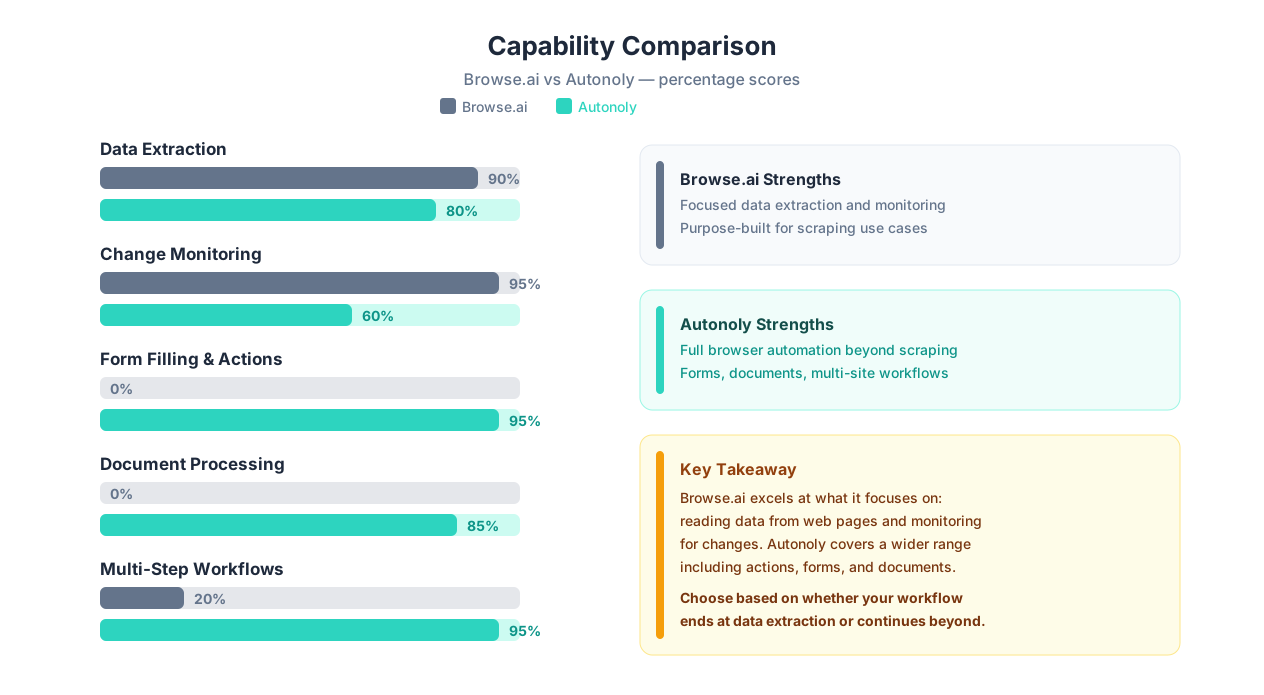
The choice comes down to one question: Do you only need to read data from websites, or do you also need to do things on websites?
| Scenario | Browse.ai | Autonoly |
|---|---|---|
| Extract a product list from one page | Perfect — train a robot in 2 min | Works, but overkill |
| Monitor a competitor's pricing daily | Excellent — built-in monitoring | Works, but Browse.ai is simpler |
| Scrape data AND fill it into a CRM | Cannot do the filling part | Handles the complete workflow |
| Navigate a login-protected portal | Limited authentication support | Full browser session with credentials |
| Process downloaded PDFs | Not supported | AI-powered document processing |
| Handle sites that change layout often | Robot breaks, needs retraining | AI adapts automatically |
Key Insight
Browse.ai's trained-robot model is not a weakness — it is a deliberate design choice that makes the tool faster, cheaper, and more predictable for its core use case. If structured data extraction is your primary need, the robot model is genuinely better than deploying an AI agent. The agent model wins when your workflow includes actions beyond reading data.
Feature-by-Feature: 16 Capabilities Compared
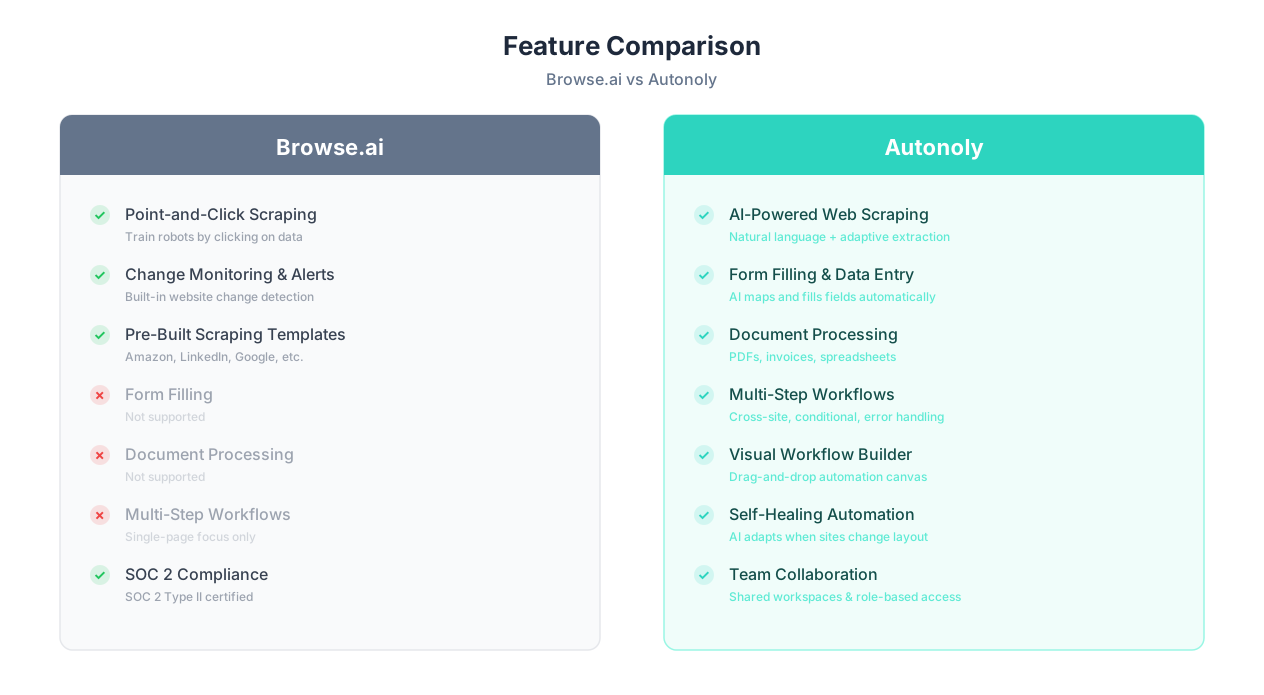
Beyond architecture, Browse.ai and Autonoly differ across specific features that matter for daily use. Here is a detailed comparison across 16 capabilities.
| Feature | Browse.ai | Autonoly | Winner |
|---|---|---|---|
| Point-and-click data extraction | Excellent — core feature | AI-guided extraction | Browse.ai |
| Bulk/list extraction | Strong — handles paginated lists | Supported via AI scraping | Browse.ai |
| Change monitoring | Built-in with alerts | Supported via scheduled workflows | Browse.ai |
| Scheduled execution | Yes — hourly, daily, weekly | Yes — full cron-based scheduling | Tie |
| Form filling | No | Yes — AI-powered form filling | Autonoly |
| Multi-step workflows | Limited (single-page focus) | Yes — multi-site, multi-step | Autonoly |
| PDF processing | No | Yes — AI PDF extraction | Autonoly |
| Data entry automation | No | Yes — spreadsheet and web forms | Autonoly |
| Self-healing (site changes) | Basic — may need retraining | LLM-based adaptive reasoning | Autonoly |
| Google Sheets integration | Yes — direct export | Yes — via Google Sheets node | Tie |
| API access | Yes — REST API for robots | Yes — full API | Tie |
| Pre-built templates | Many — Amazon, LinkedIn, etc. | Growing template library | Browse.ai |
| Team collaboration | Team plans available | Shared workspaces, role-based access | Autonoly |
| Authentication handling | Basic cookie-based | Full credential management | Autonoly |
| SOC 2 compliance | Yes — SOC 2 Type II | In progress | Browse.ai |
| Free tier generosity | Generous — free robots and credits | Limited free runs | Browse.ai |
Important Note
Feature counts can be misleading. Browse.ai has fewer features, but the features it has are deeply polished for data extraction. The point-and-click robot training, bulk list extraction, and change monitoring are refined through extensive iteration. Autonoly has more features but is a broader platform — its scraping capabilities serve a different design philosophy than Browse.ai's dedicated approach.
Where Browse.ai Genuinely Excels
Browse.ai has meaningful advantages that deserve recognition:
- Change detection and monitoring: Browse.ai's monitoring feature is purpose-built. Set up a robot, tell it to watch for changes, and get alerts when pricing, inventory, content, or any tracked element changes. This is Browse.ai's killer feature — and it works well out of the box.
- Pre-built scraping templates: Browse.ai offers pre-built robots for popular sites like Amazon product pages, Google search results, LinkedIn profiles, and more. You do not need to train these from scratch — just plug in a URL and go.
- Ease of use for non-technical users: The point-and-click training is one of the simplest scraping interfaces available. You literally click on what you want, name it, and the robot is built. No selectors, no code, no AI prompts to write.
- SOC 2 compliance: For enterprise teams with strict security requirements, Browse.ai's SOC 2 Type II certification provides documented security assurance that matters for procurement approvals.
- Generous free tier: Browse.ai's free plan includes enough credits for meaningful personal use. You can build and run multiple robots without paying anything, which makes it easy to evaluate before committing.
Where Autonoly Genuinely Excels
Autonoly's advantages emerge when the task goes beyond data extraction:
- Full browser automation: Autonoly does not just read websites — it interacts with them. Describe a task and the agent fills forms, submits applications, navigates dashboards, uploads documents, and processes results.
- AI adaptability: When websites change their layout, Autonoly's agents reason about the new structure instead of breaking on stale selectors. For scraping targets that change frequently, this eliminates the retraining cycle.
- Complex multi-site workflows: A single Autonoly workflow can span multiple websites — scrape data from site A, fill it into a form on site B, download a confirmation PDF, and log results in a spreadsheet. Browse.ai requires separate robots for each site with manual data passing between them.
- Document processing: PDF data extraction, invoice processing, and spreadsheet manipulation are built into the platform. Browse.ai cannot open, read, or process downloaded files.
- Workflow builder: Autonoly's visual workflow builder lets you chain actions with conditional logic, error handling, loops, and data transformations — capabilities that go far beyond what a scraping tool offers.
Use Case Comparison: 6 Real Scenarios
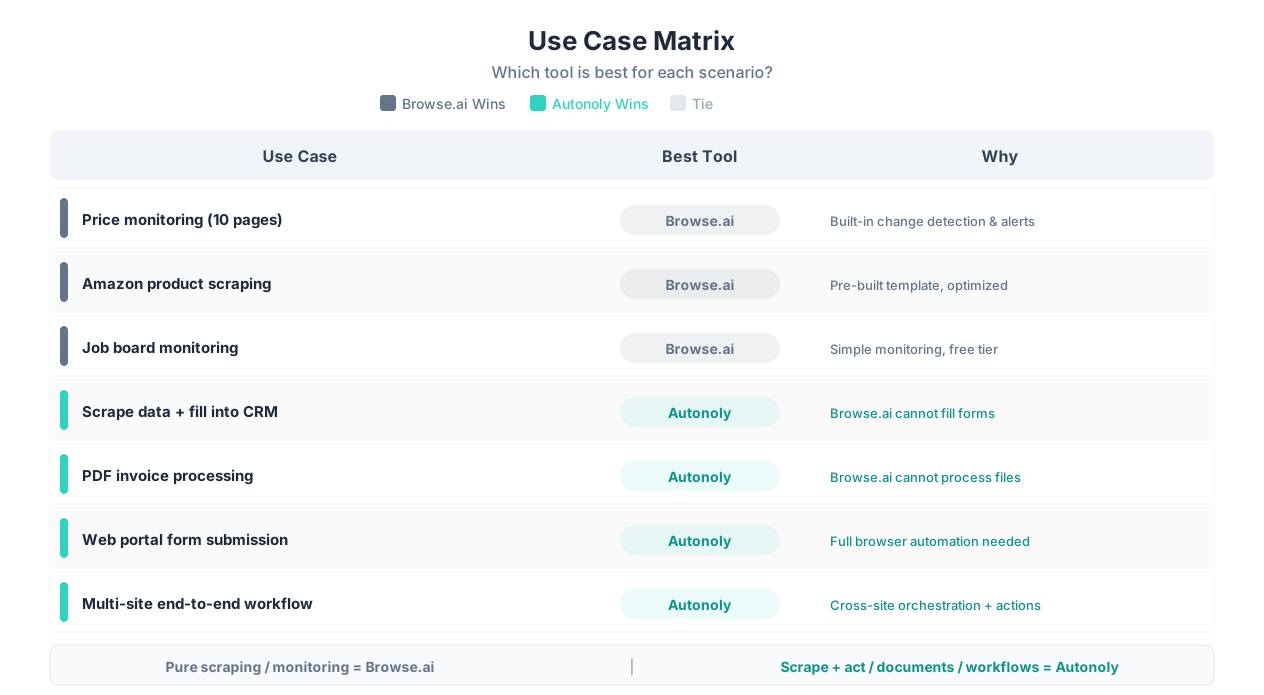
The best way to understand when to use each tool is to walk through real scenarios. Here are six common tasks and how each tool handles them.
Scenario 1: Monitor Competitor Pricing on 10 Product Pages
| Aspect | Browse.ai | Autonoly |
|---|---|---|
| Setup time | 15-20 minutes (train 10 robots) | 5-10 minutes (describe to agent) |
| Scheduling | Built-in — daily, weekly, custom | Full cron-based scheduling |
| Change alerts | Native — email and webhook alerts | Requires workflow configuration |
| When a page redesigns | Robot breaks, needs retraining | AI adapts automatically |
| Verdict | Browse.ai wins — change monitoring is its core strength, and the built-in alert system is more polished | |
Browse.ai wins this scenario. Price monitoring and change detection are exactly what Browse.ai was built for. The dedicated monitoring features, alert system, and simple robot training make this faster and more reliable than configuring an equivalent workflow in Autonoly.
Scenario 2: Scrape Product Data From Amazon and Load Into Google Sheets
| Aspect | Browse.ai | Autonoly |
|---|---|---|
| Setup time | 5 minutes (pre-built Amazon robot) | 5 minutes (describe to agent) |
| Pagination | Handles multi-page results | Handles multi-page results |
| Google Sheets export | Native integration | Native Google Sheets integration |
| Anti-bot handling | Built-in proxy rotation | Cloud browser with realistic behavior |
| Verdict | Browse.ai wins — pre-built Amazon robot is faster to set up and optimized for this exact task | |
Browse.ai wins this scenario. When you need straightforward data extraction from a well-known site with a pre-built template, Browse.ai's specialized approach is faster and simpler. See also our guide on scraping websites to Google Sheets.
Scenario 3: Scrape Real Estate Listings, Then Auto-Fill Inquiry Forms
| Aspect | Browse.ai | Autonoly |
|---|---|---|
| Scraping listings | Can extract listing data | Can extract listing data |
| Filling inquiry forms | Cannot do this | AI fills forms with scraped data |
| End-to-end automation | Scraping only — manual form filling | Complete workflow in one agent session |
| Verdict | Autonoly wins — Browse.ai literally cannot fill forms, so the workflow stops at extraction | |
Autonoly wins this scenario. The moment your workflow requires any write action — filling a form, clicking a submit button, typing into a field — Browse.ai cannot help. Autonoly handles the complete scrape-then-act pipeline.
Scenario 4: Extract Data From 50 PDF Invoices and Organize in a Spreadsheet
| Aspect | Browse.ai | Autonoly |
|---|---|---|
| PDF processing | Not supported | Full AI-powered PDF extraction |
| Structured output | N/A | Extracted data mapped to spreadsheet columns |
| Batch processing | N/A | Processes multiple PDFs in sequence |
| Verdict | Autonoly wins — Browse.ai does not process documents, only web pages | |
Autonoly wins decisively. Browse.ai scrapes web pages. It does not open files, parse PDFs, or process documents. If your workflow involves document processing, Browse.ai is not the right tool.
Scenario 5: Submit Weekly Government Compliance Reports via a Web Portal
| Aspect | Browse.ai | Autonoly |
|---|---|---|
| Login to portal | Limited authentication | Full credential management |
| Navigate multi-page form | Cannot interact with forms | AI navigates and fills each page |
| Upload attachments | Not supported | Handles file uploads |
| Confirm submission | Not supported | Verifies submission and captures confirmation |
| Verdict | Autonoly wins — this is browser automation, not web scraping | |
Autonoly wins this scenario. Submitting forms, navigating portals, uploading documents, and confirming submissions are browser automation tasks. Browse.ai is a scraping tool — it reads pages, it does not interact with them.
Scenario 6: Track Job Postings Across 5 Career Sites
| Aspect | Browse.ai | Autonoly |
|---|---|---|
| Setup | Train 5 robots, one per site | Describe monitoring task to agent |
| New listing alerts | Built-in change detection | Scheduled comparison workflow |
| Data output | Spreadsheet or API | Spreadsheet, API, or any destination |
| Cost | Likely within free tier | Requires paid plan for 5 scheduled runs |
| Verdict | Browse.ai wins — simple monitoring use case, likely free, with better built-in alerts | |
Browse.ai wins this scenario. Simple, recurring scraping jobs with change detection are Browse.ai's sweet spot. The free tier likely covers this use case entirely, and the alert system is more mature than configuring equivalent monitoring in Autonoly.
Key Insight
The pattern is clear: Browse.ai wins every pure scraping and monitoring scenario. Autonoly wins every scenario that involves acting on the data — filling forms, processing documents, navigating portals, or executing multi-step workflows. The tools are not competitors for the same job; they solve different problems.
The Deciding Question
Before choosing a tool, ask yourself: "After I get the data, does my workflow end — or does something else need to happen?"
- If the workflow ends at data extraction: Browse.ai is likely the better, simpler, cheaper choice.
- If you need to do something with the data — fill forms, update systems, process documents, trigger actions: Autonoly handles the complete pipeline.
Pricing: What You Actually Pay
Browse.ai and Autonoly have different pricing models that reflect their different scopes. Here is what you actually pay at different usage levels.
| Plan | Browse.ai | Autonoly |
|---|---|---|
| Free | Free — 5 robots, 50 credits/month | Free — limited agent runs |
| Starter | $19/month — 10 robots, 200 credits | $29/month — 500 runs, AI agent chat |
| Professional | $99/month — 50 robots, 2,000 credits | $79/month — 2,000 runs, team features |
| Company | $249/month — unlimited robots, 10,000 credits | $199/month — unlimited runs, priority support |
Pricing Context
Browse.ai's pricing is optimized for scraping volume — credits are consumed per page scraped. Autonoly's pricing reflects broader automation capability — runs include the full range of browser actions, document processing, and multi-step workflows. Comparing sticker prices directly is misleading because the tools deliver different value.
Cost Per Use Case
A more meaningful comparison looks at what you pay for specific outcomes:
| Use Case | Browse.ai Monthly Cost | Autonoly Monthly Cost | Better Value |
|---|---|---|---|
| Monitor 10 pages daily | $19 (Starter) | $29 (Starter) | Browse.ai |
| Scrape 500 product listings/month | $19 (Starter) | $29 (Starter) | Browse.ai |
| Scrape + fill CRM forms (20/week) | Cannot do this | $79 (Pro) | Autonoly (only option) |
| PDF invoice processing (100/week) | Cannot do this | $79 (Pro) | Autonoly (only option) |
| Full workflow automation (team of 5) | $99+ (scraping only) | $199 (complete solution) | Autonoly |
The Hidden Cost: Workflow Gaps
Browse.ai's lower price makes sense if scraping is all you need. But many teams discover that scraping is only the first step of their workflow. If you use Browse.ai for scraping and then manually fill forms, copy data between systems, or process documents by hand, the total cost includes your time.
Example: A team scrapes competitor pricing with Browse.ai ($19/month) but spends 10 hours per month manually entering that data into their internal system. At $30/hour, the true cost is $319/month — well above Autonoly's $79/month for a workflow that does both automatically.
For scraping-only use cases, Browse.ai's pricing is genuinely competitive and often cheaper. For end-to-end workflows, Autonoly's higher sticker price delivers better total cost of ownership. Check our pricing page for the latest details.
When to Choose Browse.ai
Browse.ai is the right choice when your needs align with its focused strengths. Here are the specific scenarios where Browse.ai wins:
1. Your Primary Need Is Recurring Data Extraction
If you need to scrape the same pages on a schedule — daily pricing, weekly inventory counts, hourly job listings — Browse.ai's robot-training model is purpose-built for this. Train a robot once, set a schedule, and get clean data delivered to your spreadsheet or API endpoint. No AI prompts, no workflow configuration, no complexity you do not need.
2. You Want Change Monitoring With Alerts
Browse.ai's change detection is its standout feature. Monitor a competitor's pricing page, a government regulation page, a job board, or any webpage — and get an email or webhook alert the moment something changes. This is not a bolted-on feature; it is core to Browse.ai's design and works reliably.
3. Budget Is Tight and Needs Are Simple
Browse.ai's free tier is generous enough for real work. If you need 3-5 scraping robots running on a schedule, you may not need to pay anything. Even the paid plans start at $19/month, making Browse.ai one of the most affordable scraping tools available.
4. You Need SOC 2 Compliance for Procurement
Enterprise procurement teams often require SOC 2 certification. Browse.ai has SOC 2 Type II compliance, which can be a deal-breaker for corporate adoption. If your security team requires this certification, Browse.ai has it today.
5. You Are a Non-Technical User Who Wants Simple Scraping
Browse.ai's point-and-click training is one of the simplest scraping interfaces available. You do not need to write prompts, understand selectors, or think about workflows. Click on the data, name your fields, and the robot is built. For business users who find even "describe what you want in English" too ambiguous, Browse.ai's explicit, visual approach is more comfortable.
Key Insight
Browse.ai is ideal for the "data extraction power user" who needs clean, structured data from websites on a schedule. It does one thing — scraping and monitoring — and does it very well. If that one thing is all you need, paying for a broader platform is wasting money.
Browse.ai's Ideal User Profile
- Market researchers monitoring competitor data
- E-commerce teams tracking pricing and inventory
- Recruiting teams scraping job boards
- Analysts who need structured web data in spreadsheets
- Anyone whose workflow ends at "get the data"
- Teams with SOC 2 compliance requirements
- Budget-conscious users who need simple, reliable scraping
When to Choose Autonoly
Autonoly is the right choice when your workflow extends beyond data extraction. Here are the specific scenarios where Autonoly wins:
1. Your Workflow Includes Actions, Not Just Data Reading
The moment your task involves filling a form, submitting an application, clicking buttons in a dashboard, uploading files, or navigating a multi-step process, you need browser automation — not just scraping. Autonoly's AI agent handles the complete read-write lifecycle that Browse.ai cannot touch.
2. You Need Multi-Site, Multi-Step Workflows
Workflows that span multiple websites — scrape data from site A, log into site B, fill a form with the data, download a confirmation from site C — require a platform that can orchestrate actions across sites. Browse.ai's robots are trained on individual pages. Autonoly's agents navigate freely across any site within a single workflow using the visual workflow builder.
3. Your Scraping Targets Change Their Layout Frequently
If you are tired of retraining Browse.ai robots every time a target website updates its design, Autonoly's AI-driven approach eliminates that maintenance cycle. The agent sees the page visually and reasons about where the data is, rather than relying on CSS selectors that break when HTML changes.
4. You Need Document Processing
Browse.ai scrapes web pages. If your workflow involves PDF data extraction, spreadsheet automation, email processing, or file management, you need a platform that handles documents — not just web pages. Autonoly processes documents as part of integrated workflows.
5. You Want End-to-End Automation, Not Just Data Pipes
Browse.ai gets data from websites into spreadsheets or APIs. That is valuable but limited. If you want to automate complete business processes — scraping competitor intelligence and auto-populating your CRM, extracting leads and sending personalized outreach, monitoring inventory and auto-reordering — you need a platform that does the full loop. Browse.ai is a data pipe; Autonoly is a workflow engine.
Important Note
You do not have to choose exclusively. Some teams use Browse.ai for simple monitoring robots and Autonoly for complex multi-step workflows. If most of your needs are scraping with a few workflows that require browser actions, using both tools can be more cost-effective than using one tool for everything.
6. You Need Team Collaboration and Governance
Shared workspaces, role-based access, audit logs, and centralized automation management matter when multiple people create and maintain workflows. Browse.ai offers team plans, but Autonoly's collaboration features are designed for operational teams that need accountability and shared ownership of automation workflows.
Autonoly's Ideal User Profile
- Operations teams automating end-to-end business processes
- Agencies managing multiple client workflows
- Teams that need to scrape AND act on the data (forms, CRM, portals)
- Document processing workflows (PDFs, invoices, reports)
- Complex multi-site workflows with conditional logic
- Teams tired of retraining broken scrapers after site redesigns
- Anyone whose workflow does not end at "get the data"
Migration Path: Growing Beyond Pure Scraping
Many teams start with Browse.ai for simple scraping and eventually realize they need more. Common triggers for exploring Autonoly:
- Spending hours manually entering scraped data into forms, CRMs, or portals
- Retraining Browse.ai robots monthly because target sites keep changing
- Needing to process downloaded documents (PDFs, spreadsheets) alongside web data
- Building increasingly complex orchestration between multiple Browse.ai robots and manual steps
- Wanting a single workflow that scrapes, processes, and acts — without human handoffs
If you are hitting these limits, Autonoly does not require you to abandon your scraping approach — you can describe the same extraction tasks to the AI agent and add the action steps that Browse.ai cannot handle. For more on scraping tools and techniques, see our guide to the best web scraping tools or learn how to automate tasks without an API.
Frequently Asked Questions
Can Browse.ai fill out forms or interact with web pages?
No. Browse.ai reads data from web pages but cannot fill forms, click submit buttons, upload files, or interact with pages beyond reading them. For write actions, you need a browser automation tool like Autonoly.
Is Browse.ai better for simple scraping than Autonoly?
Yes, for many simple use cases. Browse.ai's point-and-click training, pre-built templates, and built-in change monitoring make it faster and simpler for straightforward data extraction — and often more affordable.
Can I use Browse.ai and Autonoly together?
Yes. Some teams use Browse.ai for simple scraping and change monitoring, and Autonoly for complex workflows involving actions beyond extraction. The tools complement each other well.
Does Browse.ai handle JavaScript-heavy websites?
Browse.ai renders pages in a browser environment and handles most JavaScript-rendered content. Highly dynamic SPAs may require advanced configuration. Autonoly's AI agent interacts with pages like a human, handling more complex dynamic content.
Which tool is better for monitoring website changes?
Browse.ai wins. Its built-in monitoring, email and webhook alerts, and change tracking are purpose-built for this use case. Autonoly can monitor changes through scheduled workflows but requires more configuration.
Can Autonoly do everything Browse.ai does?
Autonoly can extract web data but approaches scraping differently. Browse.ai's point-and-click training is optimized for deterministic extraction. Autonoly's AI agents are more flexible but less specialized for pure scraping.
What happens if a website changes its layout?
Browse.ai robots may break and need retraining when a site redesigns. Autonoly's AI agent reasons about the visual layout and often adapts to changes without manual intervention.
Which tool has better anti-bot detection handling?
Both use cloud browsers with anti-detection measures. Browse.ai includes proxy rotation and fingerprint management. Autonoly uses realistic browsing patterns. For heavily protected sites, see our guide on handling anti-bot detection.