

Why Automate PDF Report Generation?
Every organization produces reports — weekly sales summaries, monthly performance dashboards, quarterly board decks, and client deliverables. The data usually lives in spreadsheets, but stakeholders expect polished PDFs they can read, share, and archive — increasingly in the PDF/A archival format that the International Organization for Standardization defines for long-term document preservation. Manually formatting a spreadsheet into a presentable report takes 1-3 hours each time: selecting the right data, building tables, creating charts, writing summary paragraphs, adding headers and page numbers, and exporting the final document. And the result is often inconsistent between reporting periods because different people format things differently, or the same person makes different layout choices each time under time pressure. The inconsistency itself becomes a problem — when the format changes every week, readers spend cognitive energy re-orienting instead of absorbing the data.
The repetition is what makes manual reporting so costly. A weekly report that takes 90 minutes to produce costs your organization 78 hours per year — nearly two full work weeks — of skilled labor spent on formatting instead of analysis. For teams that produce multiple reports (a sales summary, a marketing dashboard, a financial overview, and a client deliverable), the annual time investment can exceed 300 hours. That is time your analysts and managers could spend identifying trends, developing strategy, and making decisions that actually move the business forward. The irony is stark: the people best qualified to interpret data are spending their time formatting it instead.
Beyond time, manual reports introduce quality risks. A chart built from the wrong data range, a formula error in a growth percentage, or a narrative that contradicts the numbers — these mistakes erode stakeholder trust. When the CEO spots an error in the board deck, every number in every future report gets questioned. The credibility damage from one wrong chart can take months to recover. Automation eliminates these risks by applying the same validated logic every time, producing reports that are not just faster but more reliable. The 100th report is generated with the same precision as the first, because the template never gets tired, distracted, or rushed.
Automated report generation with Autonoly creates identical, professional PDFs every time. The AI agent reads your Google Sheets data, applies your formatting preferences, generates charts, writes narrative summaries, and outputs a publication-ready PDF — all without human intervention. The first report takes time to configure; every subsequent report generates itself. Your team transitions from report producers to report consumers, spending their time acting on insights rather than assembling them.
How the AI Agent Builds Reports
Autonoly's AI Agent Chat connects to your Google Sheet and reads the data range you specify. The agent understands tabular data and can:
Build tables: Format raw data into clean, bordered tables with headers, alternating row colors, and proper alignment for numbers and text
Generate charts: Create bar charts, line graphs, pie charts, and trend visualizations from your numeric data
Write narratives: Produce executive summary paragraphs that interpret the numbers — "Revenue grew 15% month-over-month, driven primarily by enterprise segment expansion"
Apply branding: Include your company logo, brand colors, headers, footers, and page numbers
Calculate derived metrics: Compute percentages, growth rates, averages, and rankings from raw data
Add comparisons: Automatically include period-over-period comparison tables and variance callouts
The Data Processing engine pre-processes the raw data before report generation. It calculates derived metrics, handles missing values gracefully (substituting "N/A" or zero based on your preference), and sorts data according to your specifications. The agent also handles edge cases like division by zero in growth calculations, missing comparison periods for new metrics, and data series that start mid-period. The preprocessing layer ensures the report always contains valid, meaningful numbers even when the source data is imperfect.
Report Templates and Customization
Define your report structure once and reuse it every period. The Visual Workflow Builder lets you design report templates with:
Cover page: Report title, date range, prepared-by attribution, and company logo
Executive summary: AI-written narrative highlighting key takeaways from the data
Data sections: Tables and charts for each metric category — financial, operational, marketing
Trend analysis: Multi-period comparison charts showing trajectory and momentum
Appendix: Detailed data tables for readers who want the raw numbers
Each section is configurable. Choose which columns to include, how to sort them, whether to show totals or averages, and what chart type best represents the data. The agent remembers your preferences and applies them consistently every time the report runs. Browse the templates library for pre-built report templates for common use cases like SaaS metrics, e-commerce performance, and project status reports. Each template is a starting point you can customize to match your exact requirements.
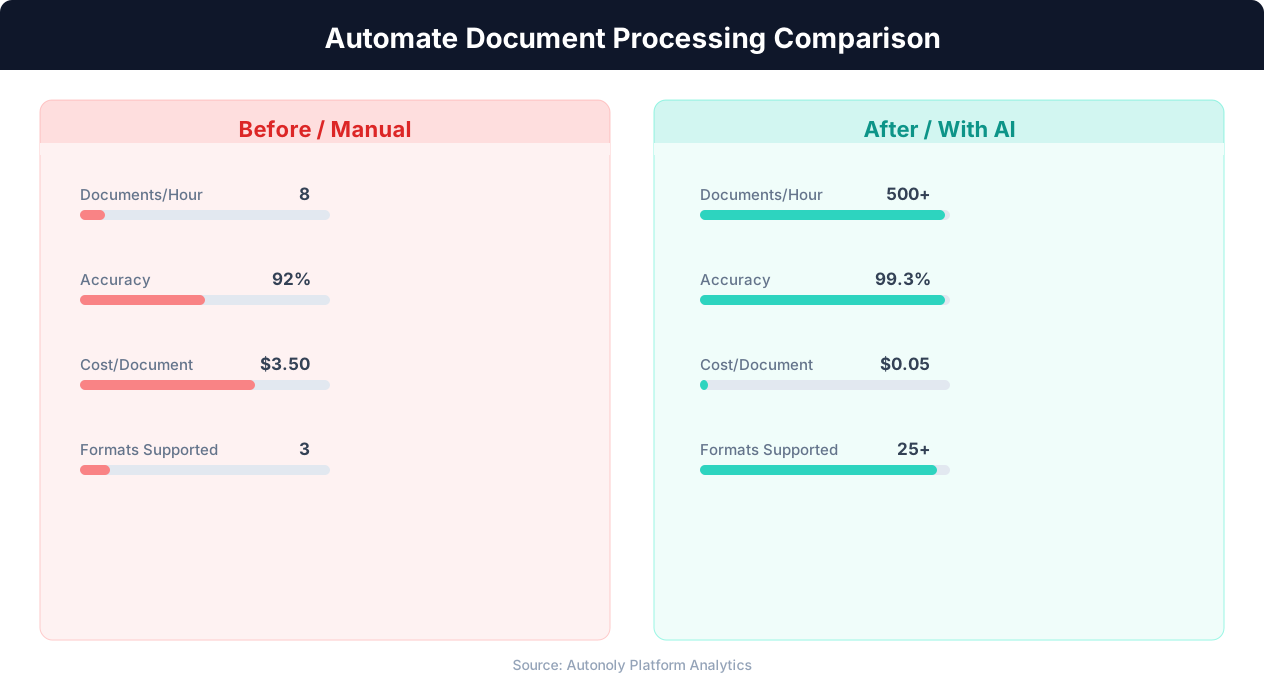
Accuracy comparison between manual and AI document processing
Key Insight: AI-powered document extraction achieves 96% accuracy on structured documents — surpassing the 88% accuracy of manual data entry (AIIM Research).
For recurring reports, the agent automatically updates the date range, pulls fresh data, and recalculates all derived metrics. The report structure stays the same while the content reflects the current period. Add Logic & Flow to conditionally include sections: show the "Alerts" section only when metrics exceed warning thresholds, or include a "Top Performers" table only when there is data to highlight. This conditional logic ensures reports stay relevant and focused rather than bloated with empty sections.
Multi-Source Reports
Pull data from multiple Google Sheets tabs or even separate spreadsheets into a single report. Combine sales data, marketing metrics, and financial summaries into one unified document. The agent handles the data aggregation and presents each source in its designated section. Add Browser Automation steps to scrape additional data — like competitor pricing or market benchmarks — and include it in the report alongside your internal metrics. Use Data Extraction to pull data from PDFs, emails, or web pages that feed into your report.
Use Cases
Weekly team performance: Compile KPIs from your operations spreadsheet into a Monday morning report that shows what happened last week and what needs attention this week. Deliver to team leads via Gmail. Include traffic-light status indicators so readers can assess health at a glance.
Monthly client deliverables: Generate branded performance reports for each client from their dedicated data sheet. Each client gets a personalized PDF with their metrics, trends, and recommendations. Automate delivery via email with a customized cover message referencing their specific results.
Quarterly board decks: Aggregate financial, product, and growth metrics into a comprehensive quarterly report with executive summaries, charts, and detailed appendices. The consistent format builds board confidence in your reporting infrastructure.
Ad-hoc analysis snapshots: Trigger the workflow manually from the Autonoly dashboard whenever you need a snapshot report — the agent generates the PDF in under a minute for most datasets. Use SSH & Terminal to query live databases for real-time data inclusion.
Delivery and Distribution
The generated PDF can be delivered multiple ways:
Google Drive: Saved to a specified folder with a timestamped filename for archiving
Email: Sent as an attachment via Gmail to your distribution list with a personalized cover message
Slack: Posted to a channel via Slack integration for instant team visibility
Multiple destinations: Deliver the same report to Drive for archiving AND email for distribution simultaneously
Use SSH & Terminal to push reports to external servers or internal file shares if your organization requires it.
Scheduling and Cadence
The workflow runs weekly by default — ideal for performance reports and team updates. Configure it for daily, monthly, or quarterly cadence depending on your reporting needs using cron-style scheduling. Each run generates a fresh PDF from the latest data and archives the previous version in Google Drive. Over time, you build a complete library of timestamped reports accessible for historical comparison and trend analysis. The archive becomes a powerful resource for year-over-year comparisons and long-range strategic planning.
The agent uses differential awareness — it compares current data to prior periods automatically, so narrative summaries always reference the correct comparison baseline. A notification chain confirms successful generation via Slack and flags any data issues (missing values, stale source data) that might affect report quality. If the source data has not been updated since the last report, the agent can delay generation and retry, or produce the report with a prominent staleness warning so recipients know the data may not reflect the current period. See pricing for report generation frequency and storage limits per plan.
Further Reading
Explore more about the tools and techniques used in this workflow: Automate Email Reports, Ai Workflow Automation, Pdf Ocr.