


Why Automate LinkedIn Lead Extraction?
LinkedIn is the world's largest professional network with over 900 million members, making it the single most valuable source for B2B lead generation. Sales teams, recruiters, and business development professionals spend hours every day manually searching LinkedIn, viewing profiles, and copying contact information into spreadsheets or CRMs. This manual process is not only tedious but severely limits the volume of prospects you can research.
Autonoly's Browser Automation transforms LinkedIn prospecting from a manual grind into a scalable, repeatable process. Define your ideal customer profile once, and the AI agent builds a qualified lead list in minutes instead of days.
How the AI Agent Extracts LinkedIn Leads
LinkedIn is one of the most technically challenging platforms to automate because of its sophisticated bot detection, rate limiting, and dynamic content loading. Autonoly's AI Agent Chat overcomes these challenges by using a real browser session with human-like navigation patterns — natural scrolling speeds, realistic click timings, and organic page transitions.
The agent navigates to LinkedIn's search interface, applies your targeting criteria (job title, industry, location, company size, keywords), and begins extracting data from search results. The Data Extraction engine identifies each profile card in the results and pulls consistent fields from every listing.
For deeper prospect data, the agent can visit individual profiles to extract additional information like current company details, education background, skills, mutual connections, and recent activity. This multi-level extraction produces rich prospect profiles that go far beyond basic search result data.
The agent respects LinkedIn's usage patterns and includes built-in pacing to navigate responsibly. It works within the context of your authenticated LinkedIn session, seeing exactly the same results you would see when searching manually.
What Data You Get
A standard LinkedIn lead export includes:
Full Name — First and last name
Job Title — Current professional title
Company — Current employer
Location — City, state, or country
Industry — Professional industry category
Profile URL — Direct LinkedIn profile link
Connection Degree — 1st, 2nd, or 3rd connection
Headline — Professional headline from their profile
Additional fields like company size, education, years of experience, and mutual connections are available when extracting from individual profile pages.
Customizing Your Lead Extraction
The Visual Workflow Builder lets you build sophisticated prospecting pipelines:
Multi-criteria targeting: Search by job title AND company size AND industry for highly qualified leads
Account-based prospecting: Extract all decision-makers from a specific list of target companies
Competitor analysis: Find employees at competitor organizations by role and seniority
Talent mapping: Identify professionals with specific skills or backgrounds in target geographies
Add Data Processing steps to score leads based on criteria like seniority level, company size, or industry fit. Use SSH & Terminal to run enrichment scripts that append email addresses, phone numbers, or company revenue data from third-party sources.
Scheduling and Pipeline Building
B2B sales is a numbers game — the more qualified prospects you can identify and reach, the more pipeline you build. Schedule weekly lead extraction workflows to continuously feed your sales pipeline with fresh prospects. Each run targets a different segment or refreshes existing searches to catch new profiles matching your criteria.
Combine automated extraction with outreach workflows for a complete prospecting pipeline. Extract leads, qualify them with scoring rules, and route the hottest prospects directly to your outreach tool or CRM.
Exporting and Integrating
Lead data flows to wherever your sales team works:
[Google Sheets integration](/integrations/google-sheets) — The most popular destination for lightweight CRM and outreach tracking
Excel (.xlsx) — Download for offline analysis or CRM bulk import
[Notion](/integrations/notion) — Build a collaborative prospect database
[Airtable](/integrations/airtable) — Create a visual sales pipeline with kanban views
Browse our templates library for pre-built LinkedIn prospecting workflows. Visit pricing for execution details. For background on automation in sales, see our workflow automation glossary. The Integrations page covers all available CRM and output destinations.
Use Cases
SDRs use automated LinkedIn extraction to build targeted outreach lists 10x faster than manual prospecting. Account executives research buying committees at target accounts by extracting all relevant decision-makers. Recruiters build candidate pipelines for hard-to-fill roles. Marketing teams build audience lists for ABM campaigns. Founders research potential investors, advisors, and partners. All of these workflows start with getting structured LinkedIn data into a spreadsheet — and Autonoly makes that effortless.
For advanced users, combine LinkedIn leads with data from other Autonoly automations. Enrich leads with Crunchbase funding data, cross-reference with company website scraping, or validate email addresses using third-party APIs through Data Processing workflows.
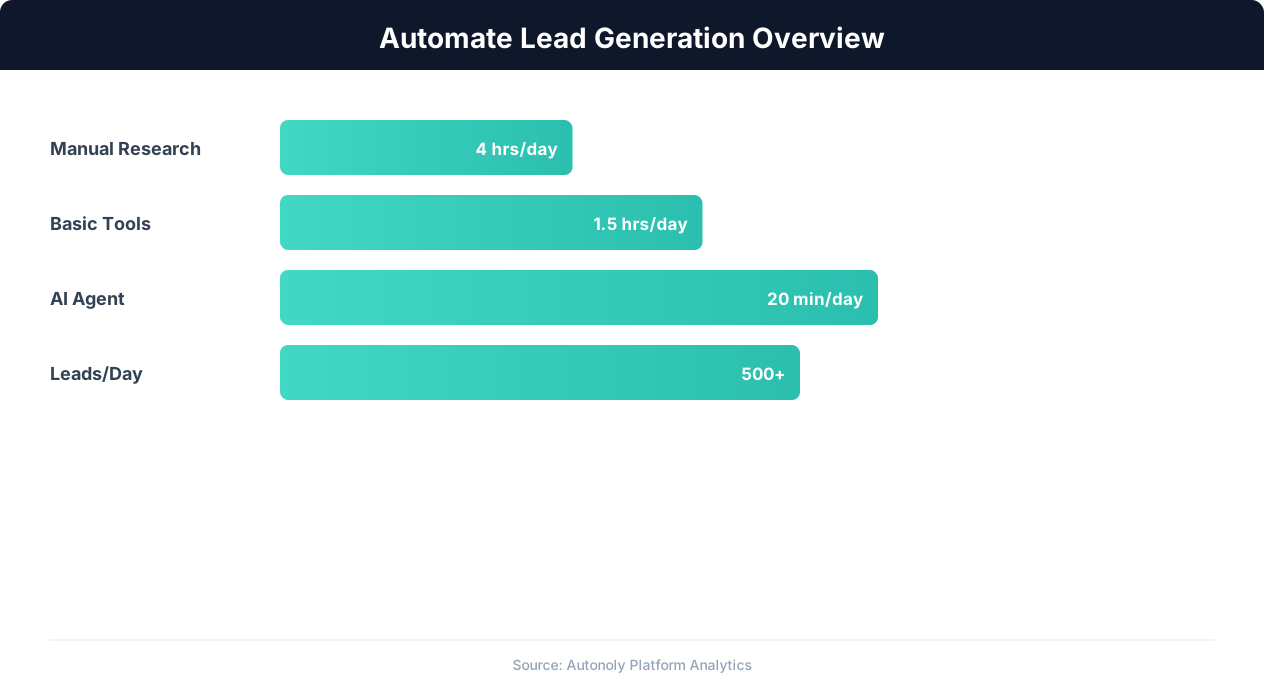
Lead generation automation funnel performance metrics
Key Insight: Automated lead generation produces 50% more sales-ready leads at 33% lower cost per lead compared to manual prospecting (Marketo Research).
How the AI Agent Handles This
Autonoly's AI agent operates in a real browser environment, which means it interacts with LinkedIn exactly the way you would — typing in search bars, clicking filters, scrolling through results, and visiting profiles. Unlike API-based tools that break when platforms change their endpoints, the Browser Automation approach adapts to interface changes automatically. The agent uses the Visual Workflow Builder to chain extraction steps with data cleaning, deduplication, and export — all without writing a single line of code.
Handling Anti-Bot Measures
The agent navigates with human-like timing and avoids patterns that trigger detection. It uses your authenticated session so LinkedIn sees normal account activity rather than suspicious automated requests.
Key Insight: Companies using automated lead scoring see a 77% increase in lead conversion rates by focusing sales effort on the highest-potential prospects (Aberdeen Group).
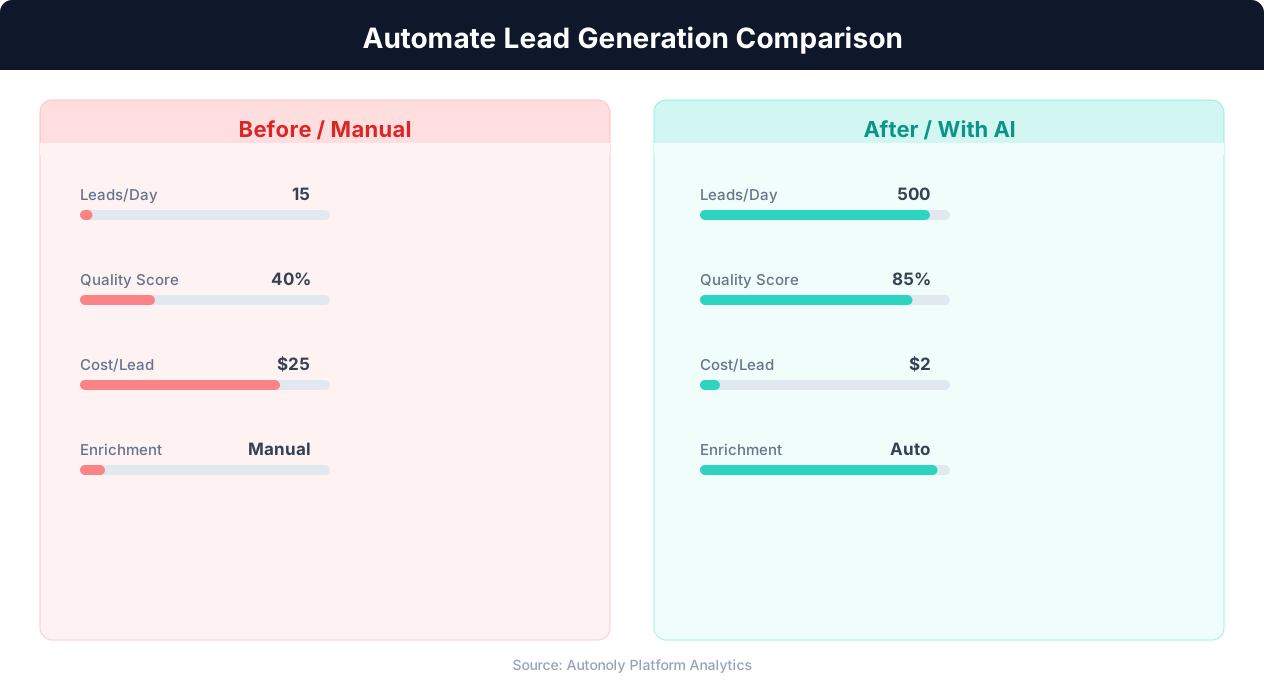
Cost per lead comparison between manual and automated methods
Key Insight: Automated multi-channel lead generation captures 3x more prospects by simultaneously monitoring LinkedIn, websites, directories, and industry databases (HubSpot Research).
What You Can Customize
Every aspect of the extraction pipeline is configurable through the Visual Workflow Builder. Define multiple search queries to run sequentially, set up Logic & Flow conditions to skip profiles that do not match secondary criteria, and add Data Processing steps to enrich or filter results before export. You control which fields to extract, how many pages to process, and where the final data lands — Google Sheets, Excel, Notion, or Airtable. Check our templates library for pre-configured LinkedIn prospecting workflows you can deploy in minutes.
Further Reading
Explore more about the tools and techniques used in this workflow: Scrape Linkedin Data, Automate Lead Generation, Linkedin Automation.