
The Government Portal Problem: Why This Is the Hardest Automation Challenge
If you have ever tried to file a business license renewal on a state portal, submit a permit application through a county website, or navigate the labyrinth of SAM.gov to maintain your federal contractor registration, you know the pain. Government portals represent the single most frustrating category of web applications that businesses must interact with regularly. And unlike a slow vendor portal or a clunky legacy CRM, you cannot simply choose a better alternative. If the state requires you to file through their website, you file through their website.
The fundamental problem: government portals are built for compliance, not convenience. They collect information in the exact format the agency requires, with validation rules mandated by regulation, using technology that was state-of-the-art when the contract was awarded but minimally maintained since. The result is thousands of portals, each with its own peculiarities, that businesses must navigate manually because these portals almost never offer APIs.
What Makes Government Portals Uniquely Difficult
Commercial SaaS applications invest in modern UX, offer APIs, and iterate on user feedback. Government portals operate under entirely different incentives — built by the lowest-qualifying bidder, maintained by skeleton IT staff, updated only when legislation mandates changes. The result:
- No APIs: No REST endpoint for submitting a building permit, no GraphQL query for checking your license status. The web form is the only interface.
- Outdated technology: Many portals still rely on server-rendered HTML, Java applets, or legacy JavaScript frameworks. Some require specific browser versions.
- Aggressive session timeouts: Sessions frequently expire after 10-15 minutes of inactivity. Complex forms mean you can lose progress mid-submission.
- Multi-page wizard forms: Government forms are typically split across 5-15 pages with no ability to skip ahead. Each page must validate before proceeding.
- Inconsistent validation: One state accepts phone numbers as (555) 555-5555 while another requires 5555555555. Date formats vary wildly.
- CAPTCHAs and security challenges: Many portals include CAPTCHA challenges and custom multi-factor authentication that varies by agency.
- Jurisdiction-specific variations: The same form type exists in slightly different versions across every state, county, and municipality.
The Scale of the Problem
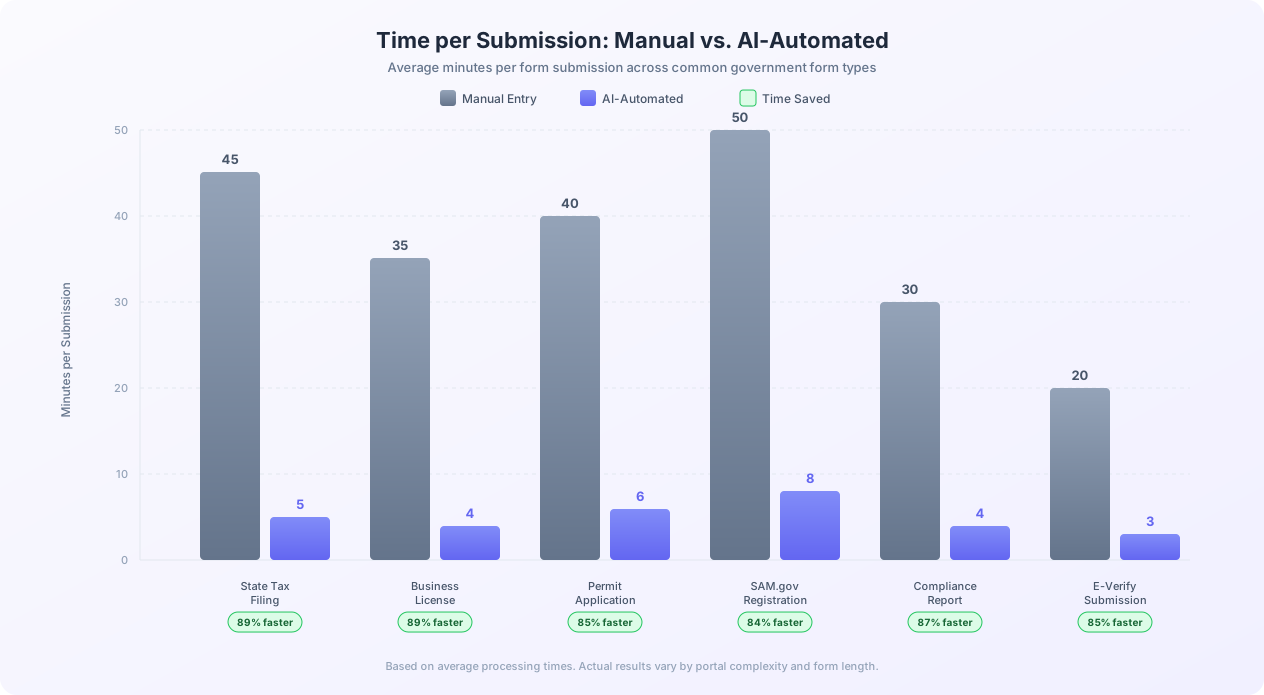
A mid-size accounting firm handling compliance for 200 business clients across 15 states may need to interact with 50+ different government portals every quarter. At 30-45 minutes per filing, that is 150-225 hours of staff time per quarter spent on pure data entry into government websites — the equivalent of almost two full-time employees doing nothing but filling out government forms.
Who Feels This Pain the Most
Certain industries are disproportionately affected because their operations require frequent filings across multiple jurisdictions:
- Accounting and tax preparation firms: State and local tax returns, sales tax reports, payroll tax submissions, and compliance documents for hundreds of clients across multiple states.
- Law firms: Court documents, business formation paperwork, trademark registrations, FOIA requests, and regulatory submissions across federal and state portals.
- Construction companies: Building permits, inspection requests, environmental compliance reports, and contractor licenses across every jurisdiction where they operate.
- Import/export businesses: Customs declarations, trade compliance documents, export licenses, and foreign trade zone applications through federal portals like ACE.
- Healthcare organizations: Medicare/Medicaid claims, provider enrollment, facility license renewals, and public health reports through CMS and state health department portals.
- Nonprofits: Annual registrations in every state where they solicit donations, grant applications, and tax-exempt status documentation.
For all of these organizations, the question is not whether government form submission is a bottleneck — it is how to solve it when the portals offer no automation-friendly interface.
Approaches to Automating Government Forms (And Why Most Fail)
Understanding why obvious approaches fall short helps explain why AI browser automation is the breakthrough solution for government portal automation.
Approach 1: Look for an API
The first instinct is to check for an API. A handful of federal systems offer limited programmatic access (the IRS offers e-file specifications through approved intermediaries), and some states have started offering API access for specific tax types. But these are exceptions. The vast majority of state, county, and municipal portals offer no API. The web form is the only interface.
Even when an API exists, it covers only one specific form type on one portal. An API for filing sales tax in California does nothing for your business license renewal in Nevada. The multi-portal nature of the problem means API-based solutions only solve a fraction of it.
Approach 2: Form-Filling Browser Extensions
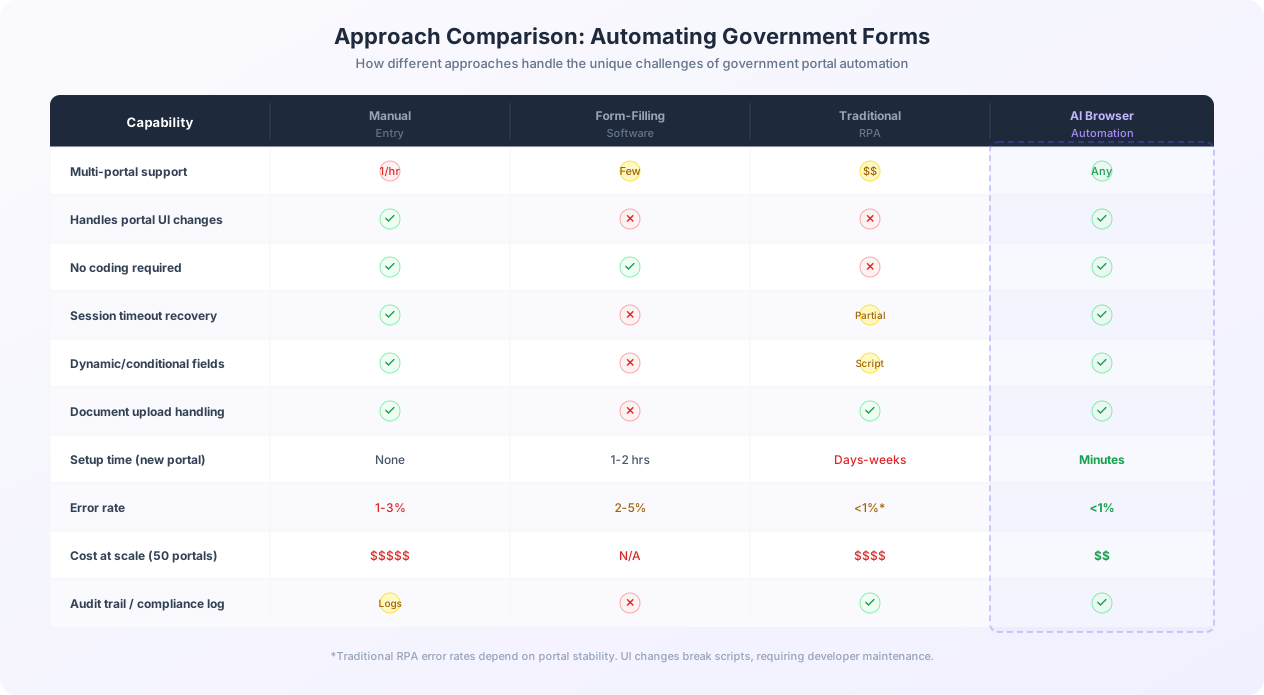
Autofill tools work for simple, single-page forms with stable field names. But they collapse against government portal complexity:
- They cannot navigate multi-page wizards
- They do not handle dynamic fields that appear based on previous selections
- They cannot upload documents
- They require manual setup for each portal
- They do not handle session timeouts or re-authentication
- They provide no batch processing capability
Approach 3: Traditional RPA
Traditional RPA tools (UiPath, Automation Anywhere, Blue Prism) record or script mouse clicks and keystrokes, then replay them. For a single, stable portal, this works. The problem is brittleness.
RPA scripts are tightly coupled to page layout — targeting elements by CSS selector, XPath, or pixel position. When a government portal updates its UI (which happens without notice), the script breaks. For 50 portals across multiple jurisdictions, each updating independently, the maintenance burden becomes unsustainable. Organizations consistently report spending more time fixing broken scripts than they save on manual data entry.
Approach 4: AI Browser Automation
AI browser automation is fundamentally different. Instead of recording click sequences or targeting elements by selector, an AI agent interacts with the portal the way a human does: it reads the page visually, understands what each field is asking for, and fills it with the appropriate data. When the portal layout changes, the AI adapts because it was never dependent on the specific layout.
Key differences from traditional automation:
- No portal-specific programming: The same AI agent handles any government portal. Describe the task in plain English, provide the data, and the agent figures out the rest.
- Self-healing: When a portal updates its UI, the AI continues working because it understands pages contextually rather than by hardcoded selectors.
- Handles complexity natively: Multi-page wizards, dynamic fields, dropdowns, date pickers, document uploads, CAPTCHAs — the AI handles all of these visually.
- Scales across jurisdictions: Adding a new state or county portal does not require building a new script.
Tools like Autonoly's AI agent are purpose-built for this category of problem: automating interactions with web applications that offer no API.
Common Government Portals and Their Automation Challenges
Here is a reference table of common government portals that businesses interact with regularly, the forms they require, and the specific automation challenges each presents.
| Portal / System | Form Types | Key Challenges | Typical Frequency |
|---|---|---|---|
| State tax portals (50 states) | Sales tax returns, income tax withholding, franchise tax, annual reports | Every state uses a different portal. Some use commercial platforms (Gentax, FAST), others are custom-built. Validation rules vary by state. | Monthly / Quarterly / Annual |
| SAM.gov (federal) | Entity registration, annual renewal, representations and certifications | 40+ page multi-step registration. Aggressive session timeouts. Requires CAGE code. UI is notoriously difficult. | Annual |
| E-Verify (USCIS) | Employee verification cases | Each new hire requires a separate case. Photo matching step. Must complete within 3 business days. No bulk processing. | Per new hire |
| County permit portals | Building permits, zoning applications, variance requests | Thousands of county-level portals (Accela, Tyler Technologies, or custom). Document upload requirements vary. Some require scanned physical signatures. | Per project |
| State Secretary of State | Business formation, annual reports, DBA filings | Each state has its own portal. Some accept online filing, others require mail-in with online payment. | Annual / As needed |
| CMS PECOS (Medicare) | Provider enrollment, revalidation, change of information | Complex multi-part application. Different tracks for different provider types. Lengthy review periods. | Every 3-5 years + changes |
| State professional license boards | License applications, renewals, CE reporting | Each profession has a separate board with a separate portal. CE credit formats vary. | Annual / Biennial |
| OSHA / EPA portals | Injury/illness logs, chemical inventory reports, emissions reports | Specific file upload formats. Reporting thresholds vary by industry and facility size. | Annual / Quarterly |
| State charitable solicitation registries | Initial registration, annual renewal | 41 states require registration. Each has a different portal, even when using common platforms. | Annual |
| Customs and Border Protection (ACE) | Entry summaries, drawback claims, FTZ applications | Highly structured data requirements. Tariff classification codes must be precise. Timing-sensitive. | Per shipment |
The Multi-Jurisdiction Multiplier
The challenge is not just that these portals are individually difficult — it is that businesses must interact with many simultaneously. A construction company operating in 5 states with projects in 12 counties may need to use 30+ different government portals, each with different credentials, form structures, and filing deadlines. Multiply by the number of active projects and the administrative burden becomes staggering.
How AI Browser Automation Handles Government Portals
AI browser automation uses a real cloud-hosted browser controlled by an AI agent that sees and interacts with web pages the same way a human does. Here is how it handles each challenge that government portals present.
Visual Understanding Instead of Selectors
Traditional automation identifies form fields by HTML attributes (ID, CSS class, XPath). When a portal changes any attribute, the automation breaks. AI browser automation identifies fields the way a human does: by reading the label text next to the field. When the AI sees a text input labeled "Business Name," it enters the business name — regardless of whether the input's HTML ID is "business_name," "biz_nm," or "field_23." This visual understanding is what makes it resilient to portal UI changes.
With Autonoly's live browser control, you can watch the AI agent interact with the portal in real time, seeing exactly what it sees and how it makes decisions.
Navigating Multi-Page Wizards
Government forms are almost always split across multiple pages. The AI completes each page, clicks "Next," waits for the next page to load, and continues. If validation fails, the AI reads the error messages and attempts to correct the issue. It does not need to be pre-programmed with the number of pages or wizard structure — it discovers the form as it navigates.
Dynamic and Conditional Fields
Selecting "Yes" for "Is this a foreign-owned entity?" reveals additional fields. Selecting "Construction" as business type shows contractor license fields. Because the AI interacts visually, it handles dynamic fields naturally — seeing new fields appear and filling them, skipping fields that disappear. No pre-programming of conditional logic is required.
Session Timeout Recovery
Government portals typically expire sessions after 10-20 minutes. The AI detects timeout indicators (login page redirect, error messages) and automatically re-authenticates. It maintains awareness of already-entered data, so it can resume from where the timeout occurred rather than restarting the entire form.
CAPTCHA and Security Challenges
AI browser automation handles common CAPTCHA types with built-in solving capabilities. For multi-factor authentication, the workflow pauses for human intervention on the auth step, then continues autonomously for form filling.
Practical Tip
For portals requiring MFA at login, authenticate manually once and let the AI handle everything after. Most portals maintain sessions for several hours once authenticated — plenty of time for multiple form submissions.
Document Uploads
Government forms frequently require document uploads: articles of incorporation, proof of insurance, site plans. The AI locates the upload field, triggers file selection, and attaches the correct document sourced from cloud storage or workflow configuration. Each filing in a batch can reference different documents.
Data Formatting and Validation
The AI handles inconsistent formatting requirements by reading validation error messages and adapting. If a portal rejects (555) 123-4567 with an error about digit format, the AI strips formatting and retries. For known portals, Autonoly remembers formatting preferences (date formats, phone formats, EIN formatting) and applies them automatically on subsequent submissions.
Building a Government Form Automation Workflow: Step by Step
This walkthrough covers building an automation workflow for submitting quarterly sales tax returns across multiple state portals. The same principles apply to permits, licenses, compliance reports, or any recurring government filing.
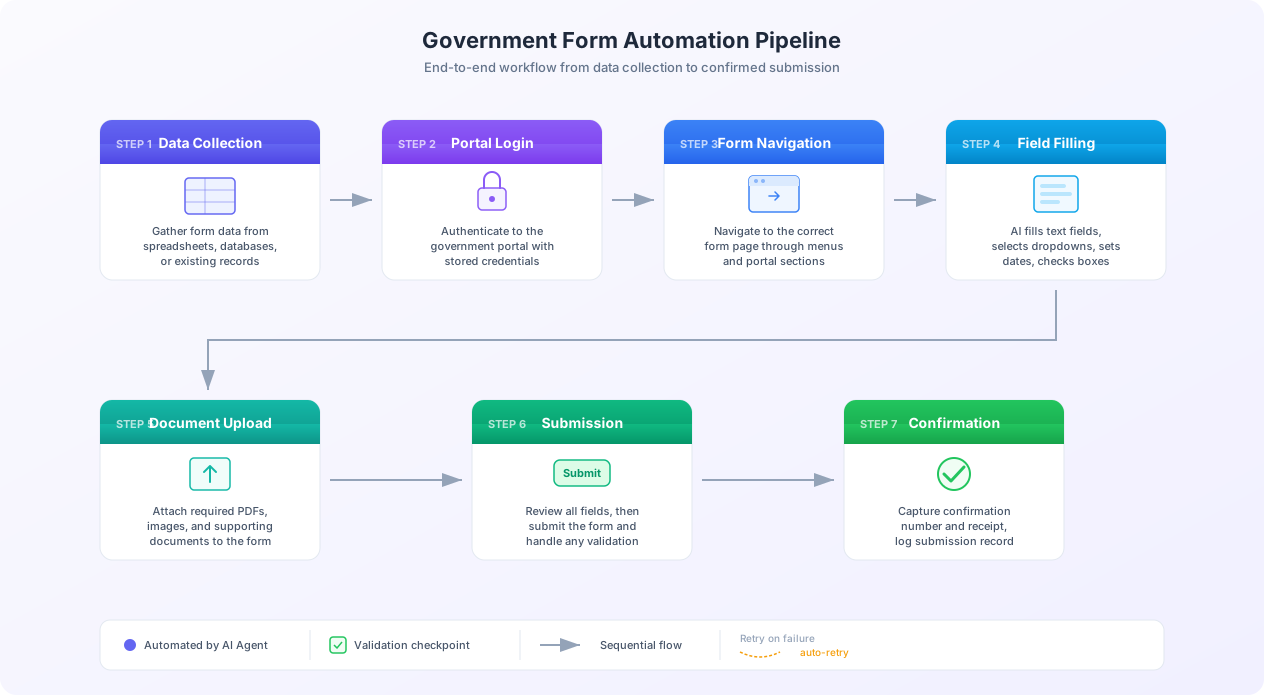
Step 1: Organize Your Filing Data
Structure your data in a Google Sheet or Excel file with one row per state filing and columns for: state name, portal URL, filing period, gross sales, taxable sales, tax collected, deductions, and tax due. Store login credentials separately using Autonoly's encrypted credential storage — never in the spreadsheet. For data from accounting systems, use Autonoly's integrations to pull it directly.
Step 2: Configure the Automation
Open the AI Agent chat and describe the task:
"For each row in my sales tax spreadsheet, log into the corresponding state tax portal, navigate to the sales tax return filing page, fill in the quarterly return with the data from that row, and submit. Capture the confirmation number and save it back to the spreadsheet."
The agent analyzes your spreadsheet, identifies data fields, navigates to the first portal, logs in, and begins filling the form.
Step 3: Supervised First Run
For the first submission to each portal, run in supervised mode — the AI fills the form and pauses before submitting so you can verify:
- The agent found the correct form (quarterly, not annual)
- Filing period and dollar amounts are correct
- Dropdown selections are correct
- Jurisdiction-specific fields are handled properly
After verifying, switch to autonomous mode for subsequent filings.
Step 4: Handle Edge Cases
Common edge cases in government form automation:
- Zero-dollar filings: Some states require a return even with no tax due. The portal may have a "zero return" shortcut or require filling the full form with zeros.
- Amended returns: Most portals have a separate section for amendments with its own form structure.
- Payment integration: Many portals combine filing with payment. Configure the AI to stop before payment if you prefer manual handling.
- Portal maintenance: Government portals go offline for maintenance. The automation logs the issue and retries after a configured delay.
Step 5: Schedule and Monitor
Schedule the workflow for each filing deadline with buffer time for retries. Monitor through Autonoly's dashboard, which shows status per submission: completed (with confirmation number), pending retry, or failed (with error details).
Real-World Time Savings
An accounting firm filing quarterly sales tax for 40 clients across 8 states each processes roughly 320 filings per quarter. At 35 minutes per manual filing, that is 187 hours of staff time. With AI automation at 4-6 minutes per filing, the same 320 filings complete in under 32 hours of machine time — freeing 155 hours of staff capacity per quarter.
Step 6: Build a Visual Workflow
For recurring filings, convert the AI agent's steps into a reusable visual workflow using the visual workflow builder. This creates an editable pipeline you can trigger manually or on a schedule, preserving the agent's learned behavior while giving you a clear, auditable view of every step.
Practical Use Cases You Can Automate Today
Beyond sales tax filings, here are the most impactful government form automation scenarios with specific workflow guidance for each.
Business License Renewals
A business with locations in 20 cities needs to renew 20 business licenses, each on a different municipal portal with different renewal windows and requirements.
Workflow: Maintain a license tracker with entity name, license number, portal URL, renewal date, and required data per jurisdiction. Schedule the AI to process renewals as they come due. Municipal portals are the most varied and least maintained category of government websites — the AI's visual approach handles the full spectrum from sophisticated platforms to barely functional sites.
Building Permit Applications
Construction companies file permits across multiple jurisdictions, each requiring project details, site plans, contractor information, and insurance documentation.
Workflow: Create a permit template, populate it per project with data and supporting documents. The AI navigates each county's permit portal, fills the application, uploads documents, and submits. Document upload requirements vary (file types, size limits, naming conventions) — the AI detects constraints and adapts automatically.
SAM.gov Registration and Renewal
Federal contractor registration on SAM.gov spans dozens of pages covering business structure, ownership, financials, and certifications. It is notoriously complex.
Workflow: Maintain a SAM.gov data profile per entity. The AI logs in, navigates to renewal, reviews and updates each section, and submits. SAM.gov's aggressive session timeouts (often under 15 minutes) and frequent UI changes make the AI's session recovery and visual understanding capabilities essential.
E-Verify Employee Verification
Each new hire requires a separate E-Verify case within three business days. No bulk processing is natively supported.
Workflow: New employee data flows from HR system to the AI agent, which creates an E-Verify case, enters I-9 document information, and submits. Photo matching steps are flagged for human review; everything else runs autonomously.
Nonprofit State Charitable Registrations
National nonprofits must register in up to 41 states, each with its own portal. This is a massive administrative burden.
Workflow: Track each state's portal, deadline, required financial data, and supporting documents (audit reports, Form 990). The AI processes each state's registration, adapting to proprietary forms and the Unified Registration Statement alike.
Combining Use Cases
The real power emerges when you combine multiple filing workflows into a comprehensive compliance automation system. A single Autonoly workspace can manage tax filings, license renewals, permit applications, and regulatory reports across all jurisdictions with a unified dashboard showing status, deadlines, and completed submissions.
Is It Legal to Automate Government Form Submissions?
This is the most common question organizations ask, and the answer is straightforward: yes, using a tool to fill and submit government forms is legal, provided you are submitting accurate information and are authorized to file on behalf of the entity.
You Are Using a Tool, Not Misrepresenting Identity
When you use TurboTax, Lacerte, or Drake to prepare and file a tax return, you are using software to fill in form fields and submit them electronically. AI browser automation is the same concept applied to portals that lack native software integration. The key legal principles:
- You are the authorized filer. The automation acts on behalf of the credentialed user, just as a pen acts on your behalf when filling a paper form.
- The information is accurate. The data comes from your records — the automation does not fabricate or alter information.
- You are not circumventing access controls. You use legitimate credentials to access portals you are authorized to use.
- No terms of service violation in most cases. Government portals generally do not prohibit automated access. Their purpose is to collect information from the public.
Important Distinction
Automating form submission is different from automated scraping of government data. Submitting forms you are authorized to submit is straightforward. Bulk scraping of public records databases may have different legal considerations under the CFAA and state computer access laws.
Power of Attorney and Third-Party Filing
Many businesses use accountants, lawyers, or compliance consultants to file on their behalf — standard practice under power of attorney or authorized representative designations. When an AI tool submits a form on behalf of a business, the same authorization applies. For regulated filings, ensure your automation complies with the specific regulations governing those filing types.
Audit Trails Strengthen Compliance
Automation actually improves compliance posture. Manual submissions leave minimal audit trails — at best, a confirmation email. AI automation produces comprehensive logs: data entered, submission timestamp, confirmation number, and screenshots. These records are valuable during audits, disputes, and internal reviews.
Compliance Best Practices
- Maintain authorization documentation for each entity you file on behalf of
- Review before submission initially — switch to post-submission review once confident in accuracy
- Store confirmation records for every automated filing
- Use test environments when available before submitting real filings
- Rate-limit submissions to avoid triggering security blocks — space filings at a natural pace
The CFAA Is Not Implicated
The Computer Fraud and Abuse Act prohibits unauthorized access to computer systems. Using your own legitimate credentials to access a government portal you are authorized to use is not unauthorized access, regardless of whether you type manually or use an automation tool. Filing a form you are authorized to file, with credentials you are authorized to use, does not implicate the CFAA.
Error Handling, Reliability, and Getting Started
Automating government form submissions at scale requires robust error handling and a clear path to getting started. This section covers both.
Common Failure Modes and Recovery
| Failure Type | Frequency | Recovery Strategy |
|---|---|---|
| Session timeout during form fill | Common (10-20%) | Re-authenticate, resume from last completed page |
| Portal maintenance / downtime | Occasional | Retry after configured delay (1-4 hours) |
| Validation error (data format) | Common on first filing | Read error message, reformat data, retry |
| CAPTCHA challenge | Varies by portal | AI solving or human-in-the-loop |
| Portal UI change | Rare per portal (1-2x/year) | AI adapts automatically via visual understanding |
| Network error / page load failure | Occasional | Retry with exponential backoff (3 attempts) |
| Two-factor authentication prompt | Per-session (if enabled) | Pause for human MFA entry, then continue |
Retry Logic
- Session errors: Re-authenticate immediately and continue
- Validation errors: Do not retry blindly. Log the error, flag for human review, continue with next filing
- Portal downtime: Retry after 30 minutes, 1 hour, and 2 hours. After 3 failures, flag for manual attention
- Rate limiting: Slow submission pace to one every 5-10 minutes
Monitoring and Alerting
For compliance-critical filings, configure alerts when: a filing fails after all retries, error rates spike for a specific portal, a deadline approaches without confirmed submission, or a previously working portal starts failing consistently. Autonoly supports notifications via email, Slack, and webhook.
Scaling Across Jurisdictions
Adding a new jurisdiction does not require building a new script:
- Add the portal URL and credentials to your configuration
- Add the jurisdiction's data to your filing spreadsheet
- Run the first filing in supervised mode
- Switch to autonomous mode for subsequent filings
This takes minutes versus the days or weeks required by traditional RPA.
Critical Warning
Never rely solely on automation for compliance-critical filings without monitoring that confirms each submission was accepted. A "submitted" status means the form was sent — it does not guarantee the agency processed it. Always verify acceptance through the portal's status page, especially for filings with legal deadlines and late penalties.
Getting Started: Your First Government Form Automation
Start with one portal and one form — ideally a recurring filing where the data is already structured and missing the deadline has consequences. A state tax filing or license renewal is the right starting point for most organizations.
Prepare your data with one column per form field. Validate it before starting: check dollar amounts, date formats, and dropdown values. Then create an Autonoly workflow, describe the task to the AI agent, and run it in supervised mode. Watch the entire process through the live browser view.
Once the first filing succeeds, expand: add more rows for additional jurisdictions, add more portals, and build a compliance calendar that schedules automation runs ahead of each deadline. Track hours saved, error reduction, and deadline compliance to justify continued investment.
Start Today
Government form automation does not require a massive upfront investment. You can automate your first filing in under an hour with Autonoly. Start with the form that wastes the most of your team's time, prove the value, and expand from there. Every quarter that passes without automation is another 30-45 minutes per filing that your team spends on mechanical data entry instead of the skilled work they were hired to do.