
APIs for Non-Developers: What They Actually Are
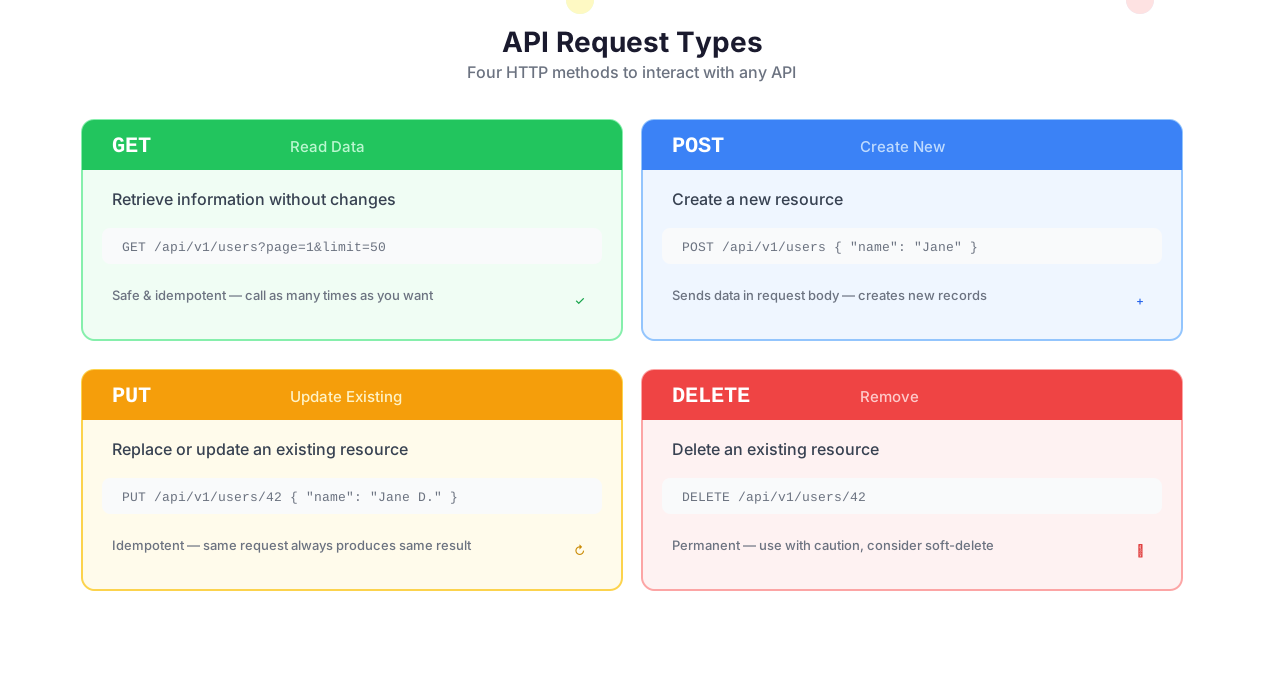
API request types: GET, POST, PUT, PATCH, DELETE
An API (Application Programming Interface) is a way for two pieces of software to talk to each other. That is the textbook definition. Here is the practical one: an API is a URL you can send data to, and it sends data back.
When you type a URL into your browser, you are making an API call. When your weather app shows tomorrow's forecast, it made an API call. When Stripe charges a credit card, it is an API call. Every time you see two apps "connected," there is an API underneath.
The reason APIs matter for automation is simple: every SaaS product you use has one. Salesforce, HubSpot, Stripe, Shopify, Notion, Airtable, Mailchimp, Twilio, GitHub, Jira — all of them expose APIs that let you read, create, update, and delete data programmatically. If a tool has an API, Autonoly can talk to it, even if there is no pre-built native integration.
Autonoly's HTTP request node gives you full control: every HTTP method (GET, POST, PUT, PATCH, DELETE), custom headers, request bodies in any format, query parameters, and complete response handling. You build the request visually — no code, no curl commands, no Postman exports.
When to Use API & HTTP vs. Native Integrations
Use native integrations for Google Sheets, Slack, Notion, and the other 50+ supported services — they are faster to set up and handle authentication, rate limiting, and error recovery automatically. Use the HTTP request node for everything else: services without a native integration, internal APIs, custom endpoints, and cases where you need fine-grained control over the request.
In practice, most workflows use both. Native Slack for posting messages. HTTP request for calling the Stripe API. Native Google Sheets for writing results. They work seamlessly together.
REST vs. GraphQL — When It Matters
Most APIs you will encounter are REST APIs. You call a specific URL (endpoint) for each resource — /customers, /orders, /invoices — and the server returns the full resource data. REST is simple, well-documented, and supported by virtually every service.
GraphQL APIs (used by GitHub, Shopify's Storefront API, Contentful, Hasura, and others) let you specify exactly which fields you want in the request. Instead of getting a 50-field customer object when you only need the email and name, you request just those two fields.
When REST vs. GraphQL matters: If you are calling an API that returns enormous response objects and you only need a few fields, GraphQL reduces data transfer and simplifies downstream processing. If you are working with a standard SaaS API, it is almost certainly REST, and GraphQL is not an option.
When it does not matter: Autonoly handles both. For REST, configure the URL, method, headers, and body. For GraphQL, write the query in the body field and set the Content-Type to application/json. The response parsing works the same way for both.
Authentication Demystified
Postman vs code-based vs AI-powered API integration
Every API requires some form of authentication. This is where most non-developers get stuck — not because authentication is conceptually hard, but because every API documents it differently and uses different terminology for the same patterns.
Here are the four patterns you will encounter, in order of how common they are:
Bearer Tokens
The most common pattern. The API gives you a token (a long string of random characters), and you send it in the Authorization header of every request: Authorization: Bearer sk-abc123.... Stripe, OpenAI, Anthropic, and hundreds of other services use this pattern.
In Autonoly, you paste the token into the auth configuration once. It is injected into every request header automatically and stored in the encrypted credential vault — you never see it again after setup.
API Keys
Similar to bearer tokens, but API keys can be sent in different locations depending on what the API expects: as a header (X-Api-Key: abc123), as a query parameter (?api_key=abc123), or in the request body. Airtable, SendGrid, and many internal APIs use this pattern.
The gotcha: API keys do not expire automatically. This makes them simpler to use but riskier — if a key leaks, it is valid until someone manually rotates it. Rotate API keys quarterly as a hygiene practice.
OAuth 2.0
OAuth is the "Sign in with Google" flow adapted for API access. Instead of giving Autonoly your password, you authorize it through the provider's login page, and the provider issues temporary tokens. Those tokens expire (typically every hour) and are refreshed automatically.
Google, Salesforce, HubSpot, Microsoft, and Slack all use OAuth. Autonoly handles the entire flow — initial authorization, token storage, automatic refresh — so you connect once and it works indefinitely.
The gotcha: OAuth scopes are set at authorization time. If you initially authorized read-only access and later need write access, you must re-authorize with expanded scopes. This is by design (security), but it surprises people when their workflow suddenly gets 403 Forbidden on a write operation.
Session Cookies
Some APIs (especially internal tools and legacy systems) use session-based authentication. You call a login endpoint with credentials, get a session cookie, and include that cookie in subsequent requests. This is less common with public SaaS APIs but is the norm for custom-built internal tools.
Autonoly supports cookie handling in the HTTP request node. For more complex session management (like handling CSRF tokens), pair the HTTP request node with browser automation to handle the login flow.
Rate Limiting: The Thing Nobody Tells You About Until You Get Blocked
Every API has rate limits. Every single one. Stripe allows 100 requests/second. The Shopify API allows 2 requests/second on the basic plan. GitHub allows 5,000 requests/hour for authenticated requests. The Google Sheets API allows 300 requests/minute.
Most automation tools ignore rate limits until you get blocked. Then your workflow fails with a 429 "Too Many Requests" error, and you have no idea why.
Autonoly handles rate limiting in two ways:
- Request throttling — configure maximum requests per second per node. If you know Shopify's limit is 2/second, set the throttle to 1.5/second to stay safely under.
- 429 retry with backoff — when a 429 response is received, the node waits for the duration specified in the
Retry-Afterheader (or a configurable default), then retries. Subsequent retries use exponential backoff to avoid hammering the API.
The practical advice: when working with a new API, always check the rate limit documentation first. Set your throttle to 80% of the stated limit. This provides headroom for concurrent workflows and prevents the frustrating cycle of running, hitting limits, waiting, retrying.
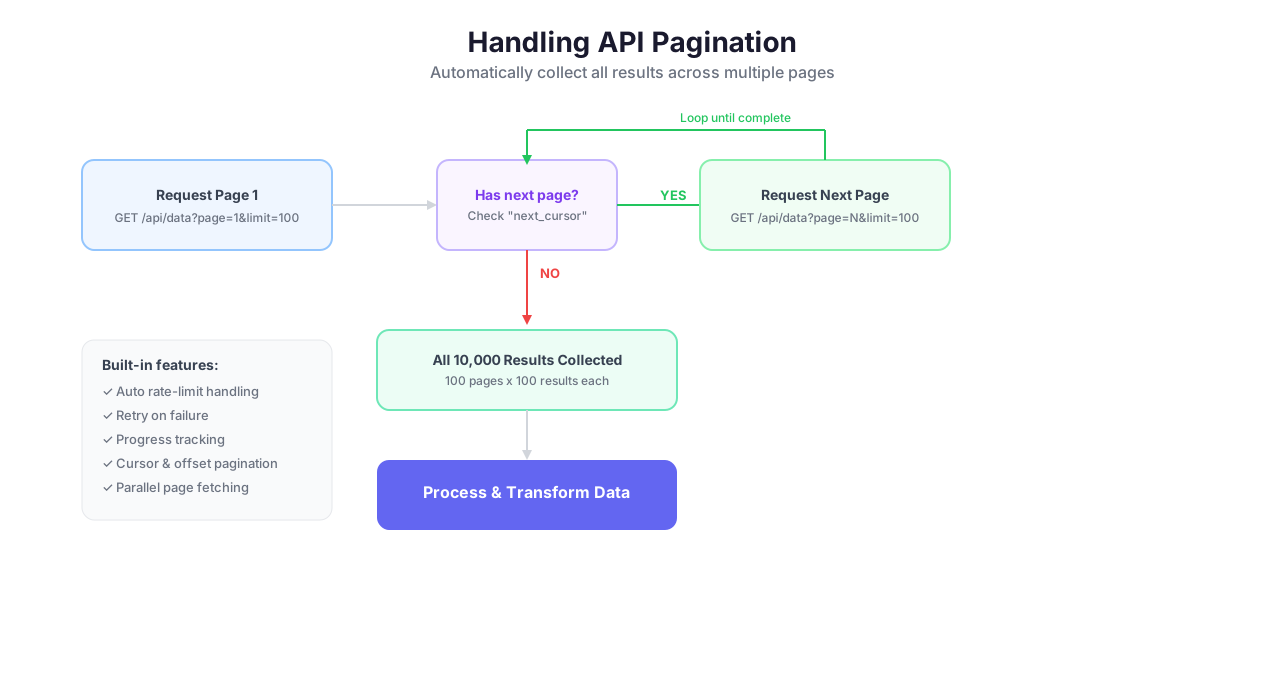
Pagination: When You Need 10,000 Results but the API Returns 100
APIs return data in pages. The Stripe API returns 100 invoices per request by default. Airtable returns 100 records. The HubSpot API returns 100 contacts. If you have 10,000 invoices and only make one API call, you get the first 100 and miss the rest.
This is the single most common cause of "my data is incomplete" in API automation. People make one call, get 100 results, and assume that is everything.
How to Handle Pagination in Autonoly
Use Logic & Flow loop nodes to iterate through pages:
- Make the initial request
- Extract the "next page" indicator from the response — this is usually a cursor (
starting_after=cus_abc123in Stripe), an offset (offset=100), or a URL (next: "https://api.example.com/items?page=2") - Loop: make the next request using the cursor/offset, collect results, check for another page
- When there is no next page, exit the loop and merge all collected results
Autonoly's loop node handles this pattern cleanly. For cursor-based pagination (Stripe, Shopify), pass the last item's ID as the cursor. For offset-based (Airtable, many REST APIs), increment the offset by the page size.
Error Handling: What Every HTTP Status Code Means and What to Do
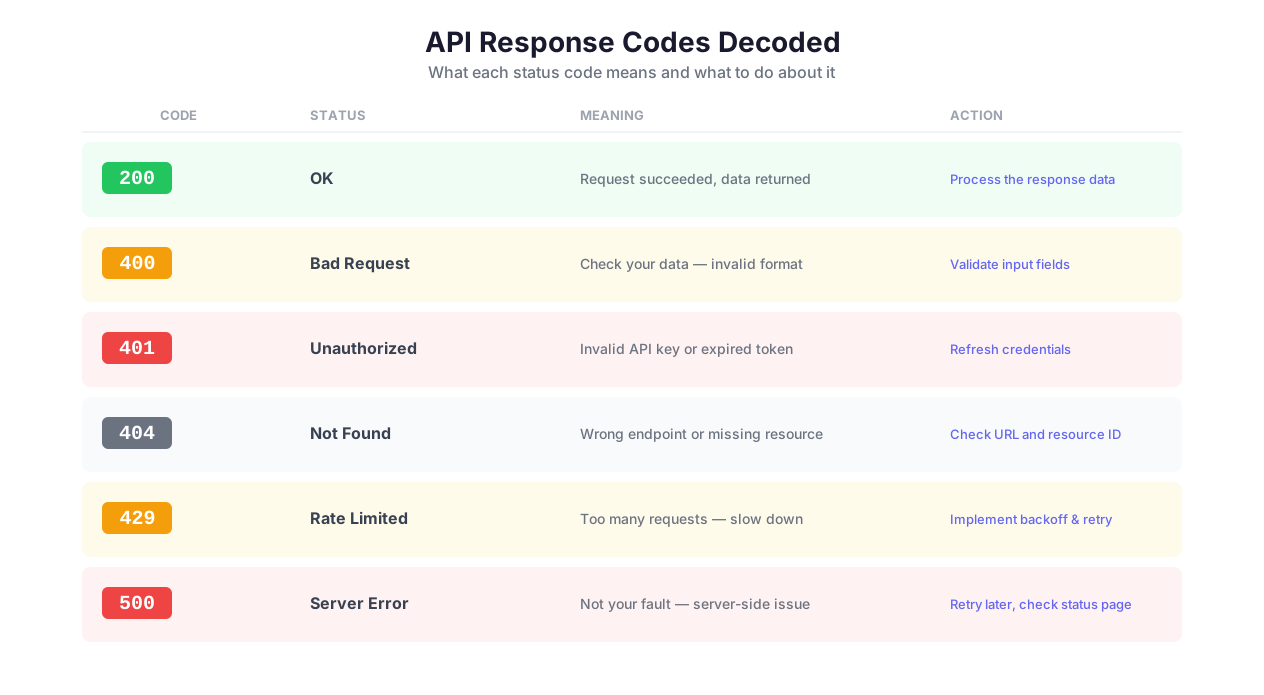
APIs communicate success and failure through status codes. Here are the ones you will actually encounter, with actionable advice:
200 OK — success. Parse the response and continue.
201 Created — success, a new resource was created. Common after POST requests.
400 Bad Request — your request is malformed. Check the request body, headers, and query parameters. The response body usually tells you which field is wrong. Fix and retry.
401 Unauthorized — your authentication credentials are wrong or expired. For bearer tokens, check that the token is correct. For OAuth, trigger a token refresh. Do not retry with the same credentials — it will fail again.
403 Forbidden — your credentials are valid but you do not have permission for this specific action. Common when OAuth scopes are insufficient. You need to re-authorize with expanded permissions.
404 Not Found — the resource does not exist. Check the URL and resource ID. This often means the record was deleted between the time you discovered it and the time you tried to access it.
429 Too Many Requests — you hit the rate limit. Wait and retry. Check the
Retry-Afterheader for how long to wait.500 Internal Server Error — the API server crashed. Not your fault. Retry with exponential backoff. If it persists, the service is having an outage.
In Autonoly, wrap every API call in a Logic & Flow error handler. Route 429 errors to a delay-and-retry path. Route 401 errors to a credential refresh path. Route 500 errors to a retry-with-backoff path. Route 400 errors to a logging path (these need manual investigation). Never let an API error silently kill your workflow.
Building API Pipelines
Configure, call, and handle response API workflow
Real Example: Stripe Invoice Collection and Follow-Up
Here is a concrete, end-to-end API workflow that a finance team can deploy today:
- Call the Stripe API to get all invoices from last month:
GET /v1/invoices?created[gte]=1709251200&created[lte]=1711929600&status=open&limit=100 - Paginate through results (Stripe uses cursor-based pagination with
starting_after) - Filter to unpaid invoices with Logic & Flow conditional branches
- For each unpaid invoice, fetch the customer via
GET /v1/customers/{customer_id}to get their email - Send reminder emails via the Gmail API (
POST https://gmail.googleapis.com/gmail/v1/users/me/messages/send) with the invoice amount and a payment link - Log everything to Google Sheets — customer name, invoice amount, email sent timestamp
- Post a summary to Slack with total outstanding amount and count of reminders sent
This workflow replaces an accounts receivable clerk spending two hours every month manually checking Stripe, copying customer emails, composing reminder emails, and logging the activity. It runs automatically on the first of every month via Scheduled Execution.
Response Handling
Autonoly automatically parses responses and makes the data available to downstream nodes:
JSON responses — parsed into structured objects you reference by field name (
response.data.customer.email)XML responses — converted to navigable object structures
HTML responses — available as raw text for processing with AI content tools
Binary responses — files, images, and documents can be saved or forwarded
Use JSONPath expressions to extract specific fields from complex nested responses. When the Stripe API returns a 50-field invoice object, you probably only need amount_due, customer, and status. JSONPath grabs those three fields and ignores the rest.
Comparison: Postman vs. Code vs. Autonoly
Postman is excellent for testing and exploring APIs. You can send requests, inspect responses, and save collections. But Postman is not an automation tool — it does not chain requests, handle pagination loops, route based on response codes, or trigger from external events. It is a debugger, not a workflow engine.
Code (Python requests, Node.js fetch, curl scripts) gives you maximum flexibility but demands programming skills, hosting, error handling, scheduling infrastructure, credential management, and ongoing maintenance. A Python script that calls the Stripe API and sends Gmail reminders works great until the developer who wrote it leaves the company and nobody knows how to modify it.
Autonoly is the middle ground: visual API configuration with the chaining, error handling, pagination, scheduling, and credential management built in. You get 90% of the flexibility of code with 10% of the maintenance burden. The workflow is visible, editable by non-developers, and runs on managed infrastructure.
Browse the templates library for pre-built API workflow templates. Check the pricing page for details on request limits per plan.
Best Practices
Always implement error handling for every HTTP request. APIs fail. Servers go down. Rate limits trigger. Authentication tokens expire. Endpoints change after API version updates. Wrap every API call in a Logic & Flow error handler with appropriate fallback behavior: delay-and-retry for 429s, credential refresh for 401s, exponential backoff for 500s. The workflows that run reliably for months are the ones where the builder assumed every call could fail.
Use environment-specific credential sets for staging vs. production. Store separate API keys for your Stripe test mode and live mode. Select the appropriate credential set based on the workflow's target environment. A single misplaced credential — test mode key hitting live Stripe — creates real charges on real cards. The credential vault supports storing multiple credentials with descriptive names like "Stripe-Live" and "Stripe-Test."
Validate response structure before processing downstream. APIs change without warning. A field you depend on gets renamed. A nested object becomes an array. An optional field becomes null instead of an empty string. Add a Data Processing validation step after each API call that checks for required fields and expected types. This catches schema changes before they cascade into downstream failures.
Implement pagination from day one, not after you discover missing data. The most common API bug is calling an endpoint once, getting 100 results, and assuming that is the complete dataset. It is not. Always check API documentation for pagination parameters and build the loop pattern into your workflow from the start. Paginating 200 records is the same work as paginating 10,000 — do it right once.
Log request and response metadata for debugging. When an API workflow fails intermittently at 3 AM, you need to see the full request URL, headers (credentials masked), status code, and response body. Autonoly's execution logs capture this automatically. For complex multi-API workflows, add intermediate data saves to Google Sheets or a database so you can inspect data at each stage. For more on building reliable API integrations, read our AI workflow automation guide.
Security & Compliance
API & HTTP requests handle some of the most sensitive data in your automation stack — API keys that can create charges, OAuth tokens that can read customer data, bearer tokens that can modify production databases.
All API credentials are stored in the encrypted credential vault with AES-256 encryption. Credentials are decrypted only at the moment of request execution and are never logged, displayed in the workflow canvas, or included in error messages. OAuth tokens are refreshed automatically before they expire. For webhook endpoints that receive incoming data, Autonoly supports HMAC signature validation to verify that payloads are authentic and untampered.
A practical compliance consideration: when your workflow transfers data between two services via API (e.g., copying customer records from Salesforce to a PostgreSQL database), you are the data processor. Ensure that both services' data processing agreements permit the transfer, and be mindful of data residency requirements — EU customer data flowing through a US-hosted API endpoint may violate GDPR. Enterprise customers can contact our team for region-specific deployment options. For the full security architecture, visit the Security feature page.
Common Use Cases
CRM Lead Enrichment Pipeline
A sales team pulls 500 new leads weekly from HubSpot via GET /crm/v3/objects/contacts. For each lead, the workflow calls Clearbit's enrichment API (GET /v2/companies/find?domain=example.com) for company data, Apollo's API for contact details, and BuiltWith's API for technographic data. Logic & Flow error handling ensures partial enrichment continues if one provider is down — a Clearbit timeout does not block Apollo and BuiltWith from running. Enriched leads are written back to HubSpot via PATCH /crm/v3/objects/contacts/{id}, and a Slack summary highlights the top 20 leads by enrichment score. The pipeline runs every morning at 6 AM via Scheduled Execution. See our automating lead generation guide.
Multi-Service Data Synchronization
An operations team keeps data in sync across four systems: a PostgreSQL database (via REST API), Google Sheets (via native integration), Asana (via API), and Chargebee (via API). When a record is updated in any system, a webhook trigger starts a workflow that reads the updated record, transforms the data format for each destination using Data Processing, and writes the update to all other systems. Conflict resolution logic in Logic & Flow uses a "last write wins" strategy with timestamp comparison, handling cases where the same record was modified in multiple systems simultaneously. See our automate Google Sheets guide for spreadsheet-centric synchronization patterns.
Payment Event Processing
An e-commerce company receives Stripe webhook events for payment_intent.succeeded, customer.subscription.deleted, charge.refunded, and invoice.payment_failed. Each event triggers a workflow that routes to different processing paths based on event type via Logic & Flow. Payment success events call the order management API to update status and the Gmail API to send confirmation. Subscription cancellations trigger a retention workflow — call the CRM API to flag the account, send a "we're sorry to see you go" email, and create a task in the project management tool for the customer success team. Failed payment events trigger a dunning sequence via Email Campaigns. Every webhook validates Stripe's HMAC signature before processing.
Internal Tool Integration
A company with a custom employee management API uses Autonoly to automate onboarding. When HR creates a new employee via the internal API, a webhook triggers a workflow that provisions accounts across the tool stack: call the Google Workspace Admin API to create an email account, call the Slack API to invite the user to appropriate channels, call the Jira API to add them to the engineering project, and call the LMS API to enroll them in required training. Each provisioning step has independent error handling — if the Jira provisioning fails, the workflow logs the failure and continues with the remaining steps rather than rolling back everything. The onboarding checklist in the internal tool updates automatically as each step completes.