


Why Track Reddit Discussions in Google Sheets?
Reddit hosts some of the most candid and detailed discussions on the internet. Unlike Twitter or LinkedIn where posts are often promotional, Reddit discussions tend to be substantive and detail-rich. For product managers, the platform reveals unfiltered user feedback and feature requests. For marketers, it shows how people talk about products and brands in their own words. For researchers, it provides rich qualitative data across virtually any topic. But Reddit's native interface is not designed for systematic analysis — posts scroll endlessly, threads branch unpredictably, and there is no built-in way to export or organize discussion data.
By extracting Reddit discussions into Google Sheets, you create a structured, filterable, and shareable dataset. Team members can sort by engagement, filter by sentiment, and collaboratively annotate discussions — turning Reddit noise into actionable intelligence. A single Reddit thread about your product can contain dozens of user experience reports, feature requests, and competitive comparisons that would take weeks to surface through traditional feedback channels.
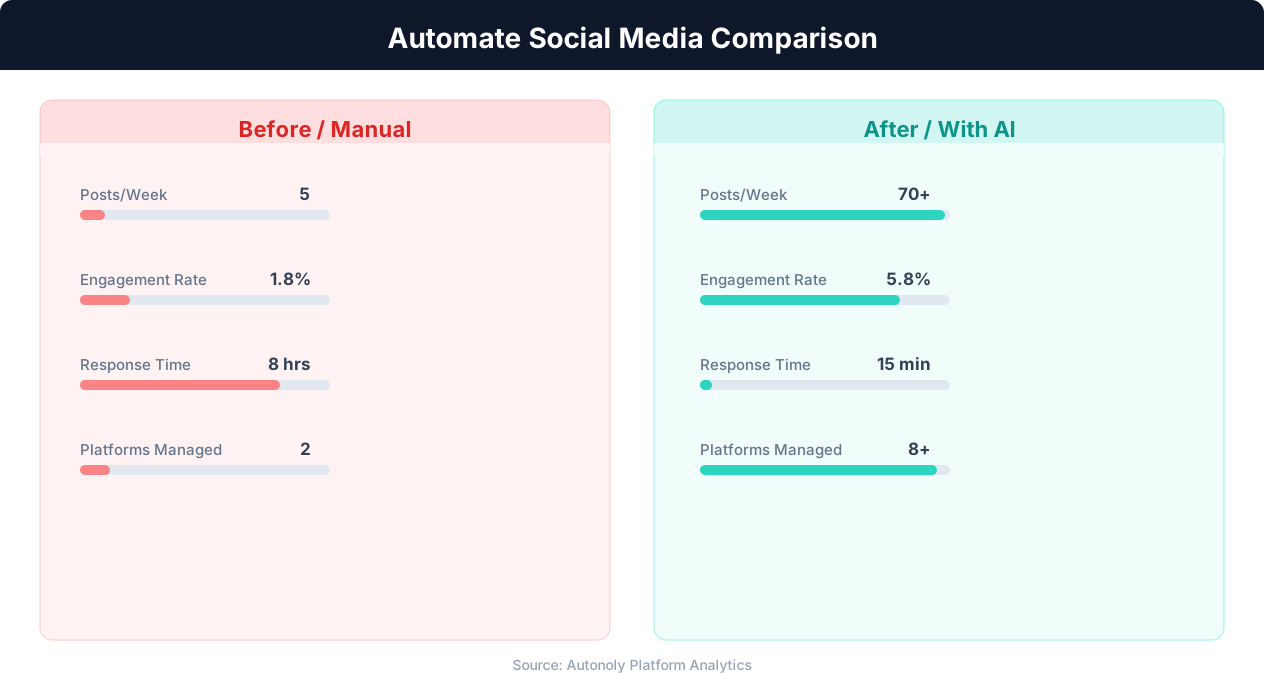
Posting consistency for manual vs automated social media
Key Insight: Automated social listening captures 12x more brand mentions and competitor activity than manual monitoring across platforms (Brandwatch Research).
How Autonoly Tracks Reddit Discussions
The AI Agent Chat lets you set up monitoring conversationally. Describe the subreddits and topics you care about, and the agent builds a workflow that runs on your chosen schedule.
The Browser Automation engine navigates Reddit's JavaScript-heavy interface with a full Playwright browser. This is essential because Reddit's modern design loads content dynamically, uses infinite scrolling, and collapses long comment threads. The agent expands collapsed threads, scrolls through results, and captures all relevant content — something no simple HTTP scraper can do. Unlike the Reddit API (which has aggressive rate limits and requires OAuth), browser-based scraping accesses the public page directly.
Comprehensive Data Extraction
For each matching discussion, the Data Extraction engine captures the post title, body text, author username, subreddit, post type (text, link, image, video), upvote count, upvote ratio, award count, comment count, top-level comments (configurable depth), flair tags, and timestamps.
This level of detail enables sophisticated analysis. You can filter for high-engagement discussions (many upvotes and comments), identify recurring themes across posts, track how discussion topics evolve over time, and compare engagement patterns across different subreddits. The agent matches posts against your specified keywords using flexible text matching — you can provide exact phrases, multiple terms with OR logic, or even regex patterns for advanced filtering.
Configuring Multi-Subreddit Monitoring
The Visual Workflow Builder makes it easy to monitor multiple subreddits in a single workflow. Add one extraction step per subreddit, then merge results with a Data Processing node before writing to Google Sheets. Common monitoring configurations include:
Brand monitoring — Track mentions of your product name across r/SaaS, r/startups, r/technology, and niche subreddits
Competitor tracking — Monitor posts mentioning competitor names in your industry subreddit
Topic research — Collect all posts in r/MachineLearning that mention "fine-tuning" or "RAG"
Recruitment signals — Track "hiring" posts in r/forhire, r/remotework, or language-specific subreddits
Each subreddit can have different keywords and filters while sharing the same Google Sheets destination.
Sentiment and Topic Analysis
The Data Processing feature enriches each entry with sentiment analysis — positive, negative, or neutral — and topic categorization. This transforms raw discussion data into research-ready insights. For product teams, sentiment scores highlight which feature discussions are driven by frustration versus excitement. For researchers, topic categories enable quantitative analysis of qualitative data.
For teams that need deeper analysis, SSH & Terminal support lets you run Python sentiment models on extracted post titles. Classify mentions as positive, negative, or neutral and add a sentiment column to your spreadsheet automatically.
Google Sheets as a Research Database
The spreadsheet format enables powerful analysis. Pivot tables summarize discussion volume by subreddit and week. Conditional formatting highlights high-engagement or negative-sentiment posts. Charts visualize trends over time. Google Sheets' built-in features let you create SPARKLINE charts, set up Apps Script email alerts, and use collaborative annotation — all on live data that updates with every workflow run.
Customization and Filtering
You control what gets tracked. Filter by minimum upvote count to focus on popular discussions only. Track specific flairs (like "Question" or "Discussion" in relevant subreddits). Include or exclude specific keywords to narrow results. The Logic & Flow feature enables conditional routing — high-priority discussions can trigger a Slack integration alert while still being logged to Sheets.
Scheduling and Growth
Daily monitoring captures the rhythm of subreddit activity. Over weeks and months, your Google Sheet grows into a comprehensive database of community discussions. The workflow automatically deduplicates by comparing post URLs against existing rows, so you never get duplicate entries even if you increase frequency. This historical data is invaluable for trend analysis, competitive benchmarking, and understanding how community sentiment shifts around product launches, industry events, or PR incidents. Check our templates library for pre-built Reddit tracking workflows, visit our pricing page for plan details, and explore the Integrations page. For more context on automated data collection, see our guide on web scraping.
Further Reading
Explore more about the tools and techniques used in this workflow: Web Scraping Best Practices, Marketing Automation, Scheduled Execution.