

Why Automate Backlink Monitoring?
Backlinks remain one of the strongest ranking factors in SEO, and their impact is far from abstract — inbound-marketing research from HubSpot repeatedly links referring-domain growth to durable gains in organic visibility. A single high-quality backlink from an authoritative domain can move your rankings for a target keyword by several positions, translating directly into increased organic traffic and revenue. Conversely, losing a key backlink from a high-authority referring domain can cause noticeable ranking drops within days. Google's algorithm treats backlinks as votes of confidence, and each vote from a reputable source carries significant weight in determining your position.
Yet most teams only check their backlink profile monthly — or even less frequently, only investigating when they notice a ranking change during a routine check. By that time, the cause-and-effect connection between lost links and ranking drops has become murky. A link that disappeared three weeks ago is far harder to reclaim than one that vanished yesterday. The referring page may have been redesigned, the webmaster may have moved on, or the content may have been completely removed. Timely detection is the difference between a quick reclamation email and a lost opportunity.
Automating backlink monitoring with Browser Automation gives you daily visibility into your backlink profile. You know immediately when a valuable link is gained or lost, allowing you to take action quickly — thank a new referring site and build the relationship, reclaim a lost link through prompt outreach, or investigate a sudden drop in referring domains that might signal a larger problem like a competitor's negative SEO campaign or a site migration gone wrong.
This is especially critical during active link building campaigns where your team is investing significant time and money in outreach, guest posting, digital PR, and content marketing. Daily monitoring shows you exactly which efforts are producing results and creates a direct feedback loop between outreach activity and link acquisition. Without this daily visibility, you are investing in link building without knowing whether your investment is paying off until weeks or months later.
How the AI Agent Monitors Backlinks
Autonoly's AI Agent Chat opens your backlink data source — this could be Google Search Console, Ahrefs, Moz, SEMrush, Majestic, or any other SEO platform with a web interface. The Data Extraction engine reads the backlink tables, extracting referring domain, referring page URL, target page on your site, anchor text, link type (dofollow/nofollow), and link authority metrics like domain rating or domain authority.
On the first run, the agent establishes a baseline snapshot of your backlink profile. On subsequent runs, it compares the current snapshot against the previous one to identify changes — new links that appeared and existing links that disappeared. The comparison is thorough, checking every referring domain and page rather than just sampling, so no changes slip through.
The agent handles login-protected dashboards through Browser Automation, navigating complex SEO tool interfaces with their filters, pagination, and data export options. Because it uses a real browser, it works with any SEO platform without requiring API access, custom integrations, or paid API tiers.
What Data You Get
Each monitoring run detects and logs:
New backlinks — Referring domains and pages that started linking to your site since the last check
Lost backlinks — Links that were present in the previous snapshot but are now gone
Authority metrics — Domain authority or domain rating of each referring domain
Anchor text — The clickable text used in each link
Link type — Dofollow, nofollow, sponsored, or UGC attributes
Target page — Which page on your site receives the link
First seen / Last seen — Timestamps for link lifecycle tracking
The Data Processing engine categorizes each change by significance. A new link from a domain with authority above 60 is more noteworthy than one from a low-authority blog. Lost links from high-authority sites deserve immediate attention and reclamation outreach.
Customizing Your Workflow
Use Logic & Flow to customize notification thresholds and routing. You might only want to be alerted when links from domains above a certain authority level are gained or lost, filtering out noise from low-quality sites. Create separate alert tiers — high-authority link changes trigger immediate Slack notifications, while low-authority changes are batched into a weekly summary digest.
The Visual Workflow Builder lets you add analysis steps that correlate backlink changes with ranking changes from your SEO rank tracking workflow. When you can see that gaining three links from high-authority sites corresponded with a ranking jump, you have the data to justify continued investment in link building and quantify the ROI of your outreach efforts.
Competitor Backlink Monitoring
Extend this workflow to monitor competitor backlink profiles. Track when competitors gain links from publications, resource pages, or industry directories in your niche. These are potential link opportunities for your own site — if a page links to your competitor, they might link to you too. Build a competitive link gap analysis that identifies referring domains linking to competitors but not to you, creating a prioritized outreach target list.
Integration Options
Beyond Slack alerts, the agent logs all backlink data to a Google Sheets spreadsheet for historical analysis. Over weeks and months, you build a complete picture of your backlink growth, seasonal patterns, and the effectiveness of your link building strategies. Chain a Gmail step to automatically send reclamation emails when high-authority backlinks are lost. Export data to Airtable or Notion for team-wide SEO dashboards. Visit the Integrations page for all supported destinations, or browse the templates library for pre-built backlink monitoring workflows.
Use Cases
SEO teams monitoring their link profile health and tracking link building campaign ROI
Digital PR agencies measuring the backlink impact of press outreach and media placements
Content marketers tracking which content pieces attract the most natural backlinks
E-commerce sites monitoring product page backlinks that drive referral traffic and rankings
Competitive intelligence teams tracking competitor link acquisition strategies and identifying gaps
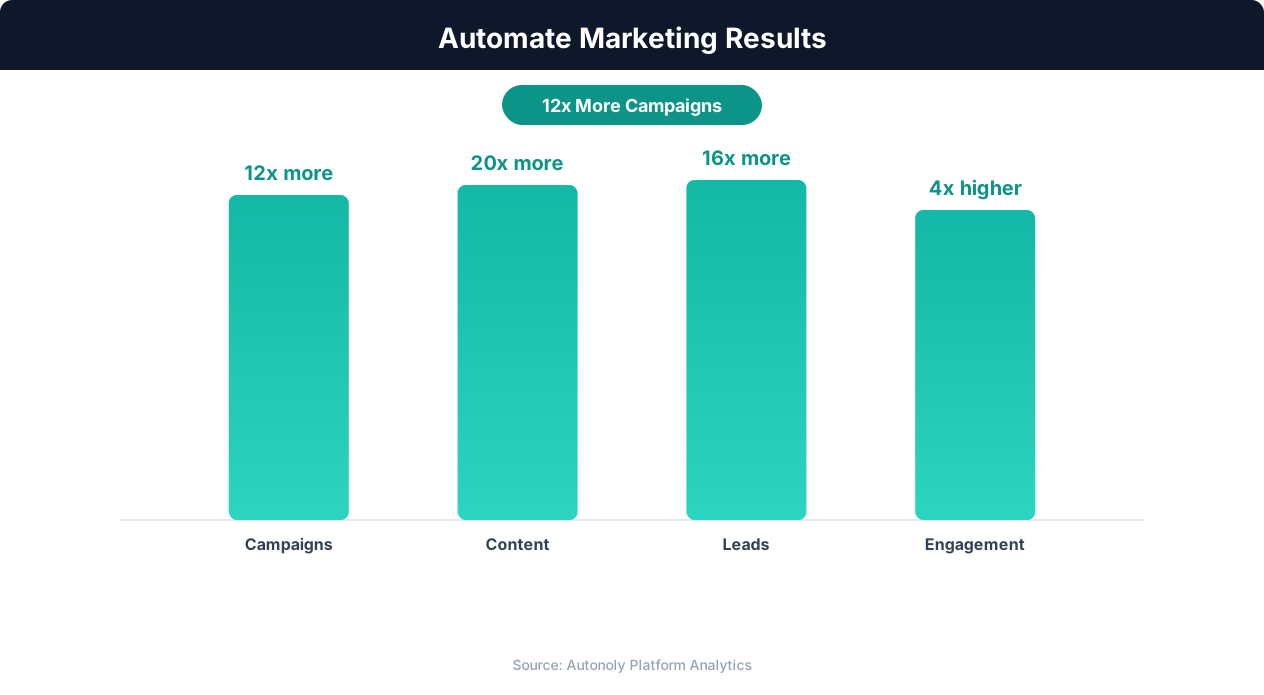
Marketing team productivity gains from automation
Key Insight: Companies automating their marketing analytics report 26% higher marketing ROI due to real-time performance tracking and rapid campaign optimization (Forrester).
How the AI Agent Does It
The agent opens your SEO tool dashboard via Browser Automation, navigates to the backlinks section, and extracts the current referring domain and page data. The Data Extraction engine reads paginated tables and exports, capturing all link details across multiple pages of results. It compares the current data against the stored previous snapshot, identifies changes, and posts a summary to Slack. The full dataset is also appended to Google Sheets for historical tracking.
Handling Multiple Data Sources
If you use multiple SEO tools for backlink data, the agent can check each one in sequence and merge the results. This provides more comprehensive coverage since different tools use different web crawlers and discover different backlinks at different times. The merged dataset gives you the most complete picture available.
Key Insight: 63% of marketers say their biggest challenge is generating traffic and leads. Automation addresses this by running campaigns 24/7 without manual intervention (HubSpot State of Marketing).
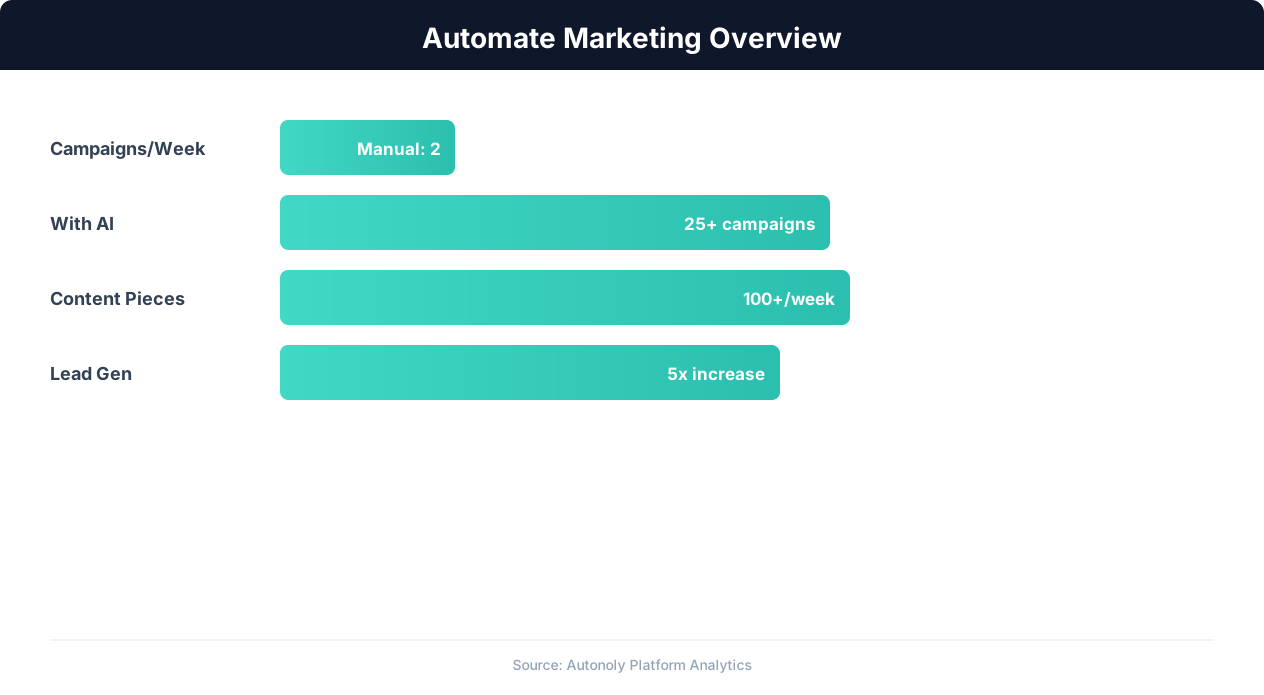
Marketing automation impact on campaign ROI
Key Insight: Automated content repurposing saves marketing teams 12+ hours per week while increasing content output by 3x across channels (Content Marketing Institute).
Scheduling and Automation
Run this workflow daily using the Visual Workflow Builder. Each morning, the agent checks your backlink profile and posts a change summary to Slack. Add Logic & Flow conditions to only alert on high-authority link changes, suppressing notifications about low-quality domains. For teams running active link building campaigns, increase monitoring to twice daily to see results faster. See our pricing page for run frequency details.
Further Reading
Explore more about the tools and techniques used in this workflow: Web Scraping Best Practices, Marketing Automation, Website Monitoring, Scheduled Execution.