

Why Automate Inventory Sync?
Selling on both Shopify and Amazon is a proven growth strategy — Amazon provides massive organic traffic and buyer intent, while Shopify gives you brand ownership, higher margins, and direct customer relationships. But managing inventory across two platforms manually is a recipe for overselling. When a product sells on Amazon but the Shopify inventory is not updated immediately, you risk selling the same unit twice — leading to order cancellations, negative reviews, and potential account suspension on Amazon. The reverse is equally painful: a Shopify sale that is not reflected on Amazon can trigger the same cascade of problems, including Amazon's dreaded late shipment rate penalties.
The consequences of overselling extend far beyond a single cancelled order. Amazon's seller performance metrics are unforgiving — a cancellation rate above 2.5% can trigger account suspension, cutting off your largest sales channel overnight. On the Shopify side, overselling damages customer trust and generates support tickets that consume your team's time. For stores selling 50 or more units per day across both channels, manual inventory reconciliation would need to happen almost continuously to stay accurate, which is simply not feasible without automation.
Dedicated multichannel inventory tools like ChannelAdvisor, Sellbrite, or Linnworks exist, but they are expensive — often $100-500 per month — require complex onboarding, demand API access that some sellers find difficult to configure, and lock you into their ecosystem with long-term contracts. With Autonoly's Browser Automation, you get a flexible, affordable alternative that reads and writes inventory data directly through the platforms' admin interfaces — no API keys, no developer setup, no monthly subscription to yet another SaaS tool. The agent interacts with Shopify and Amazon exactly as you would, navigating the same screens and updating the same fields.
For sellers with seasonal products or limited-edition drops, accurate inventory sync is even more critical. A flash sale that depletes stock on one channel must reflect on the other within hours, not days. The automation ensures that whether you sell your last unit through Shopify or Amazon, the other channel immediately shows the product as out of stock, preventing the costly oversell scenario.
How the Sync Works
The AI agent opens a real browser and logs into your Shopify admin to read current inventory levels for all products or a specific subset you define. It then switches to Amazon Seller Central's inventory management page and reads the corresponding stock quantities there. By comparing both datasets and applying your safety stock rules — for example, always holding back 5 units as a buffer on each channel — the agent calculates the correct available quantity for each platform.
If Shopify shows 100 units and Amazon shows 95 because 5 sold on Shopify since the last sync, the agent updates Amazon to 95. If Amazon sold 10 units, Shopify gets updated accordingly. The Data Extraction engine handles the dynamic JavaScript interfaces on both platforms, including pagination for stores with hundreds or thousands of SKUs. The agent processes variant-level inventory too — each size, color, and style combination is tracked independently, ensuring accurate stock levels down to the individual variant.
Preventing Stockouts and Oversells
Beyond simple quantity sync, you can configure the agent to trigger alerts when stock drops below a threshold. Combine inventory sync with a Slack notification to warn your purchasing team when a bestseller is running low — for example, alert when any SKU drops below 20 units across both channels combined. Or route low-stock alerts to Gmail so your supplier or manufacturer can start production before you run out entirely.
Track inventory movements over time by logging each sync to Google Sheets. This historical data helps you forecast demand, identify seasonal patterns, calculate sell-through rates, and optimize reorder points — turning a simple sync task into a strategic inventory intelligence system. Use Data Processing nodes within your workflow to calculate days-of-stock-remaining for each SKU, flagging products that need reordering before they sell out.
Multi-Warehouse Support
If you manage inventory across multiple warehouses or fulfillment centers, the agent can read location-specific quantities from Shopify and aggregate them for Amazon, or split inventory allocations based on rules you define. The Visual Workflow Builder makes it easy to add conditional logic for complex inventory routing scenarios — for example, allocating 60% of stock to Amazon and 40% to Shopify for products that sell faster on Amazon, while reversing the ratio for products that perform better on your own store.
Exporting and Integrating Results
Every sync run generates a detailed log that can be sent to Google Sheets, Notion, or Airtable for record-keeping and analysis. Check our templates library for pre-built inventory sync workflows you can clone and customize. For more background on multichannel inventory management, see the workflow automation glossary. Visit our pricing page to compare the cost against dedicated inventory management platforms.
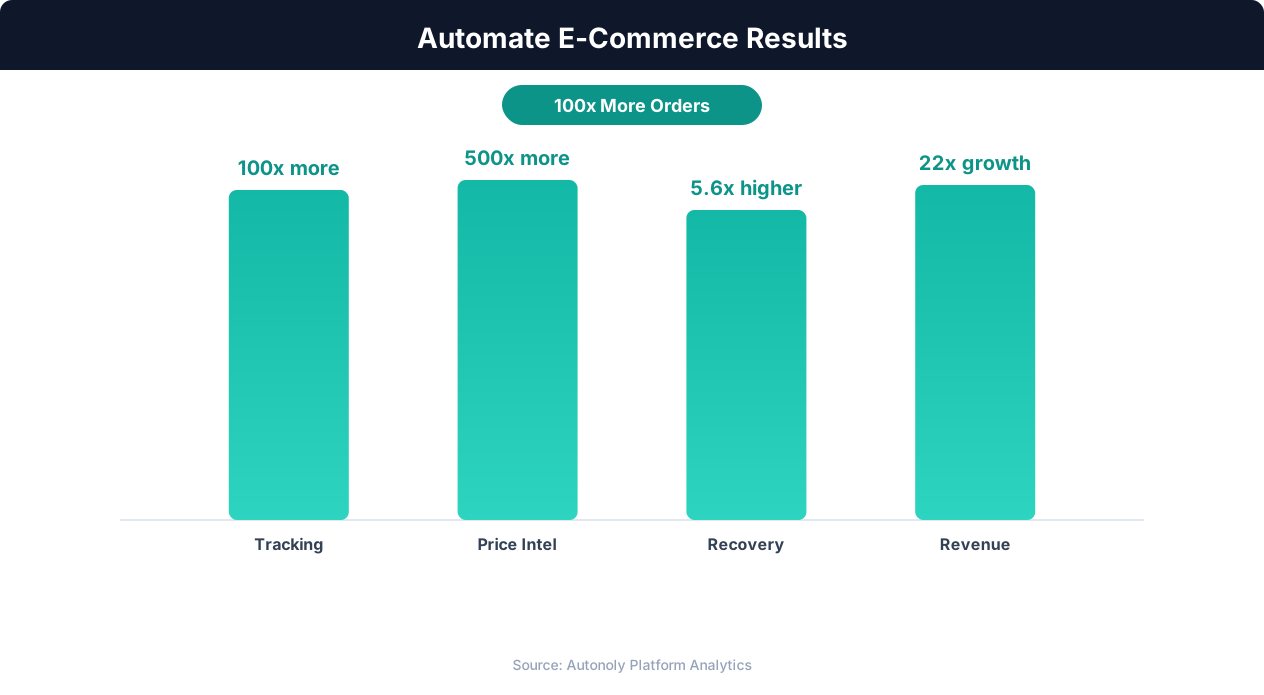
Revenue growth from e-commerce workflow automation
Key Insight: Product listing automation cuts catalog management time by 78%, allowing sellers to scale from 500 to 5,000+ SKUs without additional staff (BigCommerce Research).
How the AI Agent Does It
The agent leverages Browser Automation to interact with both Shopify and Amazon Seller Central through a real Chromium browser session. It navigates Shopify's inventory pages, extracts SKU-level quantity data including variant-specific counts and location-based inventory, then switches to Amazon Seller Central to do the same. Product matching uses SKU codes you define in the mapping, and the agent handles pagination, search, and filtering on both platforms automatically. Because it uses a real browser, it works with any Shopify plan and handles Amazon's frequently changing Seller Central interface without breaking.
The sync is bidirectional by default — whichever platform has newer sales data drives the update on the other. You can also configure it as one-directional if one platform is your source of truth. The agent uses AI Agent Chat intelligence to detect anomalies — if inventory on one platform jumps unexpectedly (perhaps due to a manual adjustment or a return), it flags the discrepancy for your review rather than blindly propagating a potentially incorrect number. Error handling ensures that if one platform is temporarily unavailable or slow to respond, the agent retries rather than leaving your inventory in a partially synced state.
Key Insight: Automated pricing intelligence captures 31% more competitive opportunities by monitoring and responding to market changes in real time (McKinsey Retail Practice).
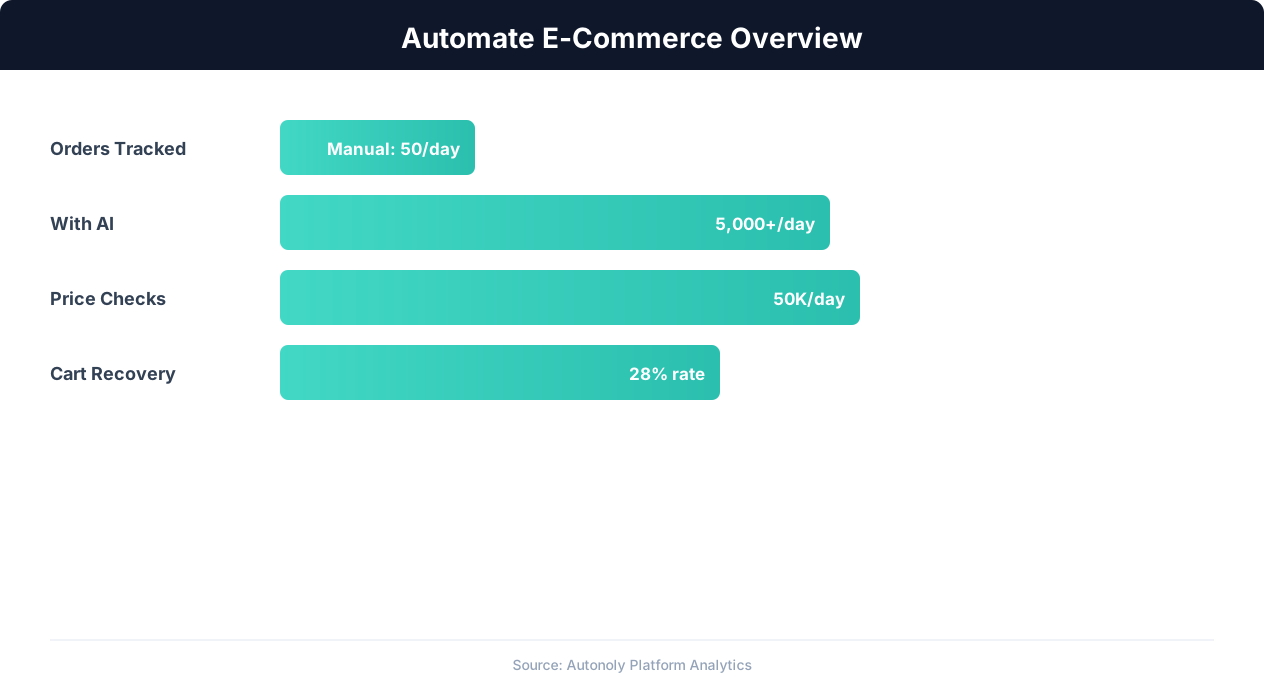
E-commerce automation impact on key performance metrics
Key Insight: Automated inventory sync reduces stockouts by 63% and overstock situations by 45%, directly improving margins (National Retail Federation).
Scheduling and Automation
Run the inventory sync every 4 hours to keep both channels aligned throughout the day. For high-velocity stores processing hundreds of orders daily, increase frequency to every 2 hours or even hourly — the cron-based scheduler in the Visual Workflow Builder supports any interval you need. Each run logs a detailed summary of changes made, including which SKUs were updated, the old and new quantities, and the direction of the sync. Differential processing ensures the agent only modifies inventory for SKUs where quantities have actually changed, minimizing unnecessary writes to either platform.
Add Logic & Flow conditions to pause syncing for products that are intentionally listed as out-of-stock on one channel, exclude pre-order items that should not be synced until they arrive in your warehouse, or apply different safety stock buffers by product category. Receive a Slack summary after each sync showing how many products were updated and any discrepancies detected. Chain this with other e-commerce workflows — for example, trigger a restock purchase order via Gmail to your supplier when a product's combined inventory drops below your reorder threshold. Use SSH & Terminal to run custom demand forecasting scripts that feed into your reorder decisions.
Further Reading
Explore more about the tools and techniques used in this workflow: No Code Automation Guide, Ecommerce Price Monitoring, Integrations, Scheduled Execution.