


Why Automate Sales Pipeline Slack Alerts?
In a fast-moving sales team, visibility into deal progress is everything. When a rep moves a deal from "Demo Scheduled" to "Proposal Sent," the account executive, sales manager, pre-sales engineer, and support team all benefit from knowing immediately. Yet most teams using spreadsheets as their CRM rely on weekly pipeline review meetings or ad-hoc Slack messages to share updates. By the time the information reaches the right people, hours or days have passed — and the opportunity for real-time collaboration on active deals is lost.
The cost of delayed pipeline visibility is significant. A sales manager who does not know a deal moved to negotiation cannot step in to help close it. A pre-sales engineer who does not know a demo was scheduled cannot prepare a tailored presentation. A finance team that does not know a large deal is approaching close cannot prepare the contract or credit check. These coordination failures slow down deal velocity, the single most important metric in most sales organizations. Research shows that deals closed within the average sales cycle length have a 50% higher win rate than deals that drag past it — and pipeline visibility directly impacts your ability to keep deals moving.
Automating pipeline alerts with Google Sheets and Slack integration creates a live pulse of your sales funnel. Every stage change triggers an instant notification in your team's Slack channel, so everyone stays aligned without anyone having to remember to send an update. The result is a team that operates with shared situational awareness, where the right people can jump in to help at the right moment.
This is especially powerful for remote and distributed teams where spontaneous conversations about deal status do not happen naturally. In a physical office, a rep might mention a deal update in passing; in a remote environment, that update never happens unless it is systematized. The automated alerts create a shared awareness that mimics the best parts of sitting together in an office, ensuring that geographic distance does not create information gaps.
How the AI Agent Monitors Your Pipeline
Autonoly's AI Agent Chat reads your sales pipeline spreadsheet through Browser Automation on a recurring schedule. On each run, it takes a snapshot of every deal's current stage and compares it against the previous snapshot. Any changes are flagged and formatted into Slack notifications with full context.
The Data Extraction engine reads your spreadsheet regardless of how it is structured. Whether your stages are in a dropdown column, color-coded cells, a separate status field, or even a custom formula-driven field, the agent identifies the relevant data. It also pulls contextual information — deal name, value, owner, close date, and any custom columns you define — to include in each notification.
The comparison logic is smart enough to handle common spreadsheet edits that are not actual stage changes. If someone reformats a cell, corrects a typo in a company name, reorders rows, or adjusts a formula, the agent does not fire false alerts. It only triggers on genuine stage transitions, keeping your Slack channels free from noise and ensuring that every alert is actionable.
What Data You Get
Each Slack notification includes rich deal context so your team can act immediately without opening the spreadsheet:
Deal Name — The company or opportunity identifier
Old Stage and New Stage — Exactly which transition occurred
Deal Value — The dollar amount at stake
Deal Owner — Who is responsible for this opportunity
Expected Close Date — When the deal is projected to close
Days in Pipeline — How long since the deal entered the pipeline
Custom Fields — Any additional columns you want included (product line, region, lead source)
Customizing Your Workflow
The Visual Workflow Builder lets you define exactly which stage transitions generate alerts and what information each alert contains. Common configurations include:
All transitions: Notify on every stage change for full visibility
Key milestones only: Alert only when deals reach Proposal, Negotiation, or Closed Won/Lost
High-value deals: Notify only when deals above a certain dollar threshold move stages
Stalled deals: Alert when a deal has not moved stages in more than 14 days
Backward movement: Highlight deals that regress to an earlier stage, signaling potential problems
You can customize the message format and add visual indicators — a green checkmark for advancement, a red flag for deals moving backward, and a trophy for closed-won deals. This makes scanning Slack notifications fast and intuitive even when multiple deals move in a single period.
Escalation and Routing
Use Logic & Flow to route notifications to different Slack channels based on deal characteristics. Enterprise deals go to the #enterprise-deals channel. Deals in the final negotiation stage go to a channel that includes finance and legal. Closed Won deals trigger a celebration message in #wins. Stalled deals that have not progressed in two weeks get escalated to the management channel with a prompt for intervention.
You can also configure direct message alerts for deal owners, so individual reps get notified about their own deals without cluttering team channels. This creates a layered notification system that delivers the right information to the right people at the right level of urgency.
Integration Options
Pipeline alerts pair naturally with other Autonoly workflows. Connect deal stage changes to automated actions — when a deal reaches the "Proposal" stage, trigger the proposal generation workflow to create a PDF automatically. When a deal closes as won, trigger the customer onboarding sequence. Log all stage transitions to a separate analytics sheet for pipeline velocity reporting. Visit the Integrations page to see all available connections, or browse the templates library for pre-built pipeline monitoring workflows.
Use Cases
Sales managers maintaining real-time visibility across their team's entire pipeline
Remote sales teams creating shared awareness of deal progress across time zones
Account-based selling teams where multiple stakeholders need to know when key deals move
Startups where founders wear multiple hats and need passive pipeline awareness without manual checking
Sales ops teams tracking pipeline velocity and identifying bottlenecks in real time
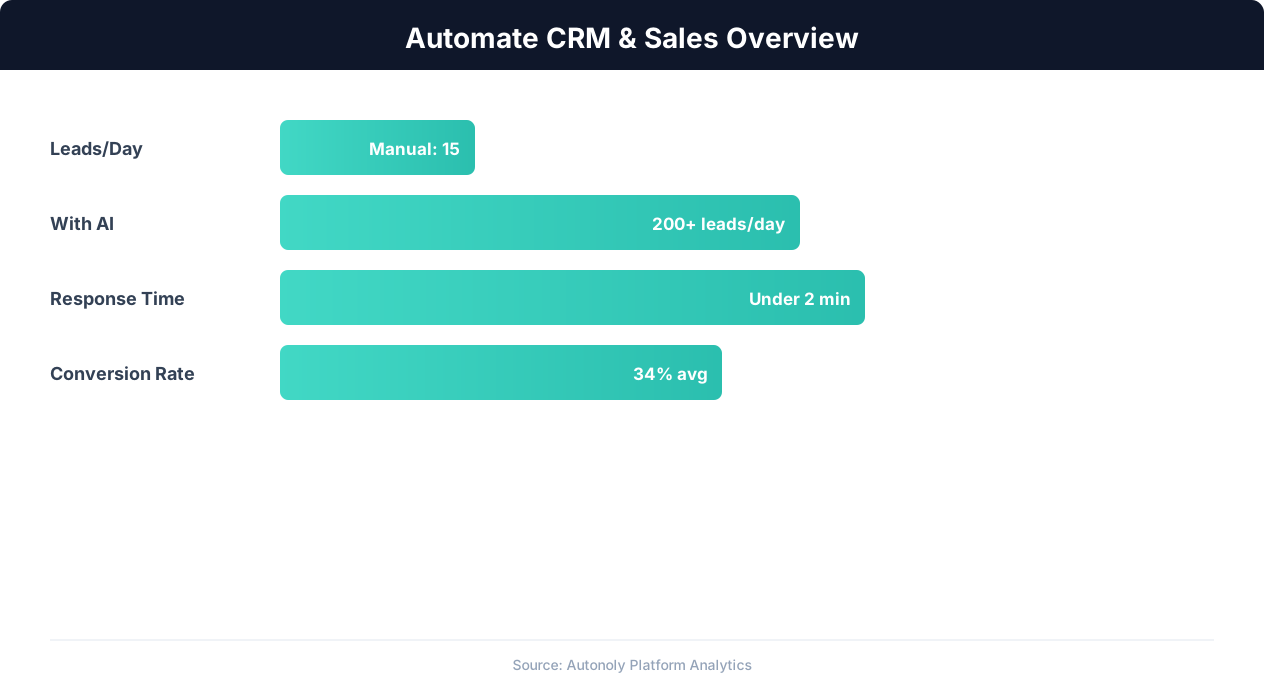
CRM automation impact on lead conversion rates
Key Insight: Organizations that automate CRM data entry report 41% higher revenue per salesperson and 27% faster deal close rates (Nucleus Research).
How the AI Agent Does It
The agent opens a real browser, navigates to your Google Sheets pipeline spreadsheet, and reads the current state of all deals. It compares this against a stored snapshot from the previous run to identify stage changes. For each change detected, it composes a formatted message and posts it to your designated Slack channel using Browser Automation. The agent handles Google Sheets authentication, Slack posting, and state management entirely on its own.
Snapshot Management
The agent stores each run's snapshot internally so it can detect changes on the next run. This means it works with any spreadsheet layout and does not require you to add formulas, scripts, change-tracking macros, or Apps Script code to your sheet. Your pipeline spreadsheet stays clean and simple — just a standard spreadsheet that your team edits naturally.
Key Insight: Companies using automated lead capture see 3x more qualified leads entering their pipeline compared to manual processes (Salesforce State of Sales Report).
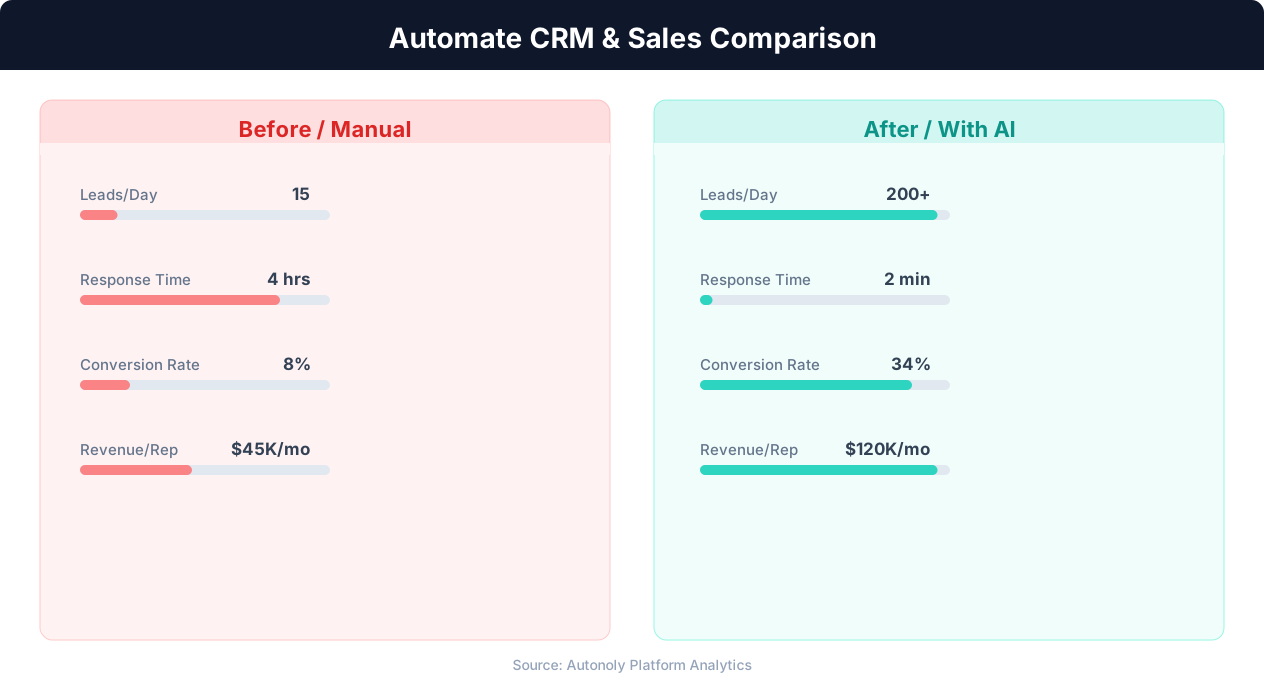
Manual vs automated CRM data entry time comparison
Key Insight: Responding to leads within 5 minutes makes you 9x more likely to convert them. Automated capture and routing makes sub-minute response times possible.
Scheduling and Automation
Schedule this workflow to run every four hours using the Visual Workflow Builder. The agent monitors your Google Sheets pipeline and posts to Slack only when genuine stage changes are detected. Add Logic & Flow conditions to suppress notifications outside business hours or to aggregate after-hours changes into a single morning summary message that gives your team a clean start to the day. For high-velocity pipelines, increase to hourly monitoring. See our pricing page for run frequency options.
Further Reading
Explore more about the tools and techniques used in this workflow: No Code Automation Guide, Automate Lead Generation, Webhooks.