

Why Automate Patient Follow-Up Emails?
Post-visit communication is one of the most impactful yet frequently neglected aspects of patient care — and when follow-up messages reference diagnoses or treatment, they fall squarely under the HIPAA rules for protected health information. A timely follow-up email reinforces care instructions, demonstrates that your practice values each patient, and creates opportunities for early intervention if recovery is not going as expected. Studies consistently show that practices with systematic follow-up communication have higher patient satisfaction scores, better treatment adherence, and stronger retention rates. In an era where patients have more choices than ever about where to receive care, the quality of communication between visits is a powerful differentiator.
The challenge is scale. Even a small practice sees dozens of patients daily, and writing individual follow-up emails for each one is simply not feasible for most staff. A provider who sees 25 patients in a day cannot be expected to compose personalized follow-up messages for each one — and delegating the task to front desk staff means it competes with phone calls, check-ins, and scheduling for attention. The result is that follow-up communication either does not happen at all, happens inconsistently, or defaults to generic one-size-fits-all messages that fail to deliver the personalized care instructions patients need.
By automating follow-ups with Google Sheets and Gmail, every patient receives a personalized, relevant email without adding any work to your team's plate. Post-surgical patients receive wound care instructions and warning signs. Dental patients get care tips specific to their procedure. Therapy clients receive homework reminders. Each message is tailored to the visit type and personalized with the patient's name and their specific provider's name — creating the impression of individual attention at industrial scale.
This workflow serves medical practices, dental offices, surgical centers, therapy clinics, dermatology offices, physical therapy practices, and any provider that wants to maintain strong patient relationships between visits. The impact extends beyond patient satisfaction — practices with consistent follow-up communication see higher appointment completion rates for follow-up visits, better medication adherence, and more online reviews (since patients who feel cared for are more willing to share their experience). Visit our templates library for pre-built follow-up workflows by specialty.
How the AI Agent Sends Follow-Ups
Each day, the agent reads your completed visit log from Google Sheets. This log includes patient name, email address, visit date, provider name, visit type (e.g., annual exam, procedure, follow-up visit), diagnosis codes or visit notes, and any specific follow-up instructions the provider wants communicated. The Data Processing engine matches each visit type to an email template — a post-surgical patient receives wound care instructions and warning signs, a dental cleaning patient gets flossing tips and a reminder to schedule their next visit, and a therapy client receives a summary of homework exercises.
Each email is personalized with the patient's name, their specific provider's name, and the visit date. The tone is warm and professional, consistent with your practice's branding. A clear call to action — schedule a follow-up, call with questions, or complete a satisfaction survey — gives the patient a natural next step. Emails are sent through Gmail from your practice's email address, and the agent logs send status back to the spreadsheet for tracking. The AI Agent Chat lets you create and refine email templates through natural conversation.
For visit types that warrant extended follow-up, the agent manages multi-touch sequences — tracking which stage each patient has received and sending the next appropriate message at the configured interval. A surgical patient might receive day-one care instructions, a day-three recovery check-in, and a two-week follow-up appointment reminder, all from a single daily workflow run.
What Data You Get
Your follow-up tracking log captures comprehensive communication data:
Patient Name — Who received the follow-up
Visit Date — When the appointment occurred
Provider — Which doctor or clinician saw the patient
Visit Type — Annual exam, procedure, follow-up, lab work, etc.
Template Used — Which follow-up template was sent
Send Timestamp — When the email was delivered
Delivery Status — Sent, failed, or skipped
Sequence Stage — For multi-day sequences, which message in the series
Survey Response — If a satisfaction survey was included, whether the patient responded
Customizing Your Workflow
The Visual Workflow Builder lets you create template libraries mapped to visit types. Common templates include general visit thank-yous, post-procedure care instructions, lab work timeline explanations, dental care tips, and mental health session summaries with homework reminders. Each template supports dynamic placeholders for patient-specific details. The Logic & Flow engine selects the right template automatically based on the visit type column. Add satisfaction survey links to measure patient experience — responses feed into a Google Sheets tab where the Data Processing engine aggregates scores and flags negative feedback for immediate attention.
Integration Options
Send follow-ups through Gmail with your practice's branded email address. Log all communication to Google Sheets for compliance documentation. Add Slack notifications to alert office managers about delivery failures or negative survey responses. Track follow-up email performance with weekly summary reports showing send volumes, survey response rates, and delivery metrics. Visit the Integrations page for all connection options.
Use Cases
Medical offices sending post-visit care instructions and follow-up scheduling reminders
Surgical centers delivering multi-day recovery check-in sequences with escalating care guidance
Dental practices sharing procedure-specific care tips and next cleaning reminders
Therapy clinics reinforcing session takeaways and homework assignments between appointments
Dermatology offices providing post-treatment skin care instructions and sun protection reminders
Physical therapy practices sending home exercise reminders between PT sessions
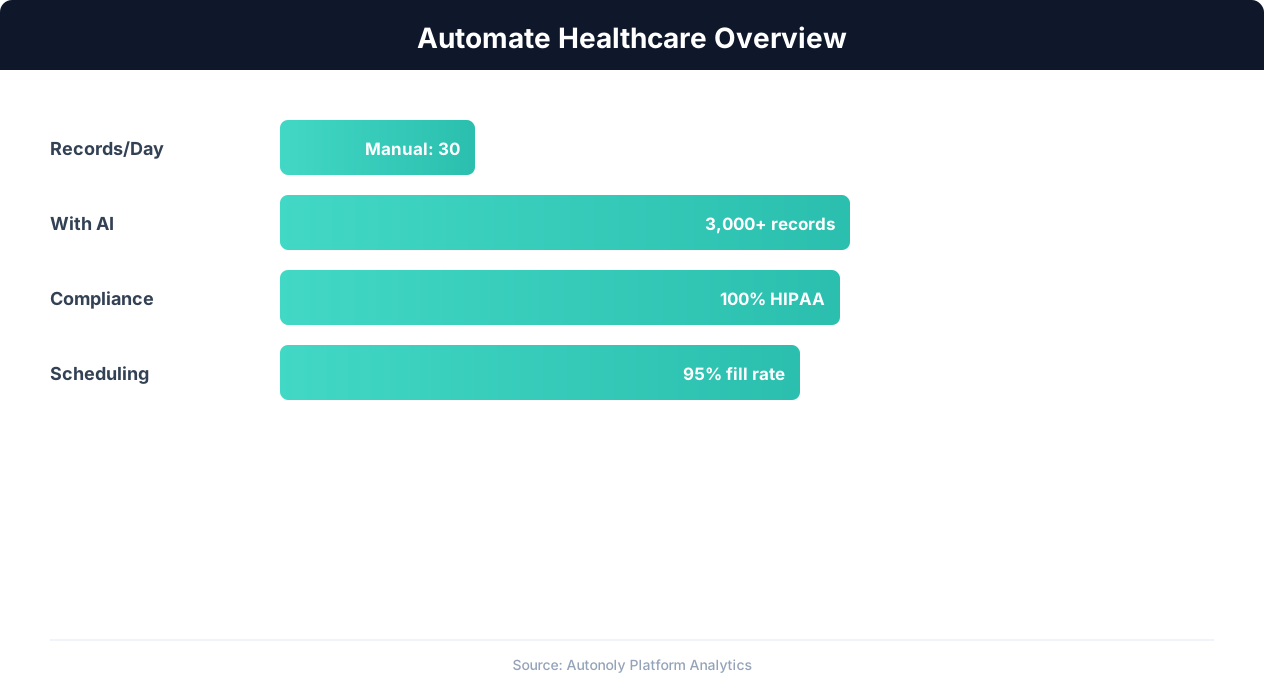
Healthcare automation impact on administrative efficiency
Key Insight: Providers using automated patient intake report 42% shorter wait times and 29% higher patient satisfaction scores (Advisory Board).
How the AI Agent Does It
The agent reads your completed visit log from Google Sheets each morning, matches each visit to the appropriate follow-up template, and personalizes the email with patient and provider details. Emails are sent through Gmail and delivery status is logged back to the spreadsheet. The Logic & Flow engine handles template selection based on visit type. For multi-provider practices, the agent handles all providers in a single run, referencing the correct provider name in each email.
Key Insight: Healthcare organizations spend 34% of total revenue on administrative tasks. Automation can reduce this overhead by up to 50% (McKinsey Healthcare Report).
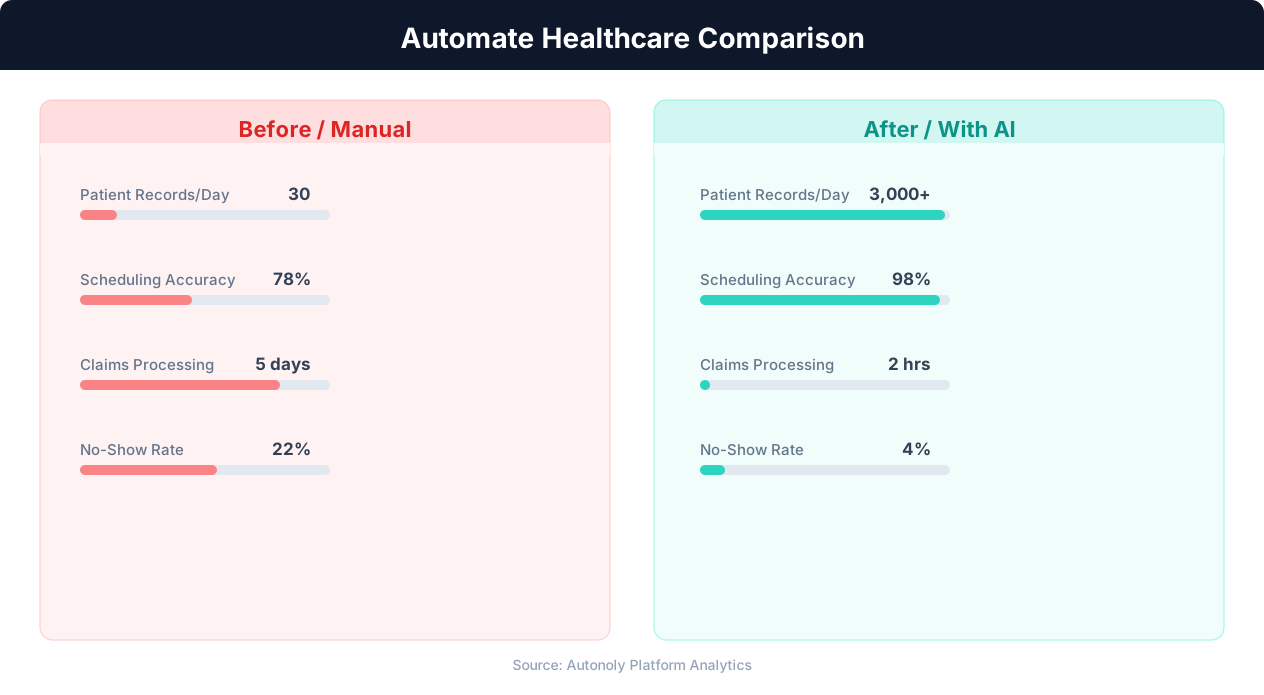
Patient wait time reduction with automated scheduling
Key Insight: AI-powered medical data extraction achieves 97% accuracy on standard clinical documents, reducing transcription errors that affect 1 in 5 manual entries (AHIMA).
Scheduling and Automation
The follow-up workflow runs daily, processing all visits from the previous day. Morning runs ensure patients receive their follow-up email the day after their visit — a timing sweet spot that balances promptness with not overwhelming patients on the same day as their appointment. The Visual Workflow Builder lets you configure the exact schedule and add multi-day sequences for certain visit types.
Configure visit-type-specific templates with Logic & Flow conditions. Add satisfaction surveys, multi-day recovery sequences, and weekly performance summaries. The entire follow-up pipeline runs without manual intervention, and you can monitor effectiveness through weekly reports delivered via Gmail. Check pricing to see how many automated runs are included in your plan.
Further Reading
Explore more about the tools and techniques used in this workflow: Automate Email Reports, No Code Automation Guide, Email Campaigns, Scheduled Execution.