


Why Automate SEO Rank Tracking?
Search engine rankings directly impact your organic traffic and revenue in ways that compound dramatically at each position. A drop from position 3 to position 8 for a high-volume keyword can cut your click-through rate by 75%, and slipping off the first page entirely can reduce clicks to near zero — the first page captures over 90% of all search traffic. For a keyword that drives 10,000 monthly searches, the difference between position 3 and position 13 could represent thousands of lost visitors and significant revenue each month. Yet most teams check rankings manually — opening Google, searching each keyword, scrolling through results to find their site, and jotting down the position. With 20 or 50 target keywords, this takes an hour or more every day.
The manual approach also produces unreliable data. Because rankings fluctuate throughout the day and across locations and devices, a single manual check gives you an incomplete and potentially misleading picture. You might check "workflow automation tool" at 9am and see position 4, but at 3pm the same keyword shows position 7 due to Google's constant algorithm adjustments. Without consistent, daily data captured at the same time and under the same conditions, you cannot distinguish genuine ranking trends from random noise — and you end up making SEO decisions based on incomplete information.
Automating rank tracking with Browser Automation gives you consistent, daily data for every keyword without any manual effort. The AI agent searches Google exactly as a real user would, recording your position with precision at the same time each day under identical conditions. Over time, this builds a historical dataset in Google Sheets that reveals true trends, seasonal patterns, the impact of algorithm updates, and the concrete results of your SEO efforts — data that turns SEO from guesswork into a measurable discipline.
Professional rank tracking tools like SEMrush, Ahrefs, or Moz cost $100 to $500 per month for meaningful keyword volumes. Autonoly gives you the same data using a real browser session, ensuring your results match what actual users see — not the API-approximated data that many tracking tools provide. This real-browser approach is particularly valuable for competitive keywords where the difference between position 5 and position 8 matters and where API-based tools sometimes report different positions than what searchers actually experience.
How the AI Agent Tracks Rankings
Autonoly's AI Agent Chat opens a real Chromium browser and navigates to Google Search. For each keyword in your tracking list, the agent enters the search query and scans through the first several pages of results to find your domain. It records the exact position, the specific URL that ranks, and whether your site appears in any special SERP features like featured snippets, People Also Ask boxes, knowledge panels, or image carousels.
The Data Extraction engine handles Google's dynamic search results page, including JavaScript-rendered elements, local packs, shopping results, and video carousels. Because it uses a real browser, the results exactly match what a human searcher would see — no discrepancies from API-based approximations that can report positions two or three spots off from reality.
For localized tracking, the agent can set the search location to a specific city or region, simulating how your target audience sees your rankings. This is critical for local businesses where rankings vary significantly by geography — a dentist in Austin needs to know their Austin rankings, not their national average.
What Data You Get
Each daily tracking run records:
Keyword — The search term being tracked
Position — Your ranking (1-100, or "Not Found" if beyond page 10)
URL — The specific page from your site that ranks
Date — Timestamp for historical trending
Change — Position change compared to the previous day
SERP Features — Whether you appear in featured snippets, local pack, or other special placements
Competitor Positions — Where your competitors rank for the same keyword (optional)
This data is appended to your Google Sheets spreadsheet daily, building a growing dataset that you can chart to visualize ranking trends over weeks and months.
Customizing Your Workflow
The Visual Workflow Builder lets you add analysis steps after each tracking run. Use Data Processing to calculate weekly averages, identify keywords with the biggest position changes, compute rolling seven-day trends, and flag any keyword that drops more than three positions. You can create separate tracking configurations for different keyword groups — brand keywords, product keywords, long-tail content keywords — each with their own alert thresholds and reporting cadence.
Add a Slack notification for significant ranking changes. When a keyword drops out of the top 10 or when you gain a featured snippet, your SEO team gets an immediate alert so they can investigate and respond. Use Logic & Flow to prioritize alerts — a position drop on your highest-traffic keyword deserves immediate attention, while a fluctuation on a low-volume long-tail keyword might only need a weekly summary. This turns passive rank tracking into an active monitoring system.
Competitive Tracking
The agent can also check competitor rankings for the same keywords. Add competitor domains to your tracking configuration and the agent records their positions alongside yours. This gives you a side-by-side competitive landscape view — see where competitors are gaining ground and where you have the advantage. Track when a competitor overtakes you on a key term, or when you surpass them. This competitive context is often the missing piece that transforms raw ranking data into strategic intelligence.
Integration Options
Connect your rank tracking data with other marketing workflows. Correlate ranking changes with backlink gains and losses from the backlink monitoring workflow. Cross-reference SEO rankings with paid search performance from your Google Ads reporting to optimize your combined search strategy. Export data to Notion or Airtable for team-wide SEO dashboards. Visit the Integrations page for all supported destinations, or browse the templates library for pre-built SEO tracking workflows.
Use Cases
In-house SEO teams tracking performance across dozens or hundreds of target keywords
Marketing agencies monitoring client keyword rankings across multiple domains
Content marketers measuring the ranking impact of new blog posts and content updates
E-commerce stores tracking product category rankings against competitors
Local businesses monitoring geo-specific rankings across multiple service areas
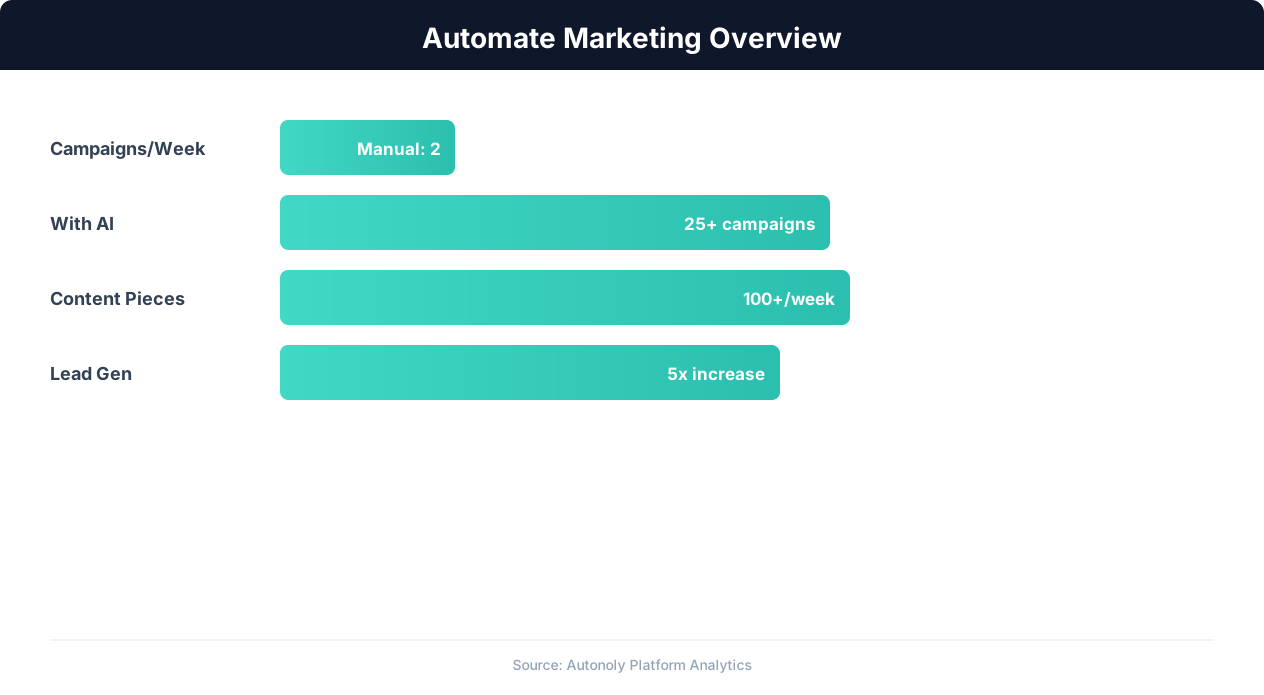
Marketing automation impact on campaign ROI
Key Insight: Marketing teams using automation see 451% more qualified leads and a 14.5% increase in sales productivity (Annuitas Group).
How the AI Agent Does It
The agent opens a real Chromium browser via Browser Automation, navigates to Google Search, and enters each keyword from your tracking list. It scans through result pages to find your domain, recording the position and ranking URL. The Data Extraction engine handles Google's dynamic SERP layout including ads, featured snippets, local results, and knowledge panels. All data is appended to your Google Sheets spreadsheet with the current date for historical tracking.
Handling SERP Variations
Google's search results page varies by query type — some show local packs, others show image carousels, video results, or shopping listings. The agent identifies these different result types and records your presence in each. If your site appears in both organic results and a featured snippet, both positions are logged. The agent also notes which SERP features are present for each keyword, giving you insight into search intent and ranking opportunities beyond traditional blue links.
Key Insight: Automated content repurposing saves marketing teams 12+ hours per week while increasing content output by 3x across channels (Content Marketing Institute).
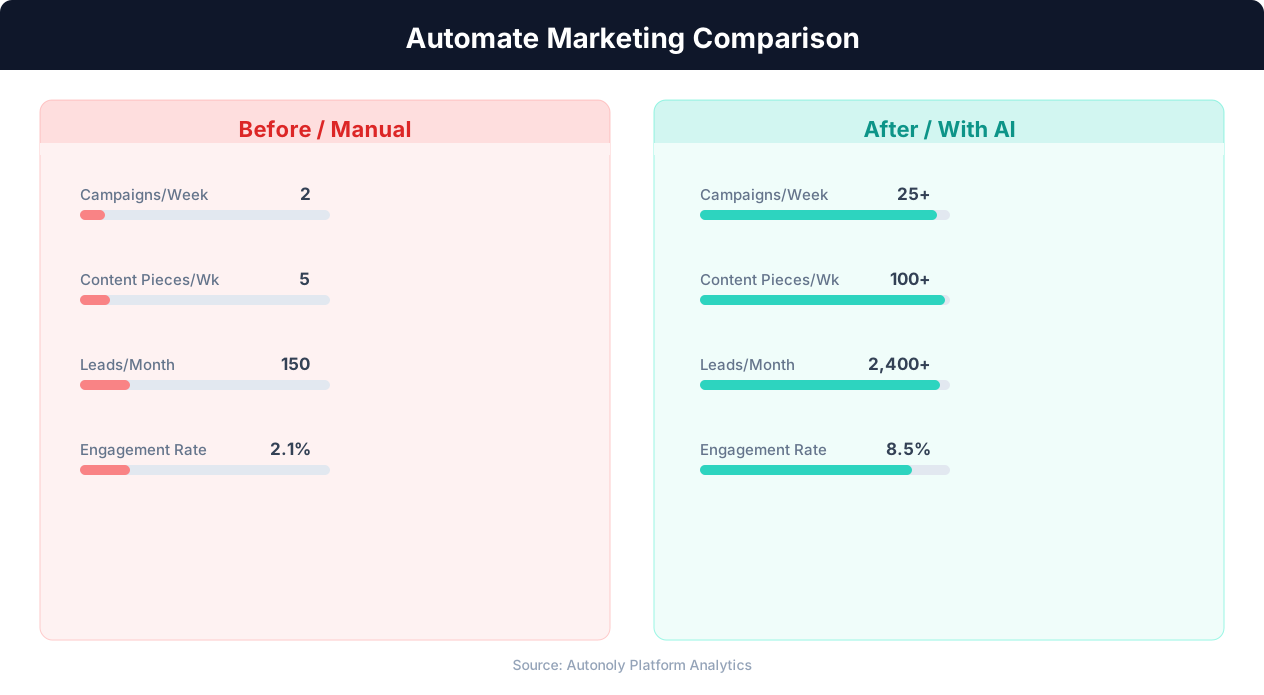
Content production speed in manual vs automated workflows
Key Insight: 63% of marketers say their biggest challenge is generating traffic and leads. Automation addresses this by running campaigns 24/7 without manual intervention (HubSpot State of Marketing).
Scheduling and Automation
Run this workflow daily using the Visual Workflow Builder. Each morning, the agent checks every keyword and appends fresh data to your Google Sheets tracking spreadsheet. The agent processes your entire keyword list in one session — even 100 keywords complete in under 30 minutes. Add Logic & Flow conditions to send Slack alerts only when rankings change by more than a threshold you define. Over time, your spreadsheet becomes a comprehensive ranking history that reveals the true impact of your SEO strategy. See our pricing page for keyword volume details.
Further Reading
Explore more about the tools and techniques used in this workflow: Web Scraping Best Practices, Schedule Automated Workflows, Scheduled Execution.