
Why Automate Student Attendance Tracking?
Attendance is one of the strongest predictors of student success. Students who miss more than 10 percent of school days — roughly two days per month — are considered chronically absent and are at significantly higher risk of falling behind academically, disengaging from school, and ultimately dropping out, a threshold the U.S. Department of Education uses in its chronic-absenteeism reporting. Research from the National Center for Education Statistics consistently shows that chronic absenteeism correlates with lower reading proficiency by third grade, higher rates of course failure in middle school, and reduced likelihood of graduating on time. Early identification of attendance problems is critical, but manually tracking patterns across hundreds or thousands of students is impractical without automation.
The challenge is not collecting attendance data — teachers take attendance every day. The challenge is transforming that raw data into actionable intelligence quickly enough to intervene before problems become entrenched. A student who misses three consecutive days in October needs outreach now, not a flag in a quarterly report that arrives in December. Schools that rely on manual tracking — pulling spreadsheets, counting absences by hand, comparing against thresholds — inevitably discover attendance problems too late. By the time a counselor learns a student has crossed the chronic absence threshold, weeks of instructional time have already been lost.
By automating attendance tracking with Google Sheets and the Data Processing engine, schools can transform raw daily records into actionable insights in real time. Running totals, absence rates, trend detection, and threshold alerts all happen automatically — giving teachers, counselors, and administrators the information they need to intervene early. The automation also eliminates the hours of manual report compilation that attendance clerks and administrators spend each week, freeing staff to focus on student support rather than data management.
This workflow serves K-12 schools, charter schools, after-school programs, tutoring centers, and any educational institution that tracks student attendance. Whether your school has 200 students or 2,000, the automation scales identically — every student receives the same level of monitoring without additional staff effort. Visit our templates library for pre-built attendance tracking workflows.
How the AI Agent Tracks Attendance
Teachers record daily attendance in a shared Google Sheets workbook. Each class or homeroom has its own tab, with rows for each student and columns for each school day. Teachers mark each student as Present, Absent, Tardy, or Excused Absent. This data entry can happen directly in the spreadsheet, through a Google Form, or via a simple web interface that feeds into the sheet.
The agent runs daily after the morning attendance window closes. The Data Processing engine reads all attendance entries for the day, then calculates running statistics for each student: total days present, total absences (excused and unexcused), total tardies, attendance rate percentage, and consecutive absence streaks. The AI Agent Chat lets you configure thresholds and reporting preferences through natural conversation.
These calculated metrics are written to a dashboard tab that provides a school-wide view of attendance health. The dashboard shows attendance rates by class, grade level, and individual student, with conditional formatting that highlights students below threshold. Administrators can open the dashboard at any time for an up-to-date picture.
Alert System for Chronic Absences
The Logic & Flow engine monitors several key thresholds and triggers alerts when students cross them:
Three consecutive absences: An immediate alert to the student's teacher and school counselor. Consecutive absences often signal a developing problem that benefits from early outreach.
Approaching chronic absence (8 percent rate): A warning notification to the counselor and administrator that the student is trending toward chronic absence status. This provides a window for preventive intervention.
Chronic absence reached (10 percent rate): A formal notification to the attendance team, including the student's full attendance record and recommended intervention steps.
Alerts are delivered via Gmail to the appropriate staff members. Each alert includes the student's name, grade, teacher, current attendance rate, number of absences, and the dates of recent absences. Staff can act on these alerts immediately rather than waiting for manual report generation.
For districts that require parent notification at certain thresholds, the agent can also send templated letters to parents via Gmail, documenting the attendance concern and inviting a conversation about support options.
What Data You Get
Your attendance dashboard spreadsheet provides comprehensive visibility into attendance health:
Student Name — Individual student identification
Grade / Class — Grade level and homeroom teacher
Days Present — Running total for the current period
Absences (Excused / Unexcused) — Broken out by type
Tardies — Running tardy count
Attendance Rate — Calculated percentage updated daily
Consecutive Absences — Current streak length
Alert Status — Which threshold tier the student has triggered
Trend Indicator — Improving, stable, or declining compared to prior month
Customizing Your Tracking System
The Visual Workflow Builder lets you tailor the tracking system to your institution's specific policies. Different schools define chronic absence differently, use different intervention protocols, and report to different stakeholders. All of these variables are configurable.
You can add additional data points beyond basic attendance. Track reasons for absence (illness, family emergency, transportation), link absences to specific periods for secondary schools, and correlate attendance with academic performance data in other spreadsheet tabs. The Data Processing engine handles complex cross-referencing to identify patterns like students who miss more on Mondays or who have declining attendance after midterm.
Integration Options
Connect your attendance tracking with Gmail for automated alerts to teachers, counselors, parents, and administrators. Use Slack to post daily attendance summaries to a staff channel so the entire team sees attendance health at a glance. All data lives in Google Sheets for easy sharing, filtering, and export to district systems. Visit the Integrations page for all connection options.
Use Cases
K-12 schools monitoring daily attendance and flagging chronic absenteeism before it affects academic performance
Charter schools demonstrating attendance accountability to authorizers with automated compliance reports
After-school programs tracking participation rates to meet grant reporting requirements
Tutoring centers monitoring session attendance to identify disengaging students early
District offices aggregating attendance data across multiple schools for board presentations
Compliance and Reporting
Many states require schools to report attendance data to the district or state education department. The automated tracking system maintains records in the format needed for compliance reporting. When reporting deadlines arrive, the data is already compiled and ready to export — no last-minute scrambling to pull numbers from multiple sources.
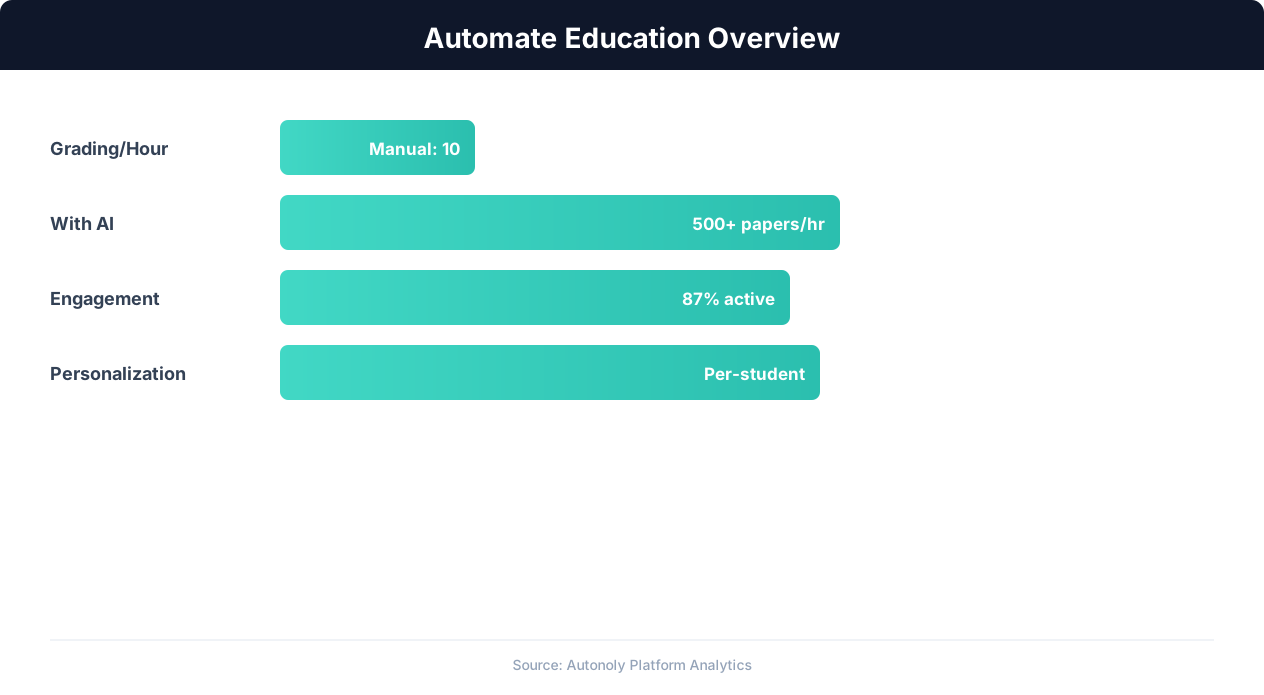
Education automation adoption rates across institution types
Key Insight: Teachers spend 50% of their working hours on non-teaching tasks like grading and admin. Automation can reclaim up to 13 hours per week (McKinsey Education Report).
How the AI Agent Does It
The agent reads daily attendance entries from your Google Sheets workbook after the morning window closes. The Data Processing engine calculates running totals, rates, and streaks for every student. Results are written to a dashboard tab and threshold alerts are sent via Gmail to teachers, counselors, and administrators. The agent handles late entries and corrections automatically — when teachers update attendance after the initial entry, all metrics are recalculated on the next daily run, so corrections are immediately reflected in the dashboard and alert system.
Key Insight: Automated grading and feedback systems improve student performance by 18% by providing instant, consistent feedback on assignments (EdTech Magazine).
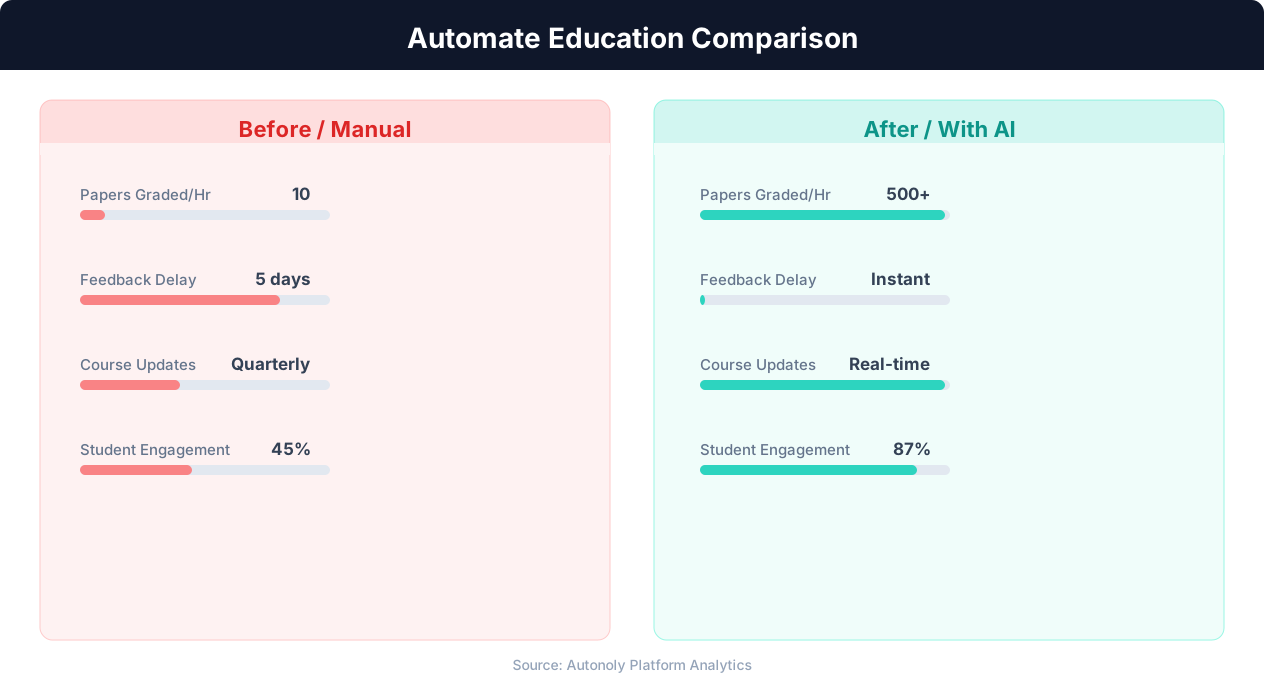
Time savings for educators using automated workflows
Key Insight: 72% of educators report that administrative burden is their top source of burnout. Automating routine tasks is the most effective intervention (Gallup Education).
Scheduling and Automation
The workflow runs daily, typically in the early afternoon after all morning attendance has been recorded. The Visual Workflow Builder lets you set the exact time. Each daily run processes that day's attendance, updates running calculations, refreshes the dashboard, and checks alert thresholds. Weekly summary reports are generated automatically and emailed to principals and attendance committees. Monthly reports suitable for board presentations or district reporting are produced on the first of each month.
At the end of each grading period or semester, the agent generates comprehensive attendance reports for every student, class, and grade level. These reports integrate directly with your existing Google Sheets workbook, creating a complete institutional attendance record that persists year over year. Add Logic & Flow conditions for multi-tier alerting at different absence thresholds. Check pricing to see how many automated runs are included in your plan.
Further Reading
Explore more about the tools and techniques used in this workflow: Automate Google Sheets, No Code Automation Guide, Form Automation, Scheduled Execution.